Eighteen Autodesk Construction Cloud Tables Carry a Status Column. One Is a Foreign Key.
An open issue is the string open. An open submittal item is the string 2. An open asset is a UUID. Five modules, five status vocabularies, and the semantic model is where all five get declared.

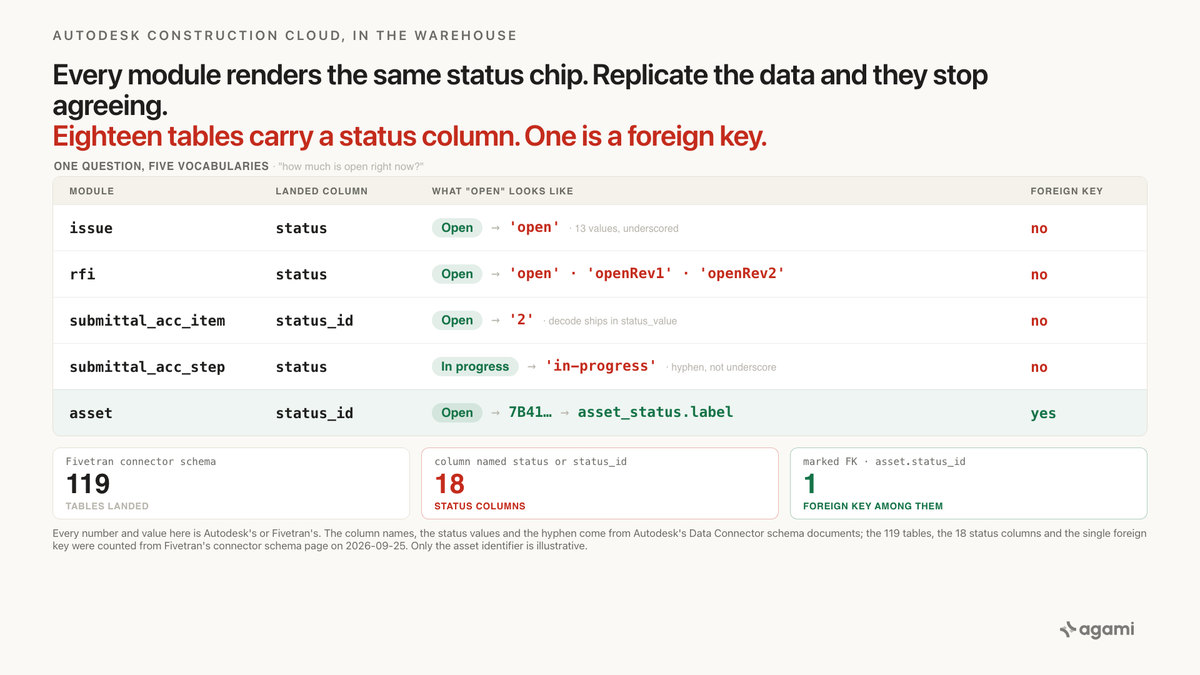
Every module in Autodesk Construction Cloud renders a status chip, and they all look the same on screen. Replicate the data and they stop agreeing. An open issue is the string open. An open submittal item is the string 2. A submittal step under way is in-progress, with a hyphen, while an issue under way is in_progress, with an underscore. An open asset is a UUID pointing at a label a project administrator typed.
A project executive wants one number: how much is open right now, across issues, RFIs, submittals, and assets.
Query your Autodesk Construction Cloud data with AI against a replicated warehouse and the schema looks cooperative. The connector lands 119 tables. Eighteen of them carry a column called status or status_id, and Autodesk publishes the issue status values on its own schema page. The question seems to be a UNION ALL away.
Exactly one of those eighteen columns is a declared foreign key.
Before you start
- Autodesk Construction Cloud replicated through the Fivetran connector, named Autodesk BIM 360 & Construction Cloud. It's a Lite connector, built from the vendor's API, so Autodesk's own schema documents are the authority for what a column means.
- One schema for every connection. Fivetran states it plainly: "This schema applies to all Autodesk BIM 360 & Construction Cloud connections." Unlike some connectors, you don't have a per-tenant schema to reconcile first.
- Twelve tables sync incrementally, and the rest are re-imported in full: "To capture updates and deletes, we re-import the remaining tables and their child tables during every sync."
ISSUE,RFI,ASSET,ISSUE_TYPEandSTATUS_STEPare on the incremental list.SUBMITTAL_ACC_ITEMisn't. - Deletes are captured on seventeen tables, including
ISSUE. That's why thedeletedcolumn onissuemeans something and should be filtered. - No free instance to practise on. Autodesk's own Postman collection for the Issues API wants an APS account with an activated subscription, a hub you administer, and issues you create by hand. This runs against an extract your employer already has.
- Table names vary by extract route. Fivetran lands
issue,submittal_acc_itemandasset_status. Autodesk's own Data Connector calls the same dataissues.issues,submittals.itemsandassets.asset_statuses. Fivetran's connector page writesISSUEin upper case while its schema page listsissue. The SQL below uses Fivetran's lower-case names. - Autodesk publishes the readable schema at a machine-facing URL. The Data Connector schema index lists every service group, and each one renders as plain HTML with per-column notes and enumerated values. The Autodesk Platform Services reference portal returns a navigation shell to a fetch, so it won't help you here.
The question
"How much is open right now?"
A project executive asks it before a client meeting. A VDC lead asks it at the end of a sprint. It's the first line of most portfolio dashboards in construction, and it spans modules by definition: open issues, open RFIs, submittals still moving, assets not yet commissioned.
It comes out of the warehouse rather than out of Autodesk because no single ACC screen shows all four at once, across every project in the portfolio.
What breaks
Here's the query almost anyone writes first.
SELECT 'issues'     AS module, COUNT(*) AS open_count
FROM   issue              WHERE status    = 'open'
UNION ALL
SELECT 'rfis',              COUNT(*)
FROM   rfi                WHERE status    = 'open'
UNION ALL
SELECT 'submittals',        COUNT(*)
FROM   submittal_acc_item WHERE status_id = 'open'
UNION ALL
SELECT 'assets',            COUNT(*)
FROM   asset              WHERE status_id = 'open';
Nothing about it is careless. Four modules, four status columns, one word. Two of the four branches are even correct.
The submittal branch returns zero. That column holds 1 through 6, and 2 is the one that means Open.
The asset branch returns zero too. That column holds a UUID.
Neither branch errors. Both columns are typed as strings, so the comparison is simply false, and COUNT(*) over no rows is 0. The report renders, the totals line up, and submittals sit flat at zero all quarter. A reader sees a quiet period rather than a broken predicate.
The RFI branch is the interesting one, because it's wrong in a way that survives inspection. It returns a real number. It just isn't the number anybody wanted, and the next section says why.
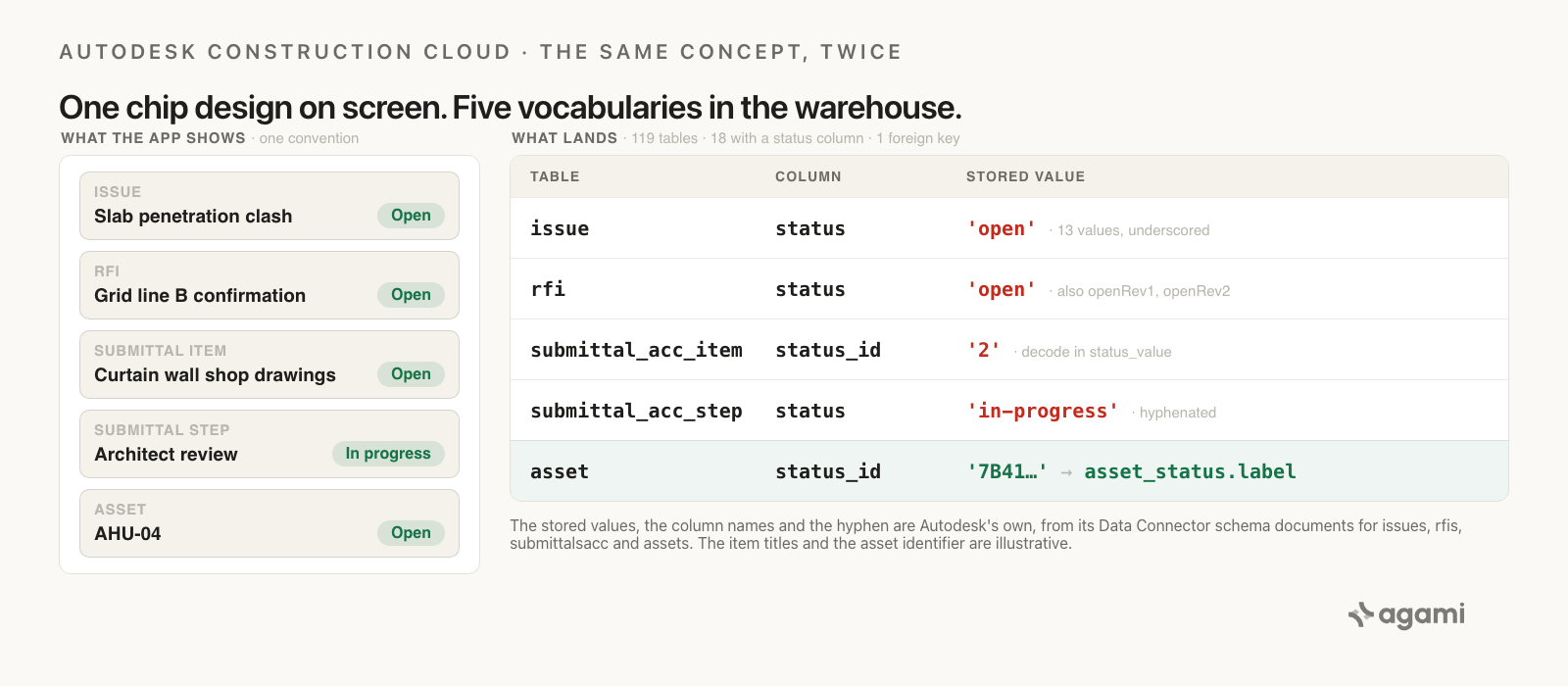
What the application shows and what lands, module by module. The status values and column names are Autodesk's own, from its Data Connector schema documents; the row identifiers are illustrative.
Why it breaks
Four things are true at once, and the query above reads none of them.
Each module shipped its own status vocabulary
Autodesk documents every one of these itself, in separate schema documents, with the possible values enumerated. Every value below is quoted from those documents.
Issues: a thirteen-value enum with no lookup table. The status column on issues.issues is typed string: null and carries "Possible Values: open work_completed ready_to_inspect not_approved in_dispute closed void answered draft pending in_progress completed in_review". Its note reads "Unique identifier of the current status of the issue", which is the only place in these documents that a bare enum gets called an identifier.
Six of those thirteen can plausibly mean finished: closed, completed, void, answered, work_completed, and not_approved. Nothing in the warehouse says which.
RFIs: a ten-value enum that changes case halfway through. The status column on rfis.rfis carries "Possible Values: draft submitted open answered openRev1 answeredRev1 openRev2 answeredManager closed void". So open is there, and a query for it runs. It just misses every RFI sitting on revision one or revision two, plus everything waiting on a manager. The companion table rfi_transitions uses the same ten values in from_status and to_status, and Autodesk describes it as "The lifecycle of the RFI - each row represents a transition of the RFI from one status to another".
Submittal items: numeric codes in a column named status_id. Autodesk types it enum: string with "Possible Values: 1 - Required 2 - Open 3 - Closed 4 - Void 5 - Empty 6 - Draft", and its note is simply "Status ID". The next column along is status_value, described as "value of the status_id".
Read that pair again, because it's the sharpest thing in this schema. The column whose name ends in _id is not a key, and the decode that would be a lookup table in any other design ships as a second column on the same row.
Submittal steps and tasks: three values, hyphenated. Both submittals.steps.status and submittals.tasks.status are enum: string with "Possible Values: not-started / in-progress / completed".
The hyphens are the whole point. An issue under way is in_progress. A submittal step under way is in-progress. One vendor, one concept, two spellings, documented on two pages of the same specification.
Only assets got a lookup table
Assets are the exception, and they're a properly built one.
assets.assets.status_id carries the note "Identifier of the Assets Status this Asset is assigned to Foreign Key: Table: asset_statuses Column: id". That status row has a label, which Autodesk calls a "Displayable name", capped at 100 characters. The status belongs to a set through status_set_id, documented as "Foreign Key: Table: status_sets Column: id".
Fivetran marks it too. On the connector schema page, asset.status_id carries an FK marker, and it's the only status or status_id column in all 119 tables that does.
So the module with three tables devoted to status is the only one you can resolve by joining. The module every construction report is actually about has none.
Two footnotes on that, and both matter when you write the join.
asset_status.status_set_id carries no FK marker on Fivetran's page, and no table named status_sets lands at all. Autodesk documents the relationship; the warehouse doesn't declare it. The newer ACC pair, status_step and status_step_value, is the same idea rebuilt: status_step_value.status_step_set_id does carry an FK marker, and status_step_value adds bucket and sort_order beside its label.
And asset_status.label is free text. Whoever administers that project typed it. Two projects in the same portfolio can spell the same state differently, and nothing reconciles them.
The warehouse says which statuses are allowed, never what they mean
This is the part that makes the gap feel deliberate rather than accidental.
Two tables land specifically to describe issue statuses. issue_permitted_status holds permitted_status and issue_id, both primary key, and issue_profile_permitted_status does the same against a profile. Between them they record which statuses a given issue is allowed to move to next.
So the schema carries a table for the transitions a status permits, and no table for what a status means.
issue_type and issue_sub_type both carry a column called status_set. Neither carries an FK marker, and no status-set table exists on the issues side to point at. The name survived the trip; the relationship didn't.
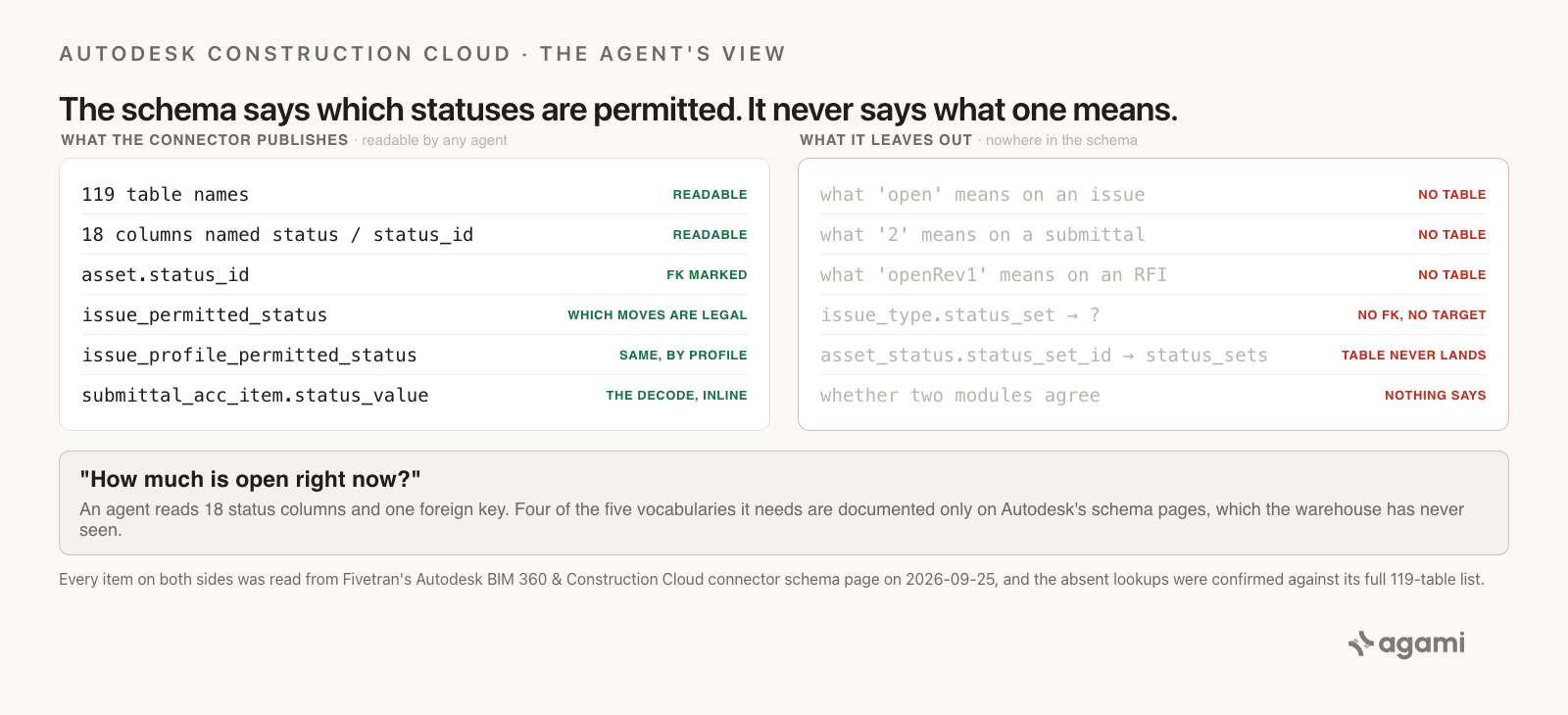
What the published schema tells an agent, and what it leaves out. The table count, the eighteen status columns, the single foreign key marker and the permitted-status tables are all readable on Fivetran's connector schema page.
What the application did for you
Inside Autodesk Construction Cloud, none of this reaches the person asking.
Every module renders a status chip with a human-readable label, in the same visual convention, and each one resolves it by different means the user never sees. Issues render the enum through a client-side string table. Submittals render status_value, which the extract happens to carry beside the code. Assets render the project's own asset_status.label.
Three mechanisms, one chip design. The application teaches everyone in the business that status is one thing, consistently, for years. Then the extract copies the rows and leaves the rendering behind.
That's a shape this series keeps meeting, and this one inverts a familiar version of it. Jira Service Management collapses many vocabularies into one on the way into the warehouse, so its trap is detail you can't recover. Autodesk does the opposite. All five vocabularies arrive intact, and they refuse to reconcile.
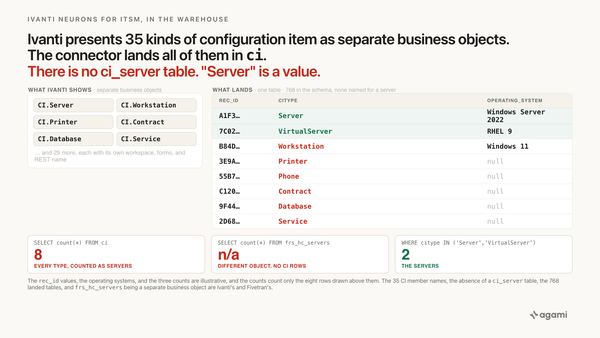
Ivanti is the nearer cousin and the cleaner contrast. Ivanti puts 35 kinds of record in one table, so one filter fixes it. Autodesk puts one concept in five tables with five encodings, so five declarations fix it, and no single filter ever will.
The fix
Patching the UNION ALL fixes this afternoon. The same dashboard asks again next month, and a fifth module joins the portfolio next year.
The vocabularies belong in the semantic model, written once with Autodesk's own schema documents as the citation, so every portfolio question inherits them.
Start with the columns, because the values are the thing no column type can carry.
# subject_areas/autodesk_construction_cloud/columns.yaml
# Autodesk Construction Cloud, landed via the Fivetran Lite connector.
# Casing varies by extract tool; confirm names in your own destination.

tables:
  issue:
    grain: one row per issue
    primary_key: [id]
    columns:
      status:
        description: >
          Issue status as a bare code. No issue-status lookup table lands in
          this schema, so the value is the whole of the meaning. Autodesk
          documents thirteen possible values, six of which can mean finished.
        allowed_values: [open, work_completed, ready_to_inspect, not_approved,
                         in_dispute, closed, void, answered, draft, pending,
                         in_progress, completed, in_review]
        not_a_foreign_key: true
        source: https://developer.api.autodesk.com/data-connector/v1/doc/schema?name=issues&format=html

  rfi:
    grain: one row per RFI
    primary_key: [id]
    columns:
      status:
        description: >
          RFI status as a bare code, on a different scale from issue.status.
          Mixes lower case and camel case. Filtering on 'open' alone silently
          drops every RFI on revision one or two, and everything with a
          manager.
        allowed_values: [draft, submitted, open, answered, openRev1,
                         answeredRev1, openRev2, answeredManager, closed, void]
        not_a_foreign_key: true
        source: https://developer.api.autodesk.com/data-connector/v1/doc/schema?name=rfis&format=html

  submittal_acc_item:
    grain: one row per submittal item
    primary_key: [id]
    columns:
      status_id:
        description: >
          Numeric enumeration, NOT a foreign key despite the name. The decode
          ships as the sibling column status_value on the same row, so no join
          is needed and none is possible.
        allowed_values: ["1", "2", "3", "4", "5", "6"]
        value_labels: {"1": Required, "2": Open, "3": Closed,
                       "4": Void, "5": Empty, "6": Draft}
        not_a_foreign_key: true
        source: https://developer.api.autodesk.com/data-connector/v1/doc/schema?name=submittalsacc&format=html

  submittal_acc_step:
    grain: one row per review step on a submittal item
    columns:
      status:
        description: >
          Hyphenated, unlike issue.status which is underscored. Same three
          values on submittal_acc_task.
        allowed_values: [not-started, in-progress, completed]
        source: https://developer.api.autodesk.com/data-connector/v1/doc/schema?name=submittalsacc&format=html

  asset_status:
    grain: one row per asset status per project
    primary_key: [id]
    columns:
      label:
        description: >
          Displayable name, chosen per project by an administrator. Free text,
          capped at 100 characters. Two projects can spell the same state
          differently, and nothing in the schema reconciles them.
        source: https://developer.api.autodesk.com/data-connector/v1/doc/schema?name=assets&format=html
Then the one join that actually exists, plus the one Autodesk documents and the connector doesn't.
relationships:
  - from_table: asset
    from_column: status_id
    to_table: asset_status
    to_column: id
    relationship: many_to_one
    confidence: declared
    review_state: unreviewed
    description: >
      The asset's status, by key. This is the only status column in the
      119 landed tables that Fivetran marks as a foreign key, and Autodesk
      documents the same target in prose.
    source: https://developer.api.autodesk.com/data-connector/v1/doc/schema?name=assets&format=html

  - from_table: asset_status
    from_column: status_set_id
    to_table: status_step
    to_column: id
    relationship: many_to_one
    confidence: proposed
    review_state: unreviewed
    description: >
      The status set a status belongs to. Autodesk documents the target as
      status_sets; no table of that name lands, and status_step is the ACC-era
      equivalent. Confirm against your own destination before trusting it.
    source: https://developer.api.autodesk.com/data-connector/v1/doc/schema?name=assets&format=html
Then one metric per module, rather than one metric over a UNION. That's the declaration this post exists for, and it's deliberate: a single metric would need one vocabulary, and no such thing exists here.
metrics:
  - name: acc_open_issues
    calculation: >
      Issues not yet resolved. Six of the thirteen documented status values
      can mean resolved, so the open set is a business decision rather than a
      schema fact. The list below is a default and needs sign-off.
    source_tables: [issue]
    required_filters: [status, deleted]
    needs_human_signoff: true
    binding: >
      SELECT COUNT(*) FROM issue
      WHERE deleted IS NOT TRUE
        AND status IN ('open','in_progress','in_review',
                       'ready_to_inspect','pending','in_dispute')

  - name: acc_open_rfis
    calculation: >
      RFIs still awaiting an answer, including the revision and manager
      states that a filter on 'open' alone would drop.
    source_tables: [rfi]
    required_filters: [status]
    needs_human_signoff: true
    binding: >
      SELECT COUNT(*) FROM rfi
      WHERE status IN ('open','openRev1','openRev2',
                       'submitted','answeredManager')

  - name: acc_open_submittal_items
    calculation: >
      Submittal items in the Open state. The code is '2'; the column named
      status_id is an enumeration, not a key.
    source_tables: [submittal_acc_item]
    required_filters: [status_id]
    binding: "SELECT COUNT(*) FROM submittal_acc_item WHERE status_id = '2'"

  - name: acc_open_assets
    calculation: >
      Assets not yet complete or retired, resolved through the only status
      lookup this schema declares. The excluded labels are per-project free
      text and have to be mapped once per portfolio.
    source_tables: [asset, asset_status]
    requires_join: asset_to_status
    needs_human_signoff: true
    binding: >
      SELECT COUNT(*) FROM asset a
      JOIN asset_status s ON s.id = a.status_id
      WHERE a.is_active IS TRUE
        AND s.label NOT IN ('Complete','Retired')
required_filters is the load-bearing line on each of them. A submittal count reached without status_id is a path the semantic model has already declared invalid, so the executive dashboard, the sprint review, and the client report all start from the same rows.
Four decisions here can't be read from the schema, and a person makes each one once.
Which issue statuses mean open. Whether not_approved is open (it needs rework) or closed (it was decided) is a question about how that contractor runs issues. answered and work_completed are the same argument.
Which RFI states count. answeredManager sits between answered and closed, and whether it belongs on the open side depends on the review workflow.
What each project's asset labels mean. asset_status.label is typed per project. No cross-project rollup exists until someone maps the labels to a shared set.
Whether the four numbers should ever be added. An open issue and an open submittal aren't the same unit of work. Presenting them in one total is a reporting choice, and the query can only supply the parts.
Reproduce it yourself
No ACC sandbox exists to spin up, so this runs against the extract your employer already has.
- Confirm what your warehouse calls these tables, because the extract route decides the names.
- Run the vocabulary census. It shows you all five status vocabularies in your own data, on one screen.
- Declare the columns and the metrics, then ask "how much is open right now" in plain English, in the assistant your team already opens.
Find the tables. Run this first, and upper-case the literals on Snowflake.
SELECT table_name, column_name
FROM   information_schema.columns
WHERE  column_name IN ('status', 'status_id', 'status_value')
ORDER  BY table_name, column_name;
Eighteen rows for status and status_id is what Fivetran's published schema predicts. If you extracted through Autodesk's Data Connector instead, expect issues_issues and submittals_items in place of issue and submittal_acc_item, and take your own names into every query below.
The vocabulary census. This is your version of the number this page can't give you.
SELECT 'issue'              AS tbl, status    AS value, COUNT(*) AS rows
FROM   issue              GROUP BY 1, 2
UNION ALL
SELECT 'rfi',                     status,    COUNT(*)
FROM   rfi                GROUP BY 1, 2
UNION ALL
SELECT 'submittal_acc_item',      status_id, COUNT(*)
FROM   submittal_acc_item GROUP BY 1, 2
UNION ALL
SELECT 'submittal_acc_step',      status,    COUNT(*)
FROM   submittal_acc_step GROUP BY 1, 2
UNION ALL
SELECT 'asset (resolved)',        s.label,   COUNT(*)
FROM   asset a JOIN asset_status s ON s.id = a.status_id
GROUP  BY 1, 2
ORDER  BY 1, 3 DESC;
Five blocks, five vocabularies, one screen. Read it like this.
- The
submittal_acc_itemblock returns digits. Every row is a submittal your= 'open'predicate scored as zero. Add up the2row and that's what the original query lost. - The
rfiblock shows the revision states. SumopenRev1,openRev2,submittedandansweredManager, and that's how much a filter onopenalone missed. - The
asset (resolved)block shows your own labels. Anything outside a small tidy set is a project that named its states differently, and a person has to map those. - A value outside Autodesk's documented list anywhere is worth chasing. The documents enumerate what the API can return, so an unexpected value usually means a transform upstream of your warehouse.
Corrected. One query per vocabulary, and the modules stay in separate rows.
SELECT 'issues' AS module, COUNT(*) AS open_count
FROM   issue
WHERE  deleted IS NOT TRUE
  AND  status IN ('open', 'in_progress', 'in_review',
                  'ready_to_inspect', 'pending', 'in_dispute')

UNION ALL
SELECT 'rfis', COUNT(*)
FROM   rfi
WHERE  status IN ('open', 'openRev1', 'openRev2',
                  'submitted', 'answeredManager')

UNION ALL
SELECT 'submittals', COUNT(*)
FROM   submittal_acc_item
WHERE  status_id = '2'                        -- 2 = Open

UNION ALL
SELECT 'assets', COUNT(*)
FROM   asset        a
JOIN   asset_status s ON s.id = a.status_id
WHERE  a.is_active IS TRUE
  AND  s.label NOT IN ('Complete', 'Retired'); -- your labels, not ours
Substitute the value lists your census returned, and write those decisions down somewhere a person will find them next quarter.
If the numbers still disagree with what ACC shows on screen, check three things before the SQL. Whether deleted is filtered on issue, since deletes are captured there. Whether the connector's credentials can read every project, because what the API user can see is what lands. And whether anyone is reading status_value on submittals instead of status_id, which is a perfectly good idea that gives a different answer when the extract drops that column.
What this looks like in Agami
Everything above holds whoever builds the semantic model. Here's what it is in our product, in the terms this post has used.
Each column's vocabulary is declared, with its own citation. Introspection reads what the warehouse exposes and gets the column types right. It can't read that 2 means Open on submittals, or that openRev1 is a state a filter on open will miss. Those value lists get recorded once, each carrying the Autodesk schema document it came from, so the next portfolio question doesn't rediscover them.
A column named like a key is declared as not being one. submittal_acc_item.status_id is marked not_a_foreign_key explicitly. That's a small declaration doing unusual work, because the name is the thing generating the wrong guess, and the schema offers nothing to contradict it.
Metrics carry the filters they can't be computed without. acc_open_submittal_items names status_id as a required filter, and acc_open_issues names status and deleted. A query that drops one isn't a different answer to the same question, and the metric says so.
Joins ship with their evidence and their confidence. asset_to_status is the one status join this schema declares, so it ships as declared. The status_set_id link is proposed, because Autodesk documents a target table that doesn't land under that name. Both arrive review_state: unreviewed, and the review queue is where a proposed join stops being a guess.
The portfolio number ships once it matches the screens. Reconciliation takes a screenshot of the ACC dashboard your team already trusts, a CSV, or numbers pasted into chat, and compares them. A difference opens the SQL. On these tables it usually points at a status value somebody classified differently, and finding which one is the useful output.
And the numbers we don't have. We haven't run this against a real Autodesk warehouse, so this page carries no figure for how far apart two projects' asset labels drift, or what share of RFIs sit on a revision state. Both depend entirely on how a contractor runs its projects. The census query returns yours. The semantic model also can't decide whether not_approved is open or closed, or whether an issue and a submittal should ever be added together. It records the answer once a person gives it.
Frequently asked questions
Why does my Autodesk submittal status query return zero?
Because submittal_acc_item.status_id holds 1 through 6, not words. Autodesk documents the enumeration as "1 - Required 2 - Open 3 - Closed 4 - Void 5 - Empty 6 - Draft", so Open is the string 2. The column is typed as a string, so comparing it to 'open' is merely false rather than an error, and the query returns zero instead of failing.
Is status_id a foreign key in Autodesk Construction Cloud?
Only on asset. Across the 119 tables the Fivetran connector lands, eighteen carry a column named status or status_id, and asset.status_id is the only one marked as a foreign key. It points at asset_status, and Autodesk documents the same target: "Foreign Key: Table: asset_statuses Column: id". On submittal_acc_item, the _id suffix is misleading; that column is an enumeration.
What are the Autodesk Construction Cloud issue status values?
Autodesk documents thirteen: open, work_completed, ready_to_inspect, not_approved, in_dispute, closed, void, answered, draft, pending, in_progress, completed, and in_review. No lookup table for them lands in the warehouse, so the value carries the whole meaning. Six of the thirteen can mean finished, and which ones count as closed is a decision your organisation makes rather than something the schema settles.
Why do issues and submittals spell in-progress differently?
Because they're documented in separate schema documents and were built by different teams. An issue under way is in_progress, with an underscore. A submittal step or task under way is in-progress, with a hyphen, from the enum not-started / in-progress / completed. Both are Autodesk's own published values, and no layer reconciles them.
Where is the readable Autodesk Construction Cloud schema documentation?
At developer.api.autodesk.com/data-connector/v1/doc, which lists every service group and renders each one as plain HTML with per-column notes and enumerated values. The Autodesk Platform Services reference portal and Fivetran's interactive ERD are both JavaScript applications that return a navigation shell to a fetch, so the machine-facing URL is the one to use. Fivetran's /connector-schema page is readable in the same way.
Can I just filter RFIs on status = 'open'?
It runs, and it undercounts. Autodesk's ten documented RFI values include openRev1, openRev2, submitted and answeredManager, all of which describe an RFI that nobody has finished with. A filter on open alone drops every one of them, and it returns a plausible number while doing it.
References
- Autodesk ACC Data Schema Documentation index. Every Data Connector service group, each rendering as plain HTML. The service group for RFIs is
rfis. - Autodesk issues schema. The thirteen-value
statusenum and its "Unique identifier of the current status of the issue" note. Documentation Updated 2026-02-04. - Autodesk RFIs schema. The ten-value RFI
statusenum, andrfi_transitionsas "The lifecycle of the RFI". Documentation Updated 2026-08-05. - Autodesk submittals schema.
status_idas "1 - Required 2 - Open 3 - Closed 4 - Void 5 - Empty 6 - Draft",status_valueas "value of the status_id", and the hyphenated "not-started / in-progress / completed" on steps and tasks. Documentation Updated 2026-09-02. - Autodesk assets schema. The documented foreign keys into
asset_statusesandstatus_sets, andlabelas "Displayable name". Documentation Updated 2026-09-03. - Autodesk BIM 360 & Construction Cloud connector schema, Fivetran. The 119 landed tables with their PK and FK markers. Parsed 2026-09-25: eighteen tables carry a column named
statusorstatus_id, andasset.status_idis the only one marked FK. - Autodesk BIM 360 & Construction Cloud connector overview, Fivetran. The twelve incrementally synced tables, the seventeen tables with delete capture, the full re-import behaviour, and "This schema applies to all Autodesk BIM 360 & Construction Cloud connections".
- Autodesk BIM 360 & Construction Cloud setup guide, Fivetran. Connecting the source and the credentials that decide what lands.
- Lite connectors, Fivetran. The connector class built from the available API, which is why Autodesk's own schema documents are the authority for these columns.
- ACC Issues API Postman collection, Autodesk Platform Services. Autodesk's own prerequisites: an activated APS subscription, a hub you administer, and issues you create yourself.
- agami-core on GitHub
Make your Autodesk Construction Cloud data answerable
Agami is the trust layer between your AI assistant and your warehouse. It declares what each module's status column actually contains, so a question about what's open returns the same answer in every report or says why it cannot.