In Infor M3, Your Custom Fields Are Rows in a Table Called CUGEX1
Infor M3 keeps every customer-defined field in CUGEX1, found by matching the extended table's name in a column called FILE. The semantic model declares that join and its mandatory filter.

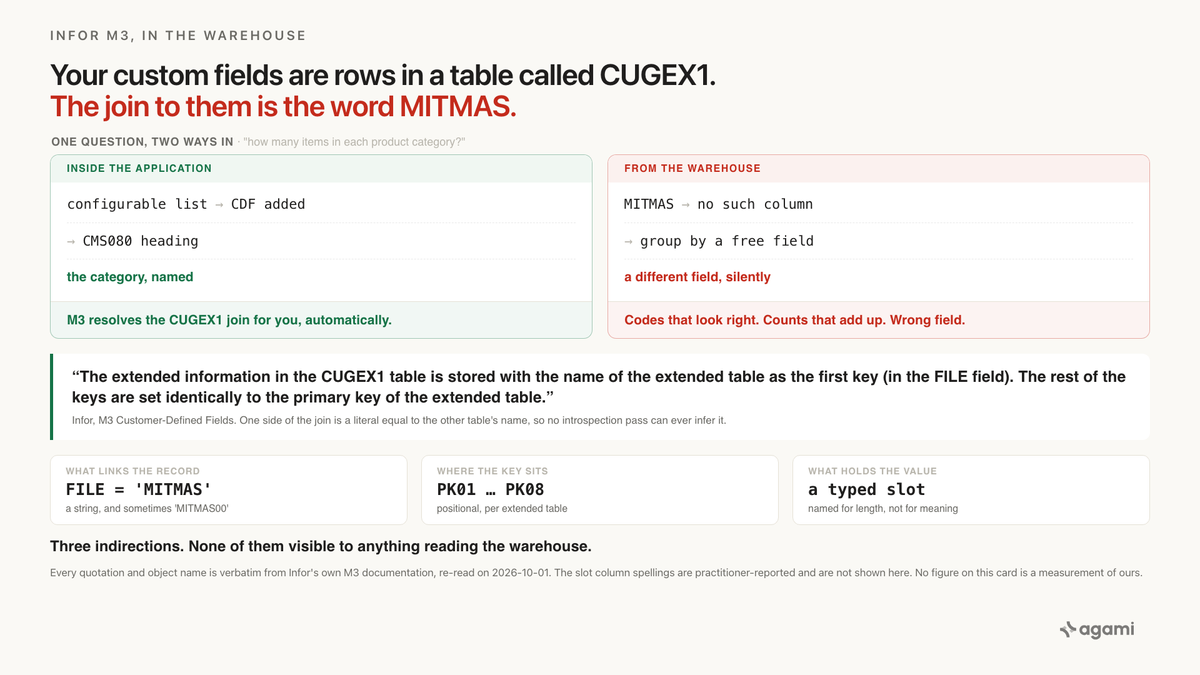
Infor M3 lets a business add fields to the item master without touching the item master. The values go somewhere else, and they're matched back by the name of the table they extend. A replication copies both tables and leaves the matching behind.
A category manager wants one number before a range review: how many items sit in each of the product categories the business added to M3 years ago.
Query your Infor M3 data with AI against a replicated warehouse and the item master looks like it already holds the answer. MITMAS is one row per item per company. Its columns are complete, they're all there, and several of them carry short codes that look exactly like a category. An agent groups by one of those and returns a tidy table of codes and counts.
The table is about a different field. Nothing errors, nothing is null, and every row that went into it is correct.
Before you start
- An M3 estate you can reach with SQL. Two routes exist and they land different things. On CloudSuite, M3 publishes into Infor's Data Lake and you query it through Compass. On-premise and single-tenant, a generic database connector replicates the M3 database directly.
- No Infor application connector. Fivetran's Infor page returns a 404, and Airbyte lists no first-party Infor source. Everything below assumes a database replication or the Data Lake, never an app connector.
- No free instance to practise on. Infor's evaluation path is a sales-led demo or a partner sandbox. This post runs against the extract your employer already has.
- Check that
CUGEX1actually landed. On CloudSuite a table reaches the Data Lake only if somebody selected it, and that's an administrative act on the ERP rather than a read against it. - Expect casing to vary. M3's own names are upper case. Compass returns lower case whatever the Data Catalog says. The SQL below is lower case, so check yours.
The question
"How many items do we have in each product category?"
Product category is not an M3 field. Somebody added it five years ago, and everybody in the business has used it ever since.
What breaks
An agent reads the item master, finds no column by that name, and reaches for the nearest thing that looks like one. M3 ships free-field columns on the item, and Infor's own initial-load reference confirms they're real: it lists code definitions for item free field 1, 3, 4, and 5, each backed by the CSYTAB code table.
So the query comes back looking like this. The column spelling varies by release and isn't the point, so substitute whichever free field your schema carries:
select mmcfi1 as category, count(*) as items
from mitmas
group by mmcfi1
order by items desc;
It returns rows. It returns short codes. It returns counts that add up to the item count.
It is a grouping by a different field, and nobody can tell from looking at it.
The second attempt is worse, because it looks like it respects the extension table:
select c.f1a030 as category, count(*) as items
from cugex1 c
group by c.f1a030
order by items desc;
That one counts every extended record in the instance. Items, customers, suppliers, and whatever else somebody extended, all summed into the same buckets.
Why it breaks
The custom field was never on the item
Infor is explicit about this, and the sentence is the whole post:
"the CDF information is not stored in the original table if it is used to extend a standard table, but retrieved in a separate database access"
A customer-defined field in M3 lives in one of three tables. CUGEX1 is "used to extend M3 standard tables with CDFs". CUGEX2 and CUGEX3 hold information that isn't related to any M3 table at all.
The warehouse copy of MITMAS is complete and standard and contains none of it. Nothing's missing from the extract. The field was never in that table inside M3 either.
Infor's own initial-load reference makes the point by omission. It's a 132-row map of business documents to the M3 master tables behind them, ItemMaster to MITMAS, SalesOrder to OOHEAD, CustomerPartyMaster to OCUSMA. The string CUGEX appears nowhere on it.
The join predicate is the name of a table
Here's how a CUGEX1 row finds the record it belongs to:
"The extended information in the CUGEX1 table is stored with the name of the extended table as the first key (in the FILE field). The rest of the keys are set identically to the primary key of the extended table."
Read that again as a join condition. One side is a column called FILE. The other side is the literal string 'MITMAS', which is the name of the table you're joining to.
Infor also states the ceiling:
"As a maximum, the CDFs can use eight keys to separate information. This means that M3 tables of more than eight primary keys cannot be extended."
So the catalogue holds a character column called FILE and eight columns called PK01 through PK08. No foreign key exists, none can exist, and no introspection pass can infer one. A tool reading information_schema sees nine ordinary columns. Nothing in the catalogue says that one of them holds a table name.
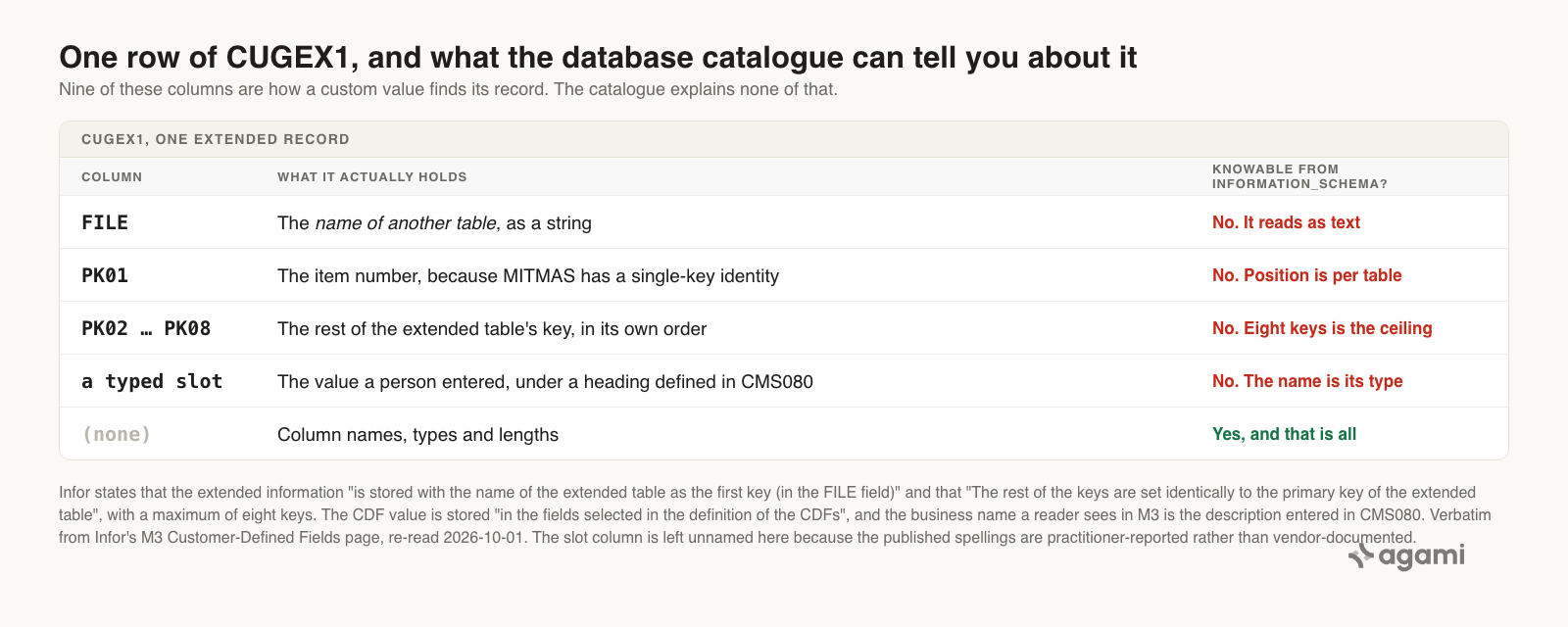
Everything that makes a CUGEX1 row mean something sits outside the catalogue. Both quotations are verbatim from Infor; the slot column is left unnamed because the published spellings are practitioner-reported.
Which PK column holds the key is positional
For a single-key master, the item number is in PK01. For a company-scoped or multi-key table, the assignment follows that table's own key order. No column names which is which, and the catalogue can't tell you.
FILE doesn't reliably hold the bare table name either. M3 addresses tables by index name as well as by table name, and Infor's own procedure for the other custom-field mechanism uses the index form: "MMITNO/MITMAS00 will display the item number of the record in question, this field is stored in the table MITMAS00 (00 must always be at the end of the file name)". Practitioner accounts report the same variation arriving in CUGEX1.FILE, with OCUSMA00 where you'd expect OCUSMA (Learn Infor M3, a practitioner blog rather than a vendor page).
Infor establishes that M3 uses both forms. Nobody public says which one your instance writes. So the right move is to ask the data, which is step 2 below.
The column names describe a type, not a field
Infor says only this about where a value goes:
"The CDF information is stored in the fields selected in the definition of the CDFs."
Those fields are generic slots, named for their type and length rather than their meaning. Practitioner references describe them running F1A030 upward through the alphanumeric range and F1N096 upward through the numeric range. Treat those spellings as unverified and read your own catalogue.
The business name of the field isn't in the database at all. It's in the metadata an implementer typed into 'Customer-Defined Fields. Open' (CMS080), and Infor says what that metadata becomes: "The user also sets the description of the CDF that is used as column headings in lists, reports, etc."
The column heading your colleagues read every day is configuration. It never left the application.
M3 calls two different things custom fields
A reader who checks CUGEX1, finds nothing, and concludes the business has no custom fields may be looking at the wrong mechanism.
M3 ships a second, entirely separate one, documented under Custom Fields (CMS470). Fields are defined with a type of A, N, or D, capped at 40 characters or 15 digits, gathered into groups in CMS471, linked to fields in CMS472, and attached to item groups or supplier groups in CMS473. In equipment, Infor calls the same thing Technical Datasheet fields.
Three mechanisms, and everybody who uses them calls all three "custom fields". Settle which one the question means before writing any SQL.
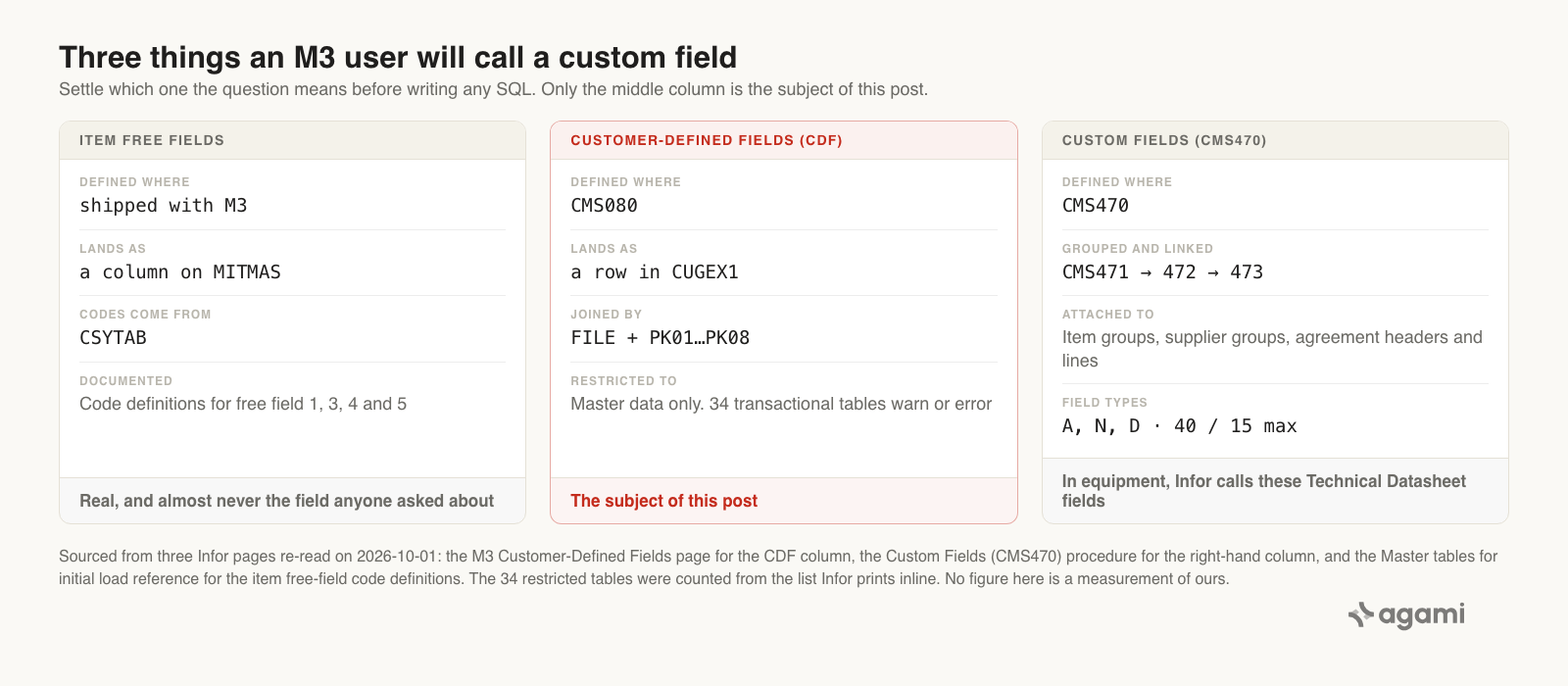
Only the middle column is the subject of this post. Every value is from an Infor page re-read on the day of publication.
Infor restricts CDFs to master data, and that decides your example
"Customer-defined fields (CDF) have a restriction to enforce its usage to master data tables only. You see error and warning messages when creating or updating CDFs that target transactional data tables."
The page then prints the list, initially 34 tables, including OOHEAD, OOLINE, MITTRA, and FGLEDG. Order headers, order lines, inventory transactions, and the general ledger.
MITMAS isn't on it. That's why the worked example is an item and not a sales order, and it's worth knowing before somebody proposes putting a custom field on a transaction.
What the application did for you
Nobody inside M3 meets this problem, because M3 resolves the join silently every time anyone builds a list:
"When a new configurable list or report is created, already defined CDFs for the master table of the list/report are automatically added to the list or report as available fields. They are directly available when the user defines the columns in the list or report."
Automatically. The person building a report sees the custom field sitting next to the standard columns, under the heading somebody typed into CMS080, and has no reason to suspect it lives anywhere else. The same page extends that convenience to API transactions through CMS100MI and to Enterprise Search.
Infor also marks exactly where the convenience stops, which is the detail that makes this feel discovered rather than argued:
"Use CDFs in older not configurable lists This is currently not supported and due to performance issues, it is not recommended to use a UI script to solve this."
And on search, Infor describes the second wrong query above, inside their own product, and prescribes the same fix:
"Note that the indexed tables contain information for many extended tables or different types of not related data. To eliminate false hits, the search query should always include the name of the file or the extension reference."
Replication copies tables. The thing that made MITMAS and CUGEX1 one record was the report builder, and it didn't come along.
The fix
Put the table name back into the join, where M3 keeps it.
select c.f1a030 as category, count(distinct m.mmitno) as items
from mitmas m
join cugex1 c
  on c.file in ('MITMAS', 'MITMAS00')
 and c.pk01 = m.mmitno
group by c.f1a030
order by items desc;
Three things are load-bearing here, and each one maps to an unknown you had to resolve first.
The file predicate is in the join rather than the where clause. Drop it and the query matches customer, supplier, and every other extended record whose key happens to collide with an item number. That isn't a smaller error than the first query; it's a larger one.
pk01 is the item number because MITMAS has a single-key item identity. On a table with a compound key, the item number sits in whichever position that table's key order puts it.
And f1a030 is an example rather than a fact about your instance. The slot that holds your category is whichever one the CDF definition assigned, and finding it is step 3 below.
In the semantic model
The SQL above is one analyst getting it right once. Declaring it is how the next question gets it right without anybody remembering.
This join is the clearest case in the whole series for why a declaration is not a nicety. One side of the predicate is a literal equal to another table's name, so it is not a foreign key, it cannot become one, and no introspection pass will ever propose it. A person writes it down or nobody does.
relationships:
  - from_table: cugex1
    from_column: pk01
    to_table: mitmas
    to_column: mmitno
    relationship: many_to_one
    confidence: proposed
    review_state: unreviewed
    filter: "cugex1.file in ('MITMAS', 'MITMAS00')"
    description: >
      An item's customer-defined fields. CUGEX1 holds the CDF values for every
      extended table in one table, keyed by the name of the extended table in the
      FILE column plus the extended table's own primary key copied positionally
      into PK01 through PK08. For MITMAS the item number is in PK01. The FILE
      filter is mandatory and not optional: without it this join matches customer,
      supplier and every other extended record as well. M3 addresses tables by
      index name as well as by table name, so confirm which form this instance
      writes before trusting either literal.
    source: https://docs.infor.com/m3udi/16.x/en-us/m3beud/appfoundhs/cms081.html
The second declaration is the one that gives a generic slot a business name:
entities:
  - name: m3_item_custom_field
    description: >
      A customer-defined field on an M3 item. The field's business name lives in
      the CDF metadata entered in 'Customer-Defined Fields. Open' (CMS080) and is
      not in the database catalogue. Its value lives in one of CUGEX1's fixed
      typed slots, named for type and length rather than meaning, so the mapping
      from name to column is configuration and has to be declared here. Infor
      restricts CDFs to master data tables, so this applies to item, customer and
      supplier masters, never to orders or ledger transactions.
    confidence: proposed
    review_state: unreviewed
    source: https://docs.infor.com/m3udi/16.x/en-us/m3beud/appfoundhs/cms081.html
And the metric, which carries the filter it cannot be computed without:
metrics:
  - name: items_by_custom_category
    description: >
      Item count by the customer-defined category on the item master. Resolves
      through CUGEX1 with the FILE predicate applied, which is what separates this
      from a count of every extended record in the instance.
    calculation: count(distinct mitmas.mmitno)
    primary_table: mitmas
    source_tables: [mitmas, cugex1]
    bindings:
      dimension: cugex1.f1a030
    confidence: proposed
    review_state: unreviewed
    source: https://docs.infor.com/m3udi/16.x/en-us/m3beud/appfoundhs/cms081.html
The slot column in bindings is a placeholder on purpose. It's the one value in all three blocks that's genuinely per-instance, and a person supplies it.
Reproduce it yourself
You need an M3 extract in a warehouse, or Compass against the Data Lake, and a SQL client. No free instance exists, so this runs on your own estate.
1. Confirm CUGEX1 is there at all. On CloudSuite this is a permissions question before it's a SQL one:
select table_name
from information_schema.tables
where table_schema = 'default'
  and table_name like 'cugex%';
Infor's documented form for Compass is select * from information_schema.tables where table_schema='default', and names come back lower case whatever the Data Catalog holds. An empty result means somebody with the M3-DLSubscriptionAdmin role has to select the table in Data Lake Publisher. Ask them, rather than debugging your warehouse.
2. Find out which form FILE carries, and how much is in there. This settles the bare-name versus index-name question for your instance, and it's the query worth keeping:
select file, count(*) as rows_in_cugex1
from cugex1
group by file
order by rows_in_cugex1 desc;
Every row in this result is a table somebody extended. Read the whole list. It's an inventory of the decisions your business made inside M3 that no warehouse query currently knows about.
3. Find your field's slot. First the column list, because the slot spellings in this post are practitioner-reported rather than vendor-documented:
select column_name
from information_schema.columns
where table_schema = 'default'
  and table_name = 'cugex1'
order by column_name;
Then count what's populated for your table, which narrows dozens of slots to the handful actually in use:
select count(f1a030) as a030, count(f1a121) as a121,
       count(f1n096) as n096, count(f1n196) as n196
from cugex1
where file = 'MITMAS';
4. Match the slot to a business name. This step has no query. Open 'Customer-Defined Fields. Open' (CMS080) in M3, or ask whoever maintains it, and write down which slot is which field. That mapping is the thing your warehouse doesn't have, and it only has to be captured once.
5. Measure your own gap. How much of your item master is invisible to anything querying MITMAS alone:
select
  (select count(*) from mitmas) as items,
  (select count(*) from cugex1 where file = 'MITMAS') as items_with_custom_fields;
If the second number is anything but zero, every query ever written against MITMAS alone has been answering a smaller question than the one asked.
6. Declare it once. Put the relationship, the entity, and the metric into your semantic model, so the next person who asks about product categories gets the FILE predicate without knowing this post exists.
What this looks like in Agami
All of the above holds for whoever builds the semantic model. Here's what it is in our product, in this post's terms.
A join whose predicate is a literal is still a declaration. The CUGEX1 relationship ships with file in ('MITMAS', 'MITMAS00') as part of the join rather than as advice in a comment. Every query that reaches a custom field carries the table-name predicate, including the ones nobody reviews. It's a line in a file, which makes the rule auditable in a way a prompt never is.
A generic slot column can carry the business name. F1A030 means nothing to a reader and nothing to an agent. Declared as the item's product category, with the CMS080 origin recorded in its description, it resolves a question asked in the business's words to the column that holds the answer.
Nothing proposed is trusted until a person signs it. The relationship above arrives confidence: proposed and review_state: unreviewed. An answer that leans on an unapproved metric still comes back, and it carries a warning until somebody approves it. On this schema that matters more than usual, because the slot-to-field mapping is one person's knowledge and it should be reviewed as such.
Fan-out is detected per aggregate before the SQL runs, from declared join cardinality. Drop the FILE predicate and the join to CUGEX1 can inflate a count. That gets named: which join inflated which number. It isn't blocked, because whether a fan is a bug depends on the question.
A table nobody published produces a refusal rather than a guess. If CUGEX1 never reached your Data Lake, it isn't in the semantic model, and a question about custom fields comes back saying so, in the same conversation where it was asked. Table and column scope are checked before the SQL runs. The alternative, which is what happened at the top of this post, is a confident grouping by a free field.
Reconciliation is how the number earns trust. Point it at the configurable list your category manager already runs inside M3, as a screenshot, a CSV, or numbers pasted into chat. That list is the one place the custom field was visible all along, which makes it an unusually good thing to agree with.
And what we can't claim. We haven't run this against a real M3 estate, so this page carries no figure for how many custom fields a typical instance defines, what share of item rows carry a CUGEX1 row, or how often an agent picks a free field instead. All three depend entirely on how an implementation was built, and the discovery queries above return yours. We also haven't tested the Infor GenAI Assistant on this question, so nothing here says it can't answer it; Infor's own page says only that the assistant "is currently in limited availability". And the semantic model can't decide which of M3's three custom-field mechanisms your colleague means. It records that answer once a person gives it.
Frequently asked questions
Where are Infor M3 custom fields stored in the database?
In CUGEX1, if they're customer-defined fields extending a standard M3 table. Infor states that "the CDF information is not stored in the original table if it is used to extend a standard table, but retrieved in a separate database access". Fields unrelated to any M3 table go in CUGEX2 or CUGEX3 instead.
Why can't I see my M3 custom fields in the warehouse?
Because they were never columns on the record. The item master lands complete and the custom values land in a separate table, matched back by the name of the extended table in a column called FILE. On CloudSuite there's a second reason: a table reaches the Data Lake only if an administrator selected it in Data Lake Publisher.
How do I join CUGEX1 to MITMAS?
Match cugex1.file to the literal table name, then match the extended table's primary key positionally. Infor: "The extended information in the CUGEX1 table is stored with the name of the extended table as the first key (in the FILE field). The rest of the keys are set identically to the primary key of the extended table." For MITMAS the item number is in PK01. Run a select distinct over FILE first, because M3 addresses tables by index name as well as by table name.
What are the F1A and F1N columns in CUGEX1?
Generic typed slots. Infor says values are stored "in the fields selected in the definition of the CDFs", so which slot holds which field is configuration rather than schema. The business name is in the CMS080 metadata and is used as the column heading inside M3's own lists. Read your own information_schema for the real column list.
Can I put a custom field on an M3 sales order?
Not as a CDF. Infor restricts customer-defined fields to master-data tables and warns or errors on transactional ones, naming 34 initially, among them OOHEAD, OOLINE, MITTRA, and FGLEDG.
Does this apply to Infor LN or SyteLine?
No. They're different products with different databases, and SyteLine's Data Lake behaviour is different in kind: its replicated table list "is predefined by Infor", where M3's publisher list is chosen by an administrator. Nothing in this post is a claim about LN or SyteLine tables.
References
- Infor, M3 Customer-Defined Fields (CDF). The
CUGEX1/CUGEX2/CUGEX3split, theFILEfirst key, the eight-key ceiling, the master-data restriction and its table list, automatic inclusion in configurable lists, and the Enterprise Search false-hit warning. - Infor, Master tables for initial load. The business-document to M3 table map, the item free-field code definitions, and the absence of any
CUGEXtable. - Infor, Custom Fields (CMS470). The second mechanism, the A / N / D field types and their limits, and the
MITMAS00index-name convention. - Infor, Data Lake Publisher administration tasks. Which tables reach the Data Lake, and the
M3-DLSubscriptionAdminrole that decides. - Infor, Data Lake database schemas. The
information_schemaqueries on Compass, and the lower-case rule. - Infor, Data Lake Compass queries. The query surface itself.
- Infor, Using the Data Lake with SyteLine. Contrast only, and a different product.
- Infor GenAI. The vendor's own current answer, and its stated availability.
- Learn Infor M3, Customer-extension tables Part 1. A practitioner account of the index-name form arriving in
FILE, and theCUSEXTMIAPI. - Fivetran Lands 19 Acumatica Tables and Not One Attribute. The opposite failure with the same symptom: there, the custom values never arrive at all.
- Three Columns Mean Won. Your Semantic Model Picks One.. Dynamics 365 lands the code and leaves the label elsewhere, which is the third place this idea breaks.
- agami-core on GitHub
Make your Infor M3 data answerable
Agami is the trust layer between your AI assistant and your warehouse. It declares the CUGEX1 join with the FILE predicate built in, so a question about your custom fields reaches the right rows instead of a free field that looks like them.