Only Your Semantic Model Knows Whether a Workday Student Row Is a Student
A Workday Student table is one custom report's output, at a grain Workday fixed inside the tenant. The table name was typed by hand. The semantic model is where that grain gets declared.

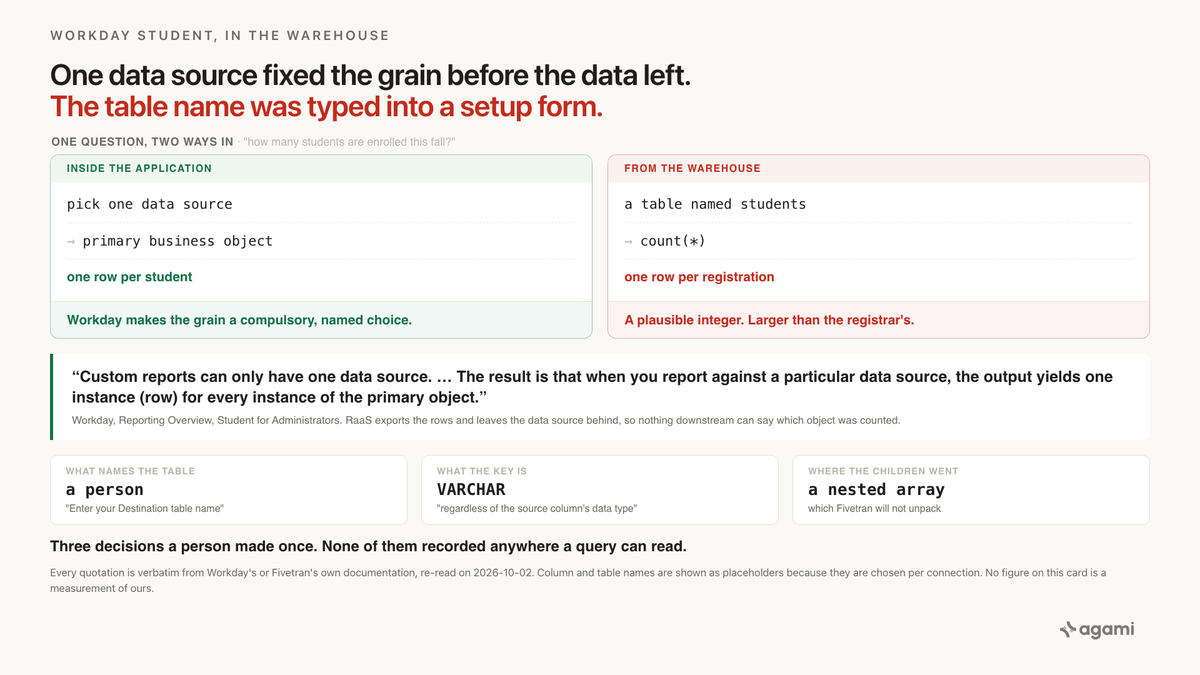
Query Workday Student data with AI against a replicated warehouse and the first number you get back is usually too high. The table whose name says students sits at the grain of a course registration, and nothing in the warehouse says so. Every other application in this series ships you a schema to be wrong about. Workday Student ships you whatever somebody at your institution put in a report, under a table name they typed themselves.
Before you start
- A Workday Student estate you can reach with SQL. No managed Workday Student connector exists, from anybody. What lands in your warehouse is the output of custom reports, pulled through Fivetran's Workday RaaS connector.
- Know that the HCM connector isn't it. Fivetran's Workday HCM connector covers six modules, and the word "Student" doesn't appear anywhere on that page. If your Student data arrived, it arrived as reports.
- No free instance to practise on. Workday's tenant types all presuppose a paying customer, and a sandbox is created once a production tenant goes live. This post runs against the extract your institution already has.
- Find out who configured the connector. They chose your table names and your primary keys, in a form, and nothing downstream recorded either decision.
- Expect casing to vary. Fivetran naming lowercases everything and splits camelCase on the case change. Source naming preserves the original spelling, and the choice is per connection. The SQL below is lower case, so check yours.
The question
"How many students are enrolled this fall?"
The registrar has a number for that. It goes in the census file, it goes to IPEDS, and the institution stands behind it. Your warehouse has a table whose name says students, and your job is to make the two agree.
What breaks
An agent reads the table, finds a column that looks like an academic period, and counts rows:
-- WRONG. Counts rows, and a row is one instance of the report's
-- primary business object, which may not be a student.
select count(*) as enrolled_students
from   <your_student_table>
where  <your_academic_period_column> = '2026 Fall Semester';
It returns a single integer. The integer is plausible, it's larger than last year's, and it's larger than the registrar's by a factor nobody can see. Nothing in the result says which object was counted.
The second attempt is worse, because it looks like it respects the structure. Two RaaS tables share a student identifier, so an agent joins them:
-- WRONG in a different way. Two reports, two grains, and a join
-- key that exists only because both authors happened to include it.
select count(distinct s.<your_student_id_column>) as students
from   <your_student_table> s
join   <your_program_table> p
  on   p.<your_student_id_column> = s.<your_student_id_column>;
That one silently drops every student the second report's data source filtered out, and inflates the rest. The join compiles. No constraint was violated, because none exists.
Why it breaks
Workday fixed the grain before the data left
Workday states the rule plainly, and this sentence is the whole post:
"Workday delivers and defines the data sources. Custom reports can only have one data source. Each data source has a primary object, as well as many secondary objects that have a one-to-one (1:1) or a one-to-many (1:M) relationship to the primary object. The result is that when you report against a particular data source, the output yields one instance (row) for every instance of the primary object."
One row per instance of the primary object. Which object that is decides what a row means, and the choice was made inside the tenant, on the first screen of the report definition, by a person.
For a student report, Workday names the candidates:
"The report must use a data source and primary business object that corresponds to the profile group. For example, when creating reports for the student profile, use the Student, Academic Records, or Student Prospect Record business objects."
Three different objects, three different row counts, one table name.
The chain below a student is one-to-many at every link
This would be harmless if a student had exactly one of everything. They don't. Workday's Student Records capability reference lists, under Manage Academic Record, the ability to "Manage multiple academic records for the same student", and on the same page, "Manage programs of study".
So a student can carry several academic records, each academic record several programs of study, and each student as many course registrations as they enrolled in. Workday's reporting terminology names the case and calls it what it is:
"Multi-instance - Represents a one-to-many (1:M) relationship between two objects. For example, one worker can have multiple dependents."
A report built at Student grain gives you one row per student. Rebuild it on the academic record, which is the natural thing to do when you need program data, and a student with two academic records becomes two rows. Build it on the registration and they become four. The question changed. The table name didn't.
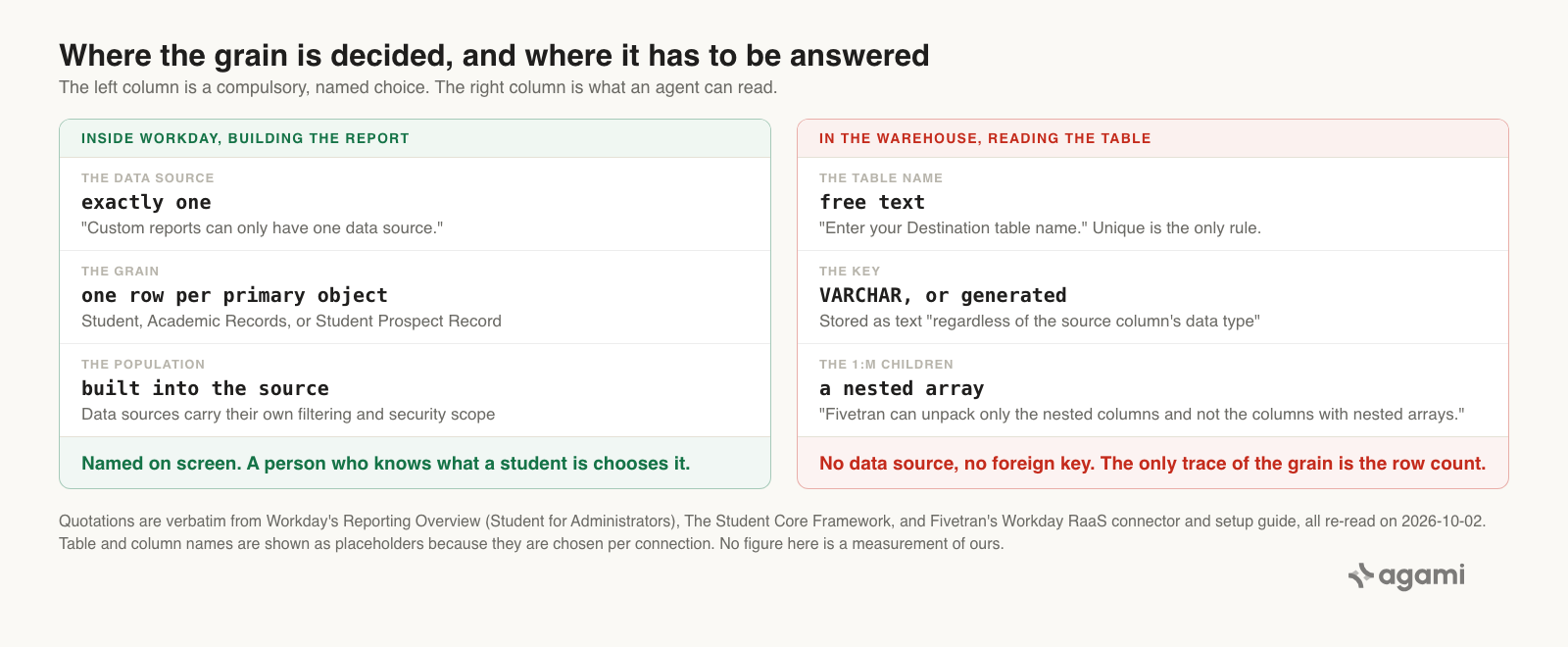
The grain is decided in the left column and unrecoverable from the right. Every quotation is verbatim from Workday's or Fivetran's own documentation.
The table name is a free-text box
For every other application in this series, the landed table names come from the connector vendor. Here the connector vendor asks the customer. From Fivetran's setup guide, at the step where a report becomes a table:
"Click + Add report. Enter your Destination table name. The name must be unique within the connection and follow Fivetran's naming conventions."
Uniqueness is the only rule. Fivetran doesn't carry through the Workday report name, or the business object, or anything else Workday chose. A person types it, probably in a hurry, probably describing what they wanted rather than what the report returns.
So a table called students is evidence about one colleague's intent on one afternoon. It isn't evidence about the grain, and no amount of reading it carefully will make it so.
The key was chosen in the same form, and its type was thrown away
Fivetran is candid about why:
"We give you the option to select the primary keys because the reports are dynamically generated."
Then it discards the type:
"We store the primary key columns as VARCHAR in the destination, regardless of the source column's data type. For example, if you select a DATE column as the primary key, it is stored as VARCHAR rather than DATE in your destination. To retain the column's original data type, cast it in downstream queries or transformations. For example, if the original data type is DATE, use CAST(column AS DATE)."
Three consequences follow, and a modeller has to declare all three rather than infer them.
The key is chosen, not discovered. The setup guide adds "Select the primary key(s). To track history of the report data, make a timestamp column part of the composite primary key." So a key may be composite, may include a timestamp, and may be absent: set "Use Fivetran Generated Primary Key" to on and you get one per row, which joins to nothing.
A date key is a string. Any academic-period or effective-date column chosen as a key sorts and compares lexically until somebody casts it. Fivetran names the remedy and leaves it to you.
Cross-table joins are the report author's accident. Two RaaS tables carry a student identifier only if both reports happened to include that field. The relationship is real inside Workday and undeclarable in the warehouse.
The children that changed the grain arrive sealed
You might hope to recover the one-to-many detail from the Student-grain table. Fivetran can't give it to you:
"To unpack the nested columns and sync them separately, set the Enable Unpacking Nested Columns toggle to ON. By default, Fivetran syncs the nested columns as JSON objects into your destination. Fivetran can unpack only the nested columns and not the columns with nested arrays."
A multi-instance field is a nested array. So a report at Student grain carries its academic records and registrations as an array that won't open, and the author's only route to querying them is a second report at the child's grain. Which is a second table, with a second grain, under a second name somebody typed.
Two vendors reached it the same way, and one stopped selling theirs
This isn't a Fivetran limitation. Airbyte's Workday enterprise source lands the same shape and says so beside the word schema:
"Support for Workday Report-as-a-Service (RaaS) streams. Each provided Report ID can be used as a separate stream with an auto-detected schema."
Its prerequisites are Report IDs. Objects and modules never appear on that list. Auto-detected means detected from whatever arrived, which is the report's output. Note the tense on that page, though: Airbyte states "We no longer sell this connector" and "Airbyte no longer sells this connector, but we continue to support it if you purchased it in the past."
Two independent vendors reached Workday Student as a report pipe, neither published a schema for it, and one has withdrawn. Nobody's holding back a data dictionary. None exists to publish.
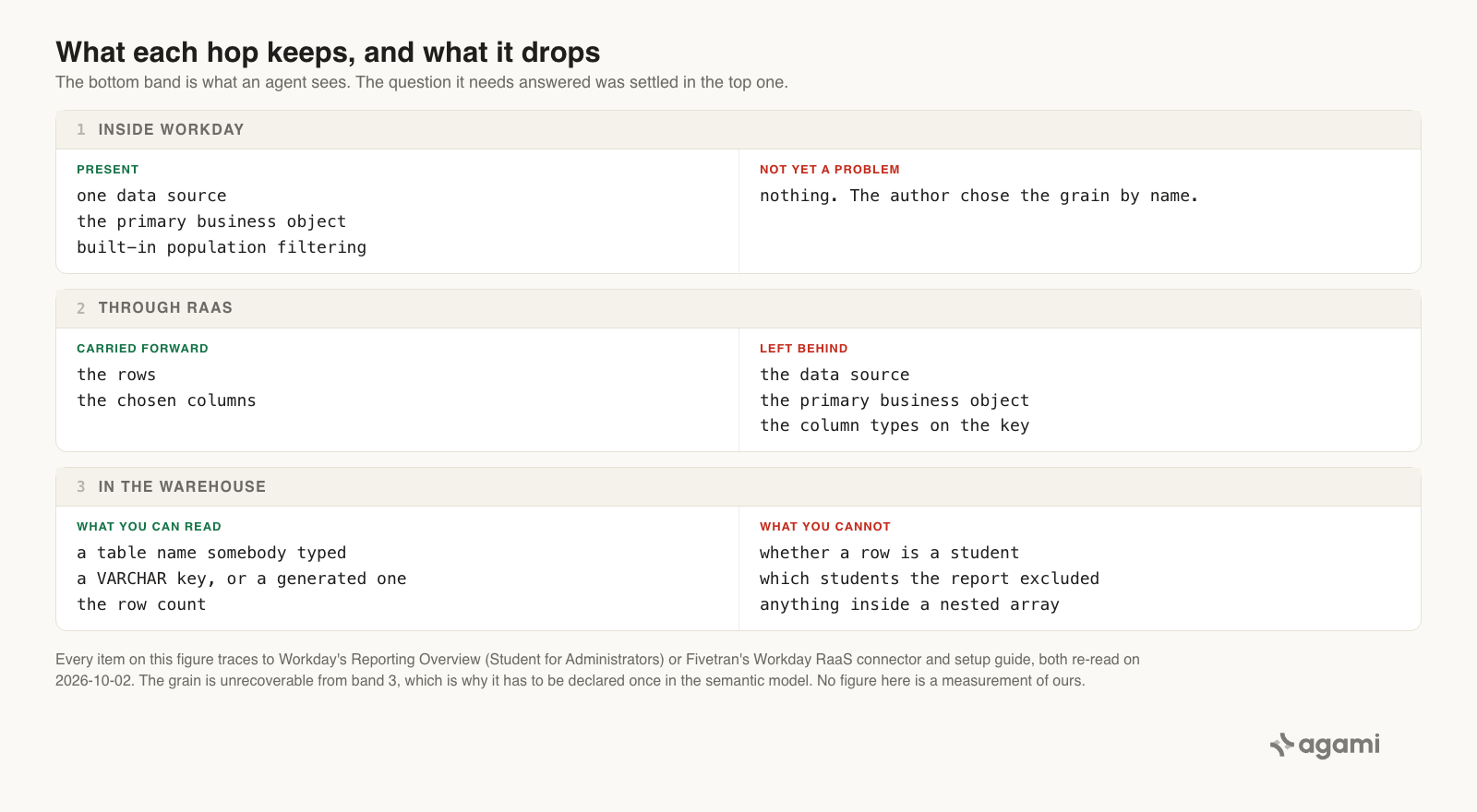
What each hop keeps and what it drops. The warehouse band is what an agent sees, and the one question it needs answered was settled two bands earlier.
What the application did for you
Inside Workday you can't ask the ambiguous question, because the data source answers it before you pick a single field. A custom report has exactly one data source. The data source fixes the primary business object. The output is one row per instance. The author confronts that on the first screen, by name, with Workday's own guidance telling them to "choose the data source that returns the smallest dataset that still includes all needed data."
The data source carries a population as well as a grain. Workday's example is its own: the Student Prospect Records data source "contains all prospect records that a user can access", and a separate Active Student Prospect Records filter narrows it to active recruitment or application. Workday adds that it "may deliver different data sources for a single primary business object to allow reporting on different sets of instances, based on the user's security access."
So the decision is compulsory, it's made by somebody who knows what a student is, and it sets both the grain and the population. RaaS then exports the answer and throws away the question. The destination table carries the rows and not the data source that produced them, and nobody downstream can recover which object was chosen, because the one place it was written down is a report definition in a tenant they can't read.
This is the Salesforce "Opportunities with Products" report type, one turn worse. There, replication copied the tables and left the report type's boundary behind. Here replication copied the report's output and left the report behind, so no tables exist to re-derive the boundary from.
The fix
The joins are the thing that doesn't exist, so what has to be declared is what each table is one row of. Every RaaS table needs an entity that says so, because nothing in the warehouse does.
In the semantic model
entities:
  - name: workday_student_raas_grain
    description: >
      What one row of this table means. A Workday RaaS table is the flattened
      output of one custom report, and Workday fixes the grain at one row per
      instance of the report's primary business object. In Workday Student the
      chain from Student downward is one-to-many at every link, so a row may be
      a student, an academic record, a program of study, or a course
      registration, and the table name can't tell you which because a person
      typed it into the Fivetran setup form. Declare the grain here or every
      count on this table is unverifiable.
    resolves_to:
      table: <your_student_table>
      grain: [<your_student_id_column>, <your_academic_record_column>]
    caveats:
      - >
        Which primary business object the report used isn't recoverable from
        the warehouse. It lives in a report definition inside the Workday
        tenant. A person reads it once and records the answer here.
      - >
        A student with two academic records is two rows at academic-record
        grain. Workday supports that on purpose, so it isn't duplication and
        must not be deduplicated away.
    confidence: proposed
    review_state: unreviewed
    source: https://doc.workday.com/workday-education/en-us/course-manuals/student-for-administrators/reporting-overview.html

  - name: workday_raas_primary_key
    description: >
      The key columns of a RaaS table are selected by whoever configured the
      connector, not derived from Workday, and Fivetran stores every one of
      them as VARCHAR regardless of the source type. A date or timestamp key
      is text in the destination and compares lexically until it's cast. Where
      no key was selected, Fivetran generates one per row, and a generated key
      joins to nothing.
    resolves_to:
      table: <your_student_table>
      cast_on_read:
        <your_date_key_column>: DATE
    caveats:
      - >
        Fivetran's own remedy is a downstream cast, so the cast belongs in the
        model rather than in each query. Anything that won't cast is a signal
        the key was chosen badly and the report needs revisiting.
    confidence: proposed
    review_state: unreviewed
    source: https://fivetran.com/docs/connectors/applications/workday-raas

  - name: workday_student_multi_instance_columns
    description: >
      Multi-instance fields arrive as nested arrays. Fivetran unpacks nested
      columns but not nested arrays, so a report built at Student grain carries
      its academic records, programs of study, and course registrations as an
      array that can't be queried. Mark these columns unanswerable rather than
      letting an agent attempt JSON extraction against them.
    resolves_to:
      table: <your_student_table>
      opaque_columns: [<your_nested_array_columns>]
    caveats:
      - >
        The remedy is a second report at the child's grain, which is a second
        table with its own grain declaration, not a join key on this one.
    confidence: proposed
    review_state: unreviewed
    source: https://fivetran.com/docs/connectors/applications/workday-raas/setup-guide
Then the two metrics. The first is the answer the registrar wants, and it counts identifiers rather than rows:
name: workday_student_enrolled_headcount
calculation: >
  Distinct students with a registration in the academic period. Counts distinct
  student identifiers and never rows, because the table's grain is whatever the
  report author's primary business object was and the table name doesn't say.
bindings:
  Snowflake: >
    SELECT COUNT(DISTINCT s.<your_student_id_column>) AS enrolled_students
    FROM   <your_student_table> s
    WHERE  s.<your_academic_period_column> = :academic_period
source_tables: [<your_student_table>]
primary_table: <your_student_table>
requires_entity: workday_student_raas_grain
other_names: [enrollment, headcount, how many students, enrolled students]
confidence: proposed
review_state: unreviewed
The second one is the diagnostic, and it's the metric worth keeping permanently:
name: workday_student_raas_grain_surplus
calculation: >
  Rows minus distinct students on a RaaS table, per academic period. Zero means
  the table is at student grain. Anything else is the multiplier sitting under
  every count anyone has ever run against this table.
bindings:
  Snowflake: >
    SELECT COUNT(*) - COUNT(DISTINCT s.<your_student_id_column>) AS surplus_rows
    FROM   <your_student_table> s
    WHERE  s.<your_academic_period_column> = :academic_period
source_tables: [<your_student_table>]
primary_table: <your_student_table>
other_names: [grain check, is this table one row per student]
confidence: proposed
review_state: unreviewed
Every placeholder in angle brackets is genuinely per-instance. The next section finds yours.
Reproduce it yourself
You need a Workday Student RaaS extract in a warehouse and a SQL client. No free instance exists, so this runs on your own estate.
1. List what the connector actually landed. No documented schema exists, so start here rather than assuming you know:
-- Snowflake. Every table in the schema the RaaS connection writes to.
select table_name,
       row_count
from   information_schema.tables
where  table_schema = '<YOUR_RAAS_DESTINATION_SCHEMA>'
order  by table_name;
Read the whole list. Each name on it is a sentence somebody typed, and the set of them is an inventory of reporting decisions your warehouse currently knows nothing about.
2. Find the student identifier and the period column. Casing depends on which naming convention the connection uses, so read it rather than guessing:
select table_name,
       column_name,
       data_type
from   information_schema.columns
where  table_schema = '<YOUR_RAAS_DESTINATION_SCHEMA>'
order  by table_name, ordinal_position;
Two things to note while you're here. Any column coming back VARCHAR that holds a date was probably selected as a primary key. And any column holding a JSON array is a multi-instance field that won't unpack, which tells you the report was built above that child's grain.
3. Run the grain probe. This is the query the whole post exists to hand over. It needs no schema documentation and works on any RaaS table:
-- Run this on every RaaS table before you count anything in it.
-- If the first two numbers differ, a row is not a student.
select count(*)                                   as rows_in_table,
       count(distinct <your_student_id_column>)    as distinct_students,
       count(*) - count(distinct <your_student_id_column>)
                                                   as surplus_rows
from   <your_student_table>
where  <your_academic_period_column> = '2026 Fall Semester';
surplus_rows is your multiplier, on your data. Zero means the table is at student grain and count(*) was safe all along. Anything else is the gap between your warehouse and your registrar, and it has been sitting under every count ever run against that table.
4. Cast the key before you trust an ordering. If a date landed as text, range and sort predicates are lexical:
select cast(<your_date_key_column> as date)       as effective_date,
       count(distinct <your_student_id_column>)   as students
from   <your_student_table>
group  by 1
order  by 1;
A row that won't cast is a row worth looking at. It usually means the key was chosen badly.
5. Read the report definition. This step has no query, and it's the one that settles the question. Open the custom report in Workday, or ask whoever owns it, and write down which data source and primary business object it uses. Workday requires the report to be Report Type Advanced with Enable as Web Service selected, so the person who set up RaaS has already seen that screen. The answer takes a minute to find and it only has to be found once.
6. Ask the registrar which number is official. Whether a student with two academic records counts once or twice is institutional policy rather than a schema fact. Workday creates a second academic record when cumulative GPAs must be calculated separately, when policies differ between programs, or when a new program needs an application. Your census number has an answer to that already. Get it in writing.
7. Declare it once. Put the grain, the key cast, and the opaque columns into your semantic model, so the next person who asks how many students are enrolled gets a distinct count without knowing this post exists.
What this looks like in Agami
All of the above holds for whoever builds the semantic model. Here's what it is in our product, in this post's terms.
A declared grain is what makes a count checkable. workday_student_raas_grain records what one row of your RaaS table is, as a line in a file. That line is the only artifact in the whole chain that says whether a row is a student or a registration, because Workday kept that answer in the tenant and RaaS didn't bring it along. A declaration in a file is auditable in a way a prompt never is.
A metric counts identifiers because the metric says so rather than because the agent remembered. workday_student_enrolled_headcount binds to a distinct count of the student identifier. A question asked in the institution's words resolves to that binding, so count(*) doesn't come back as the answer to "how many students" on a table that isn't at student grain.
An opaque column produces a refusal rather than an attempt. Nested arrays are marked unanswerable, so a question about programs of study against a Student-grain table comes back saying the data isn't reachable there, in the same conversation where it was asked. Table and column scope are checked before the SQL runs. The alternative is an agent inventing JSON extraction against a column Fivetran never opened.
Fan-out is detected per aggregate before the SQL runs, from declared join cardinality. Join two RaaS tables on a student identifier and a sum or a count can inflate. That gets named: which join inflated which number. It isn't blocked, because whether a fan is a bug depends on the question being asked.
Nothing proposed is trusted until a person signs it. Every block above arrives confidence: proposed and review_state: unreviewed. An answer leaning on an unapproved metric still comes back, and it carries a warning until somebody approves it. On this schema that matters more than usual, because the grain is one person's knowledge and it should be reviewed as such.
Reconciliation is how the number earns trust. Point it at the enrollment report the registrar already runs inside Workday, as a screenshot, a CSV, or numbers pasted into chat. That report is the one place the grain was ever explicit, which makes it an unusually good thing to agree with.
And what we can't claim. We haven't run this against a real Workday Student estate, so this page carries no figure for how many surplus rows an institution's RaaS table holds, how many RaaS tables a typical institution lands, or how often a report gets built at academic-record grain rather than student grain. All three depend entirely on reports somebody built, and the probe above returns yours. We also can't tell you which primary business object your report used; the semantic model records that answer once a person supplies it, and no introspection pass will ever find it. And Workday is building the thing whose absence this post is about, which the next question covers.
Frequently asked questions
Is there a Workday Student connector for Snowflake or BigQuery?
No managed connector exists for Workday Student, from any vendor. Fivetran's Workday HCM connector "only supports the following modules: Absence Management, Compensation, Core HCM, Payroll, Performance Management, Time Tracking", which is six, and Student isn't among them. The route that exists is Workday RaaS, which syncs the output of custom reports.
Why doesn't my Workday Student row count match the registrar's?
Because a RaaS table holds one row per instance of its report's primary business object, and that may be an academic record or a course registration rather than a student. Workday: "the output yields one instance (row) for every instance of the primary object." Run a count(*) against a count(distinct) on the student identifier. The difference is your multiplier.
How do I tell what grain a Workday RaaS table is at?
From the data rather than the schema, because nothing in the warehouse records it. Compare count(*) to count(distinct <student_id>) for one academic period. To get the authoritative answer rather than inferring it, open the report definition in Workday and read which data source it uses.
Why is my date column a VARCHAR in the warehouse?
Because it was selected as a primary key. Fivetran: "We store the primary key columns as VARCHAR in the destination, regardless of the source column's data type." Its own remedy is to cast downstream, which belongs in the semantic model rather than in every query.
Can I query programs of study from a student-grain RaaS table?
Not usefully. Multi-instance fields land as nested arrays, and "Fivetran can unpack only the nested columns and not the columns with nested arrays." The fix is a second report built at the child's grain, which is a separate table with its own grain to declare.
Won't Workday Data Cloud make this go away?
Possibly, for new pipelines. Workday has announced a Data Lake offering a "curated catalog of Workday business objects" that names Workday Student, plus Workday Data Connect over Apache Iceberg and Workday Live Data Query for "direct SQL access". Workday's availability sentence reads: "Workday Data Cloud will be available to early adopter customers in the first half of 2026 and generally available later that year." Whether it's generally available for Student today isn't something this post verified, so it doesn't claim either way. Two things hold regardless. RaaS tables already landed will outlive any migration, and the grain question about them doesn't change. And a catalog of business objects makes the grain easier to declare rather than unnecessary.
Does this apply to PeopleSoft Campus Solutions?
No. That's an Oracle product with its own relational database, reachable directly and documented separately. Nothing in this post is a claim about PeopleSoft tables.
References
- Workday, Reporting Overview (Student for Administrators). The grain rule, one row per primary-object instance, the guidance on choosing a data source, built-in data-source filtering, and security-scoped data sources.
- Workday, Building Custom Reports. Primary and related business objects, the 1:1 and 1:M distinction, and the multi-instance definition.
- Workday, The Student Core Framework. Which primary business objects a student report uses.
- Workday, Reference: Student Records Capabilities. Multiple academic records per student, programs of study, and registration.
- Workday, Setup Considerations: Workday Student. The seven applications that make up the product.
- Workday, Concept: Reports as a Service (RaaS). Workday's own definition, and which report types can be web services.
- Workday, Workday Tenants and Tools. Why no free instance exists.
- Workday, Workday Data Cloud announcement. The Data Lake catalog naming Student, Data Connect over Iceberg, Live Data Query, and the availability sentence quoted above.
- Fivetran, Workday RaaS connector. What lands, the VARCHAR primary keys, and the cast remedy.
- Fivetran, Workday RaaS setup guide. The destination table name, primary-key selection, the nested-array limit, and the Integration System User.
- Fivetran, Workday HCM connector. The six-module list that doesn't include Student.
- Fivetran, Naming Conventions. Landed casing rules, and the Source naming alternative.
- Airbyte, Source Workday. The same report-pipe shape from a second vendor, and its withdrawal notice.
- In Your Workday HCM Warehouse, PERSON_NAME Holds People Who Don't Work for You. The same vendor with the opposite problem: a real connector, a documented schema, and a column that merges records.
- The Canvas Student Who Doesn't Exist, and the Two Rows for the One Who Does. Enrollment grain again, where the schema is published and the grain is still wrong.
- Ellucian Banner Records When a Major Started. No Column Records When It Stopped.. The other student information system, which tells you too much and dates it badly.
- agami-core on GitHub
Make your Workday Student data answerable
Agami is the trust layer between your AI assistant and your warehouse. It records what one row of each RaaS table means, so "how many students are enrolled" counts students instead of counting rows nobody checked the grain of.