How to Connect Your Warehouse to Claude, Cowork and ChatGPT
Claude Desktop launches an MCP server on your machine. Cowork, claude.ai and ChatGPT connect inbound from the vendor's cloud. Which route you need is decided by one question.

You have a semantic model that works. You introspected the schema, corrected the grain and the custom fields, signed the definitions off, and checked that the breakdown ties to the total. Locally it's done: no server, no port, no URL, and the credentials, the schema, and the results never left your machine.
Then someone on your team asks for access, and a week disappears.
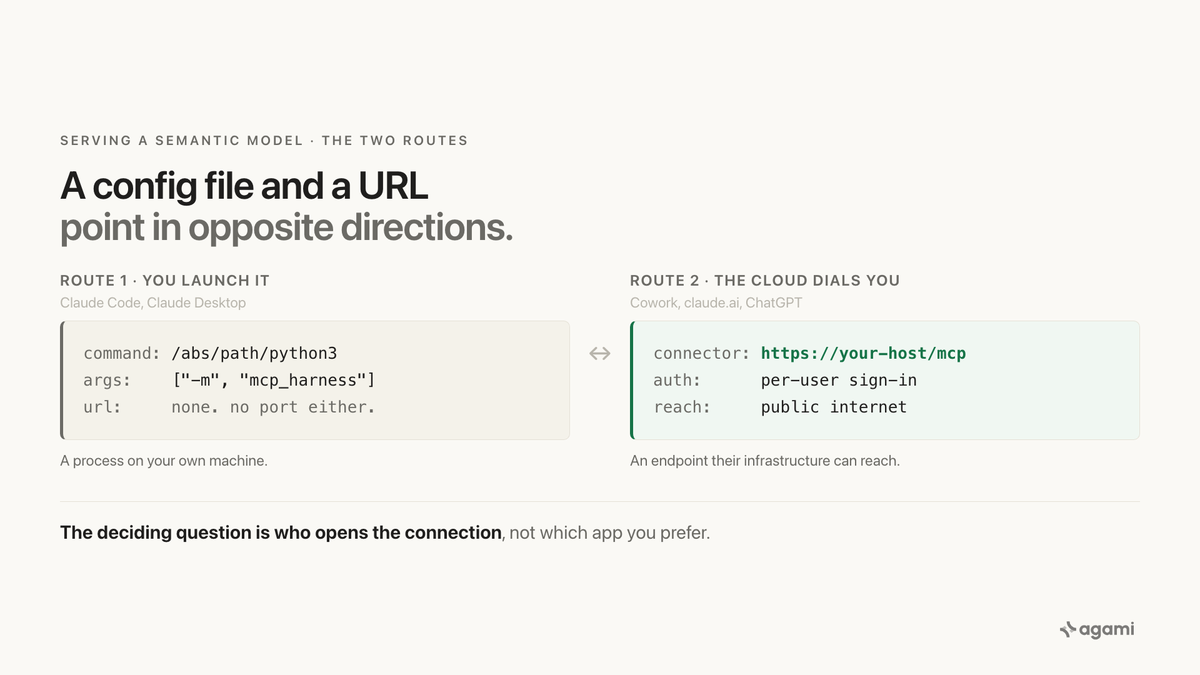
It disappears in a predictable way. Someone edits a JSON config file trying to connect the MCP server to claude.ai, and nothing happens, because no amount of editing that file will ever reach claude.ai. The config file and the URL aren't two ways of doing the same thing. They point in opposite directions.
One distinction decides everything that follows: who opens the connection. Every MCP client is on one side of it or the other, and the symptom when you pick wrong is always the same, which is that no tools appear and nothing tells you why.
The payoff for getting it right is that your team asks data questions in the assistant they already have open, so the answer arrives in the same conversation as the work that prompted it, rather than in a separate tool someone has to remember to go and open.
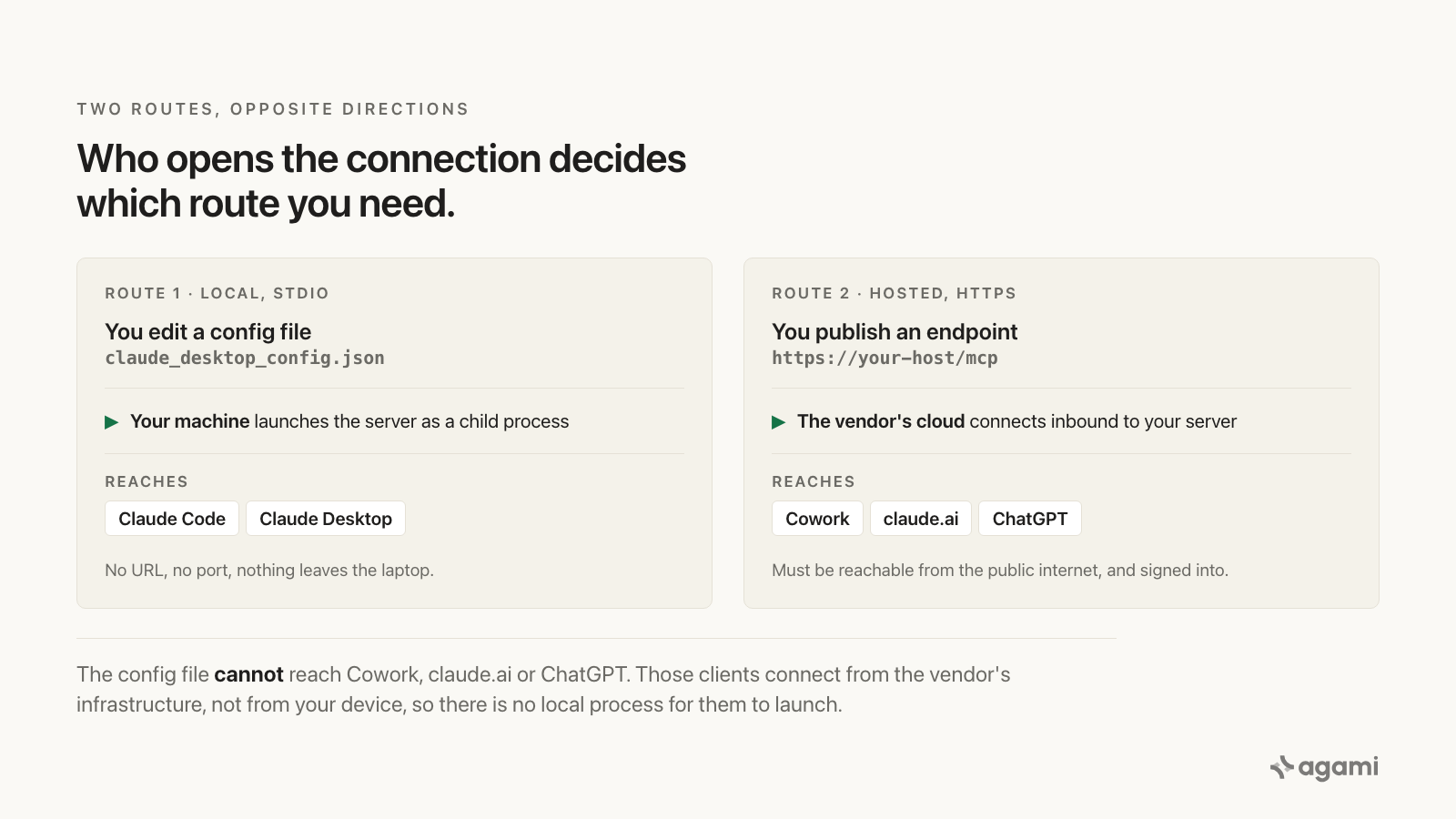
The config file and the URL aren't two ways of doing the same thing. They point in opposite directions.
Before you start
- A semantic model that already works. This post picks up where building one stops, so do that first if the definitions are not signed off yet.
- agami-core installed, which is source-available and runs locally.
Route 1 needs nothing else. No server, no port, no public URL, and the credentials never leave your machine.
Route 2 is the one with prerequisites, and they are where the week goes: an HTTPS endpoint the vendor's cloud can reach, which means a public hostname and a certificate. A tunnel is fine for testing. Read the route comparison below before provisioning anything, because the two point in opposite directions and picking wrong is silent.
Route 1: the config file, for the desktop app
A local server runs as a child process on your own machine, talking over stdin and stdout. There's no URL and no port. Ask for it:
/agami-serveThat detects the right interpreter, installs what it needs, and merges the entry into your config with a timestamped backup. To do it by hand, open Settings → Developer → Edit Config, which opens claude_desktop_config.json:
- macOS:
~/Library/Application Support/Claude/claude_desktop_config.json - Windows:
%APPDATA%\Claude\claude_desktop_config.json
mcpServers is a top-level key, a sibling of preferences rather than something nested inside it:
{
  "mcpServers": {
    "agami": {
      "command": "/Library/Frameworks/Python.framework/Versions/3.12/bin/python3",
      "args": ["-m", "mcp_harness"],
      "env": { "AGAMI_PROFILE": "main" }
    }
  }
}
Then fully quit the app, Cmd+Q on macOS or quit from the system tray on Windows, and reopen it. Closing the window doesn't reload the config, and that alone accounts for a good share of "it didn't work".
The two failures that look identical
Two details in those four lines cause nearly every silent failure, and both present the same way: you reopen the app and no tools appear. Nothing in the interface distinguishes them, which is why people fix the wrong one first.
- The Python path must be absolute, and it must be the interpreter that has your database driver. Desktop apps launch child processes with a minimal PATH, so a bare
python3usually isn't found at all. Get the right path by running, in the environment where your model already works:
python3 -c 'import sys, psycopg2; print(sys.executable)'If that import fails, you've found your problem before you started: the interpreter you were about to point at doesn't have the driver.
- agami-core must be installed into that same interpreter, because the server runs as a module rather than a script:
"/abs/path/python3" -m pip install "agami-core[model]"Installing it into whatever pip happens to be first on your PATH is the single most common version of this mistake.
Verify by asking what datasources do you see? If it answers with your profiles, the wiring is good.
Route 2: an HTTPS endpoint, for Cowork, the web app, and ChatGPT
No amount of editing that JSON will reach Cowork, claude.ai or ChatGPT, and it's worth understanding why before you spend an afternoon on it.
Those clients can't launch a process on your laptop. When you add a connector to Claude, Claude reaches it from Anthropic's cloud rather than from your device, and that holds even when you're sitting in the desktop app or in Cowork. ChatGPT supports remote MCP servers only; its documentation describes no local transport at all. A local stdio server, which is the whole point of route 1, is therefore unreachable from any of them by construction.
What they need is a URL:
/agami-deployThat writes a ready-to-run container bundle, automatic TLS included, and what comes out is an MCP endpoint at https://your-host/mcp with per-user sign-in and an admin console for deciding who gets in.
Point its datasource at a read-only database role. That role is the boundary that doesn't depend on anything in the application behaving correctly, which is the only kind of boundary worth relying on once other people can reach the thing.
Connecting it in Claude
Go to Customize → Connectors, click +, choose Add custom connector, and paste https://your-host/mcp. This works from web, desktop or Cowork, because in all three the connection originates in Anthropic's cloud rather than on your device.
On Team and Enterprise an owner adds it once for everyone under Organization settings → Connectors → Add → Custom → Web.
Because the connection arrives from Anthropic's infrastructure, the endpoint has to be reachable from the public internet. If it sits behind a firewall, allowlist their published IP ranges rather than opening it up.
Connecting it in ChatGPT
First switch on developer mode under Settings → Security and login, which is what unlocks full MCP connectors, then add the same https://your-host/mcp URL as a connector.
Two constraints worth knowing before you plan around it. Developer mode is web only: the ChatGPT desktop app isn't a supported surface for MCP connectors, so there's no ChatGPT equivalent of route 1 at any point. And it needs a paid plan, currently Pro, Plus, Business, Enterprise or Education.
OpenAI has relocated this toggle more than once. If it's not under Security and login, look under Apps or Connectors before concluding your account lacks it.
Which route you actually need
| If your team works in | You need | What you're wiring |
|---|---|---|
| Claude Code | Nothing | It already works |
| Claude Desktop | Route 1 | A config entry, a local process |
| Cowork | Route 2 | A public HTTPS endpoint |
| claude.ai in a browser | Route 2 | A public HTTPS endpoint |
| ChatGPT | Route 2 | A public HTTPS endpoint, web only |
The pattern worth internalising: a config file configures something already running on your machine. A URL is something the vendor's cloud dials. Every symptom on this page traces back to that one line.
Which route you need is decided by where your team sits, not by what you would prefer to configure. Pick from the table, not from preference.
What this unlocks next
A model only you can reach answers your questions. A model your team can reach answers theirs, and that's the point where the numbers stop being something people look up and start being something other systems can act on.
That's the next step in this series. The read stays governed and read-only, and the systems that already own each action take it: a renewal risk becomes a follow-up task on the deal, a month-end exception becomes an email to finance, an incident pattern becomes a post-incident review. Agami never needs write access to your CRM to make the CRM update happen, because the connector that owns that write does it.
Getting the connection right is the prerequisite. Everything after this assumes your team can already ask.
Build one against your own schema.
agami-core is source-available. Point it at your warehouse, review what it drafts, and check whether the breakdown ties to the total.
Get agami-core or bring us the metric two teams define differently →
Frequently asked questions
Why does the desktop app show no tools after I edit the config? Almost always one of two things: the Python path isn't absolute or isn't the interpreter holding your database driver, or agami-core is installed into a different interpreter than the one named in the config. Both look identical from the app. Check the interpreter first with python3 -c 'import sys, psycopg2; print(sys.executable)'. Also confirm you fully quit the app rather than closing the window, because closing doesn't reload the config.
Can I use a local server with claude.ai or ChatGPT? No, and not because of a setting. Those clients open the connection from the vendor's cloud, so a process on your laptop is unreachable by construction. You need a URL they can dial.
Does my endpoint have to be on the public internet? It has to be reachable from the vendor's infrastructure, which for most teams means public with authentication in front of it. If it sits behind a corporate firewall, allowlist the vendor's published IP ranges rather than exposing the host.
Is there a ChatGPT version of the config-file route? No. ChatGPT's MCP support is remote-only and web-only, so every ChatGPT deployment is route 2. There's no local path to fall back on.