Every SyteLine Table in Your Warehouse Holds Every Site's Rows
Every SyteLine table holds every site's rows. The object that filtered them to one plant was a SQL view, and your connector copied the table. The semantic model is where the site becomes a key.

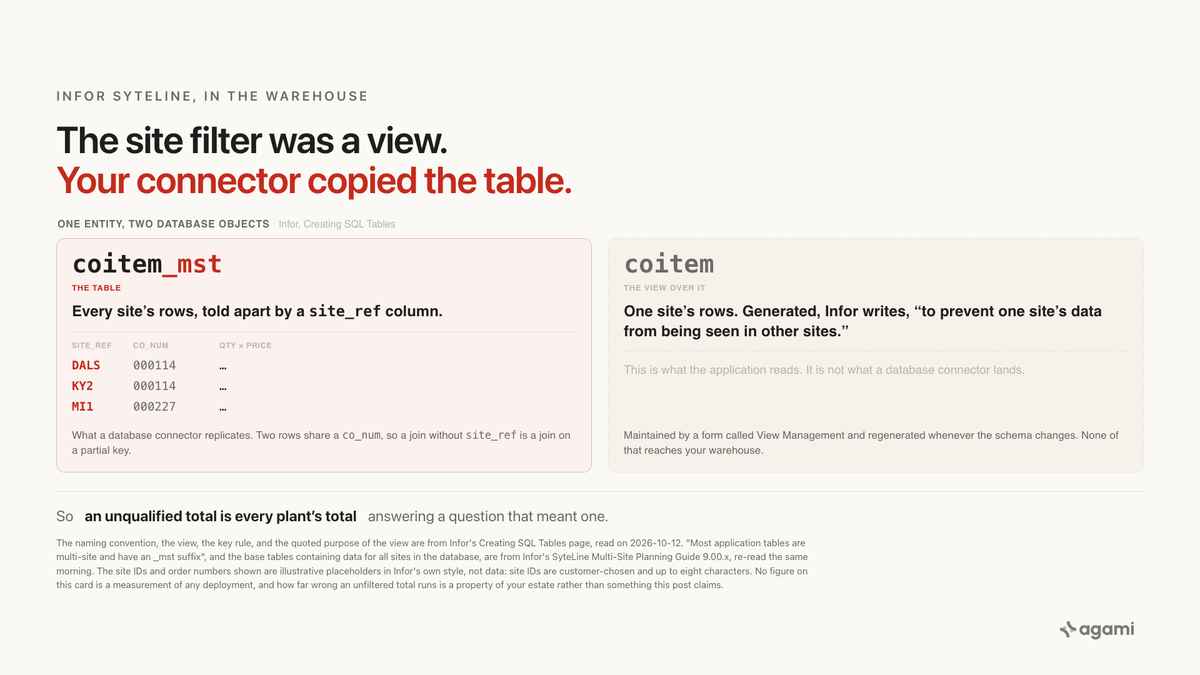
Query your SyteLine data with AI against a replicated database, ask what the plant sold last quarter, and the answer comes back too big. Infor's application tables each hold every site's rows, told apart by a site_ref column. The object that narrows them to one site is a SQL view, and a database connector copies tables. So your warehouse holds all-sites tables under names that look like one plant's tables, and every total anyone computes from them spans the whole enterprise without saying so.
Before you start
- A SyteLine database already replicated into a warehouse. No managed application connector exists for Infor, from any vendor. Four Fivetran slugs and an Airbyte source were tried and all returned 404, so they're cited rather than linked; the 404 is the finding. SyteLine runs on Microsoft SQL Server, so the route is a database connector such as Fivetran's SQL Server connector.
- Or Infor's own route. SyteLine publishes to Data Lake over ION messaging, and Infor says plainly that this is a subset: only the tables defined in the
DATALAKEreplication category arrive, and that list is predefined by Infor. - No free instance exists. Infor ships no free or developer-tier CloudSuite Industrial, so every query below runs against your own estate rather than a sandbox you can spin up.
- Read access to
information_schemain your destination, which is where the site list comes from. - Which of your site IDs are production. That's institutional knowledge, and it's the one input no query supplies.
The question
"What did we sell last quarter?"
At a manufacturer running SyteLine, that's the ordinary monthly question. In SyteLine terms it means summing coitem_mst.qty_ordered * coitem_mst.price over order lines whose header date falls in the quarter. Every row needed is in the warehouse. Nothing failed to land.
What breaks
Point an agent at the replicated schema and ask. It finds a customer-order header table and a customer-order line table, reads the columns, filters on the order date, and writes what a competent analyst would write:
-- WRONG: sums every site in the database, on a partial key.
SELECT SUM(ci.qty_ordered * ci.price) AS booked
FROM   coitem_mst ci
JOIN   co_mst c ON c.co_num = ci.co_num
WHERE  c.order_date >= '2026-07-01'
  AND  c.order_date <  '2026-10-01';
That query runs. It's fast, the column names are right, and it returns a single plausible number. It's also the sum of every site in the database presented as one plant's result, and nothing in the output says which sites went into it.
Ask the agent to restrict the answer to one plant and it has no reason to. site_ref is sitting right there in both tables, as an ordinary varchar among dozens of ordinary columns. Nothing in the replicated schema marks it as the column that decides whose rows these are.
Why it breaks
The site filter is a view, and your connector copied the table
Infor's own Creating SQL Tables page is the instruction a SyteLine developer follows when adding a table, and it spells the whole thing out. Verbatim:
If you want the table to include aSiteRefcolumn, allowing different data for different sites, select the Multi-Site field.
Note: If you select this option, these additional steps are needed:
All primary and unique keys for the table, any non-unique indexes should contain theSiteRefcolumn. […]
In the Application Schema Tables Metadata form, select this table and specify a name in the View Name field. Then use the View Management form to generate a view over the table. (The standard convention is to name multi-site tables so they end in_mst, and then use the table name without_mstfor the view name.)
Build an IDO over this view to prevent one site's data from being seen in other sites.
Read that last sentence again, because Infor wrote the post's thesis for us. The view exists for exactly one purpose: to stop one site seeing another's rows. It isn't a convenience, a shortcut, or a reporting layer. It's the isolation boundary, and it's a database object rather than a column.
So each entity in SyteLine is two objects. coitem_mst is the table, and it holds every site. coitem is the view over it, filtered to one site, and that's what the application reads. A database connector replicates tables, so the warehouse gets the first one.
How widespread this is comes from the SyteLine Multi-Site Planning Guide, again verbatim:
Multi-site tables include asite_refcolumn that indicates the site to which a row of data belongs. Most application tables are multi-site and have an_mstsuffix.
And the same guide states what those base tables contain, which is the mechanism in one sentence:
The base tables contain data for all sites in the database, including the current site, filtered by the site_ref column value."Filtered by the site_ref column value" describes what the view does, not what the table holds. The table holds everything.
"Most" is countable, and the Infor Mongoose Core Development Guide makes it countable without a warehouse. Its Restricted Tables list, the one headed "Do not add new custom columns to the following tables", names 125 distinct tables, and every single one of them ends in _mst, from ABOPTS_mst to WHSE000_mst. That's the length of a published list rather than a fact about anybody's database, and it's the right order of magnitude for "most".
Infor's own documentation can't keep the two names straight
The sharpest evidence that these really are two objects doing two jobs is that Infor's own technical writing slips between them, on one page, for one column.
The Outbound Demand EDI Transactions flat-file layout maps each EDI field to its source column. Two of those mappings point at the same column in the same entity and name the object differently:
| EDI field | Infor's mapping | Object named |
|---|---|---|
| Customer Part Number | coitem.cust_item |
the view |
| Customer Item | coitem_mst.cust_item |
the table |
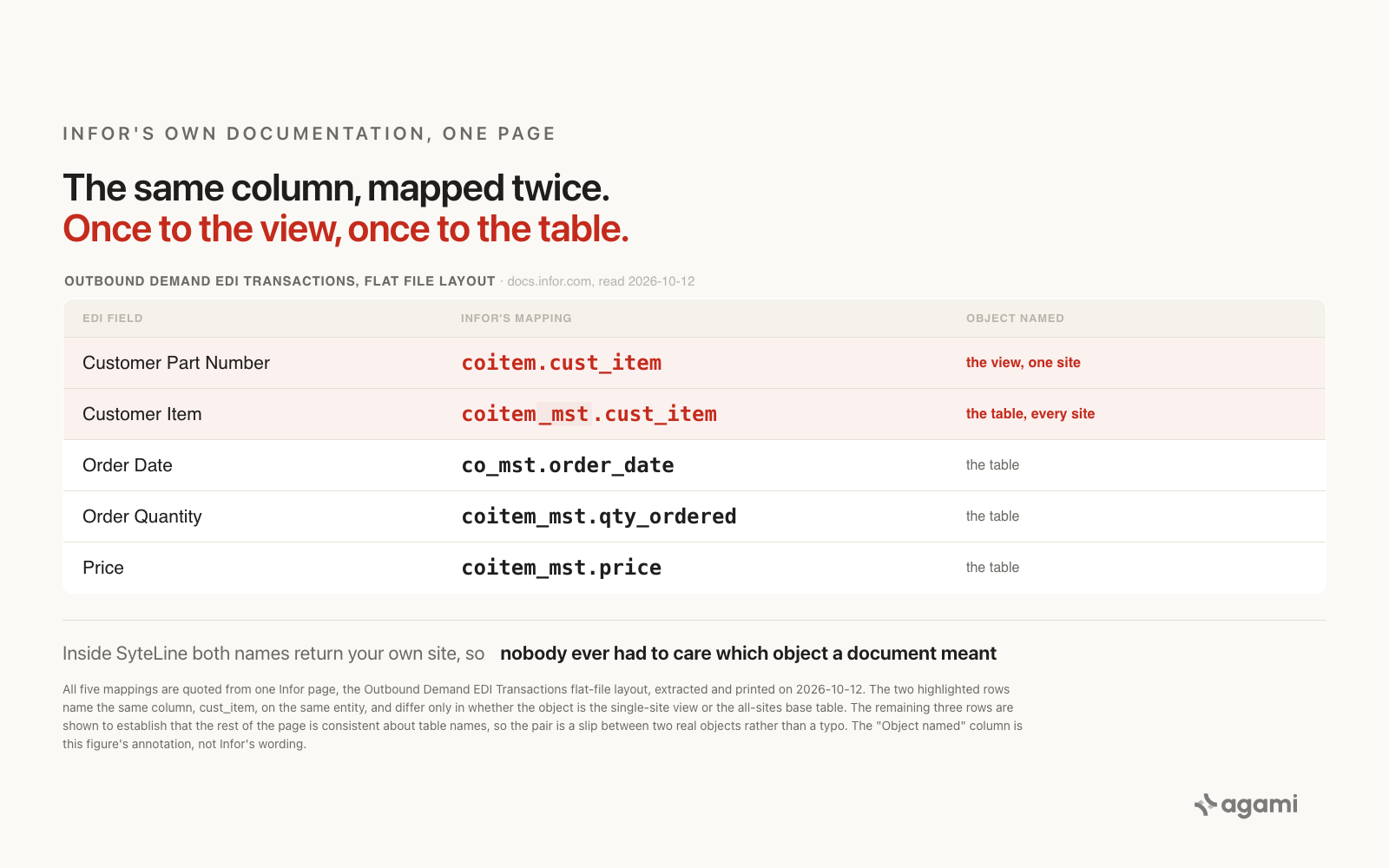
One Infor page, one column, two object names. The rest of the page is consistent about table names: co_mst.order_date, coitem_mst.qty_ordered, coitem_mst.price.
That isn't sloppiness worth scoring points over. It's the tell. Inside SyteLine the two names are interchangeable, because whichever one you reach for you get your own site's rows, so nobody has ever had to care which object a document meant. Outside SyteLine they're a one-site answer and an all-sites answer. A reader modelling from Infor's documentation can't tell from the documentation which of the two they're being pointed at.
The join is on a partial key too
The wrong query above has a second defect, and it's independent of the first.
Infor's instruction for a multi-site table is that "All primary and unique keys for the table, any non-unique indexes should contain the SiteRef column." If site_ref is part of the primary key, then co_num alone is not the key. Joining coitem_mst to co_mst on co_num by itself is a join on a partial key, and a join on a partial key is how a row matches a row it has nothing to do with.
So site_ref belongs in the join predicate as well as the WHERE clause:
JOIN co_mst c
     ON  c.co_num   = ci.co_num
     AND c.site_ref = ci.site_ref
Whether a co_num is actually allocated per site or across the whole database decides whether that omission merely risks a fan-out or guarantees one. Infor's public documentation doesn't say, so treat it as a partial key and move on rather than reasoning about how much duplication it causes.
Infor documents the exposure, and names a remedy the cloud doesn't offer
Under a heading called Data Visibility, the Multi-Site Planning Guide says this:
If you have two sites in the same database that are not replicating data between each other, and are not sharing_alltable data, a SQL user with direct database access to one of the sites can still view base (_mst) table data for both sites. If that is not desirable, then the two sites should not be placed in the same database.
A replication user is a SQL user with direct database access. That's the whole job description. So Infor has documented the exact exposure a warehouse connector creates, and its stated remedy is to keep the sites in separate databases.
Whether that remedy is available to you is a deployment question. Several sites in one database is a documented, supported, planned-for shape: the Planning Guide devotes a chapter to "Multi-Site per Database, or One Site per Database?", and the Cloud Multi-Site Implementation Guide's procedure for growing is titled "Adding a site to an existing database". Which shape you have is the first thing to find out, and the first query below tells you.
Two more things the schema won't tell you
There can be a third object per entity, and whether it's empty depends on your deployment. Many tables have an _all sibling, and the Planning Guide says their behaviour flips:
If all sites are in one database, the_alltables still exist but do not contain any data. They are simply views pointing to the base tables. […] However, if at least one site listed in the sites table for an application database is in a separate application database, then the_alltables are populated, and the_allviews point to the_alltables.
They're also narrower: the _all tables "might include only a subset of the columns from the base table". So a warehouse can receive three objects per entity whose site semantics differ, and which of them is empty depends on a deployment decision no column records.
Audit timestamps are in the site's own time zone. From the Cloud Multi-Site Implementation Guide:
Each site can have a different time zone. Most forms and reports show the time zone of the site, and audit columns such asCreateDateandRecordDatealso use the site's time zone.
The same page gives its own example: an order entered at 8:00 AM in Los Angeles shows as 11:00 AM once the data reaches New York. Union two sites in a warehouse and those columns are in different zones, with nothing in the schema naming which.
Why nobody inside SyteLine ever noticed
Inside the application none of this is visible, by design. A user works in a site, the IDO reads the view, and the view returns that site's rows. The views aren't even hand-maintained: a form called View Management exists to "create or regenerate views over any multi-site tables", and they're regenerated automatically when the schema changes.
So the person who asks what the plant sold has spent years in a product where the site was a mode rather than a key, and was never once asked to think about it. The schema fact only appears when the data is replicated, and it appears to a different person.
The integrators already know. MachineMetrics' SyteLine connector, which reads this SQL Server database directly, asks the customer before go-live to supply a value it calls Site Ref, mapped to site_ref, described as "The SyteLine site the labor ticket belongs to". Its troubleshooting table carries the row "Labor written to the wrong site/warehouse" against the cause "site_ref, whse, or user_code incorrect." They aren't guarding against an edge case. They hit the missing view, and their fix was to make a human supply what it used to supply, once per integration.
The fix
The semantic model's job here is to restore, as a declaration, what the view used to do as an object. Say that site_ref is the key that decides whose rows these are, put it in every join, and refuse a total that doesn't name a site.
# Infor SyteLine customer orders, declared over the _mst base tables.
# The site filter lived in a SQL view that a database connector does not carry.
# Source for the key rule: Infor, "Creating SQL Tables".
# "All primary and unique keys for the table, any non-unique indexes
#  should contain the SiteRef column."
tables:
  - name: customer_orders
    physical_table: co_mst
    description: >
      Customer order headers. One row per order PER SITE. The un-suffixed
      object `co` is a view over this table filtered to one site; it is what
      the application reads and is not what a database connector lands.
    columns:
      - name: site_ref
        type: string
        role: tenant_key
        description: >
          The site this row belongs to. Infor: "a database table that
          includes a site_ref column. Records for various sites are stored
          in the table, and the value of the site_ref column determines
          which site the record belongs in."
        # Source: Multi-Site Planning Guide 9.00.x, Glossary.
      - name: co_num
        type: string
        description: Customer order number. Unique only WITH site_ref.
      - name: order_date
        maps_to: order_date
        # Source: Outbound Demand EDI flat-file layout, co_mst.order_date.

  - name: customer_order_lines
    physical_table: coitem_mst
    description: One row per customer order line release, per site.
    columns:
      - name: site_ref
        type: string
        role: tenant_key
      - name: co_num
        type: string
        # Source: Inbound Demand EDI flat-file layout, coitem_mst.co_num.
      - name: qty_ordered
        maps_to: quantity_ordered
      - name: price
        maps_to: unit_price
        # Source: Outbound Demand EDI flat-file layout,
        # coitem_mst.qty_ordered and coitem_mst.price.

joins:
  - from: customer_order_lines
    to: customer_orders
    cardinality: many-to-one
    on: >
      customer_order_lines.co_num   = customer_orders.co_num AND
      customer_order_lines.site_ref = customer_orders.site_ref
    note: >
      Dropping site_ref from this predicate is a join on a partial key,
      because Infor's key rule puts site_ref in the primary key.

metrics:
  - name: booked_order_value
    calculation: SUM(customer_order_lines.qty_ordered * customer_order_lines.price)
    source_tables: [coitem_mst, co_mst]
    primary_table: coitem_mst
    grain: one row per customer order line release
    required_dimensions:
      - site_ref          # refuse an all-sites total that does not say so
    description: >
      Booked order value. site_ref is required rather than optional: an
      unqualified total spans every site in the database, including any
      demo or training site, and reads like one plant's number.

excluded_sites:
  # Which site IDs are production is institutional knowledge rather than
  # a query result. Discover the list with the first query below and have
  # a person sign the exclusions.
  - note: unset until a person confirms
Three things that declaration buys, in this post's own terms:
site_refis a declared key rather than onevarcharamong dozens, so "by site" becomes a grouping instead of something you have to know to add.site_refrides inside the join predicate, so the partial-key join can't be written by accident against this model.booked_order_valuecan't return a single unqualified number, so the all-sites total stops being the default answer to a one-plant question.
Reproduce it yourself
No free SyteLine instance exists, so this runs against your own warehouse. The first two steps are read-only.
Step one: find out how many sites your warehouse actually holds. This is the query that turns the whole argument from an abstraction into your number.
-- How much of what you call "the company" is several sites?
SELECT ci.site_ref,
       COUNT(*)                       AS order_lines,
       SUM(ci.qty_ordered * ci.price) AS booked
FROM   coitem_mst ci
JOIN   co_mst c
       ON  c.co_num   = ci.co_num
       AND c.site_ref = ci.site_ref
WHERE  c.order_date >= '2026-07-01'
  AND  c.order_date <  '2026-10-01'
GROUP  BY ci.site_ref
ORDER  BY booked DESC;
One row back means the question was never ambiguous in your estate and you can stop here. More than one row means every unfiltered total anyone has ever run against this schema was the sum of that column, and the rows tell you how it splits. The site IDs are customer-chosen and up to eight characters, so this is also how you learn what yours are called. Infor's own illustrations use values like DALS, which is why this post prints no example value for you to paste.
Step two: check whether item_mst means what its name suggests. "The item master" sounds like one row per part number, and in a multi-site database it isn't. A part stocked at three sites is three rows.
-- Part numbers that exist at more than one site, so item_mst is not
-- one row per part number for them.
SELECT item, COUNT(DISTINCT site_ref) AS sites
FROM   item_mst
GROUP  BY item
HAVING COUNT(DISTINCT site_ref) > 1
ORDER  BY sites DESC;
Any rows here mean a count of distinct items, an average cost, or a join from a sales line to "the item" is answering at a grain nobody chose.
Step three: run the business question properly. One site, with site_ref in the join as well as the filter.
-- RIGHT: one site, and site_ref carried in the join.
SELECT SUM(ci.qty_ordered * ci.price) AS booked
FROM   coitem_mst ci
JOIN   co_mst c
       ON  c.co_num   = ci.co_num
       AND c.site_ref = ci.site_ref
WHERE  c.order_date >= '2026-07-01'
  AND  c.order_date <  '2026-10-01'
  AND  c.site_ref = :site;          -- the value the view used to supply
The gap between this result and the first query's grand total is your own exposure, and it's the number this post deliberately doesn't guess at.
Two things to settle with a person before signing any of this off. Which site IDs are production, which is institutional knowledge rather than anything discoverable: "KY2 is the plant we sold in 2024 and never decommissioned" is not in the data. And whether your sites share one database, because that decides whether the _all tables are empty views or populated tables with fewer columns.
What this looks like in Agami
Agami is a trust layer between an AI assistant and your warehouse. A site filter that used to be a view is a clean example of what that buys, because prompting can't fix it: the thing the agent needs to know was an object that didn't get copied.
site_refis declared as the key that decides whose rows these are. Introspection sees avarchar. The model records that it's the discriminator Infor's own key rule puts in every primary key, so "sales by site" is a grouping rather than tribal knowledge.- The site rides inside the join predicate, where the key rule puts it. Declaring the join as
co_numplussite_refmeans the partial-key join isn't available to be written against this model. The fix lives in one reviewed file instead of in the habits of whoever writes the next query. - A metric can require a dimension.
booked_order_valuewon't return one unqualified enterprise-wide figure for a question that meant one plant, which is what makes the all-sites total stop being the silent default. - Demo and training sites are excluded by name, once. Infor's own guide says a SQL user with direct database access sees base-table data for every site in the database. These are rules enforced where the query runs rather than suggestions in a prompt, so a question that would have swept in a training estate doesn't.
- Receipts make the answer auditable. When somebody disputes a plant's total next quarter, the trail says which sites were in scope and which were excluded. The argument becomes one about the declaration instead of one about the number.
- The declaration is portable across LLMs and databases. It's YAML, so the next assistant, BI tool, or warehouse inherits it. Fixing this inside one reporting tool's semantic layer fixes it for that tool alone.
What Agami can't do is tell you which of your site IDs are real. That's a sign-off, and it should be asked for by name rather than inferred from the data. We also have no measurement of how far off an unfiltered total runs on any SyteLine estate, because no SyteLine warehouse sits behind this post. The first query above is how you get your own number, and the sign-off is the part no query can do.
Frequently asked questions
What is site_ref in SyteLine? It's the column that records which site a row belongs to. Infor's glossary defines a multi-site table as "a database table that includes a site_ref column. Records for various sites are stored in the table, and the value of the site_ref column determines which site the record belongs in." The Multi-Site Planning Guide adds that most application tables are multi-site and carry an _mst suffix.
Why do SyteLine table names end in _mst? Because that's Infor's convention for a multi-site table, and it exists to leave the un-suffixed name free for a view. Infor's Creating SQL Tables page states it: name multi-site tables so they end in _mst, then use the name without _mst for the view, and "build an IDO over this view to prevent one site's data from being seen in other sites."
Should I query coitem or coitem_mst? Inside SyteLine it hardly matters, which is why Infor's own EDI documentation uses both names for the same column on one page. In a warehouse it matters a lot: the _mst table holds every site and the view held one. A database connector replicates tables, so assume you have the all-sites object unless you've checked.
Can I just filter on site_ref in the WHERE clause? That's necessary and it isn't sufficient. site_ref also belongs in the join predicate, because Infor's key rule puts it in the primary key, so joining order lines to order headers on the order number alone is a join on a partial key.
Why is my SyteLine item count higher than our part count? Because item_mst is one row per item per site rather than one row per part number. A part stocked at three sites is three rows. The second query above lists the parts this affects in your estate.
Is there a SyteLine connector I can just install? No. No managed application connector exists for Infor from any vendor, which is why the route is a database connector against the SQL Server instance, or Infor's own Data Lake path. The Data Lake route carries only the tables in the predefined DATALAKE replication category, so it's a curated subset rather than a copy.
References
- Creating SQL Tables. The load-bearing page. The
SiteRefcolumn, the_mstconvention, the view, the key rule, and the sentence that says what the view is for. Re-read on 2026-10-12. - SyteLine Multi-Site Planning Guide 9.00.x (PDF). "Most application tables are multi-site and have an
_mstsuffix", the glossary definition of a multi-site table, the base tables holding every site, the Data Visibility paragraph, and the_alltable behaviour. Re-extracted and all six quotes confirmed on 2026-10-12. - SyteLine Cloud Multi-Site Implementation Guide 10.x (PDF). "Adding a site to an existing database", and the per-site time zone on
CreateDateandRecordDatewith Infor's own Los Angeles to New York example. - View Management. The form that creates and regenerates the views, which is what makes them maintained infrastructure rather than a one-time convenience.
- Outbound Demand EDI Transactions flat-file layout. Real column names, including
co_mst.order_date,coitem_mst.qty_orderedandcoitem_mst.price, and thecoitem.cust_item/coitem_mst.cust_itempair that is this post's figure. - Inbound Demand EDI Transactions flat-file layout. Where
coitem_mst.co_numis documented. - About Warehouses. The containment order: a warehouse is a location within a site, and each site has at least one.
- Using the Data Lake with SyteLine. Infor's own route out, and its statement that only the predefined
DATALAKEreplication category is available. - Fivetran SQL Server connector. The route that exists, given there's no application connector. Also the source of the warning that landed casing varies, since the connector offers both source names and Fivetran naming.
fivetran.com/docs/connectors/applications/infor,.../syteline,.../infor-syteline,.../cloudsuite-industrialanddocs.airbyte.com/integrations/sources/syteline. All 404, which is the evidence that no managed application connector exists, so they're cited rather than linked. Worth re-checking yourself, because catalogs move.- MachineMetrics, Infor SyteLine (On-Premises) Integration Guide. A vendor describing an app whose data it sells access to, so it's interested; it's also an integrator reading this database directly, which makes it good evidence for what the database contains and for
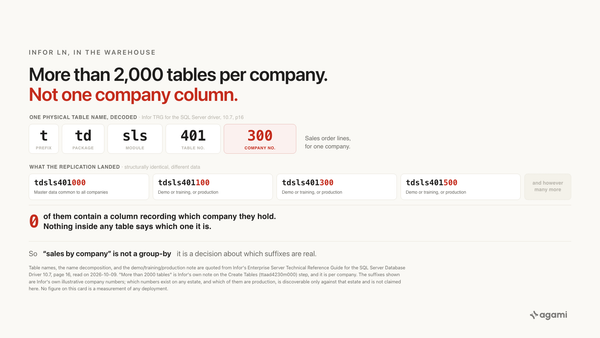
site_refbeing a value a human has to supply. - How to Query Infor LN by Company When the Company Number Is in the Table Name. The sibling product on the same Infor row, isolating sites in the opposite place.
- In Infor M3, Your Custom Fields Are Rows in a Table Called CUGEX1. The third product on that row, with a third unrelated schema problem.
- Oracle EBS Secured Every Operating Unit in a Session Variable. Your Warehouse Copied the Table.. The same shape of problem with the isolation in a session variable instead of a view.
- agami-core on GitHub
Make the site a key your totals have to name
Agami is the trust layer between your AI assistant and your warehouse. It records that site_ref decides whose rows these are, carries it into every join, and refuses an all-sites total for a one-plant question.