The Only Place IFS Says What Code Part B Means Is a Power BI File
IFS ships nine ledger dimensions named B through J, and never writes down which one is the cost centre. The semantic model is where that finally gets said.

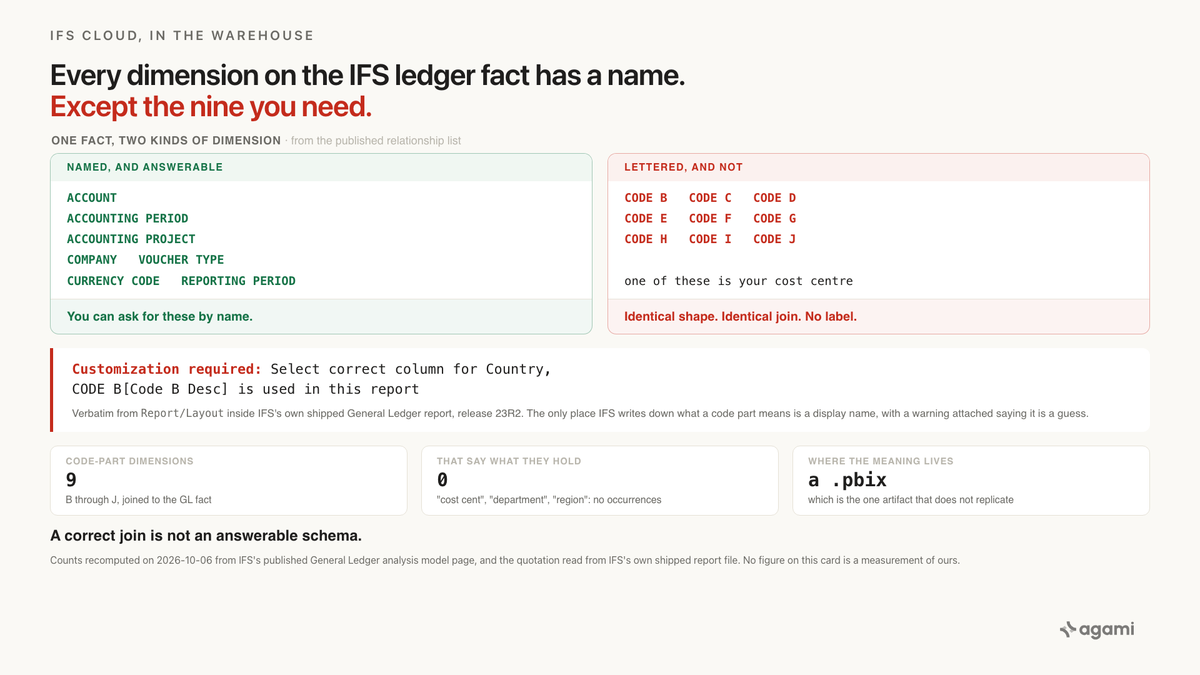
Query your IFS Cloud data with AI against a replicated ledger, ask for operating spend by cost centre, and you'll get a number. It will be wrong, and nothing in the result will say so. The IFS Cloud code part that holds your cost centre is one of nine dimensions called CODE B through CODE J, and the schema never says which.
Before you start
- An IFS Cloud instance you can reach with SQL. This matters more here than in most of this series. A remote or customer-hosted deployment can expose the Oracle database; an IFS-managed cloud deployment generally doesn't. Check which tier you're on before planning anything.
- No managed connector exists. Fivetran publishes no IFS connector at
fivetran.com/docs/connectors/applications/ifsor/applications/ifs-cloud, Airbyte publishes no IFS source atdocs.airbyte.com/integrations/sources/ifs, and there's nofivetran/dbt_ifspackage. All four return 404, re-checked this morning. Those URLs are deliberately not linked here, because a 404 is the finding. Your route is the Oracle database, the IFS REST and OData APIs, or IFS's own analysis models published to Power BI. - Read access to the
IFSAPPschema. That's where the information sources live. A finance reporting user normally has it. - Someone who knows your chart of accounts, available for about five minutes. That's the whole human cost of this, and you can't skip it.
The question
"What did we spend by cost centre last quarter?"
It's the first question anyone asks of a general ledger. It's also the question that exposes this, because the cost centre isn't a column in IFS. It's one of the code parts, and which one depends on how your finance team set the system up years ago.
What breaks
Point an agent at the replicated IFS schema and ask. It finds the general ledger fact, FACT_GL_ANALYSIS_PQ. It looks for a cost centre dimension. It finds these instead:
DIM_ACC_STRUCT_CODE_B_PQ
DIM_ACC_STRUCT_CODE_C_PQ
DIM_ACC_STRUCT_CODE_D_PQ
DIM_ACC_STRUCT_CODE_E_PQ
DIM_ACC_STRUCT_CODE_F_PQ
DIM_ACC_STRUCT_CODE_G_PQ
DIM_ACC_STRUCT_CODE_H_PQ
DIM_ACC_STRUCT_CODE_I_PQ
DIM_ACC_STRUCT_CODE_J_PQ
Nine dimensions. Identical shape, identical column pattern, identical join. Each one has an ID and a description column named after its own letter: Code B Desc, Code C Desc, and so on.
The agent picks one. Probably B, because it's first and because IFS's own sample report uses it. Then it writes this:
SELECT  b.code_b_desc         AS cost_centre,
        SUM(f.act_period_dom) AS actual
FROM    ifsapp.fact_gl_analysis_pq_ol f
JOIN    ifsapp.dim_acc_struct_code_b_pq_ol b
       ON b.id = f.dim_code_b_id
GROUP BY b.code_b_desc;
That query is syntactically perfect. The join is correct, the foreign key is real, and the result is a tidy table of names and amounts under a column header reading cost_centre.
On an instance that configured B as the country, it's a report of spend by country wearing the wrong label. Nobody reviewing the output can tell. The values look like values, the totals add up, and the only thing wrong is the one thing SQL can't check.
Why it breaks
Every other dimension on this fact has a name
Here's what makes it stark. IFS publishes the full relationship list for the General Ledger analysis model, and the GL fact carries 77 relationships. Read the dimension names:
ACCOUNT. ACCOUNTING PERIOD. ACCOUNTING PROJECT. COMPANY. COUNTERPART GL. CURRENCY CODE. INTERCOMPANY PAIRS. REPORTING PERIOD. VOUCHER TYPE.
Every one of them says what it is. Then:
GL ANALYSIS (dim_code_b_id) - CODE B (ID)
GL ANALYSIS (dim_code_c_id) - CODE C (ID)
GL ANALYSIS (dim_code_d_id) - CODE D (ID)
GL ANALYSIS (dim_code_e_id) - CODE E (ID)
GL ANALYSIS (dim_code_f_id) - CODE F (ID)
GL ANALYSIS (dim_code_g_id) - CODE G (ID)
GL ANALYSIS (dim_code_h_id) - CODE H (ID)
GL ANALYSIS (dim_code_i_id) - CODE I (ID)
GL ANALYSIS (dim_code_j_id) - CODE J (ID)
Nine dimensions that don't. The same page carries 45 more rows joining those same nine keys to five attribute tables each, so the letters propagate rather than resolve.
Search that page for the words a finance team actually uses and you get nothing. "Cost cent" appears zero times. So do "department", "region", "country", and "product line". The documentation for the general ledger analysis model never once names a business dimension, because it can't: the names are yours, not IFS's.
The slots ship empty on purpose
The accounting code string is IFS's chart of accounts. The account answers "what kind of money this is". Code parts B through J answer everything else the business wants to slice by.
IFS leaves them unnamed deliberately. A utility and a defence manufacturer want different dimensions, so the product ships nine typed, joined, fully-wired slots and lets each customer decide what goes in them. That's good product design. It's also the reason the meaning can't be in the schema: the schema is shared across every customer, and the meaning isn't.
So your warehouse ends up holding a well-formed star schema in which every dimension is anonymous. The joins are right. The cardinalities are right. The labels are missing, and a label is the thing a question is asked in.
IFS's own report has to tell you which letter to use
The strongest evidence for all this is in IFS's own shipped content.
IFS distributes an example Power BI report for the General Ledger. Inside it, on the report canvas where a customer will read it, are these notes. Quoted verbatim:
Customization required: Select correct column for Country, CODE B[Code B Desc] is used in this report
Customization required: Select correct column for Region, CODE C[Code C Desc] is used in this report
Customization required: Select correct column for Company name, COMPANY[Company Name] is used in this report
Read the third one against the first two. For COMPANY, a named dimension, IFS tells you to pick the right column. For Country and Region, IFS tells you to pick the right letter, because the letter it guessed is almost certainly not yours.
That's the whole problem, written down by the vendor, in the one artifact that doesn't replicate. A display name inside a .pbix never reaches the database, the views, or the relationship list. Copy the data to a warehouse and you leave behind the only sentence that said what any of it meant.
And a display name binds one report. The next report restates it, the next dashboard restates it, every ad-hoc query restates it, and an agent gets none of them.
What the application did for you
Inside IFS, none of this is visible. A finance user sees form labels reading Cost Centre and Region, because the application renders the configured names over the lettered slots.
So the person asking for spend by cost centre has spent years in a product where the cost centre was obviously a thing with a name. The letters are not their experience of the system. They show up when the data is replicated, and they show up to a different person.
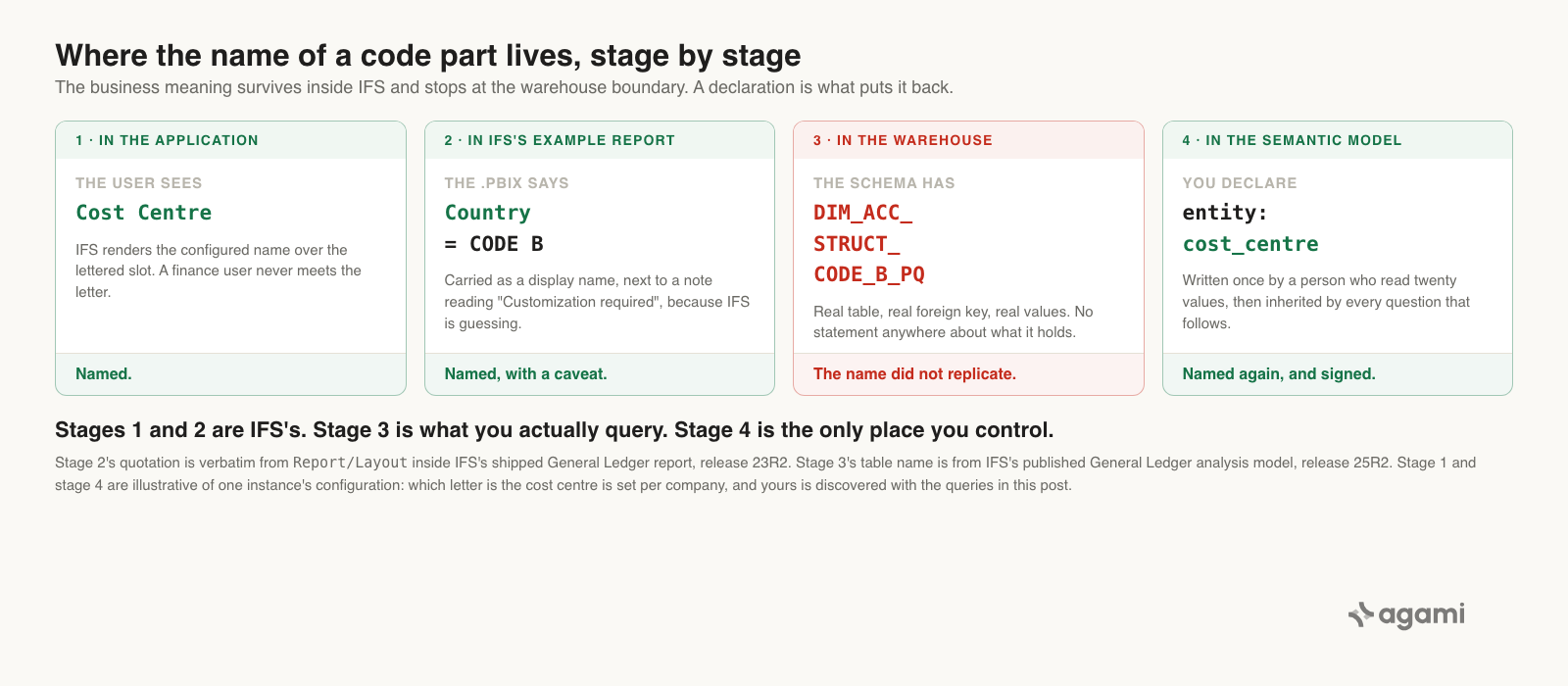
The name survives every stage until replication, and a declaration is what puts it back.
The fix
The joins here need no help. IFS publishes them, the foreign keys exist on both sides, and any introspection pass will find them. That's unusual for this series, and it sharpens the point: a correct join is not an answerable schema.
What has to be declared is the one fact that isn't in the database.
In the semantic model
First, the fact and its relationships, which are mechanical:
# subject_areas/finance/tables/fact_gl_analysis.yaml
# Every join below cites IFS Analysis Model: General Ledger, 25R2,
# "Relationships", rows "GL ANALYSIS (dim_code_<x>_id) - CODE <X> (ID)".
name: fact_gl_analysis
source: ifsapp.fact_gl_analysis_pq_ol
description: >
  General ledger analysis fact. IFS composes it from GL transactions, GL
  opening balances, business planning transactions, and period budget,
  discriminated by balance set. IFS does not publish its row grain; establish
  that against your own instance before writing any aggregate.

relationships:
  - name: code_part_b
    local_column: dim_code_b_id
    foreign_table: dim_acc_struct_code_b
    foreign_column: id
    cardinality: many_to_one
  # ... one entry per configured code part, c through j, identical shape.
  - name: account
    local_column: dim_account_id
    foreign_table: dim_acc_struct_account
    foreign_column: id
    cardinality: many_to_one
  - name: reporting_period
    local_column: dim_reporting_date_id
    foreign_table: dim_bi_time_finance
    foreign_column: id
    cardinality: many_to_one
Then the part no introspection pass can produce, because what it records isn't in the database:
# subject_areas/finance/tables/dim_acc_struct_code_b.yaml
# NOT derivable from the schema. This binding is per-company configuration.
# Read it from the instance with the queries below, and have a person sign it.
name: dim_acc_struct_code_b
source: ifsapp.dim_acc_struct_code_b_pq_ol
description: >
  Code part B. In this instance, code part B is the cost centre. IFS ships code
  parts B through J unnamed; which letter carries which business meaning is set
  per company and appears nowhere in the schema.
entity: cost_centre
columns:
  - name: id
    description: Cost centre code.
  - name: code_b_desc
    description: Cost centre name.
entity: cost_centre is the line that matters. Declared once, it's what lets someone ask for spend by cost centre without knowing a letter, and it's what stops an agent answering confidently from CODE C.
Write it down once and the next question doesn't need the archaeology.
Reproduce it yourself
No free IFS Cloud instance exists, so this runs against your own. Three steps, and none of them touches the fact table, so none depends on its grain.
Step one: which code parts are configured at all. An unused code part comes back empty, which usually cuts nine candidates to three or four.
SELECT 'B' AS code_part, COUNT(*) AS values_defined
FROM   ifsapp.dim_acc_struct_code_b_pq_ol
UNION ALL SELECT 'C', COUNT(*) FROM ifsapp.dim_acc_struct_code_c_pq_ol
UNION ALL SELECT 'D', COUNT(*) FROM ifsapp.dim_acc_struct_code_d_pq_ol
UNION ALL SELECT 'E', COUNT(*) FROM ifsapp.dim_acc_struct_code_e_pq_ol
UNION ALL SELECT 'F', COUNT(*) FROM ifsapp.dim_acc_struct_code_f_pq_ol
UNION ALL SELECT 'G', COUNT(*) FROM ifsapp.dim_acc_struct_code_g_pq_ol
UNION ALL SELECT 'H', COUNT(*) FROM ifsapp.dim_acc_struct_code_h_pq_ol
UNION ALL SELECT 'I', COUNT(*) FROM ifsapp.dim_acc_struct_code_i_pq_ol
UNION ALL SELECT 'J', COUNT(*) FROM ifsapp.dim_acc_struct_code_j_pq_ol
ORDER BY 1;
Step two: read the values and recognise them. Twenty rows is plenty. Cost centres look like cost centres, and countries look like countries.
SELECT   id, code_b_desc
FROM     ifsapp.dim_acc_struct_code_b_pq_ol
ORDER BY id
FETCH FIRST 20 ROWS ONLY;
Repeat per populated letter. This is the five minutes of human judgment mentioned at the top, and it's the only part an agent genuinely can't do. Recognising that a list of values is a list of cost centres is exactly the recognition being asked for.
Step three: write the answer down once, in the semantic model, rather than in the next query.
A note on names. _OL is the on-line information-source view and _BI is the BI access view over it. Which you can reach depends on your grants, so try both rather than assuming. IFS describes an information source as "a combination of facts and dimensions which are structured and holds information about a specific transaction table in IFS Cloud". Casing varies by extract tool too, so match whatever yours landed.
What this looks like in Agami
Agami is a trust layer between an AI assistant and your warehouse, and this post is a clean example of what that means in practice. Four mechanisms apply directly to code parts.
- Entities name a dimension that the schema left as a letter. Declaring
entity: cost_centreonDIM_ACC_STRUCT_CODE_B_PQis what turns "spend by cost centre" into a resolvable question. The binding lives in one reviewed file instead of in nine people's heads. - Every metric and entity carries a sign-off state. An entity nobody has approved still answers, and the answer arrives carrying a warning that it's unsigned. For a binding that came from someone reading twenty rows, that distinction is the point.
- Table and column scope is enforced before the SQL runs. If
CODE Eis unconfigured and excluded from the semantic model, a query can't quietly wander into it. Those rules are enforced where the query is executed, which is what makes them auditable rather than advisory. - Receipts record which declarations an answer used. When a number gets questioned three months from now, the trail says which code part was read as the cost centre, so the argument is about the binding rather than about the number.
- The binding is portable across assistants and warehouses. It's a declaration in YAML, so the next tool that connects inherits it. Renaming a column in one warehouse helps that warehouse alone.
What Agami can't do is tell you that B is the cost centre. Nothing can read that off the schema, because it isn't there. The queries above are how a person finds it, and the semantic model is where it stops being rediscovered. We also have no measurement of how often an agent picks the wrong code part on a real IFS estate, and this post doesn't offer one.
Frequently asked questions
What is a code part in IFS Cloud? A code part is one of the dimensions of the IFS accounting code string. The account says what kind of money a transaction is, and code parts B through J carry everything else the business slices by, such as cost centre, region, or project. IFS ships the slots unnamed on purpose, because every customer configures them differently, so which letter holds which business meaning is set per company and does not appear in the schema.
How do I find out which IFS code part is my cost centre? Count the rows in each DIM_ACC_STRUCT_CODE_x_PQ dimension first, because unconfigured code parts come back empty and that usually cuts nine candidates to three or four. Then read about twenty values from each populated one. Cost centres are recognisable as cost centres and countries as countries. Record the answer in a semantic model rather than rediscovering it for the next query.
Is there a Fivetran or Airbyte connector for IFS Cloud? No. Fivetran publishes no IFS connector, Airbyte publishes no IFS source, and there is no fivetran/dbt_ifs package. The routes are the underlying Oracle database through the information source views, the IFS REST and OData APIs, or publishing the IFS analysis models to Power BI. Whether you can reach the Oracle database depends on your deployment tier.
Why does grouping the IFS general ledger by CODE B give the wrong answer? Because the join is correct and the label is a guess. CODE B is a real dimension with a real foreign key, so the query runs and returns a sensible looking table. If your instance configured B as something other than the cost centre, the result is spend by that other thing under a cost centre heading, and nothing in the output indicates it.
Can I aggregate the IFS GL analysis fact safely? Not without establishing its row grain first. IFS composes the GL analysis fact from general ledger transactions, opening balances, business planning transactions, and period budget, discriminated by balance set, and does not publish a row grain for the composed result. Check the grain against your own instance before writing any aggregate.
Two more worth knowing. This post is written against IFS Cloud: IFS Applications 10 and earlier, IFS FSM, Maintenix, and assyst are separate products with separate schemas, so don't assume these view names carry over. And if your reporting reaches past J, the same analysis model's business planning fact joins a wider letter range and adds counterpart dimensions at K and L. Apply the same treatment to each.
References
- IFS Analysis Model: General Ledger, 25R2. The primary source, and the page every count in this post was recomputed from on 2026-10-06. Fact and dimension tables, the information sources behind them, and the full relationship list.
- IFS, About Information Sources. Where the definition of an information source quoted above comes from. It sits in the HCM documentation, but the definition is general.
- IFS GENERAL LEDGER TM.pbix, release 23R2, Internet Archive capture. IFS's shipped example report, where the "Customization required" notes live inside
Report/Layout. Cited from an archive capture because IFS has removed the live file; the release and capture date are given so the claim can be dated. - dataSourceExport_General_Ledger.json, release 24R2, Internet Archive capture. The Oracle layer underneath the model: the
_OLview names, theIFSAPPandIFSINFOschema split, and the fact-versus-dimension typing. Also an archive capture, for the same reason. - Fivetran connector docs,
fivetran.com/docs/connectors/applications/ifs. Returns 404, which is the evidence that no managed IFS connector exists, so it's cited rather than linked. Worth re-checking yourself before you conclude anything, because catalogs move. - Sage Intacct's Dimensions Don't Land. The Semantic Model Puts Them Back.. The same job, solved the other way round: Intacct's dimensions don't arrive as tables, but the ones that arrive are named.
- Six of Eight Business Central Dimension Columns Are Computed on Read. Another ledger whose dimensions mostly don't survive replication, and whose survivors keep their names.
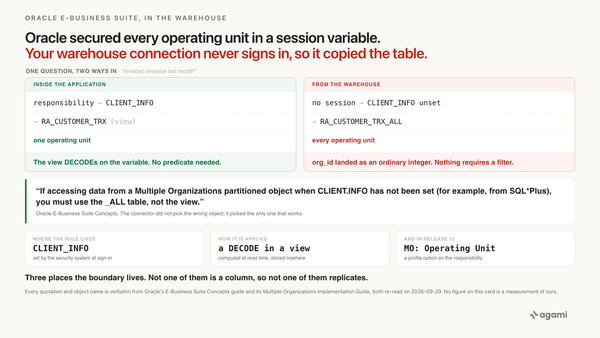
- Oracle EBS Secured Every Operating Unit in a Session Variable. Your Warehouse Copied the Table.. A boundary the application applied and replication dropped, which is this post's shape with a different missing piece.
- agami-core on GitHub
Make your IFS data answerable
Agami is the trust layer between your AI assistant and your warehouse. It records that code part B is your cost centre, so a question asked about cost centres resolves to the dimension your finance team actually configured.