Six of Eight Business Central Dimension Columns Are Computed on Read
Business Central shows eight dimension columns on the G/L Entries page. Six are computed on read, so only two survive replication. The semantic model resolves the rest through the dimension set.

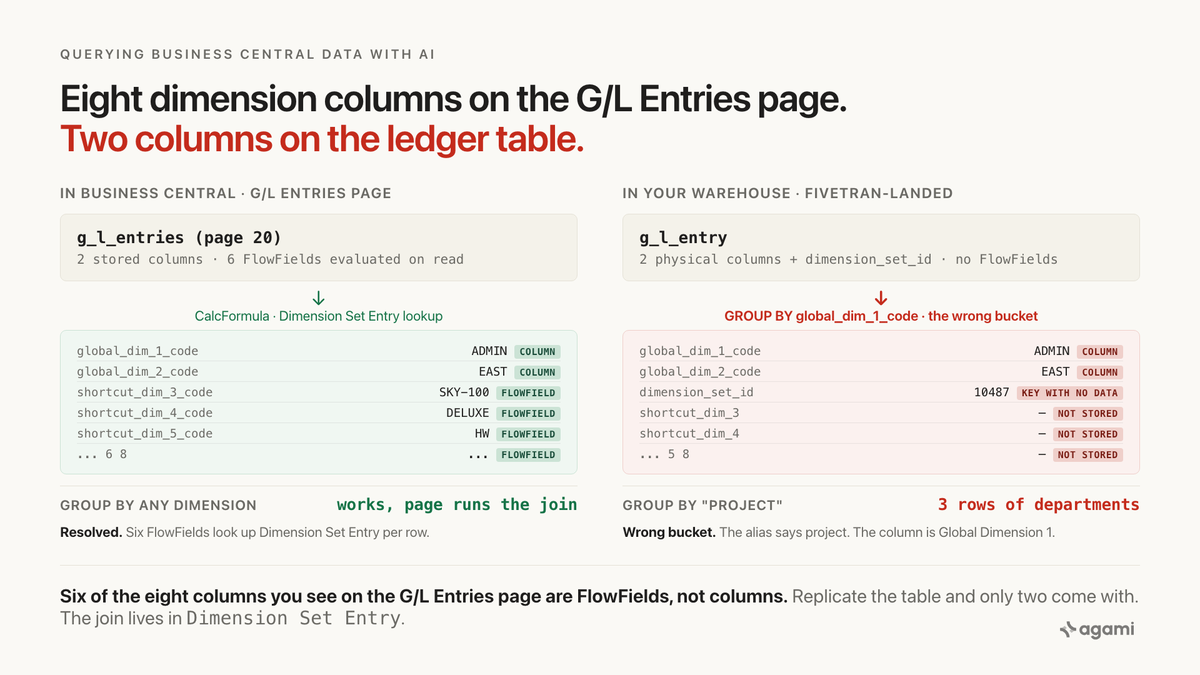
Query Business Central data with AI against a replicated ledger and six of the eight dimension columns you can see in the app are simply absent.
Business Central's own documentation names the shape up front. From Microsoft Learn's page on Work with dimensions to track and analyze data, verbatim:
When you create a journal line, document header, or document line, you can specify a combination of dimension values. Instead of explicitly storing each dimension value in the database, a dimension set ID is assigned to the journal line, document header, or document line to specify the dimension set.
That is the vendor documenting the architecture the whole post rests on. Every posted line carries one Dimension Set ID, and the values on it live in a separate Dimension Set Entry table, one row per dimension on the posting.
Inside Business Central, that is invisible. The G/L Entries page shows a column for every shortcut dimension the tenant configured, filtering them takes one click, and the standard financial reports enforce dimension boundaries across every ledger by walking the same lookup. The platform is doing the join at read time.
Replicate the ledger to a warehouse and only two of those columns come with. The rest were computed, not stored, and computation does not travel with a row.
Before you start
- Business Central replicated into a warehouse. Postgres, Snowflake, BigQuery and Redshift all work. Casing varies by destination: lowercase on BigQuery and Postgres, uppercase on Snowflake.
- Read access. A read-only role is the right one.
- The
Dimension Set Entrytable exposed through an AL API page. Fivetran's connector reads through custom AL API pages, and the pre-definedinitial_setup_periodic_reimport.alfile targets common finance and sales tables on the US region.Dimension Set Entry(table ID 480) needs an API page or the tenant landsg_l_entry.dimension_set_idas a key that points nowhere in the warehouse.
A free instance is available with a gate. Microsoft's Business Central trial seeds a demonstration company (CRONUS in most localizations) with a chart of accounts, dimensions configured, and posted G/L, customer and vendor entries. The gate is real and it decides the route. From the Trial FAQ, verbatim:
Use your work or school email address. We'll establish your trial on your organization's account. You can't use email addresses provided by consumer email services or telecommunication providers, such as outlook.com, hotmail.com, gmail.com, and others.
A reader without a Microsoft 365 tenant cannot sign up. In regions where Microsoft does not offer built-in localization, the trial runs through a Cloud Solution Provider partner and is not self-serve at all. A reader in either situation is on route two: the queries below run against their own replicated schema, and they compute the gap on their data rather than quoting a number from ours.
The question
"What was our posted amount by project, this quarter?"
That is the shape of every non-global dimension question a Business Central finance team asks: by project, by cost centre, by area, by fund, by whatever Shortcut Dimension 3 through 8 the tenant configured. It is a legitimate question. G/L Entry has a posting date and an amount. Project exists as a dimension. One value per project, this quarter.
The trap sits between what the G/L Entries page shows and what the warehouse copy of g_l_entry actually stores.
What breaks
Here is the obvious query, against a Fivetran-landed schema on a tenant whose Global Dimension 1 is Department, Global Dimension 2 is Region, and whose Project dimension is Shortcut Dimension 3:
select gle.global_dimension_1_code as project,
       sum(gle.amount)             as posted_amount
from g_l_entry gle
where gle.posting_date >= date_trunc('quarter', current_date)
group by 1
order by 2 desc;
There is no project column on the landed g_l_entry, so the query reaches for the next thing that looks close. global_dimension_1_code is a real column on every posting. The query runs. It groups. It returns three rows that read ADMIN, PROD, SALES next to plausible amounts.
Every row is a department. The column is labelled project because the alias said so. Both sides of the room agree.
Three counting queries establish the size of the gap against your own warehouse:
-- 1. how many of the eight shortcut slots the tenant has configured,
-- and whether Dimension Set Entry was exposed at all
select count(distinct dse.dimension_code)               as distinct_dim_codes,
       count(distinct dse.global_dimension_no)          as distinct_shortcut_slots,
       sum(case when dse.global_dimension_no is null
                then 1 else 0 end)                      as non_shortcut_rows,
       count(*)                                         as total_rows
from dimension_set_entry dse;

-- 2. how many G/L postings this quarter have a dimension_set_id that
-- resolves to more than one dimension_set_entry row, and how many resolve
-- to none (which means Dimension Set Entry did not land for those rows)
select case when dse_count = 0 then 'no_dse_landed'
            when dse_count = 1 then 'one_dim_on_set'
            when dse_count between 2 and 4 then 'two_to_four_dims_on_set'
            else 'five_or_more_dims_on_set' end        as bucket,
       count(*)                                        as postings
from (
  select gle.dimension_set_id,
         count(dse.dimension_code) as dse_count
  from g_l_entry gle
  left join dimension_set_entry dse
    on dse.dimension_set_id = gle.dimension_set_id
  where gle.posting_date >= date_trunc('quarter', current_date)
  group by gle.dimension_set_id
) t
group by 1
order by 2 desc;

-- 3. the naive Global-Dimension-1 sum against the resolved Project sum,
-- side by side, for the same period
select 'group_by_global_dim_1'                          as method,
       gle.global_dimension_1_code                      as bucket,
       sum(gle.amount)                                  as posted_amount
from g_l_entry gle
where gle.posting_date >= date_trunc('quarter', current_date)
group by 2
union all
select 'group_by_project_via_dimension_set_entry',
       coalesce(dv.name, dse.dimension_value_code),
       sum(gle.amount)
from g_l_entry gle
join dimension_set_entry dse
  on dse.dimension_set_id = gle.dimension_set_id
 and dse.dimension_code   = 'PROJECT'
left join dimension_value dv
  on dv.dimension_code    = dse.dimension_code
 and dv.code              = dse.dimension_value_code
where gle.posting_date >= date_trunc('quarter', current_date)
group by 2
order by 1, 3 desc;
The first query tells you whether Dimension Set Entry was exposed to the connector, and how many of the eight shortcut slots the tenant actually uses. Any row with non_shortcut_rows above zero is a dimension the tenant defined past the eight shortcut slots, which no global_dimension_no will ever recover. The second returns how many postings this quarter carry a Dimension Set ID that resolves to no Dimension Set Entry rows at all; every one of those postings is a row the naive query is silently attributing to Global Dimension 1. The third puts the naive Global Dimension 1 buckets and the resolved Project buckets on adjacent groups so the finance team can see where they disagree, and by how much.
The PROJECT code above is illustrative. The next section explains how to discover which dimension_code the tenant uses, which is a per-tenant configuration in General Ledger Setup.
Why it breaks
Global caps at two, shortcut caps at eight, everything else is a set
Business Central caps global dimensions at two and shortcut dimensions at eight. From Microsoft Learn, finance-dimensions, verbatim:
Global Dimensions are used as filters, for example, on reports, batch jobs, and XMLports. You can use only two global dimensions, so choose dimensions you use often.
Shortcut Dimensions are available as fields on journals, document lines, and ledger entries. You can create up to eight shortcut dimensions.
Every ERP has dimensions and most cap them somehow. The load-bearing part is where the values live. Only Global 1 and 2 are copied down as physical columns on G/L Entry, Customer Ledger Entry, Vendor Ledger Entry and the other ledger tables. Every other dimension on the posting lives only in Dimension Set Entry, keyed by the transaction's Dimension Set ID.
The vendor's own docs describe the split cleanly:
A dimension set is a unique combination of dimension values. They're stored as dimension set entries in the database. Each dimension set entry represents a single dimension value. Also, each dimension set, and the dimension set entry within it, get a common dimension set ID.
FlowFields make six columns look real that are not
Inside the app, Shortcut Dimensions 3 through 8 appear as columns on the G/L Entries page. That is not because the physical G/L Entry table has those columns. It is because the AL page defines them as FlowFields with a CalcFormula that looks up Dimension Set Entry."Dimension Value Code" where Dimension Set ID matches the row and Global Dimension No. equals a constant, one FlowField per slot. An independent Business Central practitioner writeup at KTL Solutions restates the same fact:
Instead of existing as fields on core tables, Business Central stores [shortcut dimensions] inside the Dimension Set Entry structure. Shortcut dimensions: Are not stored as native table fields. Exist only within the Dimension Set framework. Do not automatically appear on ledger entries or reports.
FlowFields are computed columns, not stored columns. Fivetran reads through an AL API page which by default exposes storable columns. So the landed g_l_entry has global_dimension_1_code and global_dimension_2_code as real columns, dimension_set_id as a real column, and Shortcut Dimensions 3 through 8 as nothing. The warehouse copy is not lossy relative to the underlying record. It is faithful to a record whose UI-visible columns were computed by application code that did not travel with it.
That leaves a reader with three things they might want and cannot get without more work:
- Shortcut Dimensions 3 through 8. The values exist in
dimension_set_entry, keyed bydimension_set_idand filtered byglobal_dimension_no, if the AL file exposed theDimension Set Entrytable as an API page. Not every configuration does by default. - Any non-shortcut dimension the tenant defined. These have no
global_dimension_noat all and cannot be pivoted onto a fixed column even in principle. They must be joined bydimension_code. - The display name of any dimension value.
Dimension Value Codeis a short code likePRODorADMIN. The human-readable name lives indimension_value.
The wrong query does not error. It succeeds against global_dimension_1_code, which every tenant has and every warehouse copy of g_l_entry carries, and returns a smaller answer than the CFO is asking for.
The join fans if the filter is missing
The load-bearing edge is g_l_entry.dimension_set_id to dimension_set_entry.dimension_set_id, and it is one to many by construction. One G/L Entry has one Dimension Set ID. One Dimension Set has one dimension_set_entry row per dimension value on the posting. A posting with three dimensions on it (Department, Project, Region) has one g_l_entry row and three dimension_set_entry rows sharing the same Dimension Set ID.
Aggregate g_l_entry.amount after joining dimension_set_entry without filtering to one dimension_code, and every posting is counted once per dimension on it. Two dimensions on the average posting doubles the total, three triples it, and so on.
dimension_code in the join is what keeps the fan trap from firing. That is the sentence next to the Dimension Set ID edge in the semantic model, and without it any agent that reaches for the join will find it, use it, and return a number that ties to nothing.
The three boundaries the app enforced
Inside Business Central, four mechanisms hid these traps.
The FlowField engine. The G/L Entries page defines Shortcut Dimensions 3 through 8 as FlowFields with a CalcFormula that walks Dimension Set Entry at read time. The user sees them as columns and filters them like columns. The engine is evaluating the join per row.
General Ledger Setup. The setup page names which dimensions are Global 1 and Global 2 and which shortcut slot each other configured dimension occupies. The FlowField CalcFormulas reference those slot constants; the standard financial reports (Trial Balance, Income Statement, Balance Sheet) accept dimension filters through the same setup and enforce them across every entry table.
The Change Global Dimensions batch job. Changing which two dimensions are Global 1 and 2 requires a platform-side batch that rewrites every posted entry to move the value onto the physical column, because moving that boundary is the only way the app itself can make a non-global dimension queryable as a column. That batch job is the tell: BC's own answer to "make dimension N filterable as a column" is to rewrite the ledger. Replicate the ledger to a warehouse and the physical columns come with, the FlowFields do not, and the batch is a platform-side operation the reader cannot run against their warehouse.
Copilot inside the tenant. Business Central Copilot runs inside the tenant, so it can call the same FlowFields the page uses and the dimension architecture is invisible to it. That is a real answer for a reader who mostly asks BC questions inside BC. A warehouse-first reader with a Fivetran-landed copy of g_l_entry and no dimension_set_entry API page is not that reader, and their agent will use whatever columns are physically there.
Every one of the four is a boundary the application enforced and the warehouse did not. Getting a BC answer right against a replicated schema is mostly a matter of re-establishing those boundaries by hand.
The fix
Declare the join, and make the filter mandatory
g_l_entry, dimension_set_entry, dimension_value and g_l_account sit in the same finance subject area. The four edges declare cleanly, with the dimension_set_id edge carrying the description that names the fan trap and the filter that keeps it from firing:
relationships:
  - from_table: g_l_entry
    from_column: dimension_set_id
    to_table: dimension_set_entry
    to_column: dimension_set_id
    relationship: one_to_many
    description: |
      One G/L Entry has one Dimension Set ID; one Dimension Set has one
      dimension_set_entry row per dimension value on the posting.
      Aggregating g_l_entry.amount across this join without filtering
      dimension_set_entry to a single dimension_code fans by every
      dimension on every entry. The join is safe only in combination with
      a dimension_code filter. Source: Microsoft Learn, Work with
      dimensions to track and analyze data (finance-dimensions);
      base-application "Dimension Set Entry" (Table 480).

  - from_table: dimension_set_entry
    from_column: dimension_value_code
    to_table: dimension_value
    to_column: code
    relationship: many_to_one
    description: |
      dimension_value.dimension_code must also match
      dimension_set_entry.dimension_code; the same dimension_value_code
      (e.g. 'ADMIN') can exist under different dimensions.

  - from_table: g_l_entry
    from_column: g_l_account_no
    to_table: g_l_account
    to_column: no
    relationship: many_to_one
Two of those descriptions carry a citation, and that is deliberate. The dimension_set_id edge is not what column-name introspection reaches for without help, and the fan trap fires the moment the dimension_code filter is missing. The sentence next to the declaration is what stops a later edit from deleting the filter as "an unnecessary constraint on a foreign key."
Bind each dimension the tenant uses as an entity
The eight shortcut dimensions and every user-defined dimension have no target table to join to. Dimension Set Entry is one table with one row per (dimension code, dimension value) pair on a set. The mapping from "Project", "Cost Center", "Region" to a dimension_code string is per-tenant configuration recorded in General Ledger Setup, not a schema fact. That mapping is what an entity binds:
entities:
  - name: project_dimension
    description: |
      The dimension the tenant uses to categorise a G/L posting by project.
      Value lives in dimension_set_entry, keyed by the G/L Entry's Dimension
      Set ID and filtered to this dimension's Dimension Code. In BC's own
      UI, Shortcut Dimensions 3 through 8 look like columns on the G/L
      Entries page because they are FlowFields with a CalcFormula that
      does this same lookup; the warehouse copy of g_l_entry does not
      carry those FlowFields.
    resolves_to:
      table: dimension_set_entry
      key_filter: "dimension_code = 'PROJECT'"
      value_column: dimension_value_code
      display_column_source: dimension_value.name
    caveats:
      - |
        Global Dimensions 1 and 2 are the exception: their values are
        also copied down as g_l_entry.global_dimension_1_code and
        global_dimension_2_code. Prefer the physical columns for those
        two, the dimension_set_entry join for everything else.
      - |
        Postings made before a dimension existed will not have a row in
        dimension_set_entry for it. Decide whether unbucketed postings
        appear under a "(none)" bucket or are dropped.
    source: https://learn.microsoft.com/en-us/dynamics365/business-central/finance-dimensions
The same shape declares department_dimension, region_dimension, cost_center_dimension, and every other dimension the tenant configured. The dimension_code string in key_filter is the one piece a person names once from General Ledger Setup. Everything else is documented.
Ship two metrics, because there are two questions
Getting one query right today is not the same thing as making the schema safe. The next dimension question written against this warehouse will be written from scratch and will re-run the naive shape unless the split between "on a physical column" and "resolved through Dimension Set Entry" travels with the metric, not with the person who last wrote the SQL:
name: posted_amount_by_global_dimension_1
calculation: |
  Sum of g_l_entry.amount grouped by Global Dimension 1, a physical column
  on every ledger table. Answers whichever question Finance wired into
  Global Dimension 1 years ago (typically Department). Fast, and correct
  for that dimension only.
bindings:
  PostgreSQL: |
    SUM(g_l_entry.amount)
source_tables: [g_l_entry]
primary_table: g_l_entry
other_names: [posted amount by department, GL by GD1]
confidence: proposed
review_state: unreviewed
name: posted_amount_by_dimension
calculation: |
Sum of g_l_entry.amount grouped by the value of a named dimension for
each posting, resolved through dimension_set_entry. Requires the
tenant's dimension_code to be bound via an entity such as
project_dimension. The default_filter carries the dimension_code
through so a caller that reaches the metric without naming a dimension
gets a warning, not a fan.
bindings:
PostgreSQL: |
SUM(g_l_entry.amount)
source_tables: [g_l_entry, dimension_set_entry]
primary_table: g_l_entry
default_filters:
- "dimension_set_entry.dimension_code = <bound dimension code>"
confidence: proposed
review_state: unreviewedBoth bindings are SUM(g_l_entry.amount). The expression alone is not where the correctness lives. The join graph and the entity binding are. A metric definition without the semantic model around it is a shape, not an answer.
Read review_state: unreviewed. Every declaration above is a proposal until a person signs it, because the load-bearing choice (which dimension_code means "Project" on this tenant) is not a schema fact.
That signature is what makes the answer auditable months later. Rules enforced where the metric is defined survive the next person, the next agent, and the next question. A convention that lives in someone's memory does not.
What the schema cannot decide for you
Which dimension_code each business concept maps to. "Project" is PROJECT in one tenant, PROJ in another, PROJEKT in a German localization. General Ledger Setup lists the codes; the mapping to what Finance means by "Project" or "Cost Center" is a person, not introspection.
Which dimensions matter enough to model. BC has no cap on the number of dimensions defined, only on the two global and eight shortcut promotion slots. A large tenant can carry dozens. A person picks which get first-class metric definitions and which stay as generic dimension_set_entry lookups.
The Global 1 / Global 2 choice. Whether the tenant's Global Dimension 1 answers "by department" or "by cost center" is a business decision from years ago and should be recorded in other_names on the metric, not silently inferred.
Multi-company aggregation policy. Whether to sum across companies, restrict to one, or present per-company. The AL setup determines the shape; Finance decides the semantics.
Custom fields on ledger tables. Any AL extension can add a physical column to G/L Entry. Its meaning is per-tenant and belongs in the description on that column.
Reproduce it yourself
If you have a work or school email in a Microsoft-localized region, the free Business Central trial seeds a demonstration company with a chart of accounts, dimensions configured, and posted G/L entries. Create a journal line, tag it with a value on Shortcut Dimension 3, post it, and inspect G/L Entry and Dimension Set Entry side by side. The value shows on the G/L Entries page as a column and lives in Dimension Set Entry as a row. The split is immediate. Trials time out after 45 days of inactivity and can be extended once; the sample-data form lasts as long as you keep signing in.
If you do not have that email, or your region routes the trial through a Cloud Solution Provider partner, the reproduction path is route two: your own replicated schema. Run the three counting queries from the top of this post against a Fivetran-landed g_l_entry and dimension_set_entry. The first tells you whether Dimension Set Entry was exposed to the connector at all and how many shortcut slots the tenant uses. The second returns how many postings this quarter carry a Dimension Set ID that resolves to no rows on Dimension Set Entry, which is the size of the silent gap. The third puts the naive Global Dimension 1 buckets and the resolved Project buckets on adjacent rows so the finance team can see where they disagree.
If the first query returns zero for distinct_dim_codes, Dimension Set Entry did not land. Adding an AL API page for Microsoft.Finance.Dimension."Dimension Set Entry" (table ID 480) with the six documented columns (Dimension Set ID, Dimension Code, Dimension Value Code, Dimension Value ID, Dimension Value Name, Global Dimension No.) is the concrete first step. Fivetran's setup guide walks the package-assembly steps and the idRanges step for adding a new API page.
Three notes on what you will be looking at. Casing at the warehouse level depends on your destination: lowercase on BigQuery and Postgres, uppercase on Snowflake. The pre-defined AL file targets the US region, so an EU or Asia tenant may land columns the US file does not and vice versa. And multi-company setups can either be split per company or consolidated by API page depending on how the AL package was configured, so a naive SUM(g_l_entry.amount) without a company filter can aggregate across legal entities.
Related traps in the same schema
The FlowField trap is the one worth fixing first, and it is not alone. Three more sit in the same tables, each documented and each its own kind of wrong.
Multi-company aggregation. BC ships a Company table and every finance table is scoped to one company. On tenants where the AL package exposes each company as a separate entityName, the landed g_l_entry is unioned across companies with no discriminator on the row other than which sync it came from. A naive SUM sums every company at once. The Fivetran connector docs describe this axis as company alongside route and entityName; the right treatment at the metric layer is a default_filter on the company identifier keyed to the primary reporting company, plus an explicit across_companies variant for consolidated views.
Posting vs Ledger Entry model. The Sales Header / Sales Line tables carry the document lifecycle before posting. After posting, the document moves to Sales Invoice Header / Sales Invoice Line, plus G/L, Customer Ledger and Item Ledger. A query against sales_line sees open orders; a query against sales_invoice_line sees invoiced revenue. Adding both to the same metric is a classic BC failure mode; adding a default_filter on the state or picking the right table is a metric-layer decision, not a join-layer one.
G/L Entry vs G/L Budget Entry. Actuals live on G/L Entry; budgets live on G/L Budget Entry. A variance report needs both. A naive query hits only one, and looks correct on whichever half it hits.
Find out which dimensions your warehouse dropped on the way in.
agami-core is source-available. Point it at your replicated Business Central and see which relationships come back inferred, which come back empty, and which of the eight shortcut slots actually resolves before an agent goes near them.
Get agami-core or tell us which BC dimension you stopped trusting
Frequently asked questions
Does this only affect tenants that use more than two dimensions? No. Every replicated Business Central estate has this shape because it is in the schema, not the tenant. Global 1 and 2 land as physical columns and everything else lives in Dimension Set Entry. The size of the reader's gap is proportional to how many dimensions past the two globals the tenant uses; the existence of the trap is not.
Can I use the FlowField values through the OData endpoint? Yes. BC exposes the G/L Entries page as an OData query and the OData layer does evaluate the FlowFields, because it goes through the page and the page runs the CalcFormula. That is the same reason BC Copilot sees them: both go through the tenant. It does not help a warehouse copy of the underlying table, which is what Fivetran and any other replication path lands.
Isn't this what Business Central Copilot is for? Business Central Copilot runs inside the tenant and calls the same FlowFields the page uses, so the dimension architecture is invisible to it. That makes it credible on in-app questions. The scope this post addresses is different: a warehouse copy of g_l_entry, queried by an agent that is not inside BC. Two different queries, two different systems.
Why bind each dimension as an entity if Dimension Set Entry already holds every value? Because the pivot has to cross tables. A posted-amount-by-project question starts on g_l_entry, joins dimension_set_entry, and needs the dimension_code value that means "Project" on this tenant. Nothing in the schema tells the semantic model that PROJECT, PROJ or PROJEKT is the one the reader means; the entity binding is where that per-tenant mapping lives, once, next to the source that named it.
Is this specific to Fivetran or to one warehouse? No. The cause is upstream. BC materialises Shortcut Dimensions 3 through 8 as FlowFields on the page, not as columns on the table, and any replication path that reads the storable columns (Fivetran, Airbyte, Stitch, a custom OData puller, CSV export) reproduces the pattern. Column casing and table names vary by extract tool and destination, but the FlowField boundary does not.
References
- Microsoft Learn: Work with dimensions to track and analyze data
- Microsoft Learn: base-application "Dimension Set Entry" (Table 480)
- Microsoft Learn: Business Central trial signup
- Microsoft Learn: Business Central trial FAQ
- Fivetran: Microsoft Dynamics 365 Business Central connector overview
- Fivetran: Business Central connector setup guide
- KTL Solutions: Global Dimensions vs Shortcut Dimensions in Business Central
- Microsoft Learn: Dynamics 365 Business Central 2026 release wave 1 plan
- agami-core on GitHub