Fivetran Lands 19 Acumatica Tables and Not One Attribute
Fivetran's Acumatica connector lands 19 tables and no Attribute values, so the fields the business asks about are not in the warehouse copy. What a semantic model can recover, and what it cannot.

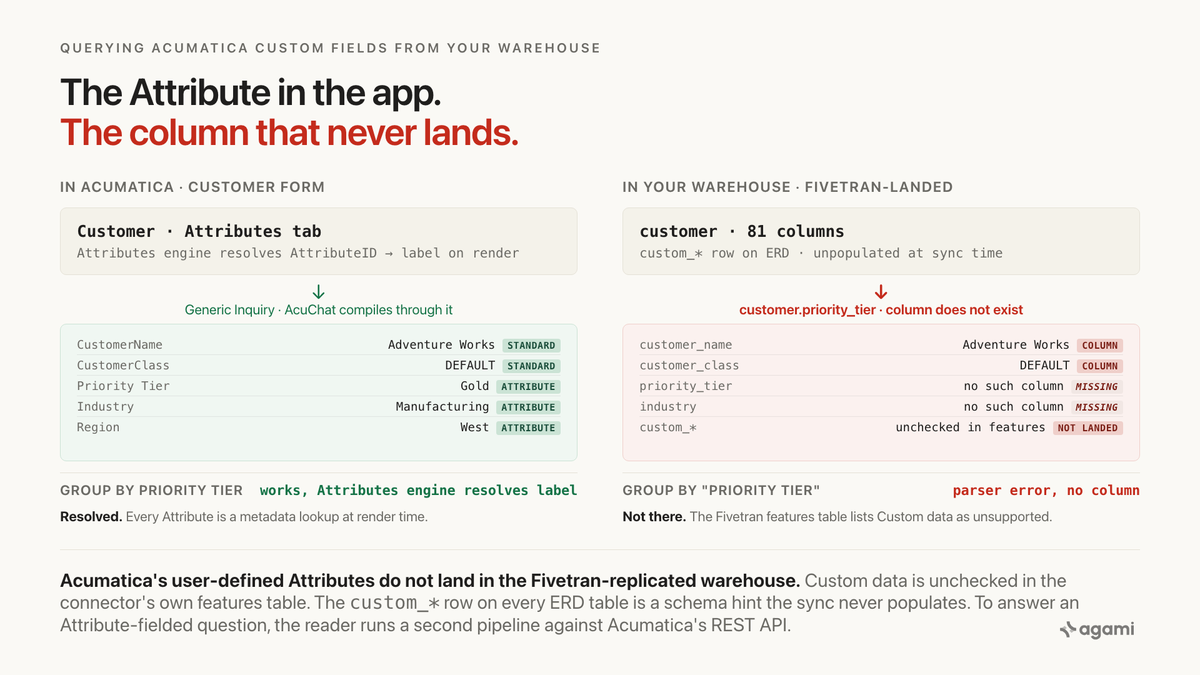
Query Acumatica custom fields from a Fivetran warehouse and there is nothing to query: the connector lands 19 tables and not one Attribute value.
Fivetran's own connector documentation says it up front. The features table on the Acumatica connector overview lists Custom data with no support icon in the Supported column, next to a row of checked features (Data blocking, Column hashing, Re-sync, Row filtering, API configurable, Priority-first sync, Authorization via API). Compared to the same table on the Procore connector overview or the Salesforce connector overview, where Custom data carries a check icon, the boundary is explicit.
The Fivetran Acumatica Schema ERD adds the other half. Every one of the 19 landed tables carries a custom_* row at the bottom of its column list, exactly the shape the reader would expect if custom attributes did land. From the general Fivetran features documentation, verbatim on Custom data:
"As part of complete schema replication, Fivetran replicates custom data whenever it exists and is accessible. Not all sources that have custom data expose it in a way we can access."
Acumatica is one of the sources that does not, at least through this connector today. The ERD row shows what would land if the sync populated it. The features table shows the sync does not.
Inside Acumatica, that is invisible. The Customer form shows a labelled Priority Tier dropdown, the Attributes tab lists Priority Tier alongside Industry and Region, and a Generic Inquiry groups by Priority Tier and returns Gold, Silver, Bronze. The Attributes engine resolves the internal AttributeID back to its label the moment any form renders. AcuChat, the vendor's native natural-language surface, compiles through Generic Inquiries and inherits that resolution for free.
Replicate the tables to a warehouse and only the standard fields come with. The Attribute values are application state the connector does not carry. Your Fivetran-landed customer has 81 columns per the Acumatica Schema ERD, and no way to answer "how many Gold-tier customers ordered last month" without a second pipeline.
Before you start
- Acumatica replicated into a warehouse. Postgres, Snowflake, BigQuery and Redshift all work through Fivetran's Acumatica connector. Casing varies by destination: uppercase snake_case on Snowflake (
CUSTOMER,SALES_ORDER), lowercase on Postgres and BigQuery (customer,sales_order). Airbyte also lists an Acumatica connector, and Acumatica's own OData endpoints expose Generic Inquiries directly if you prefer a native path. - An Acumatica REST API credential. The Attribute pivot lives against
https://{subdomain}.acumatica.com/entity/Default/{contract_version}/Customerwith$expand=Attributes, not against the warehouse. An OAuth 2.0 Connected Application under System > Integration > Connected Applications in Acumatica is sufficient; a Fivetran-configured tenant already has one and the same credential works. - Read access to
customer,sales_order,invoice,bill,stockitem, and the GL trioaccount,journal_transaction,journal_transaction_detail. These carry the questions a mid-market ERP-driven business actually asks; the other 11 landed tables are useful and out of scope for this post.
A free trial is available and it reproduces the trap on seeded data. Acumatica ships a 14-day free trial through its Request a Demo page. The route is partner-mediated (a VAR provisions the tenant) rather than plain self-serve, and the trial arrives with an industry-tailored sandbox and sample data. Add one custom Attribute to Customer through the Attributes (CS205000) form (a Selector called Priority Tier with values Gold, Silver, Bronze is the fastest reproduction), attach it to the Customer class, save, and query the Customer through the REST API. The Attributes array appears immediately, keyed by the AttributeID the tenant assigned when the Attribute was created.
Two gotchas the trial adds. The 14-day window is the tightest reclaim policy of the four route-1 apps in this series (Salesforce Developer Edition is indefinite, ServiceNow Personal Developer Instance reclaims after 10 days' inactivity, Procore Developer Sandbox is indefinite once created). And the trial does not include a Fivetran connector, so a full end-to-end reproduction needs a Fivetran trial pointed at the tenant, an Airbyte trial, or a short script that materialises the 19 tables Fivetran's Acumatica ERD lists from the REST API.
The question
"How many active Gold-tier customers placed a sales order this quarter?"
That is the shape of every Attribute-fielded question an Acumatica-driven mid-market business asks. Not "how many customers", which is a row count. Not "how many customers are class DEFAULT", which is a standard field. But "how many are Gold tier", or "how many are Manufacturing", or "how many are in Region West": every one of those buckets is a Priority Tier or Industry or Region Attribute the business created for its own vocabulary. Standard fields are the easy half. Attributes are what the business actually asks about.
The trap sits between what the Customer form shows and what the Fivetran-landed customer table actually stores.
What breaks
Here is the query an agent reaches for, against a Fivetran-landed schema:
select c.customer_name,
       c.customer_class,          -- standard field, works
       c.priority_tier,           -- Attribute, does not exist as a column
       count(so.id)               as orders_this_quarter,
       sum(so.order_total)        as order_value
from customer c
left join sales_order so
  on so.customer_id = c.id
 and so.date >= date_trunc('quarter', current_date)
where c.status = 'Active'
group by 1, 2, 3;
The parser rejects it. c.priority_tier is not a column on customer. A well-meaning agent substitutes c.custom_priority_tier, which also fails. More carefully, an agent searches the schema for anything starting custom_ and finds custom_* on all 19 tables in the Fivetran Acumatica ERD, but not one row of any custom_ column carries a value in the reader's warehouse. The label the reader sees in Acumatica ("Priority Tier") is nowhere in the warehouse copy, and neither is any column derived from it.
Three counting queries establish the size of your gap against your own warehouse:
-- 1. does any custom_* column carry a value on any of the 19 landed tables?
with cols as (
  select table_name, column_name
  from information_schema.columns
  where table_schema = :acumatica_schema
    and column_name like 'custom_%'
)
select table_name,
       count(*)                              as custom_columns_declared
from cols
group by table_name
order by 1;

-- 2. for each landed parent table, how many rows have any custom_ column
-- populated. This is the emptiness check the ERD row does not answer.
-- Run per table with the actual custom_ column list from query 1.
select 'customer' as landed_table,
       count(*)                              as rows_total,
       count(*) filter (
         where coalesce(
           customer.custom_priority_tier,
           customer.custom_industry,
           customer.custom_region
         ) is not null
       )                                     as rows_with_any_custom
from customer;

-- 3. against the REST API side-table (populated in the fix), how many
-- distinct AttributeIDs the tenant has provisioned on each entity, and
-- which entities have coverage on real rows.
select entity, attribute_id,
       count(distinct entity_id)             as entities_with_value,
       count(distinct value)                 as distinct_values
from attribute_side_table
group by 1, 2
order by 3 desc;
The first query returns how many custom_* columns your warehouse actually declared. On a fresh Fivetran-landed Acumatica connection, the count of columns is whatever the ERD listed, and the count of populated rows in query 2 is zero on every table. The third query only works after the fix in the next section lands a side-table; the point of running the first two against the raw warehouse is to see that the schema-hint columns from the ERD are literally empty.
Why it breaks
Standard fields land as columns; Attributes do not land at all
Acumatica separates its standard fields (which are on the entity's contract and land as columns) from Attributes (user-defined fields configured on the Attributes (CS205000) form and attached to an entity through a Class). The split travels through the connector, badly. Standard fields land in the ERD as their own columns, typed and named: customer.customer_name, customer.customer_class, customer.status, sales_order.order_total, invoice.amount, stockitem.item_status. Every one of these is queryable the way column-name introspection expects.
Attributes do not land in the Fivetran extract. Not as columns, not as JSON, not at all. The Fivetran Acumatica connector's own features table records Custom data with no check icon in the Supported column, and the general Fivetran features documentation is explicit that "Custom data" support is a per-connector claim: some connectors do, some do not, and Acumatica is one of the latter today. The custom_* row at the bottom of every ERD table is a schema hint that would populate if the sync supported it, not a promise it fulfils.
The AttributeID is a decision the tenant made once
From the Acumatica community forum thread on Fetching User-Defined-Field in Customer, verbatim on the syntax:
"If the element is a user-defined field, use the syntax below,Document.Attribute<AttributeID>, where you replace<AttributeID>with the ID of the attribute that corresponds to the user-defined field. I've tried it with the customer entity and works fine. Example,/Customer/AACUSTOMER?$custom=Baccount.AttributePRODREQ."
Read that URL. The syntax is Baccount.Attribute<AttributeID> on Customer (because a Customer is a Business Account, whose acronym is Baccount) and Document.Attribute<AttributeID> on transactional documents like Sales Order, Invoice, Bill and Purchase Order. In every case, the client has to know the AttributeID string before it can ask. The string is assigned when the Attribute is created and is not stable across tenants: the same-named Priority Tier on production and on the trial sandbox almost certainly carry different AttributeID values. Inlining a literal string in a query works against one tenant and returns null against every other.
$expand=Attributes on Stock Item, and its rate-limit trap
The Acumatica User Group Forums thread on Stock Item Attributes documents the alternative expand syntax, verbatim:
"Here I'm trying to get the value of the StockItem Attribute named A1007: http://10.1.1.22/alive/entity/Default/17.200.001/StockItem?$expand=Attributes&$Custom=Document.AttributeA1007&$top=10"And the constraint that costs an unwary reader an afternoon, verbatim from the same thread:
"If I remember right, you can not expand the Attributes only. you have expand all the fields include custom fields. that made the request very large. or you can have another endpoint to request the attribute, and combine the data on somewhere else."
Two things follow. First, on entities exposed with an Attributes collection (Stock Item is the canonical example), the syntax is $expand=Attributes plus Attributes/AttributeID and Attributes/Value in a $select, not the $custom=Baccount.Attribute<AttributeID> shape that works on Customer. The wire format varies by entity. Second, running $expand=Attributes without also selecting standard fields returns very large payloads for large tenants. The practical pattern is a periodic side-pipeline that fetches Attributes for the entities in scope, persists them, and joins on entity_id at query time; not a per-question round trip.
Acumatica's own AI answers this because it lives inside the app
The clearest evidence that this is a structural boundary and not a Fivetran oversight: Acumatica's own natural-language surfaces answer Attribute- fielded questions correctly because they run inside the tenant, where the Attributes engine is available. AcuChat, which reached general availability in Acumatica 2026 R1, compiles through Generic Inquiries; the AI Assistant on the same 2026 R1 substrate is on Managed Availability with GA planned at 2026 R2. Generic Inquiries resolve Attributes because a functional admin declares which fields participate in the saved query and the Attributes framework joins the label-to-AttributeID map at compile time. Copilot for Reporting narrates over Generic Inquiries too.
A warehouse consumer on Fivetran-landed data is a different reader. The Attributes engine is not in the extract; it lives in Acumatica. Whatever the warehouse-side agent asks about Priority Tier gets answered from whatever columns are physically there, which is why the naive query fails as a categorical parser error rather than a subtle wrong number. Acumatica has already built the resolution. Extraction leaves it behind, and the reader rebuilds it on their side of the connector.
The three boundaries the app enforced
Inside Acumatica, three mechanisms hid this trap.
The Attributes engine on every form. Resolves the AttributeID back to its label the moment any customer, sales-order, invoice or bill form renders. A sales rep creating a customer sees "Priority Tier" as a labelled Selector; the AttributeID is invisible.
Generic Inquiries. A functional admin declares which fields (including Attributes) participate in a saved query, and the Generic Inquiry engine joins the label-to-AttributeID map at compile time. Every AcuChat query and every AI-Assistant answer compiles through this layer.
Acumatica Analytics Reports and paginated reports. Both surfaces resolve labels the same way, so a printed AR aging report groups by Priority Tier correctly. The report designer never has to know the AttributeID.
Getting an Acumatica answer right against a replicated schema is mostly a matter of re-establishing those boundaries by hand, and the specific hard part is that the label-to-id map is not in the warehouse extract at all.
The fix
Declare the standard joins, then name the missing Attributes on the parent
customer, sales_order, invoice, bill and account sit in one Acumatica subject area, so the relationships between them declare cleanly. Two shapes are worth naming inline so a later edit does not delete them: the natural-key GL join and the flag that Attributes are elsewhere.
relationships:
  - from_table: sales_order_detail
    from_column: sales_order_id
    to_table: sales_order
    to_column: id
    relationship: many_to_one
    confidence: confirmed
    review_state: approved
    description: |
      Sales-order lines. sales_order has composite (id, uuid) PK and
      sales_order_detail has composite (sales_order_id, sales_order_uuid) FK;
      pick one pair and do not mix. custom_* on both sides is unpopulated
      by the Fivetran connector; see the customer_attribute entity below.
    source: https://fivetran.com/docs/connectors/applications/acumatica/connector-schema

  - from_table: sales_order
    from_column: customer_id
    to_table: customer
    to_column: id
    relationship: many_to_one
    confidence: confirmed
    review_state: approved

  - from_table: invoice
    from_column: customer_id
    to_table: customer
    to_column: id
    relationship: many_to_one
    confidence: confirmed
    review_state: approved

  # GL account joins by natural key, not surrogate id
  - from_table: journal_transaction_detail
    from_column: account_cd
    to_table: account
    to_column: account_cd
    relationship: many_to_one
    confidence: confirmed
    review_state: approved
    description: |
      Detail-line FK is account_cd (natural key), not account_id. account.id
      is a uuid surrogate; account.account_cd is the human account code. An
      FK-inference tool that matches on column name to a PK will propose
      account_id -> account.id, which does not exist. Source: Fivetran ERD
      marks account_cd as FK on this table.
    source: https://fivetran.com/docs/connectors/applications/acumatica/connector-schema

  - from_table: invoice_detail
    from_column: account_cd
    to_table: account
    to_column: account_cd
    relationship: many_to_one
    confidence: confirmed
    review_state: approved

  - from_table: bill_detail
    from_column: account_cd
    to_table: account
    to_column: account_cd
    relationship: many_to_one
    confidence: confirmed
    review_state: approved
The load-bearing declaration for this post is not any single cardinality. It is an entity binding on a side-loaded table the reader maintains, because the Fivetran connector does not carry the payload at all.
Bind the Attribute as an entity that resolves through the REST API
entities:
  - name: customer_attribute
    description: |
      Acumatica customer-level user-defined field. Values live in a
      separate Attributes collection reachable through the contract-based
      REST API as /Customer/{id}?$expand=Attributes with columns
      Attributes/AttributeID and Attributes/Value. Fivetran's Acumatica
      connector does not land Custom data (verified in the connector
      overview features table), so this data has to be side-loaded from
      the REST API into a warehouse table the reader maintains. Resolve
      the label to the AttributeID from the reader's own attribute-
      definition map; do not hardcode the string, because it is different
      across tenants and across sandbox versus production.
    resolves_to:
      table: customer_attribute
      value_column: value
      key_column: attribute_id
      key_source_endpoint: /entity/Default/{contract_version}/Customer?$expand=Attributes
    caveats:
      - |
        The AttributeID is not stable across Acumatica tenants. A query
        written against production returns null in the trial sandbox
        because the same-named attribute was created with a different ID.
      - |
        $expand=Attributes cannot be used alone on the REST API; the
        request expands all fields including custom fields, which makes
        payloads large. Fetch on a cadence rather than per-question, and
        persist.
      - |
        The Fivetran Acumatica connector is Lite and does not support
        Custom data, Capture deletes, History mode or Fivetran data
        models. All four are unchecked in the connector's own features
        table.
    source: https://community.acumatica.com/develop-integrations-with-web-services-apis-289/fetching-user-defined-field-in-customer-acumatica-rest-api-13947

  - name: document_attribute
    description: |
      Same mechanism, on transactional documents. Sales Order, Invoice,
      Bill and Purchase Order all support user-defined Attributes reached
      via Document.Attribute<AttributeID> in the contract-based REST
      API's $custom parameter. Stock Item exposes Attributes through
      $expand=Attributes with Attributes/AttributeID and Attributes/Value.
      Not landed by Fivetran; side-load as above.
    resolves_to:
      table: document_attribute
      value_column: value
      key_column: attribute_id
      key_source_endpoint: /entity/Default/{contract_version}/{Entity}?$expand=Attributes
    source: https://www.augforums.com/forums/everything-else/contract-based-rest-api-to-get-stockitem-attributes/
The entity does two things a hardcoded literal cannot. It records where the id comes from (the REST API endpoint), so a person picking this up in six months can rebind it against a new instance without archaeology. And it records why the value is bound as a parameter and not a literal, which is the sentence that survives the next refactor.
Ship two metrics, because there are two questions
Getting one query right today is not the same thing as making the schema safe. The next Attribute-fielded question will be written from scratch and will re-run the naive shape unless the split between "standard column" and "resolved through the side-table" travels with the metric, not with the person who last wrote the SQL:
name: active_customer_count
calculation: |
  Count of active customers. Uses only standard fields, safe against any
  Acumatica tenant.
bindings:
  PostgreSQL: |
    COUNT(DISTINCT customer.id) FILTER (WHERE customer.status = 'Active')
source_tables: [customer]
primary_table: customer
other_names: [live customers, customers in good standing]
confidence: proposed
review_state: unreviewed
name: gold_tier_active_customer_count
calculation: |
Active customers whose Priority Tier Attribute is 'Gold'. Requires the
customer_attribute entity to be bound to the tenant's Priority Tier
AttributeID and the customer_attribute table to be populated from the
Acumatica REST API on a cadence.
bindings:
PostgreSQL: |
COUNT(DISTINCT customer.id) FILTER (
WHERE customer.status = 'Active'
AND EXISTS (
SELECT 1 FROM customer_attribute ca
WHERE ca.customer_id = customer.id
AND ca.attribute_id = :priority_tier_attribute_id
AND ca.value = 'Gold'
)
)
source_tables: [customer, customer_attribute]
primary_table: customer
default_filters:
- "customer.status = 'Active'"
confidence: proposed
review_state: unreviewedRead review_state: unreviewed. Every declaration above is a proposal until a person signs it, because the load-bearing choice (which AttributeID means Priority Tier on this tenant) is not a schema fact. That signature is what makes the answer auditable months later. Rules enforced where the metric is defined survive the next person, the next agent, and the next question. A convention that lives in someone's memory does not.
What the schema cannot decide for you
Which AttributeID each business label maps to. Priority Tier is PRODREQ in one community-forum example and A1007 on a different Stock Item example on a different tenant; on your tenant it is whatever the Attribute's creator typed. Only the REST API $expand=Attributes response knows, and only a person can decide which run is authoritative.
Whether the standard customer_class field or a custom Priority Tier Attribute is the source of truth for tier-based reporting. Both can exist in the same tenant. Only the business decides which is canonical.
Which contract_version to point Fivetran at. The default is 20.200.001 (a 6-year-old endpoint version). Newer Acumatica releases publish newer endpoint versions with additional fields exposed. A tenant on a newer version may want the connector configured against a newer contract to expose additional standard fields; that is a Fivetran setup decision, not a modelling one.
Sandbox drift. A trial tenant and a production tenant have different AttributeID values for identically-named Attributes. A model developed against one and moved to the other silently returns nulls until rebound. The entity above is what makes the rebind mechanical rather than manual.
Reproduce it yourself
If you have a business email address, use Acumatica's Request a Demo page. A partner VAR picks up the request and provisions a 14-day industry-tailored sandbox with sample data. Open the Attributes (CS205000) form, add one Attribute (a Selector called Priority Tier with values Gold, Silver, Bronze is the fastest reproduction), attach it to the Customer class, save, and open a customer record to set a value.
Then call the discovery endpoint against the trial tenant, verbatim from the Acumatica community thread's working syntax:
GET https://{your-subdomain}.acumatica.com/entity/Default/20.200.001/Customer/AACUSTOMER?$custom=Baccount.AttributePRODREQReplace AACUSTOMER with the customer's ID and PRODREQ with the AttributeID your tenant assigned. The response includes an Attributes array with the AttributeID and Value for that Attribute. That is your label-to-id map for a single customer. Persist the tenant's (entity, AttributeID, label, data_type) tuples into a small warehouse table keyed by (entity, AttributeID) so metric definitions can resolve the label without a round trip.
With no trial and a Fivetran-landed production estate, the same call runs against your production subdomain, and the ingestion runs on a cadence into a customer_attribute and document_attribute pair the reader owns. Run the counting queries from the top of this post against customer in your warehouse. The first returns how many custom_* columns your ERD declared but the sync never populates. The second confirms zero rows have any of them set. The third, run against the side-table after the fix lands, is where the answers finally appear.
Three practical notes on what you will be looking at. First, casing depends on your destination: uppercase snake_case on Snowflake, lowercase on Postgres and BigQuery. Second, the REST API's contract version is per-tenant; 20.200.001 is the default and older tenants may still be on 17.200.001. Third, the trial's 14-day window is tight. Add the Attribute on day one, materialise the side-table on day two, and finish the metric wiring on day three; leave slack for the discovery pass returning larger payloads than expected on entities with many custom fields set.
Related traps in the same schema
The connector-does-not-land-custom-fields trap is the one worth fixing first, and it is not alone. Four more sit in the Acumatica schema, each documented and each its own kind of wrong.
account_cd versus account_id on GL joins. Every detail table foreign-keys to account.account_cd, not account.id. The parent account table has both id (a uuid surrogate PK) and account_cd (the human-readable account code). An FK-inference tool that matches on column name to a PK will propose detail.account_id -> account.id, find no such column, and generate a broken query. The Fivetran ERD marks account_cd as FK on all four detail tables.
Segmented subaccounts land as a concatenated string. Every subaccount value on journal_transaction_detail, invoice_detail, bill_detail and purchase_order_detail is a concatenated string whose segment layout is declared per tenant on Acumatica's Segmented Keys (CS202000) form. "01-100-DIRECT" might be (branch, department, cost bucket) in one tenant and (division, product line, region) in another. The Fivetran ERD lands the value but no segment definition.
Invoice natural key is type plus reference_nbr. The ERD marks invoice.id as PK, but Acumatica's UI and API treat (type, reference_nbr) as the natural key: an "AR" invoice with number 000123 is a different document from an "AR-Credit-Memo" with number 000123. Same shape on bill. A case-and-key hazard.
The 2020-01-01 sync floor. The Fivetran connector overview states verbatim: "To improve sync performance, we only sync data for a connection starting from 2020-01-01 onwards." Any question about pre-2020 history is unanswerable from the Fivetran-landed warehouse without a separate historical extract.
Each of these is a wrong answer waiting for a query that looks reasonable. The semantic model is where they get declared once, so the next agent to touch the schema finds the fix rather than the trap.
Six other apps in this series carry adjacent-shape traps that are worth the internal link. Procore lands its custom fields as JSON keyed by an integer, so the label the reader knows is not the key. Acumatica is the categorical version of the same pattern: not just the wrong key, no key at all in the warehouse copy. HubSpot's deal_company bridge fans by type_id, an undocumented-in-the-warehouse magic integer. Salesforce hands you opportunity.amount as a rolled-up column that double-counts when you join to line items, a grain trap. Every one is a different pathology of the same shared cause: the vendor's own application resolves a boundary that replication does not carry, and each replicator resolves a slightly different part of that boundary. Acumatica is the case where the replicator resolves the least.
Find out which of your Acumatica Attributes your warehouse can actually answer.
agami-core is source-available. Point it at your replicated Acumatica and see which relationships come back inferred, which come back empty, and which of your Attributes have coverage on the rows an agent will read.
Get agami-core or tell us which Acumatica Attribute you stopped trusting
Frequently asked questions
Does this only affect tenants that use a lot of Attributes? No. Every Fivetran-landed Acumatica estate has this shape because the connector's Custom data support is unchecked at the connector level, not at the tenant level. The custom_* row is present on all 19 landed tables whether the tenant defined one Attribute or fifteen. The size of the gap scales with configuration; the existence of the trap does not.
Can I use Acumatica Generic Inquiries to answer these questions? Yes, inside Acumatica. Generic Inquiries resolve Attributes through the Attributes engine at compile time, so groupings by Priority Tier return labelled buckets. They do not help a warehouse copy of customer queried by an agent that is not inside Acumatica, which is the scope this post addresses.
Isn't this what AcuChat and the AI Assistant are for? AcuChat and the AI Assistant run inside the tenant and compile through Generic Inquiries, so Attributes resolve without an extra step. That makes them a real answer for a paying Acumatica customer who mostly asks Acumatica questions inside Acumatica. The scope this post addresses is different: a warehouse copy of customer on a base-SKU tenant, queried by an agent outside Acumatica. Two different systems, two different queries, and a warehouse consumer often does not have AcuChat entitled on their tenant at all.
Is this specific to Fivetran or to one warehouse? Partly. The cause is upstream in the connector's feature choices: Acumatica's REST API returns Attributes correctly through $expand=Attributes and $custom=Baccount.Attribute<AttributeID>, and any replication path that reads those endpoints and lands the payload would carry it. The Fivetran Acumatica connector chose not to for now. Airbyte's Acumatica connector, CData's Acumatica driver, and a custom puller against the REST API each make their own choice. Casing and storage syntax vary by destination; the presence-or-absence of the Attribute payload varies by connector.
References
- Fivetran: Acumatica connector overview
- Fivetran: Acumatica Schema ERD
- Fivetran: Acumatica Setup Guide
- Fivetran: Acumatica API Configuration
- Fivetran: Features documentation ("Custom data")
- Fivetran: Procore connector overview
- Fivetran: Salesforce connector overview
- Acumatica Community: Fetching User-Defined-Field in Customer Acumatica REST-API
- Acumatica User Group Forums: Contract Based REST API to GET StockItem Attributes
- Acumatica AI Assistant: 2026 R1 Managed Availability and FAQ
- Acumatica: Request a Demo
- agami-core on GitHub