Three Columns Mean Won. Your Semantic Model Picks One.
Every code field on the opportunity lands as an integer, and the labels live in a stringmap the connector cannot decode. The semantic model is where Won stops meaning three different things.

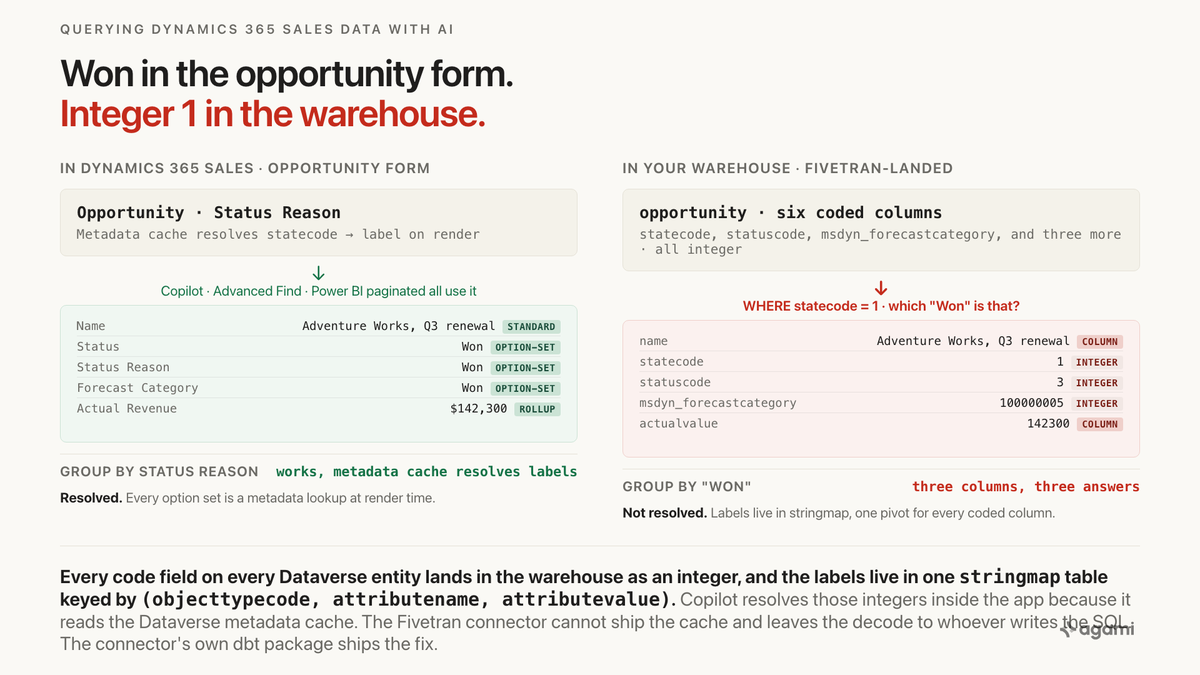
Query Dynamics 365 Sales data with AI and every answer about Won deals depends on which of three integer columns the agent happened to pick.
The Fivetran dbt package for Dynamics 365 CRM describes itself in one sentence on the package README, verbatim:
"This package enables you to enhance Microsoft Dynamics 365 CRM data by adding human-readable labels for coded values and integrate stringmaps into source tables. It creates enriched models with metrics focused on translating codes into meaningful labels for better data analysis."
The connector's own description of the pivot table, verbatim from src_dynamics_365_crm.yml:
"Table mapping option set values (integer codes) to their corresponding string labels for fields across Dynamics 365 CRM tables."
Read those two together. A first-party connector publishes a first-party dbt package whose stated job is to un-do a trap the connector itself creates. The extract lands every code field on every Dataverse entity as an integer, plus one stringmap table keyed by (objecttypecode, attributename, attributevalue). Inside the app, model-driven forms and Copilot resolve the integers to labels through the Dataverse metadata cache. Point a warehouse agent at the same tables and it either counts "1,240 opportunities in state 1" or invents a mapping.
Before you start
- Dynamics 365 Sales replicated into a warehouse. Snowflake, BigQuery, Redshift and Postgres all work through Fivetran's Microsoft Dynamics 365 CRM connector, which uses the Dataverse Web API with change-tracking. Airbyte also lists a Dataverse connector; Microsoft's own Synapse Link and Fabric Link for Dataverse export the same tables to a Delta lake without a third-party ETL. Casing varies by destination and by tool: Fivetran lands table names lowercase and singular (
opportunity,account,stringmap), Synapse Link preserves Dataverse casing (Opportunity,Account,StringMap). - Read access to the six tables that answer real sales questions.
opportunity,opportunityproduct,account,contact,systemuser, andstringmap. The Field Service extension addsmsdyn_workorderand its children; the activity family (task,email,phonecall,appointment) plusactivitypartyis a separate subject area and out of scope for this post. - A copy of the option-set values from Microsoft Learn. The opportunity entity reference is the primary source for
statecode,statuscode,prioritycode,msdyn_forecastcategoryandbudgetstatus. Read it before writing the first metric definition.
A 30-day free trial reproduces the trap on seeded data. Microsoft ships a Dynamics 365 Sales trial pre-loaded with the Fourth Coffee and Litware sample companies. Both include opportunities in every branch of the statecode / statuscode / msdyn_forecastcategory tree, which is enough to walk the wrong-versus-right SQL end to end. The trial does not include a Fivetran connector, so a full route-1 reproduction needs a Fivetran trial pointed at the tenant, an Airbyte trial, or a short script that materialises the six tables against the Web API. Two gotchas the trial adds. The window is 30 days, reclaim rather than extension. And Copilot in Dynamics 365 Sales requires the appropriate license; on a fresh trial it is generally available, on a Power Platform developer environment it may not surface at all.
The question
"How much of the current-quarter pipeline is Won, and how much is Committed but not yet Won?"
That is the shape of every forecast question the sales team asks. Not "how many opportunities", which is a row count. Not "which opportunities closed this quarter", which reads one column. But "how much is Won" (a decision the system made when the deal state changed) versus "how much is Committed" (a decision a sales manager made in a forecast rollup). Both are labels on the same opportunity row, and both live in the same schema. In Dynamics they almost always align. The exceptions are the deals sales operations argues about, so a report that cannot see the difference is a report that cannot answer the question that got asked.
The trap sits between what the opportunity form shows and what opportunity.statecode and opportunity.msdyn_forecastcategory actually store.
What breaks
Here is the query an agent reaches for, against a Fivetran-landed schema:
select count(*)                            as won_opps,
       sum(actualvalue)                    as won_amount
from opportunity
where statecode = 1
  and date_trunc('quarter', actualclosedate)
    = date_trunc('quarter', current_date);
Two problems. The statecode = 1 filter is right on the code but silent on which "Won" convention the report uses, and the result is a table full of integers no executive will read. Sum actualvalue and it looks like a real number until someone asks whether the filter used the state Won, the status Won, or the forecast category Won. Those are three different columns with three different meanings, and Fivetran lands all three as integers.
Three counting queries establish the size of your gap against your own warehouse:
-- 1. how many distinct statecodes and statuscodes actually appear on
-- opportunity, and how many rows carry each. On a real tenant the
-- statuscode value set is wider than statecode because each state has
-- multiple statuses beneath it.
select statecode, statuscode, count(*) as opps
from opportunity
group by 1, 2
order by 1, 2;

-- 2. for the opportunity entity, how many coded columns are documented in
-- stringmap for this tenant. This is a per-tenant inventory the metadata
-- cache serves inside the app.
select attributename,
       count(distinct attributevalue) as distinct_codes
from stringmap
where lower(objecttypecode) = 'opportunity'
group by 1
order by 2 desc;

-- 3. the split that reveals the trap. Same rows, three "Won" columns,
-- decoded. Rows where the three disagree are the deals sales operations
-- argues about.
with decoded as (
  select o.opportunityid,
         o.statecode, o.statuscode, o.msdyn_forecastcategory,
         sm_st.value  as state_label,
         sm_su.value  as status_label,
         sm_fc.value  as forecast_label
  from opportunity o
  left join stringmap sm_st
    on lower(sm_st.objecttypecode) = 'opportunity'
   and lower(sm_st.attributename)  = 'statecode'
   and sm_st.attributevalue = o.statecode
  left join stringmap sm_su
    on lower(sm_su.objecttypecode) = 'opportunity'
   and lower(sm_su.attributename)  = 'statuscode'
   and sm_su.attributevalue = o.statuscode
  left join stringmap sm_fc
    on lower(sm_fc.objecttypecode) = 'opportunity'
   and lower(sm_fc.attributename)  = 'msdyn_forecastcategory'
   and sm_fc.attributevalue = o.msdyn_forecastcategory
)
select state_label, status_label, forecast_label, count(*) as opps
from decoded
where state_label = 'Won'
   or forecast_label = 'Won'
group by 1, 2, 3
order by opps desc;
The first query returns the value distribution on your tenant. The second inventories which coded columns stringmap even carries labels for. The third is the split: rows where state_label = 'Won' and forecast_label = 'Won' agree are the easy majority; rows where they disagree are the exact deals a forecast rollup would count differently from a bookings rollup. The size of that split is your gap.
Why it breaks
Dataverse stores enums as integers, and the connector faithfully copies that
Every code field on every Dataverse entity is an option set. Option sets resolve the integer to a label through the metadata cache at read time: model-driven forms, Advanced Find, Power BI paginated reports and Copilot in Dynamics 365 Sales all do it, and the user never sees the integer. Dataverse stores the integer because labels are metadata. Labels can be renamed by administrators, localized into other languages, or extended with new options over time. Storing the label as the column value would freeze whichever label was current at write time; storing the integer plus a resolvable label table is what makes rename-safe reporting possible in the first place.
The Fivetran connector cannot ship the metadata cache. It ships the raw integer plus a snapshot of the metadata as the stringmap table, and leaves the decoding to the reader. The opportunity entity reference on Microsoft Learn lists the option-set values that matter for pipeline reporting, verbatim:
statecode: 0 = Open, 1 = Won, 2 = Lost.statuscode: 1 = In Progress (state 0), 2 = On Hold (state 0), 3 = Won (state 1), 4 = Canceled (state 2), 5 = Out-Sold (state 2).msdyn_forecastcategory: 100000001 = Pipeline, 100000002 = Best case, 100000003 = Committed, 100000004 = Omitted, 100000005 = Won, 100000006 = Lost.budgetstatus: 0 = No Committed Budget, 1 = May Buy, 2 = Can Buy, 3 = Will Buy.
Two things follow immediately. "Won opportunities" is ambiguous even in principle: statecode = 1 counts every opportunity closed as won at any point, msdyn_forecastcategory = 100000005 is the value a forecast rollup would use, and the two answers diverge by exactly the deals moved out of the current-period forecast and then closed-won late. "Lost opportunities" collapses two different statuscode values, Canceled and Out-Sold, so statecode = 2 alone hides the distinction sales operations actually cares about.
stringmap is one pivot table for every coded column on every entity
stringmap has one row per (entity, field, integer value) triple, keyed logically by (objecttypecode, attributename, attributevalue). Every picklist on every entity in the tenant, standard and custom, gets its labels stored here. To decode any coded column foo.bar on entity foo:
LEFT JOIN stringmap sm
  ON  LOWER(sm.objecttypecode) = 'foo'
  AND LOWER(sm.attributename)  = 'bar'
  AND sm.attributevalue        = foo.bar
The join predicate matches on two string constants (the entity name and the column name) and one integer (the value). It is a metadata join, not a foreign key, and no introspection tool will find it from column types. The connector's own dbt macro, string_mapping.sql, ships the pattern: unpivot every coded column on a source table, join to stringmap, re-pivot to add a <field>_label column beside each <field>. Every warehouse consumer needs the same shape.
Copilot in Dynamics 365 Sales answers this because it lives inside the app
The clearest evidence that this is a structural boundary and not a Fivetran oversight: Copilot in Dynamics 365 Sales answers option-set questions correctly because it runs inside the tenant, where the metadata cache is available. The Copilot overview on Microsoft Learn lists Accounts, Contacts, Leads and Opportunities as natively supported, and names the sales-specific terms Microsoft ships verbatim: "conversion rate, deal cycle, pipeline, deal size, win rate, and deal value." Sample supported queries include "How many opportunities were closed?", "Show me my current pipeline" and "What is the average deal size for successful opportunities?", all decoded through the metadata cache inside the app.
The FAQ about natural language chat in Copilot names the limitation that matters for a warehouse post, verbatim:
"The chat feature supports only structured data available in Dataverse tables. For answers from unstructured content such as SharePoint documents, use the SharePoint search capability."
And, on custom fields, verbatim:
"If your organization uses different sales terminology or custom fields, ask your Dynamics 365 Sales administrator to add those terms to the glossary to help Copilot better understand the context of your questions."
Copilot is an in-app surface. It does not reach data outside Dataverse, so a warehouse where Dynamics was joined with a Fivetran-landed NetSuite or Snowflake extract is out of scope. It does not resolve custom fields without an admin glossary edit. And it does not compose across the polymorphic customerid and ownerid lookups without prompting. A warehouse-side agent reading opportunity on Fivetran-landed data is a different reader answering a different question.
The three boundaries the app enforced
Inside Dynamics, three mechanisms hid this trap.
The metadata cache on every form. Resolves the option-set integer to its label the moment any opportunity, account or lead form renders. A sales manager sees "Won" and "Committed" as labelled dropdowns; the integers 1 and 100000003 are never rendered.
Advanced Find and system views. Both surfaces resolve labels the same way, so a saved view for "Won opportunities this quarter" groups by statecode = 1 correctly. The view designer never has to know that Won is code 1 and Lost is code 2.
Power BI paginated reports and Copilot. Both compile through the Dataverse metadata layer and inherit the resolution for free. A printed forecast report groups by "Pipeline / Best case / Committed / Won" without the report author touching msdyn_forecastcategory.
Getting a Dynamics 365 Sales answer right against a replicated schema is mostly a matter of re-establishing those boundaries by hand, and the specific hard part is that the label-to-integer map is not encoded in the schema; it is one pivot table the connector ships alongside the data.
The fix
Declare the standard joins first, so the metadata pivot is the only novel edge
Same-subject joins on the sales side are straightforward primary-key-to-foreign-key. Declaring them cleanly first is what makes the metadata pivot readable when it lands in the next block.
relationships:
  - from_table: opportunityproduct
    from_column: opportunityid
    to_table: opportunity
    to_column: opportunityid
    relationship: many_to_one
    confidence: confirmed
    review_state: approved
    description: |
      Line items on the opportunity. Sum(baseamount) on opportunityproduct
      and sum(actualvalue) on opportunity double-count every deal where
      IsRevenueSystemCalculated is true, because the parent value is a
      rollup of the child values. Same shape as the Salesforce Amount
      trap in APP1.
    source: https://learn.microsoft.com/en-us/dynamics365/customerengagement/on-premises/developer/entities/opportunity

  - from_table: opportunity
    from_column: parentaccountid
    to_table: account
    to_column: accountid
    relationship: many_to_one
    confidence: confirmed
    review_state: approved

  - from_table: opportunity
    from_column: parentcontactid
    to_table: contact
    to_column: contactid
    relationship: many_to_one
    confidence: confirmed
    review_state: approved
The load-bearing declaration for this post is not any of these. It is the metadata pivot to stringmap, and the polymorphic pair on customerid and ownerid sits alongside it. Both live in cross_subject_area_relationships.yaml because stringmap spans every entity in the tenant and opportunity.customerid reaches two subject areas at once.
Bind the stringmap decode as a metadata_pivot, not a foreign key
# cross_subject_area_relationships.yaml
edges:
  - name: stringmap_decode_opportunity
    kind: metadata_pivot
    from:
      table: opportunity
      coded_columns:
        - statecode
        - statuscode
        - prioritycode
        - msdyn_forecastcategory
        - budgetstatus
        - opportunityratingcode
    to:
      table: stringmap
      match:
        objecttypecode: opportunity
        attributename: <coded_column_name>
        attributevalue: <coded_column_value>
    cardinality: many_to_one_per_column
    description: |
      Every coded column on opportunity decodes through stringmap keyed by
      (objecttypecode, attributename, attributevalue). The join is
      metadata, not a foreign key: no FK-inference tool will find it from
      column types alone. Fivetran's dbt package ships the pattern
      verbatim in macros/string_mapping.sql.
    source: https://raw.githubusercontent.com/fivetran/dbt_dynamics_365_crm/main/macros/string_mapping.sql

  - name: opportunity_customer_polymorphic
    kind: polymorphic_lookup
    from:
      table: opportunity
      columns: [customerid, customeridtype]
    to:
      - when: customeridtype = 'account'
        target: { table: account, columns: [accountid] }
      - when: customeridtype = 'contact'
        target: { table: contact, columns: [contactid] }
    description: |
      opportunity.customerid is typed Customer on Dataverse and targets
      account and contact; opportunity.customeridtype disambiguates. The
      -idtype sibling column exists precisely so a query can pick the
      right side.
    source: https://learn.microsoft.com/en-us/dynamics365/customerengagement/on-premises/developer/entities/opportunity

  - name: opportunity_owner_polymorphic
    kind: polymorphic_lookup
    from:
      table: opportunity
      columns: [ownerid, owneridtype]
    to:
      - when: owneridtype = 'systemuser'
        target: { table: systemuser, columns: [systemuserid] }
      - when: owneridtype = 'team'
        target: { table: team, columns: [teamid] }
    source: https://learn.microsoft.com/en-us/dynamics365/customerengagement/on-premises/developer/entities/opportunity
The edge does two things a manual LEFT JOIN cannot. It records that the join is metadata rather than a foreign key, so a governance step that walks the model does not flag it as undefined_relationship. And it records that the same pattern applies to every coded column on the entity, not just statecode, so the next agent to touch budgetstatus does not rediscover it from scratch.
Ship metrics that carry the decoded label with them
The point of the model is not one metric written correctly today. It is that the next Won-versus-Committed question is written from the same building blocks and answers the same way.
name: won_opportunity_amount_qtd
calculation: |
  Sum of opportunity.actualvalue where the opportunity state resolves to
  Won and the actualclosedate falls in the current quarter. Uses the
  state Won convention, not the forecast-category Won or the statuscode
  Won. Report which convention this metric uses next to the number.
bindings:
  PostgreSQL: |
    SUM(o.actualvalue) FILTER (
      WHERE sm_state.value = 'Won'
        AND date_trunc('quarter', o.actualclosedate)
          = date_trunc('quarter', current_date)
    )
source_tables: [opportunity, stringmap]
primary_table: opportunity
default_filters:
  - "sm_state.value = 'Won'"
required_joins:
  - stringmap_decode_opportunity: [statecode]
confidence: proposed
review_state: unreviewed
name: committed_but_not_won_amount_qtd
calculation: |
Sum of opportunity.actualvalue where msdyn_forecastcategory resolves to
Committed AND statecode does NOT resolve to Won, in the current quarter.
This is the delta a bookings report and a forecast rollup argue about.
bindings:
PostgreSQL: |
SUM(o.actualvalue) FILTER (
WHERE sm_forecast.value = 'Committed'
AND sm_state.value <> 'Won'
AND date_trunc('quarter', o.actualclosedate)
= date_trunc('quarter', current_date)
)
source_tables: [opportunity, stringmap]
primary_table: opportunity
required_joins:
- stringmap_decode_opportunity: [statecode, msdyn_forecastcategory]
confidence: proposed
review_state: unreviewedRead review_state: unreviewed. Every declaration above is a proposal until a person signs it, because the load-bearing choice (which of the three "Won" columns is canonical for this business) is not a schema fact. That signature is what makes the answer auditable months later. Rules enforced where the metric is defined survive the next person, the next agent, and the next question. A convention that lives in someone's memory does not.
What the schema cannot decide for you
Which "Won" the business uses for reporting. statecode = 1, statuscode = 3 and msdyn_forecastcategory = 100000005 almost always align. The exceptions (deals pulled from the forecast and then closed-won late, or closed-won deals a manager omitted from the forecast) are the ones sales operations argues about. A person picks which column is canonical; the model enforces the pick.
Whether Canceled and Out-Sold under statecode = 2 (Lost) are one metric or two. statuscode = 4 (Canceled) means the deal disappeared from the pipeline; statuscode = 5 (Out-Sold) means it was closed as a loss for a specific reason. Whether to report them together or split them is a business call, not a schema call.
Which side of opportunity.customerid to prefer. The polymorphic lookup targets both account and contact. Some tenants use account-attached opportunities almost exclusively; others attach to contacts when the deal is with an individual. Whichever pattern the tenant follows, the metric definition names it explicitly, so a report does not silently drop half the pipeline.
Which sync tool your extract used. Fivetran, Airbyte, Synapse Link and Fabric Link all land the same source tables with different casing conventions and slightly different column names. The declarations above assume Fivetran's lowercase; a Synapse Link estate uses Opportunity, StateCode, ParentAccountId. Landed casing is an extraction fact, not a modelling one.
Reproduce it yourself
Sign up for the Dynamics 365 Sales 30-day free trial. The trial arrives with Fourth Coffee and Litware sample data pre-loaded, which is enough to populate every branch of the statecode / statuscode / msdyn_forecastcategory tree. Open an opportunity in each state to see how the metadata cache resolves the labels on the form, then open Advanced Find and build a view grouped by "Status Reason" to see the labels resolved server-side.
Then get the data out. The Fivetran Microsoft Dynamics 365 CRM setup guide walks the connector configuration: an application user in the tenant with a security role that grants read on the tables to be replicated, plus Fivetran's redirect back into your destination. The alternative paths are Airbyte's Dataverse connector or Microsoft's own Synapse Link for Dataverse, which exports the tables to Delta without a third-party ETL.
Run the three counting queries from the top of this post against your landed schema. The first shows the state and status distribution on your tenant. The second inventories which coded columns stringmap even carries labels for. The third finds the rows where the three "Won" columns disagree.
Then build the metrics. Add the two YAML blocks above to your semantic model, wire the stringmap_decode_opportunity edge into cross_subject_area_relationships.yaml, and rerun a natural-language question about pipeline. The right answer names which "Won" it used and gives a two-line breakout for the deals where the three columns disagreed.
Three practical notes. First, casing varies by destination: Snowflake uppercases and singularises, Postgres and BigQuery keep lowercase, Synapse Link preserves the Dataverse casing verbatim. Second, the stringmap table is per-tenant, and administrators can rename option-set labels or add new options at any time. Materialise the decoded columns as views rather than tables, so an option-set change on Monday morning does not leave Friday's report reading a stale label. Third, the trial's 30-day window is enough for a first pass but tight for a full modelling project; add the connector on day one, wire the metadata pivot on day two, and finish the metric wiring by the end of week two.
Related traps in the same schema
The stringmap decode is the one worth fixing first, and it is not alone. Three more sit in the Dynamics 365 Sales schema, each documented in the Microsoft Learn entity references and each its own kind of wrong.
opportunity.customerid and opportunity.ownerid are polymorphic. Both are typed Customer and Owner respectively on Dataverse, and each targets two entities: account, contact for customer, systemuser, team for owner. The -idtype sibling column disambiguates. An FK-inference tool that keys on constraints alone cannot decide which side to join, and either choice returns half the pipeline on a tenant that uses both targets. Same shape as Salesforce's polymorphic WhoId and WhatId.
opportunity.actualvalue is a rollup when IsRevenueSystemCalculated is true. Sum actualvalue on the parent and sum baseamount on opportunityproduct line items and every rolled-up deal is counted twice. Same shape as the Salesforce Amount trap in APP1: the parent value is either the sum of the children or a manually typed override, disambiguated by a flag no FK-inference tool reads.
activityparty fans every activity out across multiple entities. Every task, email, phonecall and appointment attaches to accounts, contacts, opportunities and leads through an activityparty table with a participationtypemask code. This is the ServiceNow-style fan-out for activity reporting; count activities per opportunity naively and every multi-attendee meeting counts as several.
Each of these is a wrong answer waiting for a query that looks reasonable. The semantic model is where they get declared once, so the next agent to touch the schema finds the fix rather than the trap.
Other apps in this series carry adjacent-shape traps that are worth the internal link. NetSuite's multi-book accounting silently doubles every dollar when a query touches both transaction and transactionaccountingline, a fan-trap the semantic model resolves with a book-scoped view. Salesforce hands you opportunity.amount as a rolled-up column that double-counts when you join to line items, a grain trap of the same family as IsRevenueSystemCalculated above. ServiceNow's inheritance chain hides the same-subject join behind a sys_class_name discriminator no foreign key encodes. Every one is a different pathology of the same shared cause: the vendor's own application resolves a boundary that replication does not carry. Dynamics is the case where the boundary is one table wide.
Find out which of your Dynamics option-set columns your warehouse can actually answer.
agami-core is source-available. Point it at your replicated Dynamics 365 Sales and see which relationships come back inferred, which come back as metadata pivots, and how many of your opportunity rows disagree across the three "Won" columns.
Get agami-core or tell us which option-set column you stopped trusting
Frequently asked questions
Why does WHERE statecode = 1 return the wrong answer for "Won opportunities"? Because statecode = 1 is one of three columns that carry a "Won" label, and the three disagree on the deals sales operations argues about. statuscode = 3 and msdyn_forecastcategory = 100000005 also mean Won in their own conventions. On the majority of rows the three align, but a deal moved out of the forecast and then closed-won late appears as Won on statecode and not-Won on msdyn_forecastcategory. A report has to name which convention it used, and the metric definition is where that name lives.
How do I find the option-set values for a custom column on my tenant? Every option-set value on every Dataverse entity is stored in stringmap, keyed by (objecttypecode, attributename, attributevalue). Filter to your entity and column: SELECT attributevalue, value FROM stringmap WHERE LOWER(objecttypecode) = '<entity>' AND LOWER(attributename) = '<column>'. Custom option-set values land the same way standard ones do. The metadata cache inside the app resolves them from the same table.
Does Copilot in Dynamics 365 Sales help with this? Inside the app, yes. Copilot compiles through the Dataverse metadata cache, so option-set columns resolve to labels automatically and the sample queries Microsoft publishes ("How many opportunities were closed?", "Show me my current pipeline") return the right answer. In a warehouse copy of opportunity on Fivetran-landed data, Copilot is not the agent doing the reading and the metadata cache is not available. The scope this post addresses is different.
Is this specific to Fivetran or to one warehouse? The cause is upstream in the Dataverse storage model, not in any one connector. Airbyte, Synapse Link and Fabric Link all land the same integers and the same stringmap pivot; only the casing differs. Custom implementations that call the Dataverse Web API directly hit the same shape. Any replication path that copies Dataverse tables ends up with the decoding as a downstream concern.
References
- Microsoft Learn: Opportunity entity reference
- Microsoft Learn: Copilot in Dynamics 365 Sales overview
- Microsoft Learn: FAQ about natural language chat in Copilot
- Microsoft Learn: Synapse Link for Dataverse
- Fivetran: Microsoft Dynamics 365 CRM connector
- Fivetran: Microsoft Dynamics 365 CRM setup guide
- Fivetran dbt_dynamics_365_crm README
- Fivetran dbt_dynamics_365_crm src_dynamics_365_crm.yml
- Fivetran dbt_dynamics_365_crm string_mapping.sql macro
- Dynamics 365 Sales free trial
- agami-core on GitHub