One HubSpot Deal, Three Companies, Three Rows
A HubSpot deal has no company column. The link lives in a bridge table that repeats per association type, so pipeline by account double counts. The semantic model declares the primary association.

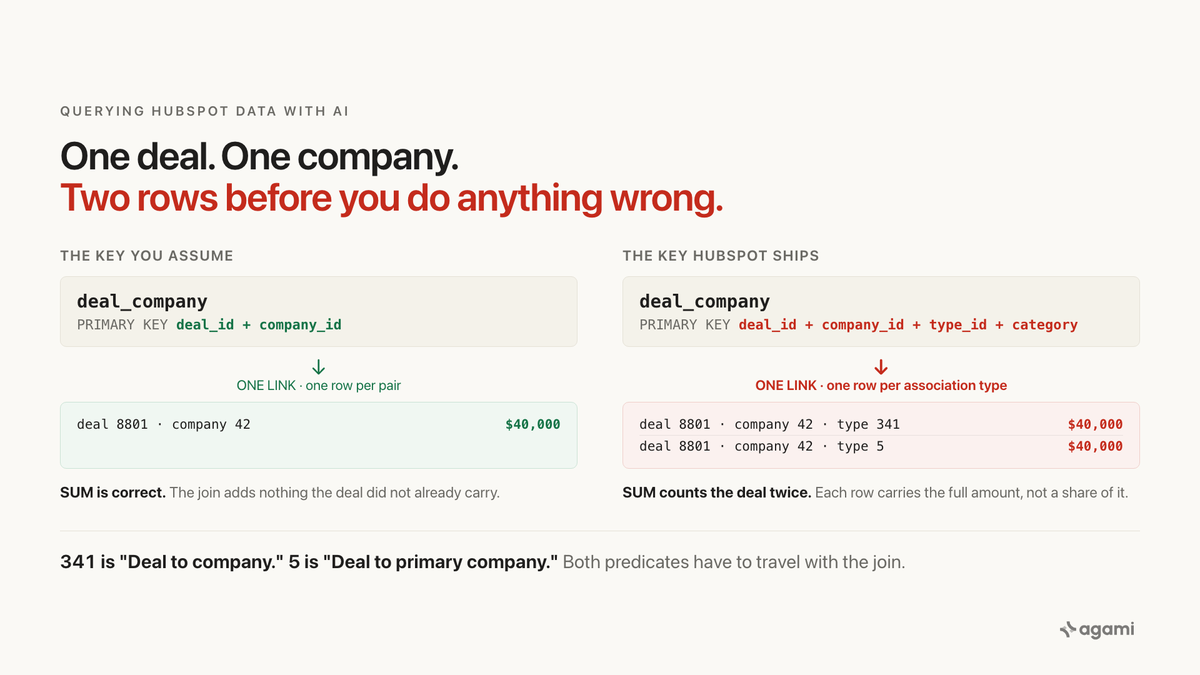
Search for HubSpot duplicate deals and you land in the company's own community forum, on threads with titles like "How to report on deals with multiple associated companies" and "Duplicates showing on advanced reports using multiple data sources." The answers are polite and the problem never quite goes away. People notice that when a deal touches more than one company, their reports start counting it more than once.
That is not a reporting bug. It is the shape of the data, and it follows the deals into your warehouse, where nothing warns you about it at all.
HubSpot says so itself, inside the product, in the documentation for the custom report builder:
When a report includes multiple data sources, a record might be counted more than once depending on the filters added. This occurs because associated records can meet filter criteria more than once per association.
Inside the product, that warning at least exists. The replicated copy carries the rows and not the warning.
Before you start
- HubSpot replicated into a warehouse, if you want to run the SQL. Or just a free portal, if you only want to see the shape.
No portal? HubSpot's free CRM is self-serve and runs the real data model, so associations behave exactly as they do on a paid one. Two limits matter here. It arrives empty, so you create the deal and the companies yourself. And custom association labels are Professional and Enterprise only, so you will reproduce the two-row case below and not the three-row one.
Nothing in a warehouse yet? Fivetran and Airbyte both authenticate with a private app token. The scope people miss is associations: without it the bridge table this post is about never lands at all.
The question
"What is our open pipeline by industry?"
It is the first question anyone asks of a replicated CRM, and it is checkable: one row per industry, one total, ordered. Two tables hold the answer. deal has the money, in property_amount. company has the industry, in property_industry.
Getting from one to the other is where it goes wrong.
What breaks
Here is the obvious query, written against the schema a Fivetran HubSpot connector lands. Every join in it is correct in the sense that the keys line up, and it runs without complaint:
select c.property_industry     as industry,
       sum(d.property_amount)  as pipeline
from deal d
join deal_company dc on dc.deal_id = d.deal_id
join company c       on c.id      = dc.company_id
where d.is_deleted = false
group by 1
order by 2 desc;
It returns plausible industries in a plausible order, and the totals are too high.
How much too high depends on your portal. Two queries size it against your own warehouse:
-- deals genuinely linked to more than one company
select count(*) as deals_with_multiple_companies
from (select deal_id
      from deal_company
      group by deal_id
      having count(distinct company_id) > 1) x;

-- rows per deal-company pair; this one fires on ordinary deals
select rows_per_pair, count(*) as pairs
from (select deal_id, company_id, count(*) as rows_per_pair
      from deal_company
      group by deal_id, company_id) x
group by 1
order by 1;
The second query is the one that surprises people. Run it before reading on.
Why it breaks
A HubSpot deal has no company
Not a nullable one. Not a badly named one. The deal table Fivetran documents carries deal_id, is_deleted, portal_id, deal_pipeline_id, deal_pipeline_stage_id, owner_id, and a set of property_ columns for the deal's own fields: property_dealname, property_description, property_amount, property_closedate, property_createdate.
There is no company_id on that list. There is no contact_id either.
The relationship lives in a separate table, deal_company, which Fivetran describes in one line: "Each record represents a 'link' between a deal and company." One row per link. HubSpot lets a deal link to more than one company and states no limit on the page that documents it, which is how the same deal ends up attached to a parent and a subsidiary, or to a partner and the end customer it was sourced for.
So any question of the form "by account" or "by industry" has to cross that bridge, and crossing it duplicates the deal.
Salesforce is the useful contrast, because it looks similar and is not. An opportunity there has account_id sitting on the row, resolving to exactly one account. Its famous fan trap comes from a level deeper, the line items underneath. In HubSpot the first join out of a deal is already the dangerous one. You are not in the trap because you went one level too far. You are in it as soon as you ask about the customer.
The bridge repeats even when there is only one company
This is the part that catches people who have already been careful, and it is why the second counting query above matters more than the first.
deal_company is not keyed on the pair. Its primary key is the composite of four columns: deal_id, company_id, type_id, and category. Fivetran's changelog records both additions and says exactly why:
We have added a new column,type_id, to the following tables: DEAL_COMPANY, DEAL_CONTACT. We have also included thetype_idcolumn as a part of the composite primary key for these tables. You can use thetype_idcolumn to identify primary associations.
and, later:
We have added a new column, category. This column is a part of the composite primary key for all the standard and custom association tables.The reason that key is four columns wide is that HubSpot does not store one relationship between a deal and a company. It stores several at once, one per association type. Its own documentation is explicit that the default set includes both an unlabeled type and a primary type, and that custom labels sit alongside them rather than replacing them.
HubSpot publishes the identifiers. For the deal-to-company direction, 341 is "Deal to company" and 5 is "Deal to primary company."
Which means one deal, one company, correctly configured, can already be two rows. Add a custom association label on a Professional or Enterprise portal and it is three. The deal is not split across those rows. Each one carries the full property_amount, so a naive SUM adds the whole deal value once per row.
And the distortion is not uniform. It tracks how thoroughly each team labelled its associations, which means it lands hardest on the accounts that get the most attention. That reorders a ranking rather than simply scaling it, and a reordered ranking is the kind of wrong answer nobody catches.
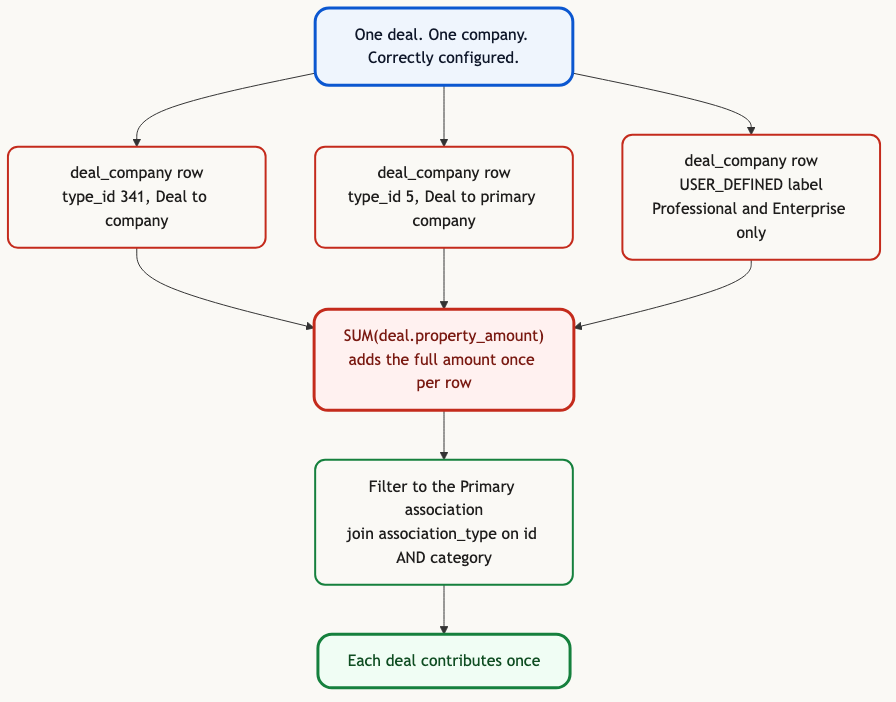
One deal, one company, three rows. The fix is one predicate, and it has to travel with the join.
The vendor's own models tell you this is hard
The strongest evidence that this join is not safe to make naively is that the people who built the connector decline to make it.
Fivetran ships reference dbt models over this exact schema. Its deal model, int_hubspot__deals_enhanced, joins pipelines, pipeline stages, owners and merged deals. It never references deal_company or deal_contact at all, and the published column list for hubspot__deals confirms the result: pipeline label, stage label, owner details, engagement counts, and no company.
The same package handles the identical shape correctly for tickets. hubspot__tickets joins ticket_company and then collapses it with array_agg and a group by before it can fan out.
So the vendor defends the ticket grain against this exact problem and ships a deal model with no account on it. That is not an oversight. That is someone deciding the many-to-many was not theirs to resolve.
The fix
Decode the association type instead of guessing at it
Filtering on type_id = 5 works, and it is the weaker version.
Custom association labels get portal-specific identifiers. The constant 5 is only correct for HubSpot's defaults, so a query that hardcodes it is right on your portal and wrong on your customer's. The connector lands an ASSOCIATION_TYPE table for exactly this, and Fivetran publishes the query under the heading "Identifying primary associations":
SELECT * FROM DEAL_COMPANY dc
JOIN ASSOCIATION_TYPE t ON dc.type_id = t.id
WHERE t.label LIKE 'Primary';
One refinement before you use it. Join association_type on both id and category, not on id alone. Identifiers repeat across HUBSPOT_DEFINED and USER_DEFINED, so joining on the identifier by itself reintroduces a fan-out inside the fix:
select c.property_industry     as industry,
       sum(d.property_amount)  as pipeline
from deal d
join deal_company dc    on dc.deal_id = d.deal_id
join association_type t on t.id       = dc.type_id
                       and t.category = dc.category
                       and t.label like 'Primary'
join company c          on c.id       = dc.company_id
where d.is_deleted = false
group by 1
order by 2 desc;
One caveat to check before you rely on type_id: Fivetran's changelog says that column arrived for connections created after May 8, 2023 and was rolled out to older connections gradually. If yours predates that, confirm the column is there.
Then write it down once
Getting the query right is not the same as making the schema safe. The next person to ask about pipeline by account will write the naive version, and so will every agent pointed at this warehouse.
Declaring the relationship is what moves the fix from a query somebody remembered to a property of the model. The cardinality first, because both edges are individually ordinary and it is their composition that fans:
relationships:
  - from_table: deal_company
    from_column: deal_id
    to_table: deal
    to_column: deal_id
    relationship: many_to_one
  - from_table: deal_company
    from_column: company_id
    to_table: company
    to_column: id
    relationship: many_to_one
Declaring those two is necessary and not sufficient, which is the unusual part of this app. Each edge is safe on its own. The damage happens on the traversal, so the primary-association filter has to travel with the bridge rather than being remembered at the call site:
name: deal_company_primary
description: The one company a deal belongs to. HubSpot marks exactly one
  association primary and the bridge repeats per association type, so without
  this filter any revenue-by-company question counts a deal once per type and
  once per extra company.
default_filters:
  - "{alias}.type_id = 5"
  - "{alias}.category = 'HUBSPOT_DEFINED'"
caveats:
  - Both predicates, not just the identifier. Identifiers repeat across
    HUBSPOT_DEFINED and USER_DEFINED, so filtering on type_id alone matches a
    custom label too and puts the fan-out back. For a portal with custom
    labels, resolve through association_type on id and category as above; a
    default filter can only reference the bridge's own columns.
Two details in there are easy to get wrong and both cost you the fix. {alias} is not decoration: the filter is matched against the statement by alias, so writing the table name instead leaves the model unable to tell whether a query applied the filter or skipped it. And the two predicates are separate entries rather than one AND expression, for the same reason.
Then the metric, defined at the deal grain so it survives the traversal:
name: open_pipeline
calculation: Open pipeline at the deal grain, in the deal's own currency.
bindings: { PostgreSQL: "SUM(deal.property_amount)" }
source_tables: [deal]
primary_table: deal
confidence: proposed
review_state: unreviewed
Every field above is derived from a documented column or a documented association type, and the sources are linked at the end. Read review_state: unreviewed. The declaration is a proposal until a person signs it, because the one judgment in here is not a schema fact.
That signature is what makes the result auditable later. The filter is not buried in whoever's SQL ran that morning; it is a named object with an owner and a reason, and every answer that used it can be traced back to it.
Be precise about what a declared filter does, because it is not what most people assume. agami-core does not rewrite your SQL: it reports, on the receipt, which of a table's declared filters the statement applied, which it omitted, and which it could not determine. So a query that skips the primary filter still returns a number. What you also get is a line saying it skipped it, next to that number, in a form you can put in a ticket. A rule written where the query is built survives the next person, the next agent and the next question. A convention that lives in someone's memory does not.
What the schema cannot decide for you
Whether primary is the right answer depends on the question, and nothing in the data knows which question you asked.
For revenue reporting, primary-only is almost always what you want, because it gives each deal exactly one home. For "which accounts are touched by open pipeline," counting every association is correct and filtering to primary is the bug. Same tables, same joins, opposite answers.
That decision is the reason the declaration has a description field and a signer. Six months from now, type_id = 5 will look like a magic number to whoever inherits it. The sentence next to it is what stops them deleting it.
Reproduce it yourself
Two routes, depending on whether you already have HubSpot in a warehouse.
If you do not: HubSpot's free CRM is self-serve and carries the real data model. Create a deal, associate it with one company, then associate a second company and mark the first as primary. Build a custom report on deals that includes the company name column, and watch one deal occupy two rows. That is the same mechanism, rendered in the product, before any warehouse is involved.
If you do: run the two counting queries from the top of this post against your replicated schema. The first tells you how many deals genuinely span several companies. The second tells you how many rows a single deal-company pair occupies, which is the number most people have never looked at. Then run the naive pipeline query and the corrected one side by side and compare the totals.
Two things will differ in your warehouse:
- Column names vary by extract tool. These queries use the raw Fivetran landing, where deal amount is
property_amount. The same connector's dbt staging layer renames it toamount. - Table casing depends on your destination. Lowercase on BigQuery and Postgres, uppercase on Snowflake, same object either way.
Related traps in the same schema
The association bridge is the one worth fixing first, and it is not alone. Three more, each documented and each its own kind of wrong:
deal_pipeline_stage.closed_won does not mean closed won. Fivetran documents it as "Boolean indicating if the pipeline stage is closed. NOTE: This field is deprecated in favor of the is_closed column," and documents is_closed identically. A column named closed_won that flags closed-anything is a hazard made entirely of a name.
Enumeration properties store internal values, not the labels you see in the app. property_industry holds a code; the label lives in property_option, reachable by a two-column join because property is keyed on both the object and the property name.
And property_amount is documented as the value in the deal's own currency, so summing it across a multi-currency portal adds euros to dollars.
Find out what your bridge tables are doing.
agami-core is source-available. Point it at your replicated HubSpot and see which relationships come back inferred, which come back empty, and which ones fan.
Get agami-core or tell us which report you stopped trusting
Frequently asked questions
Is this a HubSpot bug? No. Associating a deal with several companies is a supported feature, and the primary label exists precisely to resolve the ambiguity. The application applies that resolution on every screen it renders. Replication copies the rows and leaves the resolution behind.
Can I just use the primary company property on the deal? Possibly, and check before relying on it. Community answers describe a computed primary-company property, but it does not appear on HubSpot's published default-deal-properties page, and Fivetran's staging models bring across a subset of fields by default. Confirm what your own connection actually lands.
Does this affect contacts too? Yes. deal_contact has the same four-column key and the same behaviour, and HubSpot's association reference documents type 3 for deal to contact. Nine more bridge tables in the same schema share the shape.
Why not fix it with a view? A view fixes the query and not the governance. It is another object that has to be described before anything can reason about what it means, and you will be writing one per bridge.
References
- Fivetran: HubSpot connector schema and identifying primary associations
- Fivetran: HubSpot connector changelog
- HubSpot: associate records, and the primary label
- HubSpot: associations v4 and association type IDs
- HubSpot: understand the custom report builder
- Fivetran dbt package: int_hubspot__deals_enhanced
- Fivetran dbt package: hubspot__tickets
- Fivetran dbt source definitions for HubSpot
- agami-core on GitHub