Your Jira Portal Has Dozens of Request Types. Your Warehouse Has Three.
Customer Request Type is not a column on issue. It lives under a customfield id that differs per instance, so the obvious grouping returns three buckets. Bind the id once in the semantic model.

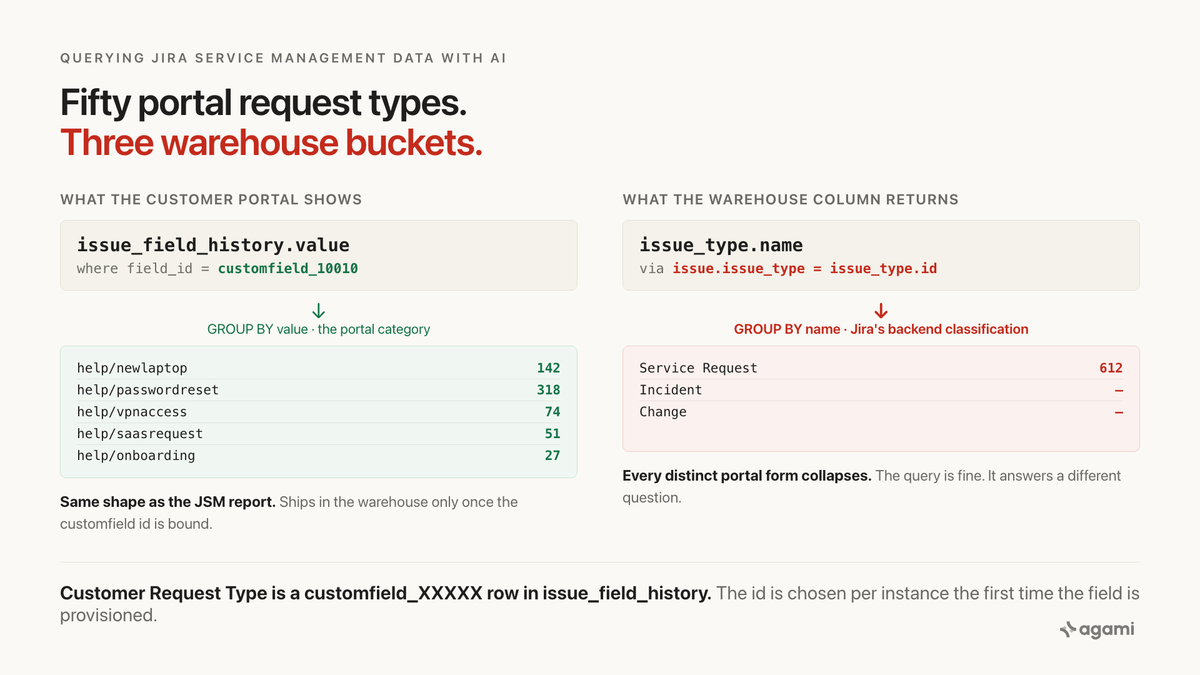
Search for jira service management request type reporting warehouse and the results split cleanly in two. Atlassian's own pages explain how to configure request types in the product. Everyone else writes about reporting without ever pointing at the actual table. The people who point at the table are on the community forum, asking the same question in different words: "why does grouping by issue type only show three categories when we have fifty request types in our portal?"
That is not a reporting bug. It is the shape of the warehouse copy, and Atlassian's own KB describes the mechanism in one paragraph, buried inside an article about creating issues over the REST API.
Inside the product, the request type sits at the top of every ticket, in every queue, on every built-in report. Its own developer documentation lists it as a first-class field, requestTypeId, on the JSM REST endpoint. Point a connector at Jira and none of that lands. What lands is the underlying Jira issue and its bag of custom fields, one of which happens to be the request type, keyed by an id nobody outside the tenant can predict.
Before you start
- Jira Service Management replicated into a warehouse, if you want to run the SQL. Or a free service project, if you only want to see the shape.
No portal? Jira Cloud Free supports JSM with a three-agents-or-fewer limit and unlimited customers, so a real portal is a signup away. The site arrives empty, so any reproduction starts by creating a project, two request types, and a handful of issues by hand. Two request types is enough, because the indirection appears the moment a second one exists. Rovo, Atlassian's own NL layer, is Premium and Enterprise only, so the free plan cannot be used to compare against the vendor's native answer.
Nothing in a warehouse yet? Fivetran and Airbyte both authenticate with an API token against the Jira Cloud REST API. The scope that matters here is not what you might expect from JSM: the connector reads the Jira platform API, not /rest/servicedeskapi/. Which is precisely why the request type ends up in a custom field.
The question
"How many of each request type did we get last month?"
It is the single most-asked question of a JSM warehouse, because it is the question the customer portal invites and the question every built-in JSM report answers. Concrete and checkable: one row per request type, one count, ordered.
Two tables ought to hold the answer. issue has the tickets. issue_type has the categories. issue.issue_type is a foreign key between them.
Except that issue_type is not the category the customer sees.
What breaks
Here is the obvious query, written against the schema a Fivetran Jira connector lands. Every column exists, every join key lines up, and it runs without complaint:
select it.name           as request_category,
       count(*)          as tickets
from issue i
join issue_type it   on it.id = i.issue_type
join project p       on p.id  = i.project
where p.key = 'HELP'
  and i.created >= date_trunc('month', current_date - interval '1 month')
  and i.created <  date_trunc('month', current_date)
group by 1
order by 2 desc;
It returns three rows. In a JSM project they will be Service Request, Incident, and Change, in some order. Every "Password reset", "New laptop", "VPN access", "Access to SaaS tool" and "Onboard new hire" ticket collapses into Service Request. A JSM agent looking at the same period in the built-in reports sees ten to fifty distinct request types.
Both numbers are correct. They answer different questions and the SQL does not tell the reader which.
How much collapse is happening depends on your portal. Two queries size it against your own warehouse:
-- distinct request types that exist in the project
select count(distinct value) as request_type_count
from issue_field_history ifh
join field f
  on f.id = ifh.field_id
where lower(f.name) like 'customer request type%'
  and ifh.is_active = true;

-- for each backend issue type, how many portal request types roll up to it
select it.name             as backend_type,
       count(distinct ifh.value) as request_types_hidden_in_it
from issue i
join issue_type it       on it.id = i.issue_type
join issue_field_history ifh
  on ifh.issue_id = i.id
join field f
  on f.id = ifh.field_id
where lower(f.name) like 'customer request type%'
  and ifh.is_active = true
group by 1
order by 2 desc;
The second query is the one that surprises people. Run it before reading on.
Why it breaks
The customer sees a request type. The warehouse sees an issue type.
Atlassian's own community explains the relationship in one line: "A single Issue Type can be linked to multiple Request Types. This means that one foundational work process (Issue Type) can cater to various customer needs, each represented by a different Request Type."
Inside the product, the portal form the customer fills in ("Report a Bug", "Request Access", "New laptop", "Password reset") is a Request Type, and it is what the agent sees at the top of every ticket. Behind it sits an Issue Type (Incident, Service Request, Change) that governs the workflow and fields. Multiple portal forms roll up to the same backend issue type. Every built-in JSM report groups by request type. The customer portal groups by request type. The queues can be filtered by request type.
The JSM REST API preserves all of that. Hit /rest/servicedeskapi/request/{id} and requestTypeId comes back as a first-class field on every request, alongside issueId. The response supports _expands for sla, requestType, serviceDesk, participant, status, organization.
Fivetran's Jira connector reads a different endpoint. It replicates the Jira platform REST API, /rest/api/2/issue, which knows about issues and their custom fields and does not know about request types at all. Atlassian's KB is explicit about what has to happen for the request type to land through that path:
To set the request type via REST API, you will have to use the custom field ID for the Request Type custom field. For example, if the request type custom field in your instance has the id of 10202, you will have to usecustomfield_10202. As for the value, it is actually a combination of the project key with the values of the KEY column in theAO_54307E_VIEWPORTFORMtable.
Examples of valid values:sda/getithelpsda/cc54f9a4-11bc-4783-a32e-382ff1840eb2
Note that if a project was renamed, the Customer Request Type value will be prefixed by the original project key instead.
Three things that one paragraph tells you about the warehouse copy.
The field's id is per-instance. customfield_10202 in that example, customfield_10010 in many Cloud tenants, something else in yours. The number is chosen by Jira the first time the field is provisioned. It is not stable across instances, so a query that hardcodes it works in one place and returns nothing in another.
The value is not the display name. It is an opaque composite key like sda/getithelp, project key slash portal form key. Any report that shows end users something readable needs a separate lookup, which does not land in the Fivetran schema at all (the display strings live in an internal Atlassian table, AO_54307E_VIEWPORTFORM, that the connector does not replicate).
The original project key sticks after a rename. A report that assumes the value prefix matches the current project.key silently drops or mis-groups requests.
None of these are documented columns on issue, because none of them are columns at all. They are all encoded into issue_field_history.value for one field id the reader has to discover.
issue.issue_type is a real column, and it answers a different question
The trap is a good one because the wrong query has none of the usual warning signs. issue.issue_type is a documented foreign key. It joins cleanly. It groups. It returns a plausible result table. The result is just categorically not what a JSM user is asking for when they say "request type", because inside the product those two words never mean Incident / Service Request / Change. They always mean the portal form.
Neither of the two most widely used dbt packages for Jira models this either. The Fivetran-published fivetran/dbt_jira package pivots the default fields (status, sprint, sprint_name) and leaves any custom field, including Customer Request Type, to the operator via a issue_field_history_columns variable. Its own README warns that "it is very easy to create another Sprint field, and different Jira users across your organization may choose the wrong or inconsistent version of the field." Which is the same shape of hazard, one level up: a custom field named the same thing in two places, resolved by whoever last edited the config.
So the vendor's own reference implementation over this exact schema declines to model the request type. That is not an oversight. That is someone deciding the per-tenant field id was not theirs to resolve.
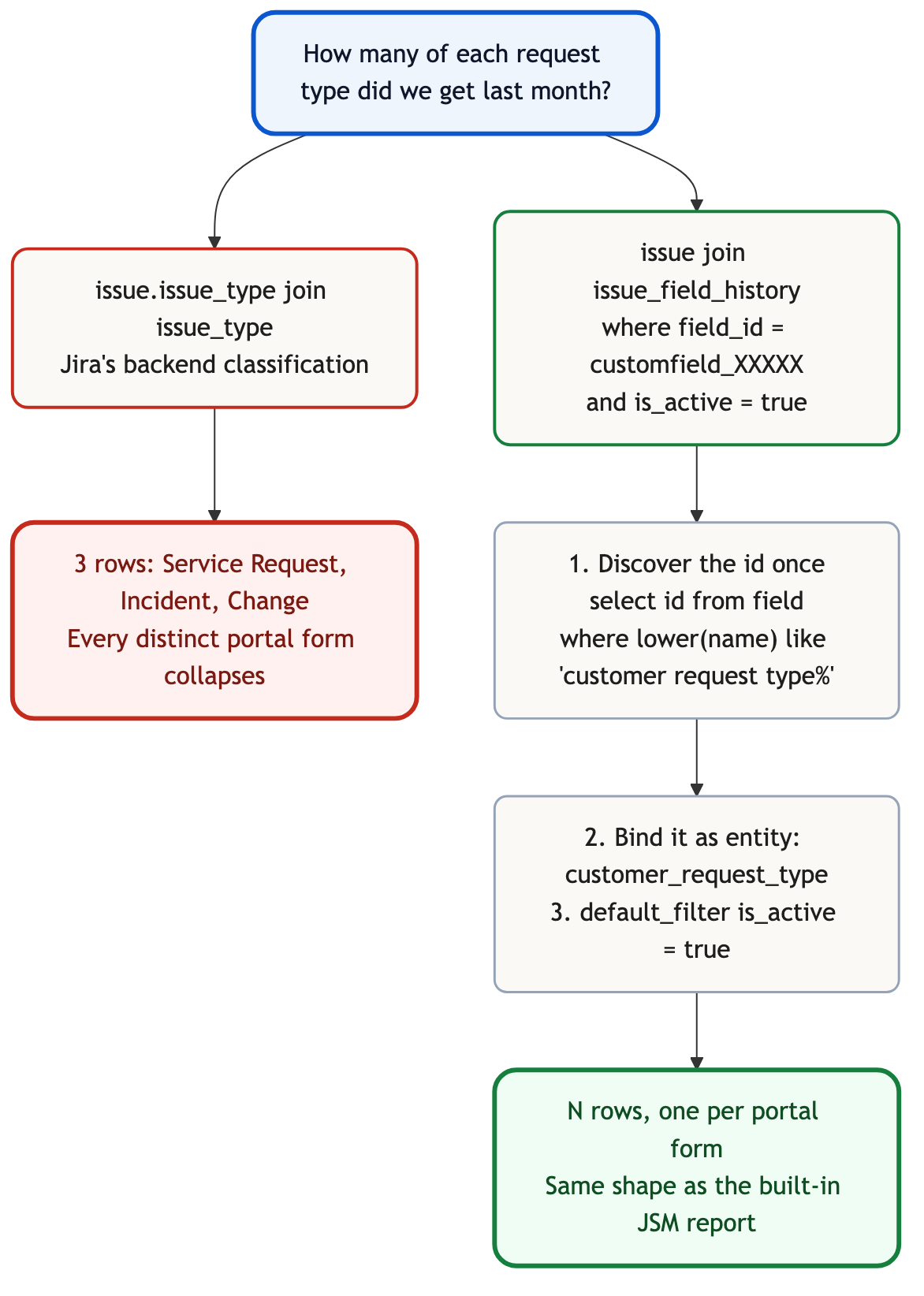
Both paths run. Only one answers the question the caller asked.
The fix
Bind the customer request type as an entity, not a column
The idea is that "customer request type" is a semantic thing the model knows about, and its physical binding to a customfield_XXXXX id is a per-estate configuration recorded once. Then every metric that groups by request type inherits the binding, and no query has to remember the id again.
First, discover the id. This query is deterministic against field, which Fivetran documents as the table of all issue fields, and returns the row with the right display name:
select id, name
from field
where is_custom = true
  and lower(name) like 'customer request type%';
-- returns e.g. id = 'customfield_10010', name = 'Customer Request Type'
Then write the entity down in the semantic model, with the id as its binding and the caveats on the value format as part of the definition rather than folklore:
entities:
  - name: customer_request_type
    description: |
      JSM's customer-facing category (Password reset, New laptop, Report
      a bug). Lives in issue_field_history under a customfield_XXXXX id
      whose numeric part is instance-specific. Value is an opaque
      composite key like 'sda/getithelp'; a display-name lookup does not
      land in the Fivetran schema and requires either a curated map or a
      live call to /rest/servicedeskapi/requesttype.
    resolves_to:
      table: issue_field_history
      value_column: value
      key_filter: "field_id = 'customfield_10010'"   # per-estate; discover once
    caveats:
      - The value string is prefixed by the ORIGINAL project key even
        after a rename. Do not assume it matches the current project.key.
      - Only issues created through the customer portal carry this field.
        Agent-created issues in a JSM project may not.
Then default_filter, so the is_active predicate cannot be forgotten
issue_field_history holds every value the field has ever been set to. Fivetran documents is_active in one line: "Boolean showing whether this issue field is currently active." Miss that filter and every ticket whose request type has ever been reassigned lands as two rows, both counted, both fanning the total.
The fix has to travel with the join, not be remembered at the call site:
default_filters:
  - table: issue_field_history
    filter: "is_active = true"
    rationale: |
      issue_field_history stores every historical value of every non-array
      field. Without is_active = true, every metric double-counts once per
      historical change.
    source: https://github.com/fivetran/dbt_jira_source/blob/main/models/src_jira.yml
Two metrics, because there are two questions
Not one. Both are correct. The semantic layer keeps both and lets the reader ask for the one they meant:
metrics:
  - name: tickets_by_backend_type
    description: |
      Count of issues grouped by Jira's backend issue type (Incident,
      Service Request, Change). Safe, and answers a different question
      than "requests by portal category".
    bindings: { PostgreSQL: "COUNT(DISTINCT issue.id)" }
    source_tables: [issue, issue_type]
    primary_table: issue
    other_names: [tickets by issue type, tickets by work type]
    confidence: proposed
    review_state: unreviewed

  - name: tickets_by_request_type
    description: |
      Count of issues grouped by JSM Customer Request Type, resolved
      through issue_field_history. Requires
      entity: customer_request_type to be bound to the instance's
      customfield_ id.
    bindings: { PostgreSQL: "COUNT(DISTINCT issue.id)" }
    source_tables: [issue, issue_field_history]
    primary_table: issue
    default_filters:
      - "issue_field_history.is_active = true"
    confidence: proposed
    review_state: unreviewed
Two identical COUNT(DISTINCT issue.id) expressions, two completely different answers. The correctness does not live in the metric expression. It lives in the join graph and the entity binding, which is where a declarative model puts it. Same lesson HubSpot gave with two identical SUM(deal.property_amount) bindings on either side of a bridge.
Read review_state: unreviewed. The entity binding is a proposal until a person signs it, because "customfield_10010 is Customer Request Type" is a fact about this estate, not a fact about JSM.
That signature is what makes the result auditable later. field_id = 'customfield_10010' is a magic number the day it is written down and a mystery six weeks later. The sentence next to it, plus the signer, is what keeps the next person from deleting it or overwriting it with whatever their instance uses.
Be precise about what a declared default_filter does, because it is not what most people assume. agami-core does not rewrite the SQL: it reports, on the receipt, which of a table's declared filters the statement applied, which it omitted, and which it could not determine. A query that skips is_active = true still returns a number. What you also get is a line saying it skipped it, next to that number, in a form you can put in a ticket.
What the schema cannot decide for you
Whether "Customer Request Type" is what the business means by "type of request" depends on the question, and nothing in the data knows which question the caller asked.
Support wants request-type buckets, because that is what capacity planning against the portal looks like. Finance wants backend-issue-type buckets, because that is what the workflow costs. Both are correct. Both live in the model. The caller picks.
Two more things a person has to record, once, before any query is trustworthy.
The display-name lookup. The opaque sda/getithelp values are what the connector lands. Whether to maintain a curated map, enrich at query time through /rest/servicedeskapi/requesttype, or accept the keys in the internal report and label them in the presentation layer, is a judgment about how the answers are consumed. Introspection cannot make it.
Team-managed vs company-managed projects. JSM has both, and the request-type administration surface differs between them. The underlying custom-field mechanism is the same; the operational implications for governance may not be.
Reproduce it yourself
Two routes, depending on whether you already have JSM in a warehouse.
If you do not: Jira Cloud Free includes a JSM service project up to three agents. Create the project, add two request types (say "New laptop" and "Password reset"), file one issue against each, and inspect the underlying issue in the API browser or in advanced JQL. The Customer Request Type value comes back as a customfield_XXXXX key you did not choose, and its value is an opaque composite string. That is the same indirection this post is about, rendered in the platform, before any warehouse is involved.
If you do: run the two counting queries from the top of this post against your replicated schema. The first tells you how many distinct portal request types exist. The second tells you which backend issue types they collapse into, and by how much. Then run the naive request-type query and the corrected one side by side and compare the row counts.
Two things will differ in your warehouse:
- Table casing depends on your destination. The Fivetran
src_jira.ymlsource declares lowercase singular identifiers (issue,issue_field_history). A Snowflake destination shows uppercase (ISSUE,ISSUE_FIELD_HISTORY). Same objects. - The
customfield_XXXXXid will not be 10010 unless you are lucky. Discover it with thefieldquery above and record it in the entity binding once.
Related traps in the same schema
The request-type customfield is the one worth binding first, and it is not alone. Three more, each documented and each its own kind of wrong.
issue.work_type and issue.issue_type do not agree everywhere. src_jira.yml documents work_type as "Issue type ID for connectors that no longer sync the issue_type column." An estate on a newer connector version writes to work_type and legacy queries against issue_type see nulls. A separate small hazard, named to be caught.
JSM SLA fields land the same way as request type. Time to Resolution, Time to First Response and every custom SLA sit under customfield_XXXXX with values encoded (per practitioner writeups) in milliseconds inside a compound object. Reading them from issue_field_history requires per- tenant field-id discovery plus a value parser. Same mechanism, different entities.
Organizations, request participants and customer records do not land as first-class tables either. They are in the JSM REST resource summary alongside Request and Requesttype, and none of them are in the Fivetran source list. They land as custom fields on issue, or not at all.
Find out what your custom fields are hiding.
agami-core is source-available. Point it at your replicated Jira Service Management and see which of your custom fields hold semantics your reports depend on, and which of those still need an entity binding.
Get agami-core or tell us which JSM report you stopped trusting
Frequently asked questions
Why do I only see three request categories when we have fifty request types in our portal? Because the warehouse column that looks like the category, issue.issue_type, is Jira's backend classification (Incident, Service Request, Change), not the customer-facing Customer Request Type. The portal category lives in issue_field_history under a customfield_XXXXX id whose numeric part is chosen per instance the first time the field is provisioned.
How do I find the right customfield_ id for my instance? Query the field table for a custom field whose name matches "Customer Request Type". select id, name from field where is_custom = true and lower(name) like 'customer request type%'; returns one row per estate, and the id column is the value to bind. Do not hardcode customfield_10010; it happens to be common on Cloud tenants but is not stable.
Why is the value opaque, and where is the display name? The value is a composite key like sda/getithelp (project key slash portal form key), because Atlassian stores the human-readable request type name in an internal table (AO_54307E_VIEWPORTFORM) that the connector does not replicate. The three options are a curated map, an enrichment call to /rest/servicedeskapi/requesttype, or accepting the key in the internal report and labelling at presentation time.
Does Fivetran's dbt package model this? No. fivetran/dbt_jira pivots default fields (status, sprint, sprint_name) and exposes an issue_field_history_columns variable for custom fields, with a documented same-name-collision hazard. Customer Request Type is not on the default list, so the vendor's own transformation package ships with no request-type column at all.
Is this specific to Fivetran or to one warehouse? No. The cause is upstream of the warehouse. Fivetran replicates the Jira platform REST API. Jira Service Management's own surface lives behind /rest/servicedeskapi/, a separate endpoint the connector does not read. Any connector that reads the platform API will land the same shape.
References
- Fivetran: Jira connector setup guide
- Fivetran dbt package: dbt_jira
- Fivetran dbt source definitions for Jira: src_jira.yml
- Atlassian Support: How to set Request Type when creating an issue via REST API using /rest/api/2/issue
- Atlassian Developer: Jira Service Management REST API, Request group
- Atlassian Developer: Jira Service Management REST API intro
- Atlassian Community: What is different between issue type and request type in Jira Service Management
- Atlassian Support: Categorize customer requests into request types
- Atlassian: Jira Service Management pricing and free plan
- agami-core on GitHub