The Procore Custom Field Whose Column Name Is a Number
Procore hands you custom_fields as a JSON blob keyed by integers. The label your team picked is nowhere in the warehouse copy. The semantic model is where that id gets bound back to its meaning.

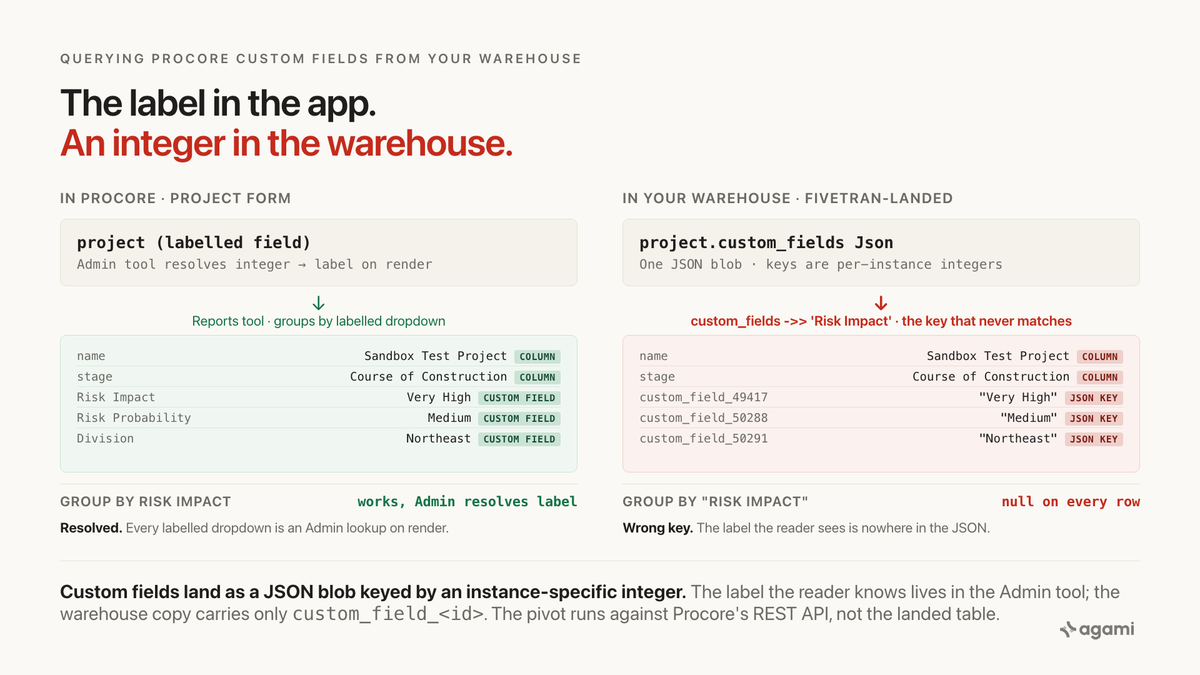
Query Procore custom fields from your warehouse and the label your project manager picked is nowhere in the answer.
Procore's own developer documentation shows the shape up front. From the Working with Configurable Fieldsets tutorial, verbatim, on the Punch List custom-fields payload:
"custom_fields": { "custom_field_49417": { "data_type": "decimal", "value": 2.0 } }
"In this example, we see the custom field id is '49417', data_type is 'decimal', and the current field value is 2.0."
That is the vendor documenting the wire format the whole post rests on. Every custom field on a project, an observation, an incident or a punch item lives as one key in a JSON blob on the parent row, and the key is custom_field_<integer>, where the integer is provisioned once by the Company Admin tool and appears in no document a reader can search.
Inside Procore, that is invisible. The Project form shows a labelled Risk Impact dropdown, the Reports tool groups by Risk Impact and returns Very Low through Very High, and the Analytics dashboards render Risk Impact as a column. The Admin tool resolves the integer back to its label the moment a form renders.
Replicate the tables to a warehouse and only the JSON comes with. The label lookup is application code, not data, and application code does not travel with a row. Your Fivetran-landed project has custom_fields Json and no document tells you which of its integer keys is Risk Impact.
Before you start
- Procore replicated into a warehouse. Postgres, Snowflake, BigQuery and Redshift all work through Fivetran's Procore connector. Casing varies by destination: lowercase on BigQuery and Postgres, uppercase on Snowflake. Airbyte also lists a Procore connector.
- A Procore REST API credential. The custom-field pivot lives against
/rest/v1.0/companies/{company_id}/custom_fields, not against the warehouse. An OAuth 2.0 app credential is sufficient; the same credential the connector uses will work. - Read access to
project,observation,project_incidentandproject_injury. These four carrycustom_fields Json; the other 114 tables in the connector's ERD do not all carry a custom-field surface and do not need to be in scope for this post.
A free instance is available and it reproduces the trap on seeded data. Register an app in the Procore Developer Portal and Procore auto-creates a Developer Sandbox with a starter project called "1234 - Sandbox Test Project" plus a small seed (three project users, eight Schedule Tasks, a basic folder structure, one Photo, a Drawing Set, one RFI, one Submittal). Add one custom field to Project in the Company Admin tool, refresh the API, and the JSON payload appears immediately.
One gotcha: the Developer Sandbox is not the Production tenant, and any custom field created in either has its own integer id. A custom_field_49417 in the sandbox is almost certainly a different integer in production. This is not a bug in the query; it is the mechanism this post is about, in miniature. The Sandbox Environments page names the endpoint pair (https://login-sandbox.procore.com and https://sandbox.procore.com) and states that Developer Sandboxes cannot be refreshed or deleted.
The question
"How many active projects do we have in Very High and High Risk Impact this quarter?"
That is the shape of every project-level question a Procore-driven organisation asks. Not "how many projects are Active", which is a standard field. Not "how many are Complete", which is another standard field. But "how many are High Risk", or "how many are in Region West", or "how many are Fixed Price": every one of those buckets is a custom field the organisation created for its own vocabulary. Standard fields are the easy half. Custom fields are what the business actually asks about.
The trap sits between what the Project form shows and what the Fivetran-landed project table actually stores.
What breaks
Here is the query an agent reaches for, against a Fivetran-landed schema:
select p.name         as project_name,
       p.stage        as project_stage,      -- standard field, works
       p.risk_impact  as risk_impact,        -- custom field, does not exist
       count(o.id)    as open_observations
from project p
left join observation o
  on o.project_id = p.id
 and o.status = 'initiated'
where p.active = true
group by 1, 2, 3;
The parser rejects it. p.risk_impact is not a column on project. A well-meaning agent then substitutes the JSON access it can see:
select p.name,
       p.stage,
       p.custom_fields ->> 'risk_impact'  as risk_impact,
       count(o.id)                        as open_observations
from project p
left join observation o
  on o.project_id = p.id
 and o.status = 'initiated'
where p.active = true
group by 1, 2, 3;
That runs. It returns risk_impact as null on every row. The JSON key is not risk_impact. It is not Risk Impact either, or risk-impact, or any other variant an agent could infer from the label. The key is custom_field_<integer>, and the integer is a decision the Company Admin made the first time somebody created the field.
Three counting queries establish the size of your gap against your own warehouse:
-- 1. how many custom fields the tenant has provisioned on project rows,
-- and how many distinct integer keys appear across the estate
with keys as (
  select jsonb_object_keys(p.custom_fields) as key
  from project p
  where p.custom_fields is not null
)
select count(*)                              as key_occurrences,
       count(distinct key)                   as distinct_keys,
       count(distinct key) filter
         (where key like 'custom_field_%')   as custom_field_keys
from keys;

-- 2. active-project count grouped by every custom-field integer key,
-- to see which fields carry a value on real rows
select k.key                                 as custom_field_key,
       count(*)                              as active_projects_with_value,
       count(distinct p.custom_fields->k.key->>'value')
                                             as distinct_values
from project p
cross join lateral jsonb_object_keys(p.custom_fields) as k(key)
where p.active = true
  and k.key like 'custom_field_%'
group by 1
order by 2 desc;

-- 3. side-by-side of what a naive standard-field group returns vs
-- what a specific custom-field id returns, for the same active set
select 'group_by_project_stage'                as method,
       p.stage                                 as bucket,
       count(*)                                as active_projects
from project p
where p.active = true
group by 2
union all
select 'group_by_custom_field_' || :risk_key,
       coalesce(p.custom_fields->('custom_field_' || :risk_key)->>'value',
                '(no value)'),
       count(*)
from project p
where p.active = true
group by 2
order by 1, 3 desc;
The first query returns how many distinct integer keys your project.custom_fields JSON carries across active rows. Every one of those keys is a custom field an admin defined; none of them have their label in this result. The second groups active projects by each of those keys so you can see which keys have coverage and which are sparse. The third is the reveal: bind the :risk_key parameter to the integer that means Risk Impact in your instance (the next section walks the discovery) and read the two blocks side by side. The stage block groups by Procore's standard field. The custom_field_<id> block groups by the business's actual definition. They rarely agree.
The :risk_key parameter is the point. Inlining a literal integer works against one tenant and returns null against every other, because the id is provisioned per instance and the same-named field carries a different id in sandbox, staging, and production.
Why it breaks
Standard fields land as columns; custom fields land as JSON
Procore separates its standard fields from its custom fields, and the split travels through the connector. Standard fields are typed, documented, and land in the ERD as their own columns: project.name, project.stage, project.city, project.completion_date, observation.priority, project_incident.recordable. Every one of these is queryable the way column-name introspection expects.
Custom fields are configured in the Company Admin tool per tool, and they carry the business's own vocabulary. From the vendor's own FAQ, What are custom fields and which Procore tools support them?, Procore documents 26 tools that support custom fields, each with its own field limit: 15 on Admin/Project, 15 on Incidents across seven fieldset types, 10 on Observations across six fieldset types, 30 on Commitments, 30 on Prime Contracts, and so on. From that same FAQ, verbatim on the Admin (Project) fieldset:
"Admin (Project) - Project - 15 - One (1) global fieldset for all new and existing projects. Some fields display on Bid Board."
Every one of those lands on the parent row as a single custom_fields Json column, keyed by an instance-specific integer.
The integer is a decision the Admin tool made once
From the same Working with Configurable Fieldsets tutorial, verbatim:
"We've created a configurable fieldset for the Punch List tool using the Procore web application, and added a custom field called 'Effort Estimate'. A unique identifier is assigned to the custom field when it is created."
Read that sentence again: the identifier is assigned when the field is created. It is not a name, it is not stable across instances, and it is not recoverable from the warehouse copy. The Fivetran-landed schema carries the column, not the label lookup that resolves it.
Multi Select lands as an array, not a scalar
One more shape worth surfacing before it costs a reader an afternoon. From the same tutorial:
"When updating a multi select custom field for a record, make sure that the value is an array. Even if the value is a single item, it should still be an array. { "company_id": 123, "project": { "custom_field_456": [789] } }"So on a Multi Select field with one value set, the JSON value is [789], not 789. Reading it with ->>'value' returns the string [789], not the id you were reaching for. Multi Select values need a separate unnest step; skipping it is the second most common cause of an empty result set on this data.
Procore's own Analytics ships the pivot as a paid add-on
The clearest evidence that this is a structural boundary and not an oversight: Procore's own Business Intelligence product publishes the exact pivot every warehouse consumer has to build. From the vendor's own tutorial, Update Custom Procore Analytics Reports Using Legacy Custom Fields, verbatim:
"Enter the SQL view name in the search bar to locate the custom field table. Below are the SQL view names for the fieldsets applicable to this tutorial: Project:vwProjectCustomField- Prime Contracts:vwPrimeContractCustomField- Purchase Orders:vwPurchaseOrderContractCustomField- Subcontracts:vwWorkOrderContractCustomField."
"Select the fieldset's ID column, thecustom_field_key_labelcolumn, and thecustom_field_valuecolumn."
"Click the Transform tab. Click Pivot Column. In the Pivot Column window: Click Advanced options. Select Don't Aggregate from the Aggregate Value Function drop-down menu."
That is Procore telling its own paying customers to run the pivot in Power BI, against a separate normalised side-table (vwProjectCustomField) whose whole reason for existing is to expose custom fields as (custom_field_key_label, custom_field_value) rows. The Fivetran-landed warehouse does not include that view; it lands the JSON on the parent row and leaves the pivot to the reader.
Procore Analytics is a paid add-on on top of a paid Procore SKU. A reader on the base app cannot answer a custom-field question with the vendor's product because they do not have that product. A reader on Procore Analytics gets the side-table but still runs the pivot themselves. Either way, the mechanism the app hid from the user is a mechanism the reader has to rebuild on the other side of the connector.
The four boundaries the app enforced
Inside Procore, four mechanisms hid this trap:
The Admin tool. Resolves the custom-field integer back to its label the moment any form renders. A project manager creating a project sees "Risk Impact" as a labelled dropdown; the JSON payload is invisible in the app.
The Reports tool. Groups by the labelled field and returns rows named Very Low, Low, Medium, High, Very High, because it resolves the label through the same admin lookup that renders the form.
The Analytics Risk Report. From Configure Custom Fields for the Procore Analytics Risk Report, the vendor's own risk report requires a Company Admin to configure four named custom fields (Risk Impact, Risk Probability, Risk Status, Risk Notes) across ten tools before it will produce a risk number. Procore itself acknowledges the pivot is a load-bearing prerequisite of its own product.
Procore Helix and Assist. The vendor's native AI agent runs inside the tenant, where the Admin tool is available and the label lookup is free. That makes it credible on in-app questions from a paying customer. A warehouse consumer with a Fivetran-landed copy of project and no admin-tool access is not that reader, and their agent will use whatever columns are physically there.
Every one of the four is a boundary the application enforced and the connector did not carry. Getting a Procore answer right against a replicated schema is mostly a matter of re-establishing those boundaries by hand.
The fix
Declare the joins, and name the JSON hazard on the parent
project, observation, project_incident and project_injury sit in one Procore subject area, so the relationships between them declare cleanly, and the descriptions carry the sentence a later edit needs before it deletes the filter as unnecessary:
relationships:
  - from_table: observation
    from_column: project_id
    to_table: project
    to_column: id
    relationship: many_to_one
    confidence: confirmed
    review_state: approved
    description: |
      Observations belong to a project. Both tables carry custom_fields as a
      JSON blob keyed by an instance-specific custom_field_<integer>; do not
      join or filter on the JSON without resolving the id first. See the
      project_custom_field entity below.
    source: https://fivetran.com/docs/connectors/applications/procore/connector-schema

  - from_table: observation
    from_column: origin_incident_id
    to_table: project_incident
    to_column: id
    relationship: many_to_one
    confidence: confirmed
    review_state: approved
    description: |
      Nullable foreign key. Observations may or may not derive from an
      incident; inner joining drops the ones that do not. LEFT join, always.

  - from_table: project_incident
    from_column: project_id
    to_table: project
    to_column: id
    relationship: many_to_one
    confidence: confirmed
    review_state: approved

  - from_table: project_injury
    from_column: incident_id
    to_table: project_incident
    to_column: id
    relationship: many_to_one
    confidence: confirmed
    review_state: approved

  - from_table: project_user
    from_column: id
    to_table: company_user
    to_column: id
    relationship: many_to_one
    confidence: confirmed
    review_state: approved
    description: |
      Procore user ids have global scope and are unique across all company
      accounts and projects; project_user.id and company_user.id share the
      integer space. Source: developers.procore.com Data Model Considerations.
The load-bearing declaration for this post is not one of those cardinalities. It is an entity binding on the custom_fields blob that resolves label to integer at query time.
Bind the custom field as an entity that resolves through the API
entities:
  - name: project_custom_field
    description: |
      Procore project-level custom field. Values live in project.custom_fields
      as JSON, keyed by custom_field_<integer>, where the integer is
      instance-specific and provisioned by the Company Admin tool the first
      time the field was created. Resolve the label to the id from the Procore
      REST API custom_fields endpoint; do not hardcode the integer, because
      it is different in sandbox and production.
    resolves_to:
      table: project
      value_column: custom_fields
      key_pattern: "custom_field_{id}"
      id_source_endpoint: /rest/v1.0/companies/{company_id}/custom_fields
    caveats:
      - |
        The integer id is not stable across Procore instances. A query written
        against production returns null in the Developer Sandbox because the
        same-named field was created with a different id there.
      - |
        Multi Select custom fields land as JSON arrays even when a single
        value is set. Unnest before comparing.
      - |
        The Procore Analytics product (a separate paid add-on) exposes custom
        fields as (custom_field_key_label, custom_field_value) rows in
        vwProjectCustomField, requiring a Power BI pivot before use. The
        Fivetran-landed schema does not include that view.
    source: https://procore.github.io/documentation/tutorial-config-fieldsets

  - name: observation_custom_field
    description: |
      Same mechanism, on observation.custom_fields.
    resolves_to:
      table: observation
      value_column: custom_fields
      key_pattern: "custom_field_{id}"
      id_source_endpoint: /rest/v1.0/projects/{project_id}/custom_fields
    source: https://procore.github.io/documentation/tutorial-config-fieldsets
The entity does two things a hardcoded integer cannot. It records where the id comes from (the API endpoint), so a person picking this up in six months can rebind it against a new instance without archaeology. And it records why it is bound as a parameter and not a literal, which is the sentence that survives the next refactor.
Ship two metrics, because there are two questions
Getting one query right today is not the same thing as making the schema safe. The next custom-field question will be written from scratch and will re-run the naive shape unless the split between "standard column" and "resolved through the JSON blob" travels with the metric, not with the person who last wrote the SQL:
name: active_project_count
calculation: |
  Count of active projects. Uses only standard fields, safe against any
  Procore instance.
bindings:
  PostgreSQL: |
    COUNT(DISTINCT project.id) FILTER (WHERE project.active)
source_tables: [project]
primary_table: project
other_names: [projects in progress, live projects]
confidence: proposed
review_state: unreviewed
name: high_risk_active_project_count
calculation: |
Active projects whose Risk Impact custom field is High or Very High.
Requires the project_custom_field entity to be bound to the instance's
Risk Impact integer id via the REST API custom_fields endpoint. The
bound id lives at query time in :risk_impact_key.
bindings:
PostgreSQL: |
COUNT(DISTINCT project.id) FILTER (
WHERE project.active
AND (project.custom_fields -> :risk_impact_key ->> 'value')
IN ('High', 'Very High')
)
source_tables: [project]
primary_table: project
default_filters:
- "project.active = true"
confidence: proposed
review_state: unreviewedRead review_state: unreviewed. Every declaration above is a proposal until a person signs it, because the load-bearing choice (which integer id means "Risk Impact" on this instance) is not a schema fact. That signature is what makes the answer auditable months later. Rules enforced where the metric is defined survive the next person, the next agent, and the next question. A convention that lives in someone's memory does not.
What the schema cannot decide for you
Which integer id each business label maps to. "Risk Impact" is custom_field_49417 in Procore's own docs; it is a different integer on your instance, in your sandbox, on staging. Only the REST API custom_fields endpoint knows, and only a person can decide which run is authoritative.
Label-name normalization. "Risk Impact" in one estate is "Risk" in another, or "Project Risk". A canonical mapping in the semantic layer decides which unqualified name means which id.
Whether the standard field or the custom field is the source of truth. A project.stage column and a custom Project Phase field can both exist and can disagree. Only the business decides which is canonical.
Which observation types are safety and which are quality. The six observation-type fieldsets (Commissioning, Environmental, Quality, Safety, Warranty, Work to Complete) are Procore-defined; whether Environmental observations count as safety in a compliance report is a business decision.
Sandbox drift. A Developer Sandbox and a Production tenant have different integer ids for identically-named fields. A model developed against one and moved to the other silently returns nulls until rebound. The entity above is what makes the rebind mechanical rather than manual.
Reproduce it yourself
If you have a developer email address, register an app in the Procore Developer Portal. Procore auto-creates a Developer Sandbox with a starter project. Open the Company Admin tool, add one custom field to Project (a Single Select called Risk Impact with values Very Low through Very High is the fastest reproduction), save, and fetch a project through the REST API. The custom_fields object appears with one key: custom_field_<some integer>. That integer is not in any documentation you can search.
Then call the discovery endpoint:
GET https://sandbox.procore.com/rest/v1.0/companies/{company_id}/custom_fieldsThe response returns each field's id, name, data_type, and (for Single Select) its allowed values. That is your label-to-id map. Persist it into a small warehouse table keyed by (tool, integer id) so metric definitions can resolve the label without a round trip.
With no sandbox and a Fivetran-landed production estate, the same call runs against https://api.procore.com and returns the map for your production instance. Run the three counting queries from the top of this post against project in your warehouse. The first tells you how many distinct custom_field_<integer> keys the estate uses. The second returns which of those keys have coverage on active projects. The third puts the naive project.stage grouping and the resolved custom-field grouping on adjacent rows so the business can see where they disagree, and by how much.
Three practical notes on what you will be looking at. First, casing depends on your destination: lowercase on BigQuery and Postgres, uppercase on Snowflake. Second, the JSON accessor syntax varies by warehouse: Postgres uses -> and ->>, Snowflake uses colon or GET_PATH, BigQuery uses JSON_VALUE. Third, the Developer Sandbox seed is small (one RFI, one Submittal, three project users), so the JSON blob is empty on every row until you add a custom field yourself. That is the reproduction step, not a bug.
Related traps in the same schema
The custom-fields trap is the one worth fixing first, and it is not alone. Four more sit in the Procore schema, each documented and each its own kind of wrong.
Observation versus Incident. Procore's Observations and Incidents modules land as different tables (observation, project_incident) with different grains, different fieldset types, and different meanings. Both carry an Environmental category independently. observation.origin_incident_id is a nullable foreign key from observation to incident, which makes "how many safety findings this month" ambiguous by construction.
Punch List versus Punch Item. The tool is Punch List, the table is punch_item, the FAQ says Punch List, the wire format says Punch Item. Ordinary tool-versus-object naming, worth declaring in the semantic layer so an agent reaching for "punch list items" finds the table.
Recordable versus reportable. project_incident.recordable is a boolean. Reportable is not a column. A safety-metrics report that groups by recordable and counts is asking a narrower question than OSHA's definition of reportable; a full compliance report needs the observation table too.
Cost-code sortability. cost_code.sortable_code is separate from cost_code.code and separate from cost_code.full_code, which is a lexicographic-versus-numeric ordering hazard. Named, not written.
Each of these is a wrong answer waiting for a query that looks reasonable. The semantic model is where they get declared once, so the next agent to touch the schema finds the fix rather than the trap.
Find out which of your Procore custom fields your warehouse can actually answer.
agami-core is source-available. Point it at your replicated Procore and see which relationships come back inferred, which come back empty, and which of your custom-field integer keys have coverage on the rows an agent will read.
Get agami-core or tell us which Procore custom field you stopped trusting
Frequently asked questions
Does this only affect tenants that use a lot of custom fields? No. Every Fivetran-landed Procore estate has this shape because it is in the schema, not the tenant. The project.custom_fields Json column is there whether the tenant configured one custom field or fifteen. The size of the gap scales with configuration; the existence of the trap does not.
Can I use the Procore Reports tool to answer these questions? Yes, inside Procore. The Reports tool resolves the label to the integer via the same Admin lookup the forms use, so groupings by Risk Impact return labelled buckets. It does not help a warehouse copy of project queried by an agent that is not inside Procore, which is the scope this post addresses.
Isn't this what Procore Helix and Assist are for? Procore Helix and Assist run inside the tenant and have access to the same Admin lookup the forms use, so custom fields resolve without an extra step. That makes them a real answer for a paying Procore customer who mostly asks Procore questions inside Procore. The scope this post addresses is different: a warehouse copy of project on a base-SKU tenant, queried by an agent outside Procore. Two different queries, two different systems, and the warehouse consumer often does not have Helix at all.
Why not just use Procore Analytics and its vwProjectCustomField view? Because Procore Analytics is a separate paid add-on on top of a paid Procore SKU, and its vwProjectCustomField view still ships in an unpivoted form that the reader has to Pivot Column in Power BI (as documented in Procore's own tutorial). A Fivetran-landed warehouse does not include that view at all and lands the JSON on the parent row. Different data, different shape, same pivot problem.
Is this specific to Fivetran or to one warehouse? No. The cause is upstream. Procore's REST API returns custom fields as a custom_fields object keyed by custom_field_<integer>, and any replication path that reads the API (Fivetran, Airbyte, a custom puller) lands the payload faithfully. Casing and JSON syntax vary by destination; the integer-keyed structure does not.
References
- Procore Developers: Working with Configurable Fieldsets
- Procore Support: What are custom fields and which Procore tools support them?
- Procore Support: What field types are available for Custom Fields in Procore Tools?
- Procore Support: Configure Custom Fields for the Procore Analytics Risk Report
- Procore Analytics: Update Custom Procore Analytics Reports Using Legacy Custom Fields
- Procore Developers: Sandbox Environments
- Fivetran: Procore connector overview
- Fivetran: Procore Schema ERD
- agami-core on GitHub