You Configured Twelve QuickBooks Custom Fields. Three Arrive.
QuickBooks Online Advanced lets you configure twelve custom fields per form. The REST API returns three. The semantic model records which three, and fails loudly on the nine that never arrive.

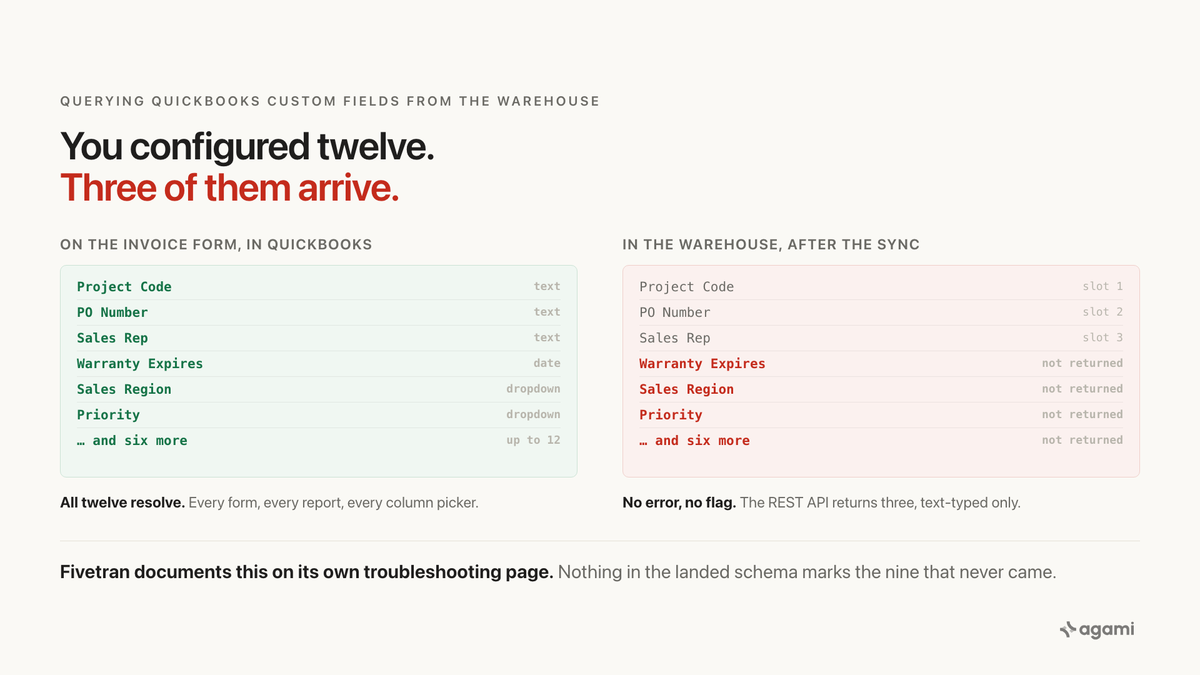
Your bookkeeper fills in Project Code on every invoice. Your AI agent cannot find the column. Getting QuickBooks data agent-ready starts with knowing which three of your twelve fields survived the trip.
A controller asks a reasonable question: which projects did we bill this quarter, and for how much?
In QuickBooks Online the answer is a report. Project Code is a custom field on the invoice form, it prints on the invoice, and the Sales by Custom Field report groups by it. The controller has been running that report for a year.
Point an AI agent at the same company's Fivetran-replicated warehouse and the query fails before it runs. There is no project_code column on invoice. There is no custom_field_project_code. A careful agent searches the landed schema for anything beginning with custom_field_ and finds nothing on invoice at all.
The field is real. The report is real. The column is not there, and nothing in the warehouse says why.
Before you start
- QuickBooks Online replicated into a warehouse. Postgres, Snowflake, BigQuery and Redshift all work.
- Read access. A read-only role is the right one.
No instance? QuickBooks Online Free is a real production plan at no cost, capped at 20 invoices a month. Two gotchas cost people an afternoon. Custom fields are not on the Free plan at all, so reproducing this trap needs Plus or Advanced. And Fivetran cannot sync a sandbox company, which its overview page states outright, so the free Intuit developer sandbox is a fine REST playground and not a valid source.
Nothing in a warehouse yet? Fivetran's QuickBooks connector authenticates with OAuth against the REST API v3 and takes your realmId. Casing varies by extract tool: uppercase on Snowflake, lowercase on Postgres and BigQuery.
The question
Which invoices this quarter carry a project code, and what did each project bill?
Concrete, checkable, and the sort of question a finance team asks weekly. It needs two things from the warehouse: the invoice total, and the custom field the business writes the project code into.
One of those two is there.
What breaks
Here is the query an agent writes against the Fivetran-landed schema:
select c.display_name        as customer_name,
       i.project_code        as project_code,
       sum(i.total_amount)   as invoiced,
       count(distinct i.id)  as invoices
from invoice i
join customer c on c.id = i.customer_id
where i.transaction_date >= date '2026-07-01'
group by 1, 2;
It fails at the parser. invoice.project_code does not exist.
That is the polite version. The impolite one is what a more determined agent does next. It looks for a side table, because that is the shape other connectors use, and it finds exactly one: credit_memo_custom_field, with columns (definition_id, index, credit_memo_id, name). Credit memos have a custom-field join surface. Invoices, sales receipts, estimates, bills and purchase orders do not, at least not in the published ERD.
So the agent concludes there are no custom fields on invoices. It is wrong, and it has no way to know it is wrong. Somewhere between one and three of them are on the parent row, in slot columns whose names depend on what your bookkeeper typed into Settings three years ago.
Why it breaks
QuickBooks Online has three separate custom-field surfaces, and they are not the same thing.
The three legacy sales-form fields. These predate QuickBooks Online Advanced. They land on the transaction row in the REST API response as a CustomField array of at most three elements, each carrying a DefinitionId, a Name, a Type that is always StringType, and a StringValue. QuickBooks Online's own support article puts the ceiling plainly: "A maximum of 3 custom fields may have Print on form turned on for any single form type."
The QuickBooks Online Advanced fields. An Advanced customer configures up to twelve custom fields per form type, in four data types: Text and number, Number only, Date, and Dropdown list. These are the fields the business actually uses. They print on invoices. They filter QuickBooks reports. The column picker offers all twelve.
The Enhanced Custom Fields API. Intuit is building a GraphQL surface that exposes the newer fields. It is a separate endpoint set, not part of the entity-based REST API a connector reads.
The trap sits in the gap between the second and the first. Fivetran reads REST v3, so it inherits REST v3's ceiling. Fivetran documents this on its own troubleshooting page, in a article whose title is a version of why are the fields you configured missing from the destination:
"In QuickBooks Online Advanced, you can create up to 12 custom fields with any of the following data types: Text and number, Number only, Date, Dropdown list. However, the QuickBooks Online API only provides the first three custom fields with the data type text and number. As a result, we only sync the custom fields provided by the QuickBooks Online API to your destination."
Read that twice, because it carries two limits, not one.
Only the first three arrive. Fields four through twelve are not in the warehouse.
Only the text-typed ones arrive. A field you configured as a Date, a Number-only, or a Dropdown does not surface even if it sits in slot one. Warranty Expires is a Date. Sales Region is very often a Dropdown. Both are invisible.
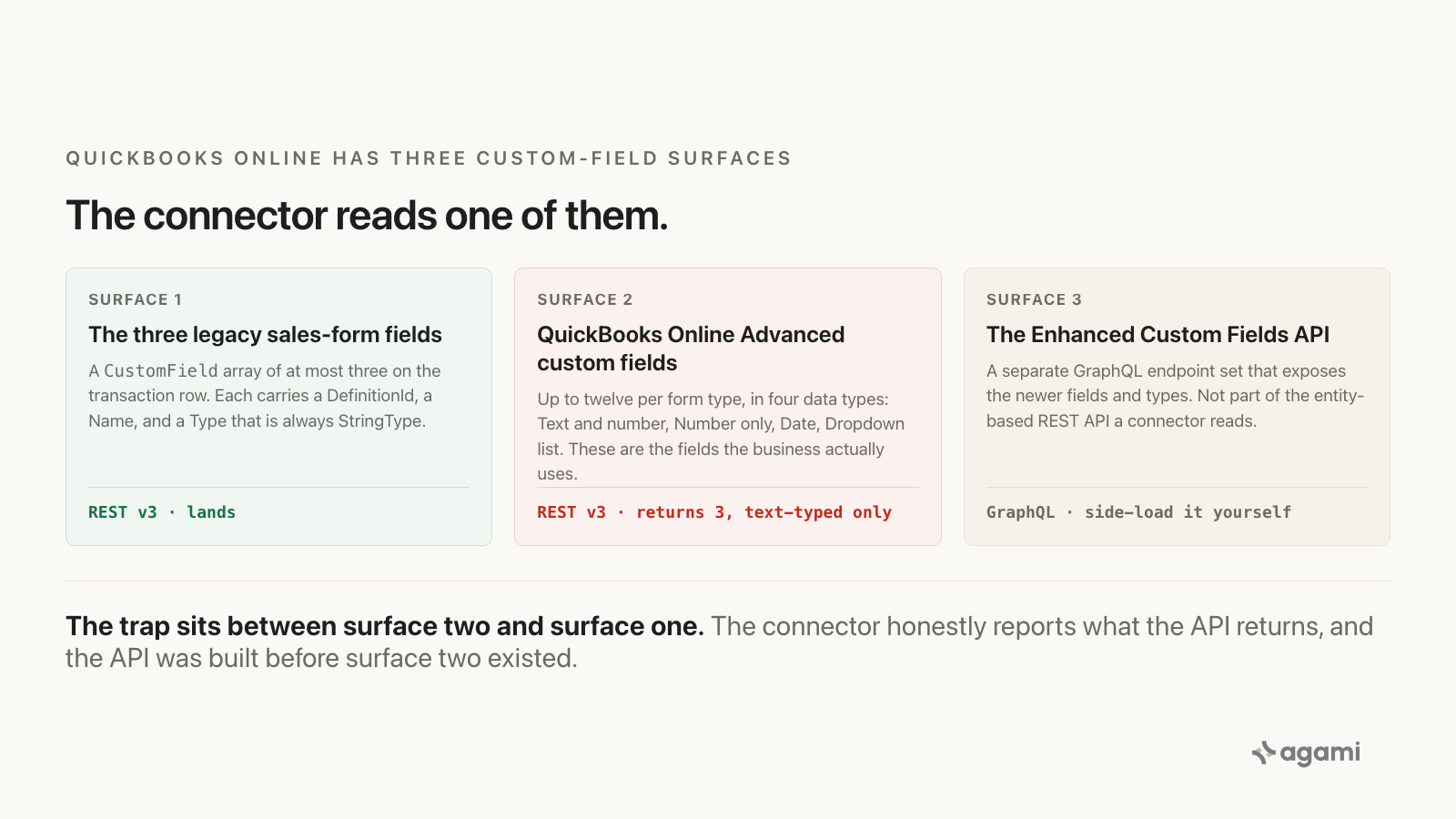
The connector reads surface one. The business uses surface two.
What QuickBooks did for you
Everything, and that is the point.
Inside QuickBooks Online Advanced, the custom-fields engine resolves all twelve the moment a form renders. A bookkeeper creating an invoice sees Project Code, Warranty Expires, Sales Region and Priority as labelled fields, regardless of slot position or data type. The Sales by Custom Field report groups on any of them. Nobody ever sees a DefinitionId.
That resolution runs inside the application. Replication copies rows. It does not copy the engine, and the API it copies through only ever offered three of the twelve.
The result is the worst shape a data problem can take: no error. There is no marker column, no _fivetran_truncated flag, no row count that looks off. Nine twelfths of your custom-field surface is missing and the schema is silent about it.
The fix
The fix is not a better prompt. It is a semantic model: the layer that tells an AI agent what your data means before it writes any SQL. For QuickBooks that means three declarations, and one honest limit.
First, discover what your tenant actually has. The three legacy slot labels live on Preferences, not on the transaction:
GET /v3/company/{realmId}/query?query=SELECT * FROM PreferencesThe response carries SalesFormsPrefs.CustomField[] for sales forms and VendorAndPurchasePrefs.POCustomField[] for purchase forms, each with up to three Name values and their DefinitionIds. Those ids are stable within your tenant. Pull one invoice to confirm them in production:
GET /v3/company/{realmId}/query?query=SELECT * FROM Invoice STARTPOSITION 1 MAXRESULTS 1Second, declare the slots against the labels people use. The warehouse column is a slot; the business term is Project Code. The model is where those two get connected, once:
entities:
  - name: invoice_custom_field
    primary_table: invoice
    description: >
      The three legacy QuickBooks custom-field slots on the invoice form.
      Slot names come from Preferences.SalesFormsPrefs.CustomField and are
      stable per tenant. Only Text and Text-and-number fields round-trip
      through the REST API, so a Date or Dropdown custom field is absent
      even when it occupies one of these three slots.
    bindings:
      - business_term: project code
        slot: 1
        definition_id: '{{ from Preferences }}'
    source: https://fivetran.com/docs/connectors/applications/quickbooks/troubleshooting
Third, declare what is not there. This is the part most models skip and the part that makes an agent trustworthy. A field the reader expects, that the warehouse cannot serve, should produce a stated refusal rather than a plausible zero:
    unavailable:
      - business_term: warranty expires
        reason: >
          Date-typed custom field. The QuickBooks Online REST API returns
          only Text and Text-and-number custom fields, so this never lands.
          Answerable only from the Enhanced Custom Fields API.
That is the work. Not teaching an agent to query QuickBooks, but writing down what QuickBooks means so any agent reads it the way your bookkeeper does.
And the honest limit. Fields four through twelve are not recoverable from the Fivetran-landed schema. No SQL retrieves them. There are exactly two paths, and both are real work: side-load the Enhanced Custom Fields API into a table you own, or reconfigure QuickBooks so the field you need occupies slot one, two or three, which means migrating the data already in it.
A model that says so is more useful than a query that returns nothing and lets you assume the answer is zero. That is what makes an answer auditable: the rule is declared once, in the open, and every question inherits it.
Reproduce it yourself
This one has a free instance, with a caveat that matters.
- Get a QuickBooks Online plan with custom fields. The Free plan is a real production company at no cost, but custom fields start at Plus, and the twelve-per-form-type surface is Advanced only. A 30-day trial on Advanced reproduces the trap end to end; it converts to paid billing on day 31 if you do not cancel.
- Do not use the Intuit developer sandbox. It is seeded and convenient, and Fivetran states it cannot sync sandbox companies. It is a good place to read the JSON and a dead end for reproduction.
- Configure five custom fields on the invoice form. Make slot one Text, and make one of the later ones a Date or a Dropdown. Populate all five on three invoices.
- Sync, then read the landed row. Count how many of the five you can find. The answer is at most three, and fewer if any of the first three were not text-typed.
- Run the discovery call above against your own tenant and compare the
Namevalues on Preferences with what reached the warehouse.
Step five is the one worth keeping. It is the query that sizes your own gap, and it works whether you have five custom fields or twelve.
Frequently asked questions
Why does Fivetran only sync three custom fields from QuickBooks Online?
Because the QuickBooks Online REST API v3 only returns three. Fivetran's troubleshooting page states it directly: the API provides the first three custom fields with the data type text and number, and the connector syncs what the API provides. It is an upstream limit, not a connector defect.
Can I get QuickBooks Online Advanced custom fields four through twelve into my warehouse?
Not through the standard REST API or a connector that reads it. Intuit's Enhanced Custom Fields API, a separate GraphQL surface, exposes the newer fields and data types. Side-loading it into a table you own is the supported path.
Why is my Date custom field missing even though it is the first one I created?
Because the limit is on type as well as position. The REST API returns only Text and Text-and-number custom fields. A Date, Number-only or Dropdown field does not round-trip regardless of slot.
Is there a column that tells me fields are missing?
No. There is no marker column and no error. The absence is silent, which is why the check belongs in the model rather than in each query.
Does this affect anything other than invoices?
The same three-field ceiling applies per form type across sales receipts, estimates, bills, purchase orders and the rest. Credit memos are the one entity where Fivetran lands a dedicated credit_memo_custom_field side table.
References
- Why Are Some Custom Fields Missing From the Destination?, Fivetran. The vendor documenting the three-field, text-typed-only ceiling on its own troubleshooting page.
- QuickBooks Online connector overview, Fivetran. Sync scope, the sandbox restriction, and the
active/_fivetran_deletedshape. - Create and edit custom fields, QuickBooks Online Support. The twelve-per-form-type limit on Advanced and the three-with-print-on-form limit.
- Manage custom fields (legacy), Intuit Developer. The legacy
CustomFieldarray, itsDefinitionId, and the always-StringTypetyping. - Enhanced Custom Fields for QuickBooks Online Advanced, Intuit Developer. The GraphQL surface that exposes fields beyond the legacy three.
- QuickBooks Online Free. The no-cost production plan, its 20-invoice monthly cap, and its tier limits.
- agami-core on GitHub
Make your QuickBooks data answerable
Agami is the semantic layer between your AI assistant and your warehouse. It declares what each column means, which joins are safe, and which questions the data cannot answer, so an agent returns a governed number or says why it cannot.