One Maximo Work Order, Five Tasks, Six Rows
A replicated Maximo WORKORDER table holds every task and every closed record beside the work orders. The semantic model holds the filter Work Order Tracking applies.

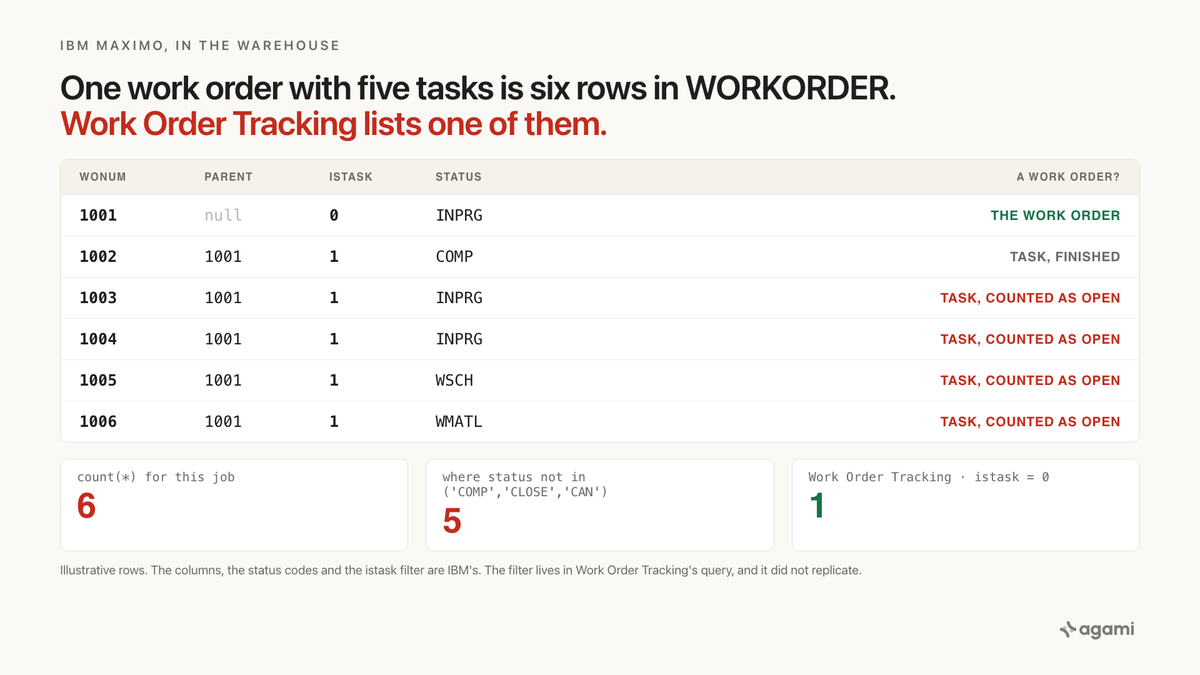
Count open work orders from a replicated IBM Maximo database and the number comes back higher than the list your planners see. Nothing in the result says why. The WORKORDER table holds a row for each work order and a row for each of its tasks, and it keeps closed work as history. Inside Maximo, Work Order Tracking filters those rows out before anyone sees the list. The filter lives in the application, and replication copied only the table.
A maintenance manager wants the open backlog by site before Monday's planning meeting.
Point an AI agent at the replicated schema and it finds the table straight away. WORKORDER has a wonum, a siteid and a status. Drop the finished statuses, group by site, count.
The query runs. Every site gets a number, and every number is plausible. Each one is also higher than the count in Work Order Tracking.
Nothing errors. The agent can't tell anything went wrong, and neither can the person reading the chart.
Before you start
- Maximo's database, replicated. No app-level Maximo connector exists, so you replicate the database Maximo Manage runs on. IBM says its structure "depends on whether the database is Oracle Database, IBM Db2, or Microsoft SQL Server." Fivetran has connectors for Db2 for LUW (in beta), Oracle and SQL Server.
- The permission that costs an afternoon. On Db2, "The database user must have the DBADM authorization." Ask your DBA before you set up the connector.
- On IBM-hosted SaaS, ask whether you have database access at all. Without it, the route out is IBM's REST object structures, which this walkthrough doesn't cover.
- No free database to practise on. IBM's Maximo Application Suite trial gives "14 day access to a MAS demonstration environment". That's the application, so it shows you tasks being created but can't feed a warehouse.
- Casing varies by extract tool. IBM writes
WORKORDERin its data dictionary andworkorderin its SQL. The SQL below uses lowercase.
The question
"How many open work orders does each site have?"
Backlog by site opens most maintenance reviews. It's also the denominator for the next few numbers: the overdue share, labour hours per open job, work orders per asset. It comes out of the warehouse because those numbers need labour, inventory and finance data beside it.
What breaks
Here's the query almost anyone writes first:
select siteid,
       count(*) as open_work_orders
from   workorder
where  status not in ('COMP', 'CLOSE', 'CAN')
group  by siteid
order  by siteid;
Nothing about it is careless. COMP, CLOSE and CAN are the completed, closed and cancelled statuses on IBM's work order statuses page. The table is called WORKORDER, and every row it counts has a work order number.
The count is too high at any site that plans work with tasks. It's also too high wherever someone has edited closed work, or added a status of their own. None of those cases errors. A site whose job plans carry more tasks just looks busier than it is.
Why it breaks
WORKORDER holds more than one kind of row. Three columns tell them apart, istask, woclass and historyflag, and the first query reads none of them.
IBM prints the query Work Order Tracking runs. Its page on correlating events in logs shows a log from the WOTRACK application, dated 2012, loading the list a user at the Bedford site sees:
select * from workorder where (woclass in (select value from synonymdomain where domainid = 'WOCLASS' and maxvalue in ('WORKORDER','WOACTIVITY')) and historyflag = 0 and istask = 0 and siteid = 'BEDFORD')Three predicates stand between the table and the list. Each one answers a question the table name doesn't.
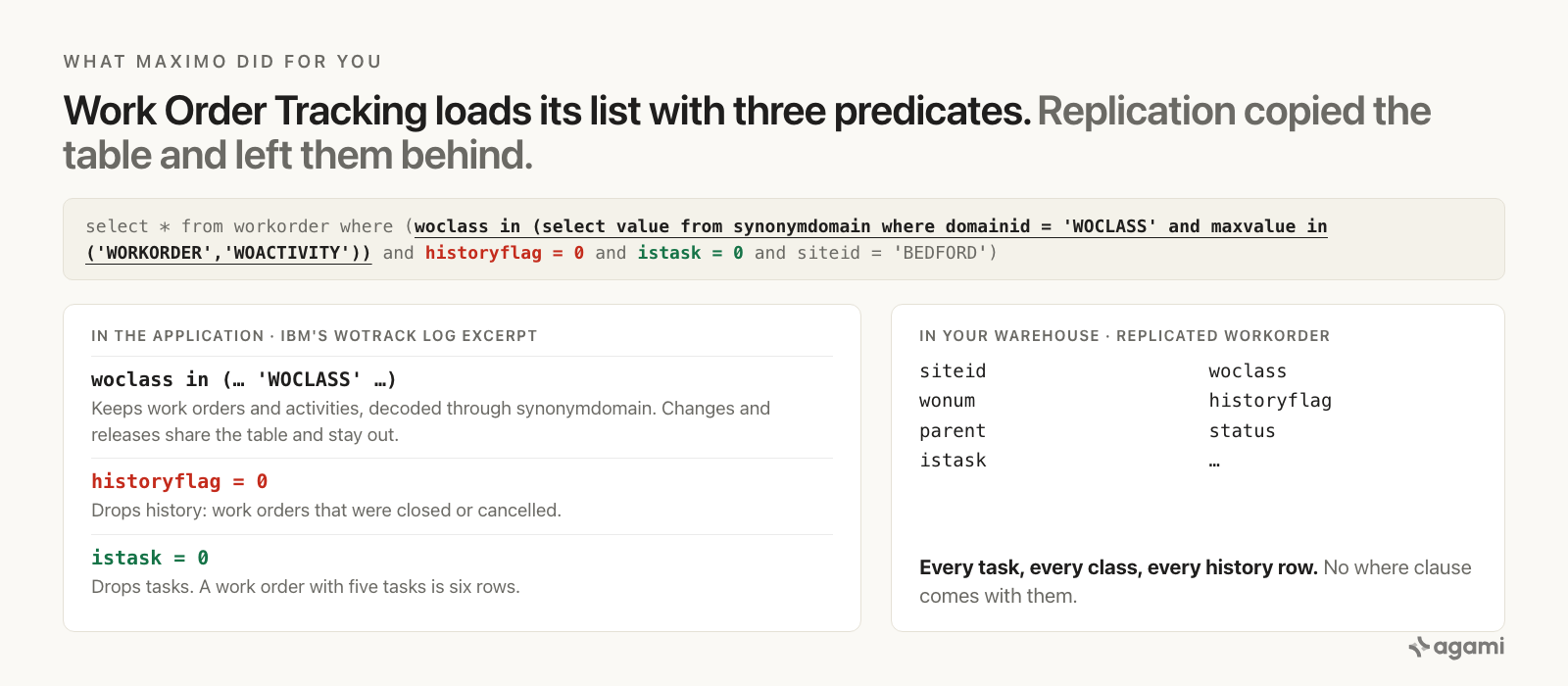
Left, the where clause Work Order Tracking runs, from IBM's own log excerpt. Right, what a replicated WORKORDER carries: every task, every class and every history row, with no where clause attached.
Tasks are rows
On the Plans tab, IBM says, "You also can add child work orders and create tasks for the work order." A task isn't a line item on its work order. It's another row in WORKORDER, with istask = 1.
IBM's work center configuration spells it out in query clauses. istask=0 is "Technician sees only regular work orders. This option is the default." istask=1 is "Technician sees only task work orders." A task points at its work order through parent, and IBM's Maximo conditions page writes that join out: w1.siteid = workorder.siteid and w1.wonum = workorder.parent.
So a work order with five tasks is six rows. IBM's support blog on child work orders and tasks adds that tasks "can each be scheduled, statused and assigned". Each task carries a status of its own, and every task that isn't finished passes the first query's filter as a work order.
Closed work stays in the table
Closing a work order doesn't delete its row. At CLOSE, IBM says, "the work order becomes a history record," and "Canceled work order become history records." historyflag marks them.
The first query drops CLOSE and CAN by name, so most history falls out by luck. Not all of it. The same statuses page lists HISTEDIT: "The work order was edited in history." That code isn't in the exclusion list, so the first query counts history that someone edited as open work. historyflag = 0 removes it without anyone needing to know the code exists.
Status carries a second gap. It's a synonym domain, and IBM's synonym domains page explains: "You cannot add internal values to synonym domains, but you can add synonyms to an internal value and display the synonym to the user." Its example adds WAPPRMAN and WAPPRVP under WAPPR, and "The work manager puts the work order in WAPPRMAN status." A site with its own synonym for a finished status stores that synonym, and a filter on the literal codes misses it.
Four classes share the table
woclass holds the class. IBM lists four: "The work order classes include activity, change, release, and work order." The statuses page says WAPPR "is the default status for work orders that are created in the Work Order Tracking, Changes, Releases, and Activities applications." So a change waiting for approval sits in WORKORDER with a status the first query counts as open.
Work Order Tracking's own query doesn't test woclass against a literal. It decodes it through synonymdomain and keeps two internal values. The 2012 log reads 'WORKORDER','WOACTIVITY'. IBM's current supervisor clauses on the work center page write 'ACTIVITY','WORKORDER'. Check which your version stores before copying either one.
What Maximo did for you
Inside Maximo, a planner never types those predicates. The application applies them.
IBM APAR IZ69969 records what happens when they're missing: "Selecting all records will return tasks and history records." The customer who raised it explained why the default matters. Their users "are not interested in viewing 300,000 records when looking for an active work order". That figure is one customer's, in one support ticket, and it says only that IBM's customers lean on the default.
Replication copies WORKORDER. It doesn't copy a list's where clause, a technician's query clause, or a condition. The table reaches your warehouse with every row, and nothing in it records that anyone ever filtered it.
The shape is familiar from earlier in this series. ServiceNow splits one record across two tables, so its trap was a join nobody declared. Maximo folds several kinds of record into one table, so its trap is a filter nobody declared. Workday's PERSON_NAME is the closest sibling: one table, several populations, and a column to tell them apart. JD Edwards had the same root cause from the other side, a ledger type the application chose for you.
The fix
Pasting three predicates into one query fixes one analysis on one afternoon. The next question, labour hours per open work order or work orders per asset, starts from the same table and makes the same reasonable mistake.
The definition belongs in the semantic model. There, "a work order" is written once, with IBM's documentation as its citation, and every backlog, ratio and per-asset question inherits it.
Start with the joins. As far as the public record shows, none of them is a foreign key in the replicated schema. IBM defines a relationship as "A link between one or more objects that is created by specifying a join statement," and keeps those in MAXRELATIONSHIP: "All relationships defined on objects." The parent join is the one no inference tool will find. It's the same table, with different column names and no constraint.
Every key also carries siteid. IBM's multisite documentation says sites share one database and still "keep their work order and inventory records separate." A work order number is unique within its site, so a join on wonum alone can fan out across sites.
# subject_areas/maximo_work_management/relationships.yaml
relationships:
  - from_table: workorder
    from_column: [parent, siteid]
    to_table: workorder
    to_column: [wonum, siteid]
    relationship: many_to_one
    confidence: confirmed
    review_state: approved
    description: >
      A task or child work order to its parent, on the site-scoped work
      order number. Same table, different column names, no constraint.
      IBM writes it as w1.siteid = workorder.siteid and
      w1.wonum = workorder.parent.
    source: https://www.ibm.com/docs/en/maximo-manage/cd?topic=manager-maximo-conditions

  - from_table: workorder
    from_column: status
    to_table: synonymdomain
    to_column: value
    filter: "synonymdomain.domainid = 'WOSTATUS'"
    relationship: many_to_one
    confidence: confirmed
    review_state: approved
    description: >
      status stores the value users see, which can be a site synonym such
      as WAPPRMAN. maxvalue is the internal value the business logic uses.
      Test statuses on maxvalue, never on the stored literal.
    source: https://www.ibm.com/docs/en/SSLPL8_cd/com.ibm.mbs.doc/domainadm/c_synonym_domain.html
Then the part that carries the weight. The schema can't say which rows are work orders, so the semantic model has to:
entities:
  - name: maximo_work_order
    description: >
      A current work order as Work Order Tracking lists it. WORKORDER also
      holds every task (istask = 1, parent set), rows of other classes,
      and every closed or cancelled record, kept as history
      (historyflag = 1). The selector is the where clause Work Order
      Tracking runs, from IBM's own log excerpt.
    resolves_to:
      table: workorder
      key: [siteid, wonum]
      selector: >
        workorder.woclass IN (SELECT value FROM synonymdomain
                              WHERE domainid = 'WOCLASS'
                              AND maxvalue IN ('WORKORDER', 'ACTIVITY'))
        AND workorder.historyflag = 0
        AND workorder.istask = 0
      forbidden_selectors:
        - >
          A status filter on its own. Counts tasks, changes and releases
          as work orders, and counts HISTEDIT history as open.
    caveats:
      - >
        The activity class is ACTIVITY in IBM's current work center
        clauses and WOACTIVITY in its 2012 log. Confirm against your own
        WOCLASS domain before approving.
      - >
        Tasks carry their own status and assignment. A labour-planning
        question may want them; that is a second entity with istask = 1,
        and it leaves this one unchanged.
    source: https://www.ibm.com/docs/en/maximo-manage/cd?topic=filter-correlation-related-events-in-logs
And the metric binds to the entity rather than the table:
metrics:
  - name: maximo_open_work_orders
    calculation: >
      Current work orders, as Work Order Tracking lists them, whose status
      is not complete, closed or cancelled, by site. Status is tested on
      its internal value, so site synonyms are handled.
    requires_entity: maximo_work_order
    source_tables: [workorder, synonymdomain]
    primary_table: workorder
    other_names: [open work orders, backlog, work order backlog, outstanding work]
    binding: >
      SELECT w.siteid, COUNT(*) AS open_work_orders
      FROM   workorder w
      WHERE  w.woclass IN (SELECT value FROM synonymdomain
                           WHERE domainid = 'WOCLASS'
                           AND maxvalue IN ('WORKORDER', 'ACTIVITY'))
        AND  w.historyflag = 0
        AND  w.istask = 0
        AND  w.status IN (SELECT value FROM synonymdomain
                          WHERE domainid = 'WOSTATUS'
                          AND maxvalue NOT IN ('COMP', 'CLOSE', 'CAN'))
      GROUP  BY w.siteid
    citation: >
      IBM Maximo Manage, correlation of related events in logs (the
      WOTRACK count query); work order statuses; synonym domains.
requires_entity: maximo_work_order is the load-bearing line. A backlog reached by a status filter alone is a path the semantic model has already declared invalid. Every ratio that divides by open work orders inherits the same denominator, so labour per job and work orders per asset agree on how many jobs a site had.
Four decisions in here can't be read from the schema, and a person makes each of them once.
Whether tasks count. For a backlog headline they don't. For technician workload they might, because a task carries its own status and assignment.
Which classes are work. Work Order Tracking keeps work orders and activities, and leaves changes and releases to their own applications. A site that runs most of its work as changes may want a different answer.
Whether COMP is open. The physical work is done and the record isn't closed. Some planners still count that as backlog, and some don't.
Which sites a question spans. Work Order Tracking scoped its query to one site. A backlog for a region or an organization is a list of sites that someone has to write down.
Reproduce it yourself
This runs against your own replicated Maximo database. The trial is the application, and no public sample reaches a warehouse, so it's the only route.
- Run the class query. It shows the internal values behind
woclassin your version. - Run the discovery query. It splits your
WORKORDERrows by class, task flag and history flag. - Run the gap query. Every site it returns is one where the first query and Work Order Tracking disagree.
- Run the corrected query and compare three sites against Work Order Tracking, filtered to the same statuses.
- Declare the relationships, the entity and the metric, then ask "how many open work orders does each site have" in plain English, in the assistant your team already opens, and check the answer against step 4.
The class query.
select value,
       maxvalue
from   synonymdomain
where  domainid in ('WOCLASS', 'WOSTATUS')
order  by domainid, maxvalue, value;
-- Use the WOCLASS maxvalues you see in the entity's selector.
-- A WOSTATUS row whose value differs from its maxvalue is a synonym your site added.
The discovery query.
select woclass,
       istask,
       historyflag,
       count(*) as rows_in_workorder
from   workorder
group  by woclass, istask, historyflag
order  by rows_in_workorder desc;
-- Rows with istask = 0 and historyflag = 0, in the work order and activity classes,
-- are what Work Order Tracking lists. Every other row is what count(*) adds.
The gap query. This is your own version of the number this page can't give you: how far the first query is from Work Order Tracking, site by site.
with counted as (
  select siteid,
         count(*)                                              as first_query,
         sum(case when istask = 0 and historyflag = 0
                   and woclass in (select value from synonymdomain
                                   where  domainid = 'WOCLASS'
                                   and    maxvalue in ('WORKORDER', 'ACTIVITY'))
                  then 1 else 0 end)                           as work_orders,
         sum(case when istask = 1 then 1 else 0 end)           as task_rows,
         sum(case when historyflag = 1 then 1 else 0 end)      as history_rows
  from   workorder
  where  status not in ('COMP', 'CLOSE', 'CAN')
  group  by siteid
)
select siteid,
       first_query,
       work_orders,
       task_rows,
       history_rows,
       first_query - work_orders                               as overcount
from   counted
where  first_query <> work_orders
order  by overcount desc;
overcount is how many extra work orders the first query gives each site. task_rows and history_rows show where they came from, and a task under a history record appears in both. Both sides use the same literal status filter, so the gap is row kinds alone. The class query shows whether synonyms widen it further.
Corrected. Work Order Tracking's where clause, with status decoded:
select w.siteid,
       count(*) as open_work_orders
from   workorder w
where  w.woclass in (select value
                     from   synonymdomain
                     where  domainid = 'WOCLASS'
                     and    maxvalue in ('WORKORDER', 'ACTIVITY'))
  and  w.historyflag = 0
  and  w.istask      = 0
  and  w.status in (select value
                    from   synonymdomain
                    where  domainid = 'WOSTATUS'
                    and    maxvalue not in ('COMP', 'CLOSE', 'CAN'))
group  by w.siteid
order  by w.siteid;
The queries use no dialect-specific functions, so they run as written on Db2, Oracle, SQL Server and Snowflake. Only the casing changes by route.
If a site still disagrees with Work Order Tracking, check two things before the SQL. The replica is only as current as its last sync. And a planner's saved query can narrow the list: the customer behind the APAR said their users "will use a work order from the default query which is by Craft". Compare against the application's defaults, not someone's saved query.
What this looks like in Agami
Everything above holds whoever builds the semantic model. Here's what it is in our product, in the terms this post has used.
The WORKORDER joins are read from your warehouse, and the parent join is declared. Introspection reads the tables, the columns, the keys, and how tables join. A replicated Maximo schema has no constraint behind parent, so the self-join, the siteid in every key and the status decode go in as readable YAML in your repo, with IBM's pages as citations. A validator blocks any write that would break the semantic model.
maximo_work_order is drafted, and a person approves it. Descriptions, entities and metric definitions are drafted from the schema, then your team approves them, and the approval is reversible. The approval is where a planner signs the three predicates, the task decision and the class decision.
The backlog ships once it matches Maximo. Reconciliation takes a screenshot of the counts your planners trust, a CSV export, or numbers pasted into chat, and compares them at a one percent tolerance by default. A mismatch opens the SQL so you can see why. On this table a mismatch points at a task, a class or a status synonym, and finding which one is the useful output.
Every answer returns with its SQL beside it. Whether a backlog came from a status filter alone or from the entity's selector is visible on the answer. Someone who knows Maximo spots a count full of tasks before it reaches the planning meeting.
A validated question becomes a golden test. Once open work orders by site match Maximo, that question and its answer are saved. A change to the semantic model that breaks it isn't promoted.
And the number we don't have. We haven't run this on a replicated Maximo database, so this page has no figure for how many WORKORDER rows are tasks or history, or how far a first-draft backlog drifts. The gap query returns yours. The semantic model also can't decide whether tasks or activities belong in your backlog. It records the answer once a planner gives it.
Frequently asked questions
Are tasks stored in the Maximo WORKORDER table?
Yes. A task is a row in WORKORDER with istask = 1 and parent set to its work order's number. IBM's work center query clauses use istask=0 for "regular work orders" and istask=1 for "task work orders". A work order with five tasks is six rows, and each task carries its own status.
How do I count open work orders from a replicated Maximo database?
Apply the three predicates Work Order Tracking applies: woclass decoded through synonymdomain to the work order and activity classes, historyflag = 0, and istask = 0. Then test status on synonymdomain.maxvalue rather than on the literal in status, and group by siteid. IBM's documentation prints the Work Order Tracking count query in its page on correlating events in logs.
Why doesn't excluding CLOSE and CAN remove closed Maximo work orders?
Most closed and cancelled records do drop out, but not all of them. IBM lists a HISTEDIT status for a work order "edited in history", and a site can add its own synonyms for any internal status. historyflag = 0 removes history records whatever their status says.
What is woclass in the Maximo WORKORDER table?
The work order class. IBM lists four classes: activity, change, release, and work order. Work Order Tracking lists work orders and activities, and the Changes and Releases applications create records in the same table. woclass is a synonym domain, so decode it through synonymdomain before filtering.
Doesn't Maximo Assistant already answer this?
Inside Maximo, it may. IBM describes Maximo Assistant as "an AI assistant available in Maximo Application Suite 9.1 and later" that "can search for and retrieve data" about "assets, work orders, and other records as configured by your administrator." IBM also says it "is not a general-purpose AI assistant or chat bot." It works inside the application, where the list defaults apply. A backlog reported beside labour, inventory and finance data is computed in the warehouse, where those defaults are absent.
References
- Correlation of related events in logs, IBM Maximo Manage. The logged
WOTRACKcount query with its three predicates. The primary source for this post. - Enabling tasks as work orders, IBM Maximo Manage. Technician and supervisor query clauses on
istask,historyflagandwoclass. - Work order statuses, IBM Maximo Manage. The internal statuses, history records,
HISTEDIT, and the applications that create work orders. - Synonym domains, IBM Maximo Manage. Internal values and synonyms, with
WAPPRMANandWAPPRVP. - Maximo conditions, IBM Maximo Manage. The parent join written out.
- Work order classes for job plans and Work order management plans, IBM Maximo Manage. The four classes, and tasks created on the Plans tab.
- IBM APAR IZ69969. "Selecting all records will return tasks and history records."
- When to use Child Work Orders, Tasks and the Multi Asset Location Table, IBM Support. What a task carries.
- Multisite capability, Relational database structure and Data dictionary tables, IBM Maximo Manage. Site-scoped records, supported databases, and
MAXRELATIONSHIP. - Using Maximo Assistant, IBM. What the in-application assistant does.
- Db2 for LUW, Oracle and SQL Server connectors, Fivetran. The replication route.
- Maximo Application Suite trial update, IBM Community. The 14-day demonstration environment.
- agami-core on GitHub
Make your Maximo data answerable
Agami is the trust layer between your AI assistant and your warehouse. It declares which WORKORDER rows are work orders and which statuses are open, so an agent returns a backlog that matches Maximo or says why it cannot.