The Canvas Student Who Doesn't Exist, and the Two Rows for the One Who Does
A Canvas Data 2 enrollments row is a user in a section in a role, and one of them is Test Student. The semantic model holds the class size Canvas computes in code.

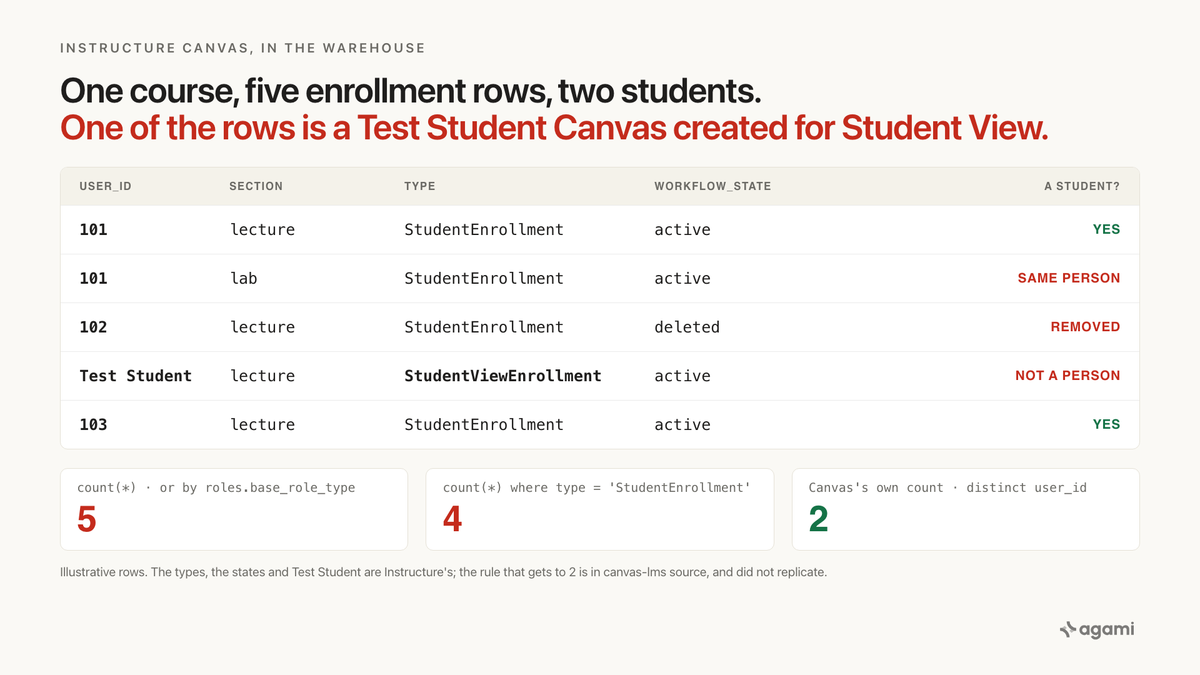
Count students per course from Canvas Data 2 enrollments in your own warehouse and the number comes back larger than the roster, with nothing in the result to say why. The enrollments table holds a row per user, per section, per role, and it keeps the students who left. A course where someone used Student View also holds an enrollment for a user named Test Student, carrying the built-in student role. The class size Canvas shows is computed in application code, and the code did not come with the data.
An institutional research analyst needs class sizes for the fall term.
Point an AI agent at the replicated schema and it finds the table in seconds. enrollments has a course_id, a user_id, and a type column whose values include StudentEnrollment. Filter on the type, join courses for the name, group, count.
The query runs. Every course gets a size. Most are close to the roster the instructor sees, some are a few too high, and nothing marks which.
Ask the same question a different way, students by role, and an intro course gains one more student. Their name is Test Student.
Before you start
- Canvas Data 2 already in a warehouse. Fivetran's Canvas Data 2 by Instructure connector "is specifically designed to sync your Canvas data using the Canvas Data 2 API." Instructure's own DAP CLI writes the same tables into PostgreSQL 16.3+, MySQL 8.2+, or Microsoft SQL Server 2019+.
- An account admin mints the key. Both routes need a Canvas Data 2 client ID and secret, which an account admin generates at identity.instructure.com. The gotcha that costs an afternoon: "Keys that are not verified within 15 minutes are permanently locked."
- There is no free instance for this. Free-for-Teacher closed to new accounts on May 26, 2026, and its replacement, Canvas Lite, launches September 30 without API access tokens. Everything below runs against your institution's own replica.
- Casing varies by extract tool. The DAP CLI keeps Instructure's plural lowercase names (
enrollments). Fivetran's connector lands singular uppercase (ENROLLMENT,COURSE), withUSERSandGROUPSas the plural exceptions. SQL below uses Instructure's names.
The question
"How many students are in each course this term?"
Class size is the denominator of whatever comes next: submission rate, pass rate, the share of a course that opened it in the first week. It has to come out of the warehouse because the rest of the question lives there, in the student information system and the retention data.
What breaks
Here is the query, and it is the first thing anyone writes:
select c.name              as course,
       count(*)            as students
from   enrollments e
join   courses     c on c.id = e.course_id
where  e.type = 'StudentEnrollment'
group  by c.name
order  by 2 desc;
Nothing about it is careless. type is the only column on the table that says student. The join key is typed as a reference in Instructure's dictionary. Every row it counts is a real enrollment of a real person.
The count is too high for any course where a student sits in two sections, holds two student-type roles, or was removed, concluded or deactivated during the term. None of those cases errors, and none of them looks odd in the output.
An agent that reads the dictionary's roles table first writes a version that looks more careful, and it counts one more row:
select c.name              as course,
       count(*)            as students
from   enrollments e
join   roles       r on r.id = e.role_id
join   courses     c on c.id = e.course_id
where  r.base_role_type = 'StudentEnrollment'
group  by c.name
order  by 2 desc;
Selecting students by their role reads like the principled choice. roles has a name for every custom role a college creates, and the Canvas Data 2 dictionary says of base_role_type: "For course-level roles, it is an enrollment type." This version also picks up the test student, for a reason that is only visible in Canvas's source.
Why it breaks
Instructure states the grain of enrollments in the second paragraph of the table's entry in the Canvas Data 2 dictionary:
"An enrollment represents a user's association with a specific course and section. There may be multiple records associated with acourse_idanduser_idcombination (records are unique on:course_id,user_id,course_section_id,role_id,workflow_state,associated_user_id)."
Six columns in the key, and the question needed two. Each of the other four is a way the row count drifts away from the number of people.
Section. The dictionary's course_sections entry says why it is in the key: "When users are enrolled in a course, they are actually enrolled in one of the sections of that course." A student in a lecture section and a lab section of the same course has two enrollments.
Role. role_id is in the key, and type is described only as "The base enrollment type." Two custom roles built on the student type are two rows with the same type.
State. The types page lists seven lifecycle states, and three describe students who are gone while their rows stay. deleted is "enrollment removed from course (soft-deleted, so users with admin permissions can include in reports)". completed is "manually marked as completed". inactive is a "hard state (i.e., tuition not paid or user drops course)". Instructure's data formats page adds that a soft delete "is equivalent to an update, and is denoted with a U", so a removal reaches your warehouse as an ordinary row with a new state.
Observed user. associated_user_id "Will be NULL unless type is ObserverEnrollment." Parents and advisors who observe a student get rows of their own, with a type the filter already drops.
Canvas's own database is a little tighter than the dictionary. The application's initial migration declares two unique indexes on enrollments: one on user_id, type, role_id and course_section_id, and the same plus associated_user_id for observers. workflow_state is in neither, which suggests a student who is removed and added back reuses the old row. That is an inference from the index, and Instructure does not document it. Neither the dictionary's key nor the database's index is course_id and user_id alone, and that is the only point that matters for a class size.
The student who doesn't exist
The type column has six named values. Five are the roles you would expect: student, teacher, TA, designer, observer. The sixth, per the types page, is StudentViewEnrollment: "this role is typically used by course designers or instructors to view the course as a student would see it."
Student View runs as a real user. The Courses API documents the endpoint behind it: "Returns information for a test student in this course. Creates a test student if one does not already exist for the course." The open-source application shows what gets created. In app/models/course.rb, find_or_create_student_view_student builds a User named "Test Student", gives it a login, and enrolls it. In app/models/enrollment.rb, get_built_in_role_for_type gives a StudentViewEnrollment the built-in StudentEnrollment role, and the readable label for the type is the same word Canvas uses for a real student: "Student".
So the test student has a users row, an enrollments row, the student role, and the student label. The one column that sets it apart is type. Filter on type and it drops out. Reach students through roles, or count every row in the course, and it is in your class size.
What Canvas did for you
Inside Canvas, nobody has needed a DISTINCT to see a class size. The Courses API offers total_students, which "Returns an integer for the total amount of active and invited students." The application computes it in one line of lib/api/v1/course.rb:
hash["total_students"] = course.student_count || course.student_enrollments.not_fake.distinct.count(:user_id) if includes.include?("total_students")Each clause is one part of the trap, defined elsewhere in the same codebase:
student_enrollments, inapp/models/course.rb, isenrollments.workflow_state NOT IN ('rejected', 'completed', 'deleted', 'inactive') AND enrollments.type IN ('StudentEnrollment', 'StudentViewEnrollment'). That is the state exclusion, and it lets the test student in.not_fake, inapp/models/enrollment.rb, iswhere("enrollments.type<>'StudentViewEnrollment'"). That takes the test student back out, and it has to be applied on top because the association above admitted it..distinct.count(:user_id)collapses sections and roles to one person.
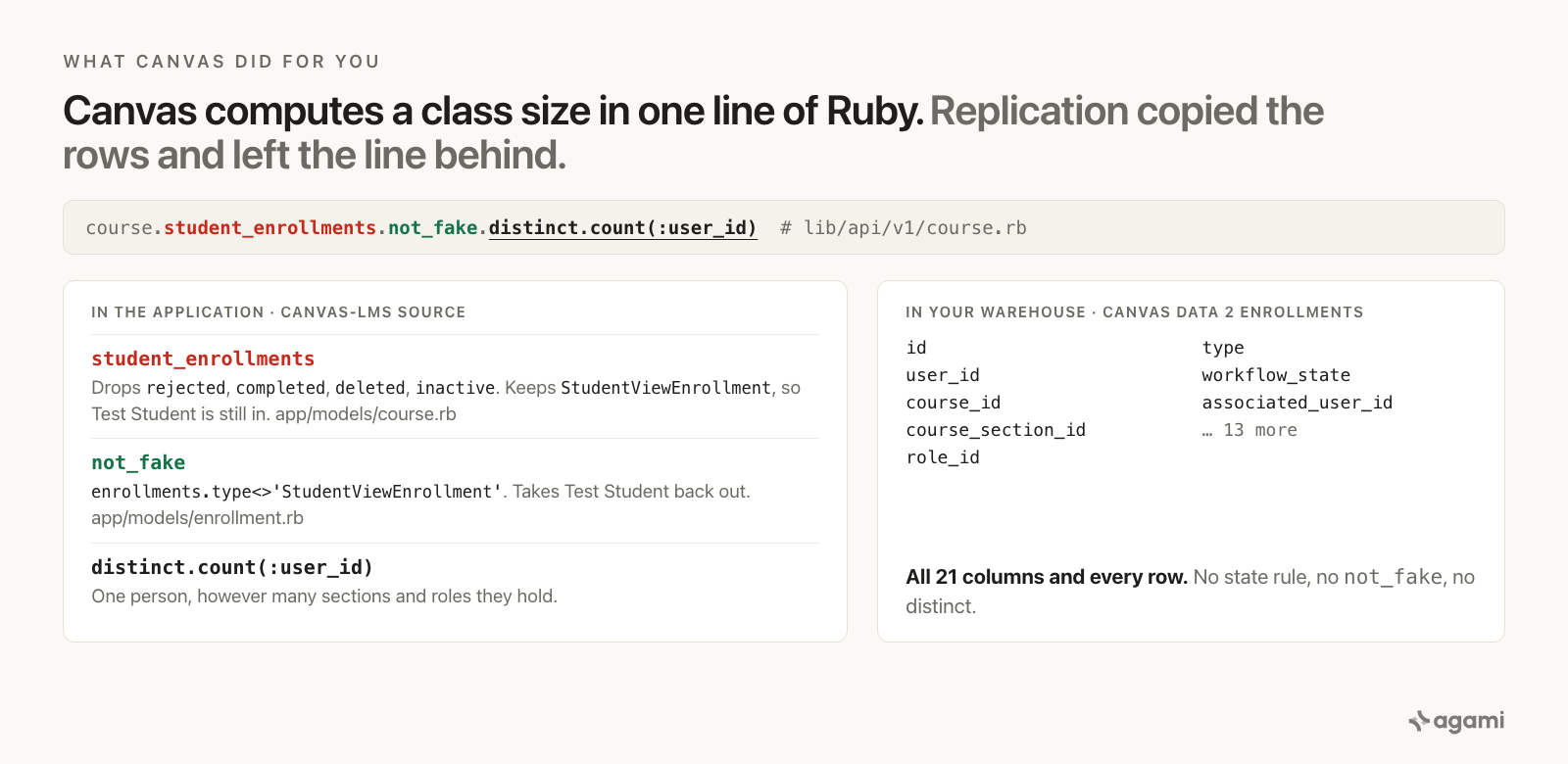
The line Canvas runs, taken apart. Left, the three rules in canvas-lms source. Right, what a Canvas Data 2 replica carries: every row and every column of enrollments, and none of the rules.
Replication copied the rows. It did not copy the Ruby, the scope names, or the decision about which states count.
There is a small sign that the definition lives in code and nowhere else. The API docs say total_students counts "active and invited" students. The code's exclusion list leaves three states in: active, invited, and creation_pending, which the types page describes as "created but user hasn't logged in yet." Instructure's docs and Instructure's code disagree on one state, and the warehouse carries neither.
The code also has more than one answer. The next lines of course.rb define student_enrollments_including_completed, which keeps concluded students, and admin_visible_student_enrollments, which keeps deactivated ones. Canvas counts students three ways depending on who is asking, and each way is a line of Ruby.
The same shape has come up before in this series. Workday's PERSON_NAME holds people from unrelated record sets and marks them with a type column. Canvas's type column looks like that trap, and filtering it is the easy half; the row underneath is still a user in a section in a role, and only a DISTINCT collapses that. Ellucian Banner, from the same sector, has the opposite problem: one row per change to a student's record and no row saying when a major stopped. And the Salesforce fan trap needs a child table to multiply through. Canvas's enrollment table multiplies on its own.
The fix
Changing count(*) to count(distinct user_id) fixes one query for one analyst on one afternoon. The next person to ask about pass rates starts from the same table, finds the same type column, and gets the same inflated denominator by the same reasonable route.
The definition belongs in the semantic model, where "a student in a course" is written once, with Instructure's dictionary and Canvas's source as its citations, and every class-size, rate and roster question inherits it.
The joins go in first, and they are the easy part. Every foreign key on enrollments is typed as a reference in the Canvas Data 2 dictionary, so a tool that reads the schema finds all of them. What no join can say is that user_id repeats inside a course by design, so the relationship carries that sentence.
# subject_areas/canvas_enrollment/relationships.yaml
relationships:
  - from_table: enrollments
    from_column: user_id
    to_table: users
    to_column: id
    relationship: many_to_one
    confidence: confirmed
    review_state: approved
    description: >
      Many enrollments per user, and many per user within one course: one per
      section, one per role, one per observed user, with removed, concluded
      and deactivated rows kept. Never count enrollment rows and call the
      result students.
    source: https://developerdocs.instructure.com/services/dap/dataset/dataset-namespaces/dataset-canvas

  - from_table: enrollments
    from_column: course_id
    to_table: courses
    to_column: id
    relationship: many_to_one
    confidence: confirmed
    review_state: approved
    source: https://developerdocs.instructure.com/services/dap/dataset/dataset-namespaces/dataset-canvas

  - from_table: enrollments
    from_column: course_section_id
    to_table: course_sections
    to_column: id
    relationship: many_to_one
    confidence: confirmed
    review_state: approved
    description: >
      "When users are enrolled in a course, they are actually enrolled in one
      of the sections of that course." A student in two sections of a course
      has two enrollment rows.
    source: https://developerdocs.instructure.com/services/dap/dataset/dataset-namespaces/dataset-canvas

  - from_table: enrollments
    from_column: role_id
    to_table: roles
    to_column: id
    relationship: many_to_one
    confidence: confirmed
    review_state: approved
    description: >
      role_id is in the unique key; type is only the base enrollment type.
      Canvas gives a StudentViewEnrollment the built-in StudentEnrollment
      role (Enrollment.get_built_in_role_for_type), so filtering on
      roles.base_role_type counts the test student.
    source: https://github.com/instructure/canvas-lms/blob/master/app/models/enrollment.rb

  - from_table: enrollment_states
    from_column: enrollment_id
    to_table: enrollments
    to_column: id
    relationship: one_to_one
    confidence: confirmed
    review_state: approved
    description: >
      enrollment_id is the primary key of enrollment_states. It holds the
      date-driven state; enrollments.workflow_state holds what a person did.
      They differ once a term's dates have passed.
    source: https://developerdocs.instructure.com/services/dap/dataset/dataset-namespaces/dataset-canvas
Then the part that carries the weight. The schema can't say who counts as a student, so the semantic model has to:
entities:
  - name: canvas_student_in_course
    description: >
      A person who counts as a student in a Canvas course. The enrollments
      table is one row per user per section per role per observed user, and
      it keeps removed (deleted), concluded (completed) and deactivated
      (inactive) rows. One of its six named types, StudentViewEnrollment, is
      the Test Student that Student View creates, and it carries the built-in
      student role. The class size Canvas shows is distinct user_id over
      student rows, minus four states, minus the test student, and that
      definition lives in canvas-lms source.
    resolves_to:
      table: enrollments
      grain: one row per user per section per role per observed user
      selector: >
        enrollments.type = 'StudentEnrollment'
        AND enrollments.workflow_state NOT IN ('rejected','completed','deleted','inactive')
      count_as: COUNT(DISTINCT enrollments.user_id)
      forbidden_selectors:
        - >
          COUNT(*) on enrollments, with or without a type filter. Counts
          sections, roles and removed students as students.
        - >
          roles.base_role_type = 'StudentEnrollment' without a type filter.
          Admits the Student View test student.
    caveats:
      - >
        Which states count is a policy. This selector copies Canvas's
        student_enrollments association, which keeps active, invited and
        creation_pending. Canvas's own code also defines a version that keeps
        completed and one that keeps inactive.
      - >
        For "active today" by term dates, join enrollment_states and use its
        state column, which is what Canvas's active_by_date scope reads.
      - >
        On the Fivetran Canvas Data 2 route the table lands as ENROLLMENT.
        Same rows, different name.
    source: https://github.com/instructure/canvas-lms/blob/master/lib/api/v1/course.rb
And the metric binds to the entity rather than to the table:
metrics:
  - name: canvas_students_per_course
    calculation: >
      Distinct people holding a live student enrollment in the course, by
      Canvas's own definition: type is StudentEnrollment, and rejected,
      completed, deleted and inactive enrollments are excluded.
    requires_entity: canvas_student_in_course
    source_tables: [enrollments, courses]
    primary_table: enrollments
    other_names: [students per course, class size, course headcount, enrollment count]
    binding: >
      SELECT c.name AS course, COUNT(DISTINCT e.user_id) AS students
      FROM   enrollments e
      JOIN   courses c ON c.id = e.course_id
      WHERE  e.type = 'StudentEnrollment'
        AND  e.workflow_state NOT IN ('rejected','completed','deleted','inactive')
      GROUP  BY c.name
    citation: >
      canvas-lms lib/api/v1/course.rb (total_students), app/models/course.rb
      (student_enrollments), app/models/enrollment.rb (not_fake).
requires_entity: canvas_student_in_course is the load-bearing line. It means a class size reached by counting rows, or by going through roles, is a path the semantic model has already declared invalid. Every rate that divides by class size inherits the same denominator, so a pass rate and a submission rate agree on how many students a course had.
Five decisions in here can't be read from the schema, and a person makes each of them once.
Which states count as enrolled. Canvas's own code answers three ways. A census-date count, a concluded-term count and a "who can open the course today" count are three different selectors, and only the person asking knows which one the question means.
Manual state or date state. enrollments.workflow_state records what a person did. enrollment_states.state records what the dates say, with a state_is_current flag that "Indicates if the enrollment state is current or needs recalculation." A student in a finished term can be active in one and completed in the other.
Custom roles. Whether a custom role built on the student type counts as a student is the institution's call. roles.name shows what the college called each one.
Cross-listed sections. course_sections.nonxlist_course_id is "The unique identifier of the original course of a cross-listed section." Whether a cross-listed student belongs to the host course or the original one is a reporting rule.
Users from other instances. The dictionary notes that "Some users are from other Canvas instances (id column being > 10000000000000)." In a consortium estate, someone decides whether they count at all.
Reproduce it yourself
This runs against your institution's own Canvas Data 2 replica, which is the only route there is for Canvas.
- Run the discovery query. It shows which types and states your replica holds, and how many people sit behind the rows.
- Run the gap query. Every course it returns is one where the obvious count and Canvas's count disagree.
- Run the corrected query for the same term.
- Compare three courses against Canvas.
GET /api/v1/courses/:idwithinclude[]=total_studentsreturns Canvas's own number for a course. - Declare the relationships, the entity and the metric, then ask "how many students are in each course this term" in plain English, in the assistant your team already opens, and check the answer against step 4.
The discovery query.
select e.type,
       e.workflow_state,
       count(*)                   as enrollment_rows,
       count(distinct e.user_id)  as people
from   enrollments e
group  by e.type, e.workflow_state
order  by e.type, e.workflow_state;
-- Any StudentViewEnrollment row is a Test Student.
-- Any gap between enrollment_rows and people is sections, roles or observers.
The gap query. This is your own version of the number this page can't give you: how far the obvious count is from Canvas's, course by course.
with per_course as (
  select c.id                                                         as course_id,
         c.name                                                       as course,
         count(*)                                                     as enrollment_rows,
         sum(case when e.type = 'StudentEnrollment' then 1 else 0 end)     as student_rows,
         sum(case when e.type = 'StudentViewEnrollment' then 1 else 0 end) as test_students,
         count(distinct case
                 when e.type = 'StudentEnrollment'
                  and e.workflow_state not in ('rejected','completed','deleted','inactive')
                 then e.user_id end)                                  as students
  from   enrollments e
  join   courses     c on c.id = e.course_id
  group  by c.id, c.name
)
select course_id,
       course,
       enrollment_rows,
       student_rows,
       test_students,
       students,
       student_rows - students                                        as overcount
from   per_course
where  student_rows <> students
   or  test_students > 0
order  by overcount desc;
overcount is how many extra students the obvious query gives that course, and test_students is how many Test Students a row count would add on top. Run it before trusting any per-course rate.
Corrected. Canvas's own definition, in SQL:
select c.name                        as course,
       count(distinct e.user_id)     as students
from   enrollments e
join   courses     c on c.id = e.course_id
where  e.type = 'StudentEnrollment'
  and  e.workflow_state not in ('rejected', 'completed', 'deleted', 'inactive')
group  by c.name
order  by 2 desc;
To scope it to a term, join courses.enrollment_term_id to enrollment_terms and filter on its name. The queries group by named columns and use no dialect-specific functions, so they run as written on PostgreSQL, MySQL, SQL Server and Snowflake; only the table casing changes by route.
If a course still disagrees with total_students, look at freshness before the SQL. The API reads the live application, and the replica is as current as its last sync. Instructure's datasets page also says the data "is a best effort attempt, and is not guaranteed to be complete or wholly accurate," and is meant "for rollups and analysis in the aggregate." Compare a handful of courses, and treat one stubborn course as a sync question first.
What this looks like in Agami
Everything above holds whoever builds the semantic model. Here is what it is in our product, in the terms this post has used.
The enrollments joins are read from your warehouse, and the student is declared. Introspection reads the tables, the columns, the keys, and how tables join, so the typed references in a Canvas Data 2 replica arrive intact. Nothing in that structure says user_id repeats inside a course, so the relationship descriptions and the entity go in as readable YAML in your repo, with Instructure's dictionary and canvas-lms as citations, and a validator blocks any write that would break the semantic model.
canvas_student_in_course is drafted, and a person approves it. Descriptions, entities and metric definitions are drafted from the schema, then your team approves them, and the approval is reversible. The approval is where someone signs the selector, the COUNT(DISTINCT user_id), the four excluded states and the forbidden route through roles.base_role_type.
Class sizes ship once they match Canvas. Reconciliation takes a screenshot of the report your registrar trusts, a CSV export of total_students for a sample of courses, or numbers pasted into chat, and compares them at a one percent tolerance by default. A mismatch opens the SQL so you can see why. On this table a mismatch points at a state decision or a cross-listed section, and finding it is the useful output.
Every answer returns with its SQL beside it. Whether a class size came from count(*), from a route through roles, or from the entity's distinct count is visible on the answer, so a reviewer who knows the enrollment rules sees a Test Student in a headcount before the provost does.
A validated question becomes a golden test. Once students per course matches Canvas for one term, that question and its answer are saved, and a change to the semantic model that breaks it is not promoted.
And the number we don't have. We haven't run this on a Canvas Data 2 replica, so there is no figure here for how far a naive class size drifts, how many courses hold a Test Student, or what share of students sit in two sections. The gap query returns yours. The semantic model also can't pick your census rule: it records which states count once a person says so, and it can't tell which extract route built your warehouse until someone reads the pipeline.
Frequently asked questions
How do I count students per course in Canvas Data 2?
Count distinct user_id from enrollments where type = 'StudentEnrollment' and workflow_state is not rejected, completed, deleted or inactive, grouped by course_id. That is the definition Canvas itself uses for total_students in lib/api/v1/course.rb: student_enrollments.not_fake.distinct.count(:user_id). Counting rows instead counts a student once per section and per role, and keeps removed students.
Why does the Canvas enrollments table have duplicate students?
Because an enrollment is a user in a section in a role. Instructure's Canvas Data 2 dictionary says there "may be multiple records associated with a course_id and user_id combination" and that records are unique on course, user, section, role, state and associated user. A student in two sections of a course, or holding two roles built on the student type, has two rows by design.
What is StudentViewEnrollment, and who is Test Student?
The enrollment Canvas creates when someone uses Student View. Instructure's types page describes it as a role "typically used by course designers or instructors to view the course as a student would see it." In canvas-lms source the user is named "Test Student", and its enrollment gets the built-in student role, so a query that finds students through the roles table counts it. Filtering on enrollments.type excludes it.
Which enrollment states should I exclude when counting Canvas students?
Canvas's student_enrollments association excludes rejected, completed, deleted and inactive, and keeps active, invited and creation_pending. Its own code also defines a variant that keeps completed and one that keeps inactive, so the right list depends on whether the question is a census, a concluded term, or who can open the course today. Decide once and record it in the semantic model.
Doesn't Instructure's Ask Your Data already answer this?
Inside Canvas, for admins, it may. Instructure describes Ask Your Data as "an AI-powered query tool that enables account admins to ask and answer questions in the natural language," and says Intelligent Insights "is a legacy add-on product" whose Ask Your Data feature is "now available in Canvas Next." It runs on Canvas's data inside Canvas. The class size a college reports next to its student information system and retention data is computed in the warehouse, where the rules in canvas-lms source are absent.
References
- Canvas Data 2, canvas namespace, Instructure Developer Documentation. The
enrollmentsuniqueness sentence, thecourse_sectionssentence, thetype,role_id,associated_user_id,roles.base_role_type,nonxlist_course_idandusersdescriptions. The primary source for this post. - Canvas Data 2, canvas types, Instructure Developer Documentation. The six enrollment types with the
StudentViewEnrollmentdescription, and the seven workflow states. - canvas-lms,
lib/api/v1/course.rb. Thetotal_studentsline. - canvas-lms,
app/models/course.rb.student_enrollments, its two variants, andfind_or_create_student_view_student. - canvas-lms,
app/models/enrollment.rb.not_fake,get_built_in_role_for_type,active_by_date, and the type labels. - canvas-lms,
db/migrate/20101210192618_init_canvas_db.rb. The two unique indexes onenrollments. - Courses API, Canvas LMS REST API documentation.
total_studentsand the test student endpoint. - Data formats, Instructure Developer Documentation and Datasets. Soft deletes as updates, and the best-effort disclaimer.
- DAP CLI, Instructure Developer Documentation. Supported databases and install.
- Canvas Data 2 by Instructure connector, Fivetran. Landed table names via the capture-deletes list.
- How do I generate a Canvas Data 2 API key?, Instructure Community. Admin-only keys and the 15-minute verification.
- Canvas Free for Teacher FAQ, Instructure Community and Instructure announces Canvas Lite, PR Newswire. Why there is no free route.
- What is Intelligent Insights?, Instructure Community. Ask Your Data, in Instructure's words.
- agami-core on GitHub
Make your Canvas data answerable
Agami is the trust layer between your AI assistant and your warehouse. It declares who counts as a student in a course and which enrollment states count, so an agent returns a class size that matches Canvas or says why it cannot.