The Kantata Link Table That Counts the Same Hour Once Per Group
Kantata has no client table. A client is a group with a box ticked, a project can sit in several, and the obvious join counts its hours under each. The semantic model declares the path that totals.

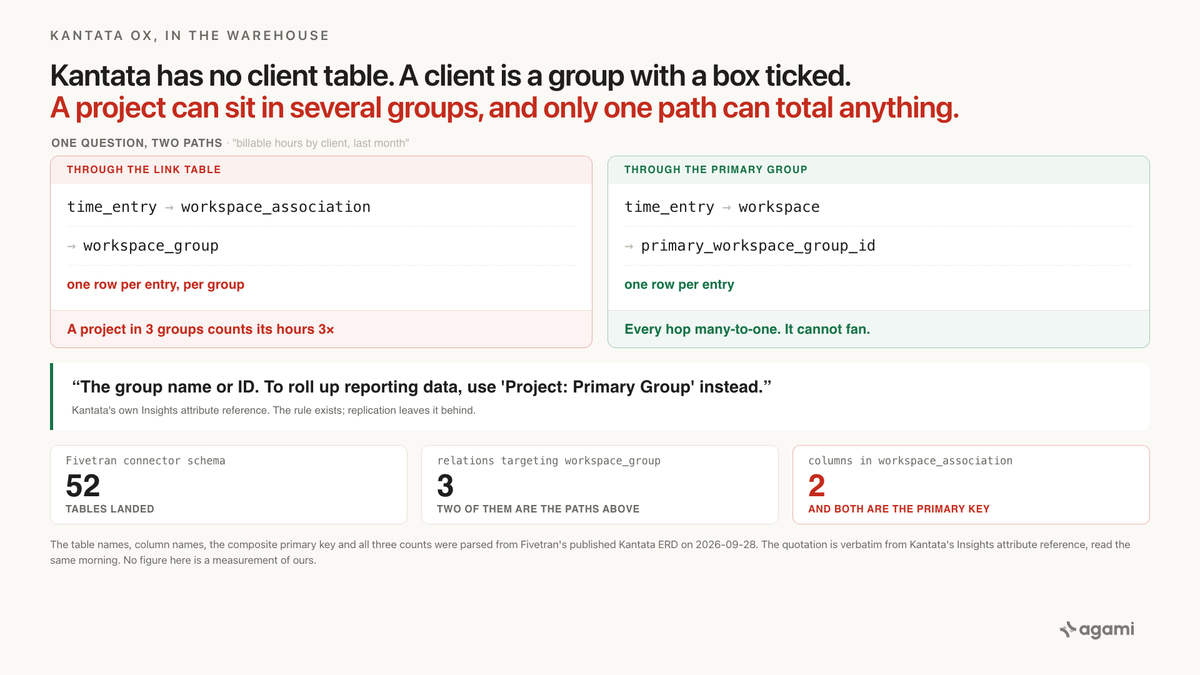
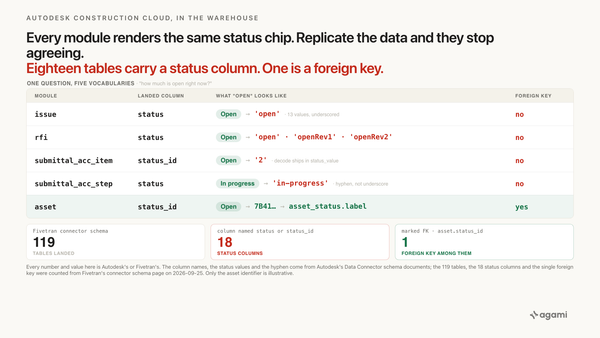
Kantata OX has no client table. A client is a workspace_group row with a box ticked, and that same table holds your departments, your regions, and your industries. A project can sit in as many of them as somebody wants. The table that records which ones has exactly two columns, and both of them are the primary key.
A partner wants one number before a renewal conversation: billable hours by client, last month.
Query your Kantata data with AI against a replicated warehouse and the schema looks helpful. The Fivetran connector lands 52 tables. One is called time_entry, one is called workspace, one is called workspace_group, and one called workspace_association sits between the last two with a key pointing at each. Four tables, three joins, one GROUP BY. Any competent agent writes that query in a second, and so would you.
It returns a row per client. Each row looks reasonable. Add the rows up and you get more hours than anybody logged.
Before you start
- Kantata OX replicated through the Fivetran connector, which was renamed from Mavenlink in August 2024. Its release notes go back to 2018, and its URLs still say
mavenlink. - No free instance to practise on. Kantata's pricing page is a contact form, and the API needs an account. This post runs against an extract your employer already has.
- Connect as an account administrator. Authorization redirects to the Kantata login page, so the sync runs as whoever signs in, and plenty of fields are permission-dependent. The setup guide's own prerequisite is short: "To connect Kantata to Fivetran, you need a Kantata account. To capture deletes in a more efficient way, you need to enable the Recent History add-on."
- Keep
workspaceandworkspace_groupin the sync. You can exclude tables, with one exception Fivetran states plainly: "You can exclude any table except the USER table." The fix below needs both group tables. - Table names vary by extract route and destination. Fivetran's ERD lists
time_entryandworkspace_groupin lower-case singular. Its overview page writesTIME_ENTRY. Its release notes writeTIME_ENTRIES. The SQL below uses the ERD's names, so check yours first. - The readable schema lives at machine-facing URLs. Fivetran publishes the connector schema with the ERD embedded as JSON, and Kantata publishes its whole API as a Swagger file. The
developer.kantata.comportal returns a navigation shell to a fetch and never contains a field name, so it won't help you here.
The question
"Billable hours by client, last month."
At a consultancy this is the question. It sets the invoice, it feeds utilization, and it's the first slide of every account review. A delivery lead asks it weekly.
It comes out of the warehouse rather than out of Kantata because it has to sit beside the CRM and the general ledger. Nobody wants hours in one tool, bookings in another, and revenue in a third.
What breaks
Here's the query almost anyone writes first, agent or human.
SELECT g.name                          AS client,
       SUM(te.time_in_minutes) / 60.0  AS billable_hours
FROM   time_entry te
JOIN   workspace_association wa ON wa.workspace_id = te.workspace_id
JOIN   workspace_group g        ON g.id = wa.workspace_group_id
WHERE  te.billable
  AND  te.date_performed >= DATE_TRUNC('month', CURRENT_DATE - INTERVAL '1 month')
  AND  te.date_performed <  DATE_TRUNC('month', CURRENT_DATE)
GROUP  BY g.name
ORDER  BY billable_hours DESC;
Nothing about it is careless. The table names lead you straight here. workspace_association is the only table in the schema that connects a project to more than one group, and a reader who wants hours grouped by client naturally reaches for the table that has all the groups in it.
Both joins are honestly many-to-one. Neither one fans out on its own. It's the pair of them, composed, that does the damage.
A time entry belongs to one project. That project belongs to however many groups somebody filed it under. So the join produces one row per time entry per group, and every one of those rows carries the entry's full time_in_minutes into the sum.
A project filed under a client, a department, and a region contributes its hours three times, under three different names, in a column the question called "client".
Nothing errors. No row is duplicated in a way a spot check would catch, because each group's total is internally consistent and looks exactly like a client total should look. The failure only surfaces when somebody adds the column up and compares it with the hours actually logged, which is not a thing anybody does when the question was "hours by client".
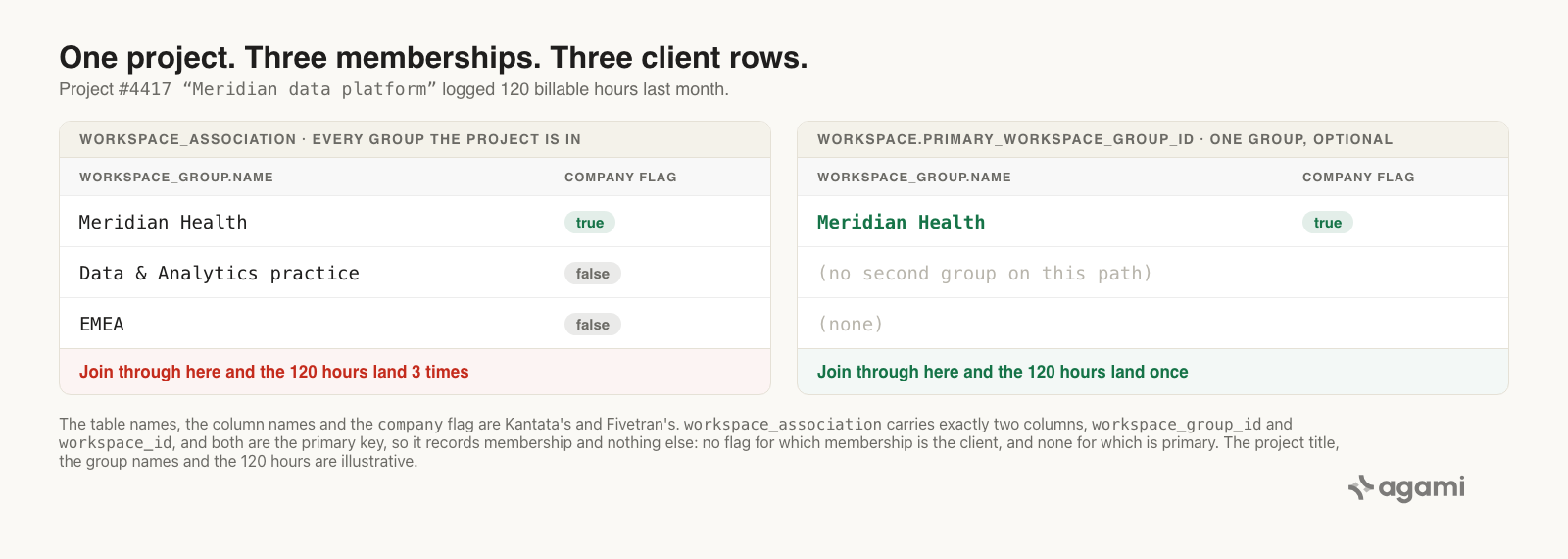
Two paths from a project to a group. Only the left one can total anything. Table names, column names, and the composite primary key are Fivetran's, parsed from its published Kantata ERD; the group names are illustrative.
Why it breaks
Four things are true at once, and the query above reads none of them.
There is no client table
Kantata never models a client as its own object. A client is a workspace_group row with a flag set. Kantata's API describes the column in five words: company is "Whether the group represents a company." Its Insights reference says the same thing from the reporting side, calling Group: Company "A flag that indicates if a group represents a company (true or false)."
The same table holds everything else you slice projects by. Kantata says so twice, in two different documents. From the Groups article: "Groups make it simple to organize and categorize your data by client, department, region name, and more." From Project Settings Overview: "While a Group is commonly used to capture Client information for a project, you can use them in a variety of ways, such as collecting data related to a specific industry or region you're working in."
So filtering on g.company is necessary and it isn't sufficient. It removes the department and the region. It does not remove a second client group, and Kantata's project side panel lists clients in the plural.
The link table records membership and nothing else
workspace_association has two columns. Both are the primary key, and both are foreign keys:
| Column | Primary key | Foreign key | Points at |
|---|---|---|---|
workspace_group_id |
yes | yes | workspace_group.id |
workspace_id |
yes | yes | workspace.id |
That's the whole table. There's no column saying which of a project's memberships is the client one, no column saying which is primary, and no column saying when the membership started. It records that a project is in a group. Anything else you want to know about that relationship isn't in there to be read.
Compare it with HubSpot, where the equivalent link row carries type_id and the primary company is the one with type_id = 5. On HubSpot the fix is a filter on the link table. Here you can't filter your way out, because the distinguishing fact was never written down on the row.
Two paths run from a project to a group
Across all 95 relations Fivetran declares, exactly three point at workspace_group. One comes from estimate. The other two are the two paths, and they're different relationships wearing the same clothes:
workspace.primary_workspace_group_id     ->  workspace_group.id   many_to_one, optional
workspace_association.workspace_group_id ->  workspace_group.id   many_to_one
Kantata's API names them plainly on the create-project body. primary_workspace_group_id is "The ID of the group that is the primary group for the project." workspace_group_ids is "The IDs of the groups the project belongs to." In the interface they're two different drop-downs: you "select an option from the Select Primary Group drop-down menu", then "In the Select Groups drop-down menu, select each secondary group that you want to add the project to."
One holds a single group. The other holds all of them. In the warehouse they arrive as two ordinary foreign key columns with nothing to say which is which.
The primary one is also optional. From the Groups article: "Once you've created a group, you have the option to set it as the Primary Group for a project." That matters for the fix, because projects without one need somewhere to go.
What the application did for you
Kantata already knows about this trap. It documents it, in its own attribute reference, as advice to its own report writers.
Two entries sit near each other in Insights Attributes, Metrics, and Facts:
Group: Name. The group name or ID. To roll up reporting data, use 'Project: Primary Group' instead.
Project: Primary Group. The primary group set to a project. Unlike the 'Group' attribute, this attribute allows you to roll up data by group.
That's the rule, written by the vendor, in a document updated last month. Build the report inside Kantata and the tool steers you onto the safe attribute and warns you off the other one. The Groups article gives the reason the primary group exists at all: setting one "will enhance your custom reporting in Insights even further, such as by calculating hours or placing it in tables."
Replication copies both paths into your warehouse as two foreign keys of equal standing. The warning isn't a column, so it doesn't come along.
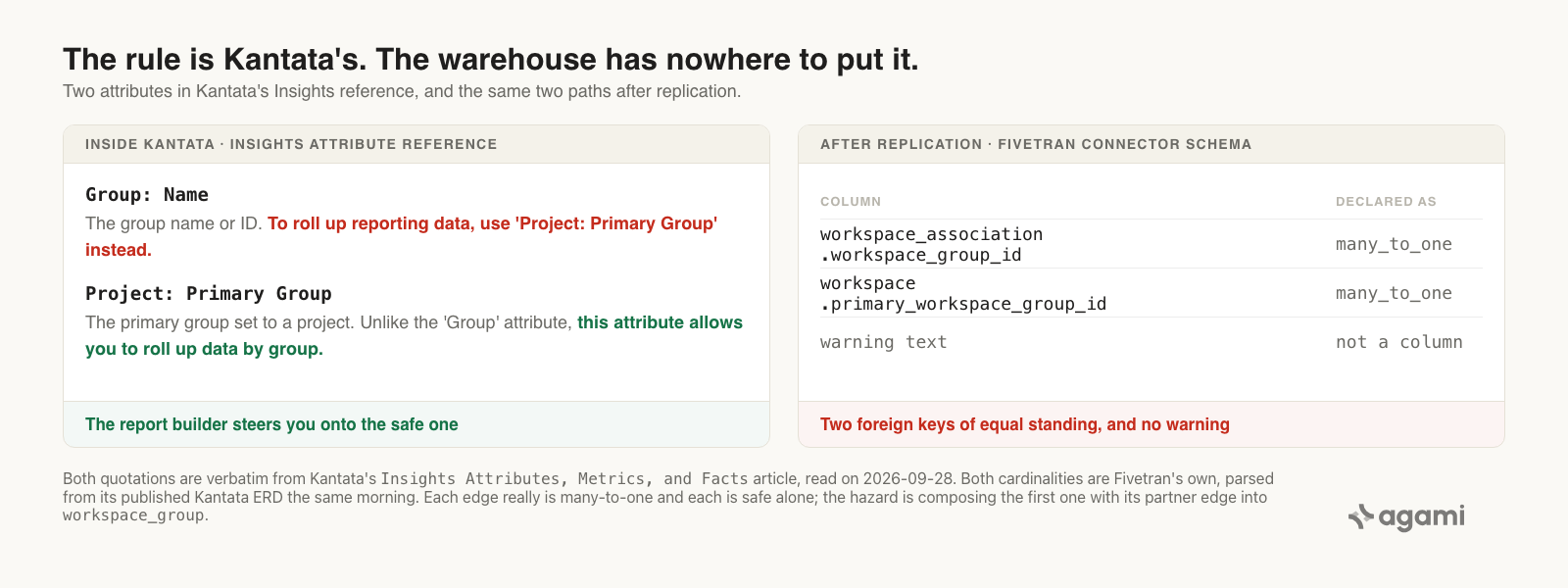
The rule exists, and it lives in a document rather than in the schema. Both quotations are verbatim from Kantata's Insights attribute reference; both cardinalities are Fivetran's own.
One date makes this sharper. Fivetran's release notes record that primary_workspace_group_id arrived in April 2024: "We have added a new column, primary_workspace_group_id, to the WORKSPACE table." Before that, the link table was the only path from a project to a group in this connector's schema. Any dashboard built on a Kantata extract older than that couldn't have taken the safe path, because the safe path hadn't landed yet.
The fix
Total through the project's one primary group. That's the path Kantata's own report builder uses, and it's the only one that can't fan.
SELECT COALESCE(g.name, '(no primary group)') AS client,
       g.company                              AS is_client_group,
       SUM(te.time_in_minutes) / 60.0         AS billable_hours
FROM   time_entry te
JOIN   workspace w            ON w.id = te.workspace_id
LEFT   JOIN workspace_group g ON g.id = w.primary_workspace_group_id
WHERE  te.billable
  AND  NOT COALESCE(te._fivetran_deleted, FALSE)
  AND  te.date_performed >= DATE_TRUNC('month', CURRENT_DATE - INTERVAL '1 month')
  AND  te.date_performed <  DATE_TRUNC('month', CURRENT_DATE)
GROUP  BY 1, 2
ORDER  BY billable_hours DESC;
Three things changed, and each one is load-bearing.
Every join is now many-to-one from time_entry outward, so the result can't hold more hours than time_entry does. The left join keeps projects without a primary group visible under their own label, instead of quietly dropping their hours out of the total. And is_client_group stays in the output so that a primary group which is really a region shows up as one, rather than being assumed into the client column.
The _fivetran_deleted filter is there because Kantata doesn't report deleted time entries at all. Fivetran's release notes explain what it does instead: "Kantata does not track deletes for the TIME_ENTRIES table … Each deleted record will be marked as true in the _fivetran_deleted column."
In the semantic model
The SQL above is one analyst getting it right once. Declaring it is how the next question gets it right without anybody remembering.
The relationships carry the rule. The description on the link table is the part doing the work here, because the cardinality by itself can't say this:
relationships:
  - from_table: time_entry
    from_column: workspace_id
    to_table: workspace
    to_column: id
    relationship: many_to_one
    confidence: confirmed
    review_state: approved

  - from_table: workspace
    from_column: primary_workspace_group_id
    to_table: workspace_group
    to_column: id
    relationship: many_to_one
    join_type: LEFT
    confidence: confirmed
    review_state: approved
    description: >
      The project's one primary group, optional. Kantata's own report builder
      rolls hours and fees up by group through this attribute only. Use this
      path for any total "by client" or "by group".

  - from_table: workspace_association
    from_column: workspace_id
    to_table: workspace
    to_column: id
    relationship: many_to_one
    confidence: confirmed
    review_state: approved
    description: >
      Link table, one row per project per group. Its primary key is
      (workspace_group_id, workspace_id) and it has no other columns. A project
      can belong to several groups at once: a client, a department, a region.
      Use this to list or filter projects by group. Never use it to total a
      project or time-entry measure by group, because the measure is counted
      once per group the project belongs to.

  - from_table: workspace_association
    from_column: workspace_group_id
    to_table: workspace_group
    to_column: id
    relationship: many_to_one
    confidence: confirmed
    review_state: approved
Both link-table edges really are many-to-one, and each is safe by itself. The hazard is what happens when you compose them, and a per-edge cardinality has no way to say that. The description is where the rule has to live.
The delete filter rides with the table rather than with whoever remembers it:
default_filters:
  - table: time_entry
    filter: "NOT COALESCE(_fivetran_deleted, FALSE)"
    rationale: >
      Kantata does not report deleted time entries. Fivetran re-syncs the
      table and marks rows it no longer sees as deleted.
    source: https://fivetran.com/docs/connectors/applications/kantata/changelog
Then the metrics. The definition isn't ours to invent, because Kantata publishes it: "Hours Actual: Billable / Calculates the sum of billable time entries. / select sum(Time Entry: Time In Minutes)/60 where Time Entry: Billable=true".
name: billable_hours
calculation: Billable time entry minutes, in hours (Kantata Insights "Hours Actual: Billable").
bindings:
  PostgreSQL: SUM(CASE WHEN time_entry.billable THEN time_entry.time_in_minutes ELSE 0 END) / 60.0
source_tables: [time_entry]
primary_table: time_entry
other_names: [billable time, billed hours]
confidence: proposed
review_state: unreviewed
name: billable_hours_by_client
calculation: >
Billable hours attributed to the project's primary group. Reached through
workspace.primary_workspace_group_id, never through workspace_association.
bindings:
PostgreSQL: SUM(CASE WHEN time_entry.billable THEN time_entry.time_in_minutes ELSE 0 END) / 60.0
source_tables: [time_entry, workspace, workspace_group]
primary_table: time_entry
other_names: [hours by client, client hours]
confidence: proposed
review_state: unreviewedLook at the two bindings. They're identical, character for character. What separates the metrics is source_tables and the path the relationships allow between those tables. Correctness lives in the join, not in the expression, which is the same lesson HubSpot's association tables teach one schema over.
Reproduce it yourself
You need a Kantata extract in a warehouse and a SQL client. There's no free instance, so this runs on your own estate.
1. Confirm your table names. Fivetran's pages disagree with each other on casing and on singular versus plural, so trust your destination over any document:
SELECT table_name
FROM   information_schema.tables
WHERE  table_name ILIKE '%workspace%' OR table_name ILIKE '%time_entr%';
2. Run the census. This is the query worth running before you trust either answer above:
SELECT w.id,
       w.title,
       COUNT(*)                                     AS group_rows,
       SUM(CASE WHEN g.company THEN 1 ELSE 0 END)   AS client_group_rows,
       BOOL_OR(g.id = w.primary_workspace_group_id) AS primary_is_in_link_table
FROM   workspace w
JOIN   workspace_association wa ON wa.workspace_id = w.id
JOIN   workspace_group g        ON g.id = wa.workspace_group_id
GROUP  BY w.id, w.title
HAVING COUNT(*) > 1
ORDER  BY group_rows DESC;
Every row it returns is a project whose hours the first query counts more than once. The group_rows column tells you how many times. If client_group_rows is above one on any row, filtering on g.company wouldn't have saved you either.
3. Check whether your primary groups are clients. A primary group set to a region gives you hours by region from a query that looks like hours by client:
SELECT g.company AS is_client_group, COUNT(*) AS projects
FROM   workspace w
JOIN   workspace_group g ON g.id = w.primary_workspace_group_id
GROUP  BY 1;
4. Measure your own gap. Run both the first query and the fixed one over the same month, sum each result, and compare the totals with SELECT SUM(time_in_minutes)/60.0 FROM time_entry WHERE billable AND ... over that month. The fixed query's total should match. The first one's should be larger, and the difference is yours.
5. Declare it once. Put the four relationships, the default filter, and the two metrics into your semantic model, so the next person who asks for hours by client gets the primary-group path without knowing this post exists.
primary_is_in_link_table in step 2 answers something the documentation leaves open. Kantata's API calls workspace_group_ids "the groups the project belongs to", while its own quick reference calls the same field "Secondary groups". Whether a primary group also has its own row in the link table isn't stated anywhere we could find, and it changes the arithmetic. Your data settles it.
What this looks like in Agami
All of the above holds for whoever builds the semantic model. Here's what it is in our product, in this post's terms.
A join can be declared as the wrong way to total something. workspace_association is a real relationship and queries need it for filtering and listing. It ships with a description saying it must not carry an aggregate, which is a different statement from its cardinality and one that many_to_one has no room to make. The declaration is a line in a file, which makes the rule auditable in a way a prompt never is.
Two metrics can share a binding and still be different metrics. billable_hours and billable_hours_by_client compute the same expression. They're separated by source_tables and by which declared path connects those tables, so asking for hours by client can't quietly resolve through the link table.
Fan-out is detected per aggregate before the SQL runs, from declared join cardinality. When a generated query would total a measure across a one-to-many edge, that gets named: which join inflated which number. It isn't blocked, because whether the fan is a bug depends on the question. Counting projects per group through that same link table is correct.
A metric carries the filter it can't be computed without. billable_hours names billable and the _fivetran_deleted filter as part of the definition, with Fivetran's changelog as the source. Dropping one doesn't give a different answer to the same question.
Reconciliation is how the number earns trust. Point it at the hours-by-client report your delivery team already uses, as a screenshot, a CSV, or numbers pasted into chat. Where ours and theirs disagree, the SQL opens. On this schema the disagreement is usually a project in more than one group, and finding which project is the useful output.
And what we can't claim. We haven't run this against a real Kantata estate, so this page carries no figure for how many projects sit in more than one group, or how far the two answers drift apart. Both depend entirely on how a firm files its projects, and the census query returns yours. Two behaviours are undocumented rather than known: whether a primary group also appears in the link table, and whether removed memberships are deleted from it. WORKSPACE_ASSOCIATION appears in neither of Fivetran's delete-capture lists, so both stay open until your own data settles them. The semantic model also can't decide whether your primary groups are your clients. It records that answer once a person gives it.
Frequently asked questions
Why do my Kantata billable hours add up to more than the hours logged?
Because the query almost certainly joined time_entry to workspace_group through workspace_association. That link table holds one row per project per group, so a project in three groups contributes each of its time entries three times. Total through workspace.primary_workspace_group_id instead, which is a single optional group per project and can't fan.
Where is the client in the Kantata schema?
There is no client table. A client is a row in workspace_group with company set true, which Kantata's API describes as "Whether the group represents a company." The same table also holds departments, regions, and industries, so company tells you which groups are companies and nothing about which company is the client for a given project.
What is workspace_association in the Kantata Fivetran schema?
It's the link table between projects and groups. It has exactly two columns, workspace_group_id and workspace_id, and both of them are the primary key. It records membership only. Use it to list or filter projects by group, and never to total hours, fees, or any other measure by group.
Can I just filter on workspace_group.company to fix hours by client?
It helps and it isn't enough. Filtering on company removes the departments and regions from the result. It does nothing about a project that belongs to two client groups, and Kantata's project side panel lists clients in the plural. The census query in step 2 tells you whether your estate has any.
Does Kantata document this anywhere?
Yes, in its own Insights attribute reference. Against Group: Name it says "To roll up reporting data, use 'Project: Primary Group' instead", and against Project: Primary Group it says that attribute "allows you to roll up data by group". The rule is the vendor's. Replication copies both join paths into the warehouse and leaves the sentence behind.
When did primary_workspace_group_id arrive in the warehouse?
April 2024, per Fivetran's release notes: "We have added a new column, primary_workspace_group_id, to the WORKSPACE table." Before then the link table was the only path from a project to a group in that schema, so any dashboard older than that took the fanning path by necessity.
References
- Fivetran, Kantata connector schema. The ERD is embedded in the page as JSON: 52 tables, 95 relations, 503 column entries, with primary and foreign key marks.
- Fivetran, Kantata connector overview. Delete-capture behaviour per table, history mode, and the custom-data tables.
- Fivetran, Kantata release notes. April 2024 for
primary_workspace_group_id, August 2018 for_fivetran_deletedon time entries, August 2024 for the rename. - Fivetran, Kantata setup guide. Prerequisites, the Recent History add-on, and the login redirect.
- Kantata OX API specification. Swagger 2.0. The field descriptions for
primary_workspace_group_id,workspace_group_ids,company, and everytime_entrycolumn quoted above. - Kantata, Insights Attributes, Metrics, and Facts. The roll-up rule and the "Hours Actual: Billable" definition.
- Kantata, Groups. What a group is, and that the primary group is optional.
- Kantata, Project Settings Overview. Primary and secondary groups as two separate drop-downs.
- Kantata, Export Account Data. The CSV route, which carries no group data set.
- agami-core on GitHub
Make your Kantata data answerable
Agami is the trust layer between your AI assistant and your warehouse. It declares which path from a project to a client can carry a total, so hours by client come back once rather than once per group.