One NetSuite Dollar, Counted Twice, Until the Semantic Model Says Once
NetSuite's reports filter the accounting line to one book automatically. The warehouse copy does not, so a naive SUM adds every dollar once per book. The semantic model is where that filter lives.

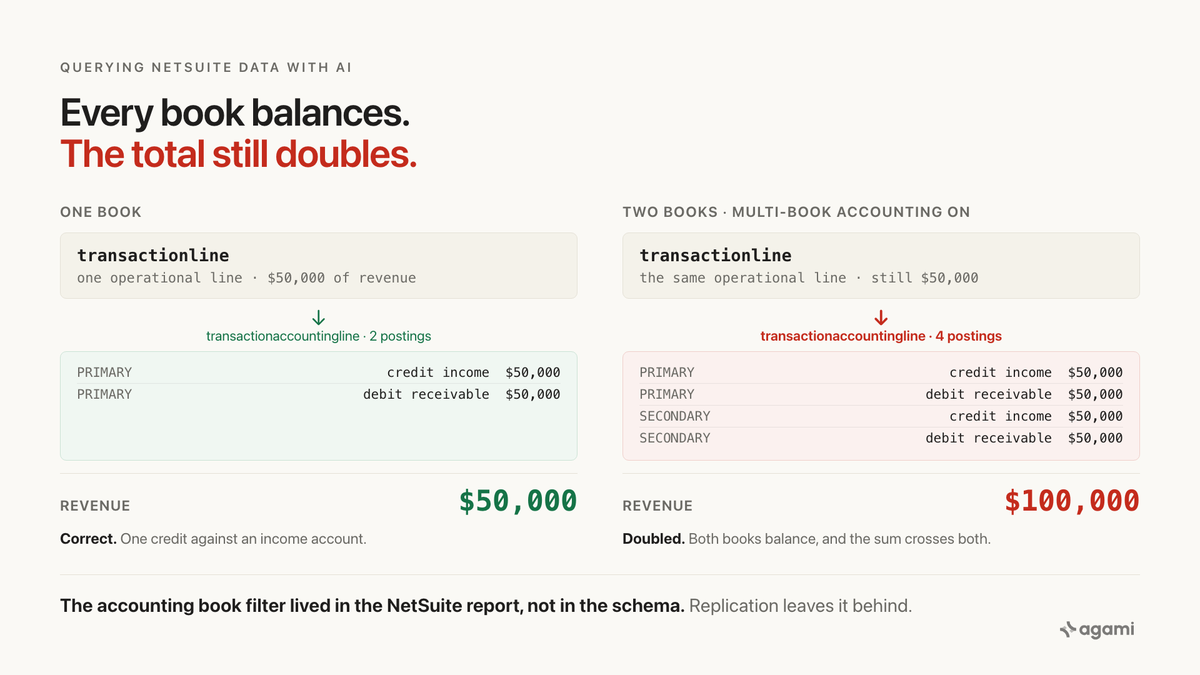
Search for NetSuite multi-book double counting and every result on the first page tells you the same thing: NetSuite Multi-Book Accounting is designed so that adding a second book (a parallel GAAP or IFRS ledger, an adjustment book, a management book) does not duplicate revenue. That is true, right up until the tables leave NetSuite.
Once they land in a warehouse, the sentence flips. The exact record type that holds every debit and credit, transaction accounting line, stores one row per posting per accounting book, and the reports that hid that from you inside the app are no longer running. Point an agent at the raw tables and ask what revenue was last quarter, and the answer scales cleanly with the number of books the estate runs.
Oracle documents this directly, on the help center page most warehouse users never see, titled Joining Transaction Line and Transaction Accounting Line in a Dataset:
If you have the Multi-Book Accounting feature enabled in your account and you join the transaction accounting line record type in a dataset, data duplication can be increased. This is because each transaction accounting line stores data for each accounting book in your NetSuite account.
To limit this, consider creating a criteria filter using the accounting book field from the transaction accounting line record type, so that data from only one accounting book is included.
The filter Oracle recommends is a workbook-level control that lives in SuiteAnalytics. Replicate the tables into a warehouse and the tables come with. The filter does not.
Before you start
- NetSuite replicated into a warehouse. Postgres, Snowflake, BigQuery and Redshift all work.
- Read access. A read-only role is the right one.
There is no free instance. NetSuite has no developer edition and no self-serve sandbox; a sandbox is a paid add-on to an existing contract. So this runs against your own replicated schema, and the queries below compute the gap on your data rather than quoting a number from ours.
Nothing in a warehouse yet? Fivetran's connector is branded NetSuite SuiteAnalytics and reads through SuiteAnalytics Connect, which is itself a paid module. Saved searches export the same tables to CSV without it. Casing differs between the NetSuite2.com and legacy NetSuite.com schemas, and again by extract tool.
The question
"What was our revenue by fiscal period, on our primary book of record?"
It is the first finance question anyone asks of a replicated NetSuite estate, and every part of it is legitimate. Fiscal periods live on accountingperiod. Posted amounts live on transactionaccountingline. The chart of accounts and the account-type classification live on account. One value per period, grouped, ordered.
Getting from the tables to the number is where it goes wrong.
What breaks
Here is the obvious query, against the current Fivetran NetSuite2 landing. Every join is on the correct key, it runs without complaint, and the totals come back neatly ordered:
select ap.periodname, sum(tal.amount) as revenue
from transaction t
join transactionline tl
  on tl.transaction = t.id
join transactionaccountingline tal
  on tal.transaction     = t.id
  and tal.transactionline = tl.id
join account a
  on a.id = tal.account
join accountingperiod ap
  on ap.id = t.postingperiod
where a.accttype = 'Income'
  and t.posting = 'T'
group by 1;
On a single-book estate, that answer is right. On a two-book estate (say Primary GAAP plus a secondary IFRS book), every revenue dollar is counted twice. On a four-book estate it is counted four times. The result table has the right shape, the right period order, and the wrong scale, which is why it survives review.
The size of the inflation is your book count. Two queries establish it against your own warehouse:
-- how many accounting books the estate runs
select count(*) as book_count,
       sum(case when isprimary = 'T' then 1 else 0 end) as primary_books
from accountingbook;

-- rows on TAL per transaction line, per book, for one recent period
select tal.transaction, tal.transactionline,
       tal.accountingbook,
       count(*) as rows_per_line_per_book
from transactionaccountingline tal
join transaction t on t.id = tal.transaction
where t.postingperiod in (
  select id from accountingperiod
  where periodname = 'FY 2026 : Q2 2026 : Jun 2026'
)
group by 1, 2, 3
order by rows_per_line_per_book desc
limit 20;
The first tells you the multiplier the naive query is about to apply. The second is the query most warehouse users have never run: it shows the individual debit and credit rows on one operational line, and whether the same line repeats across accounting books.
Why it breaks
One transaction line splits into many GL rows, and then into many books
Three record types sit in the finance section of the landed NetSuite schema. Their grains are not the same.
transaction holds one row per header: one invoice, one journal, one bill, one payment. transactionline holds one row per operational line on that transaction: the item you invoiced, the segment coding you tagged it with, the amount charged. Its primary key is composite, (transaction, id), and Fivetran's transform package spells that out in the join header of int_netsuite2__transaction_lines.sql:
left join transaction_accounting_lines
  on transaction_lines.transaction_line_id  = transaction_accounting_lines.transaction_line_id
  and transaction_lines.transaction_id      = transaction_accounting_lines.transaction_id
  and transaction_lines.source_relation     = transaction_accounting_lines.source_relation
transactionaccountingline holds one row per posting: each operational line produces at least two rows on it (a debit and a credit against different accounts), because that is the definition of double-entry accounting. And when Multi-Book Accounting is enabled, every one of those rows is replicated once per accounting book.
Oracle's help page on the same topic frames the general case in one sentence:
When records with a one-to-many relationship are joined in a dataset, the cardinality of the data from the source record type is duplicated for each instance of the target record type. The result is that aggregations based on the duplicated source record fields are inaccurate.
A two-book estate turns every operational line into four TAL rows (debit and credit in the primary book, debit and credit in the secondary). Sum the amount column and the debits and credits cancel per book (they always do, which is the definition), but the join across two books makes revenue land at twice the true figure, because you are summing income-account credits from both books, not one.
The composite join is load-bearing on its own
The other half of the trap is quieter, and it fires even on single-book estates. Matching transactionaccountingline to transactionline on transaction alone (dropping the and tal.transactionline = tl.id line) is not a syntax error, it is a cross product against every line on that transaction. A 2026 correction on Tim Dietrich's SuiteQL tutorial for exactly this pattern reads:
The INNER JOIN TransactionLine clause was missing a join condition linking TransactionAccountingLine.transactionline to TransactionLine.ID, which could produce duplicate rows due to a cross product.
That correction landed on a public tutorial written by a NetSuite MVP, which tells you the composite key gets dropped routinely by practitioners who already know the schema. An LLM writing SQL from column names alone is going to find transaction on both sides and match, because column-name equality is what generic introspection reaches for first. Introspection that only handles single-column foreign keys will miss the composite entirely.
Fivetran's own surrogate key on the joined output admits how many parts the identity really has: (transaction_line_id, transaction_id, account_id, reporting_accounting_period_id, accounting_book_id). Five columns, and accounting_book_id is one of them. The package knows the joined grain is a five-part identity. A one-line SUM does not.
The reports you were reading enforced this for you
Inside NetSuite, three separate mechanisms hid the trap.
Standard financial reports (Income Statement, Balance Sheet, GL) pick an accounting book from the user's role and apply it automatically. A finance user opening the Income Statement never sees transactionaccountingline directly. The multi-book multiplier is silently held to one, and the number that comes out is right.
SuiteAnalytics workbooks let you get closer to the raw tables, and the UI warns you when you get too close. Oracle's help calls the accounting-book filter out explicitly on the same page quoted above, as the remediation, as part of the process for building a workbook that joins TAL. The warning is built into the tool.
SuiteAnalytics Connect and any downstream analytics product built on Oracle's NetSuite Analytics Warehouse inherit that discipline in their semantic layer. Oracle's own report-authoring guidance for NSAW puts it plainly, in a sentence that reads as an admission written by people who saw this happen:
The grain of the line-level transaction tables is at the accounting book level, and you should add an Accounting Book filter to all analyses and workbooks containing line-level data when multi-book accounting has been enabled in NetSuite.
Replication copies the tables and leaves every one of those enforcements behind. Fivetran ships a first-party connector that lands both transactionline and transactionaccountingline faithfully. It does not ship the report-role book filter, or the workbook UI warning, or the NSAW semantic layer, because those are not tables. They are behavior in the application.
The vendor's own dbt package encodes the fix
The strongest evidence that this is the fault line is that the people who built the replication defend against it in their transform layer.
int_netsuite2__transaction_lines.sql treats the base accounting book as the canonical row set. It joins the base rows first and then UNION ALLs the non-base books in a second clause, so the package never sums across books by accident. int_netsuite2__tran_with_converted_amounts.sql puts accounting_book_id into the surrogate key of the joined output. And the staging model deliberately excludes the revenue-arrangement transaction type (where transaction_type != 'revenue arrangement'), because the ASC 606 revenue-recognition tables carry their own separate posting flow.
Everything the package does around this join is a defense. Someone at Fivetran hit the trap first, and the workaround is now committed. A model built by hand against the same schema, or by an agent reading the same column names, has none of that.
The fix
Declare the join, and put the composite key in the description
transaction, transactionline and transactionaccountingline all sit in the same finance subject area, so the relationship declarations go in relationships, not cross_subject_area_relationships. The composite key is the load-bearing part; the description is where it lives, because the relationship syntax does not carry it directly:
relationships:
  - from_table: transactionline
    from_column: transaction
    to_table: transaction
    to_column: id
    relationship: many_to_one
    description: |
      transactionline.transaction is the transaction header id. The
      transactionline primary key is composite (transaction, id); the id
      half distinguishes lines on the same transaction. Source:
      src_netsuite2.yml transactionline entry;
      int_netsuite2__transaction_lines.sql line 47.

  - from_table: transactionaccountingline
    from_column: transactionline
    to_table: transactionline
    to_column: id
    relationship: many_to_one
    description: |
      Composite in the underlying data: matching must include
      transactionaccountingline.transaction = transactionline.transaction
      as well, or the join returns the cross product of every line on
      that transaction. Source:
      int_netsuite2__transaction_lines.sql lines 46 to 49.

  - from_table: transactionaccountingline
    from_column: accountingbook
    to_table: accountingbook
    to_column: id
    relationship: many_to_one
    description: |
      One TAL row per accounting book when Multi-Book is on. Source:
      Oracle NetSuite help, Joining Transaction Line and Transaction
      Accounting Line in a Dataset.

  - from_table: transactionaccountingline
    from_column: account
    to_table: account
    to_column: id
    relationship: many_to_one
Two of those descriptions carry a citation, and that is deliberate. The composite transactionaccountingline to transactionline edge is not inferable from single-column FKs; the accounting-book edge is only load bearing on estates with Multi-Book enabled. Both are the kind of thing that gets deleted six months later by someone who thinks they are simplifying. The sentence next to the declaration is what stops them.
The metric carries the filter
Getting the query right this once is not the same thing as making the schema safe. The next revenue question written against this warehouse will be written from scratch and will re-run the naive shape unless the accounting-book filter travels with the metric definition, not with the person who last wrote SQL:
name: gl_revenue
calculation: |
  Sum of transactionaccountingline.amount for Income accounts on posting
  transactions, restricted to the primary accounting book. Source:
  Oracle NetSuite help, "Joining Transaction Line and Transaction
  Accounting Line in a Dataset".
bindings:
  PostgreSQL: |
    SUM(CASE
          WHEN account.accttype = 'Income'
           AND transaction.posting = 'T'
           AND accountingbook.isprimary = 'T'
          THEN transactionaccountingline.amount
          ELSE 0
        END)
source_tables: [transactionaccountingline, account, transaction, accountingbook]
primary_table: transactionaccountingline
default_filters:
  - "accountingbook.isprimary = 'T'"
other_names: [revenue, total revenue, gl revenue]
confidence: proposed
review_state: unreviewed
default_filters on accountingbook.isprimary is the machine-readable form of Oracle's own recommendation. Any query that reaches gl_revenue inherits it whether the author remembered or not. Any query that reaches transactionaccountingline any other way should trigger a warning, because the metric on top of it did.
Read review_state: unreviewed. The declaration is a proposal until a person signs it, because the one judgment in here is not a schema fact.
That signature is what makes the answer auditable months later. Rules enforced where the metric is defined survive the next person, the next agent, and the next question. A convention that lives in someone's memory does not.
What the schema cannot decide for you
Which book is authoritative is the biggest one. accountingbook.isprimary is per book, and most estates flag exactly one, but some flag multiple, each authoritative for a jurisdiction. Finance picks. If you are running IFRS as the primary book and GAAP as secondary for a US subsidiary, the metric above gives you IFRS revenue, and that is what the frontmatter description has to say plainly.
Which currency the report is in is the next decision. NetSuite carries three amount fields per transaction: transaction currency, base subsidiary currency, and consolidated parent currency, and Fivetran's int_netsuite2__tran_with_converted_amounts.sql produces both a period-based and a reporting-month conversion because the choice is not obvious. Add default_filters for currency at the same time as you add them for accounting book, or you are trading one silent multiplier for another.
Custom segments and custom fields (custrecord_*, custentity_*, custbody_*) carry their own conventions per estate, and no vendor doc knows your naming. Everything about them belongs in the description on the relevant column, and none of it can be inferred.
Revenue arrangements are a separate world. ASC 606 estates carry recognized revenue in an arrangement and revenue-element table set, and Fivetran's staging models exclude arrangement transactions on purpose. Billed revenue and recognized revenue are different answers to different questions, and the choice belongs in the metric name.
Reproduce it yourself
NetSuite does not offer a free instance. There is no PDI equivalent and no self-serve trial that lets you point Fivetran at your own copy. So the reproduction path here is route two: your own replicated schema.
If you have Fivetran's NetSuite SuiteAnalytics connector landing to a warehouse today, run the two counting queries from the top of this post against it. The first tells you how many books the estate runs. The second shows the actual TAL rows on one line, in one period.
If the first query returns more than one book, run the naive revenue query and the corrected one side by side, for the same period. The gap between them is the fan-out. If the first query returns exactly one book, run the second query anyway. The composite-join half of the trap fires on single-book estates too, and you will see it on any transaction that has more than one line.
Three notes on what you will be looking at. Column casing varies by data source: NetSuite2.com is singular, lowercase, no underscores (transactionline, transactionaccountingline, accountingbook); the legacy NetSuite.com casing is plural and underscored (transaction_lines, transaction_accounting_lines, accounting_books), and both live in the same Fivetran dbt package. Table casing at the warehouse level depends on your destination, lowercase on BigQuery and Postgres, uppercase on Snowflake. And Fivetran's transform package fivetran/dbt_netsuite will already have applied the correct joins if you built on top of it; the purpose of running the queries above against the raw landed tables is to see what an agent, or a coworker, would produce when they do not.
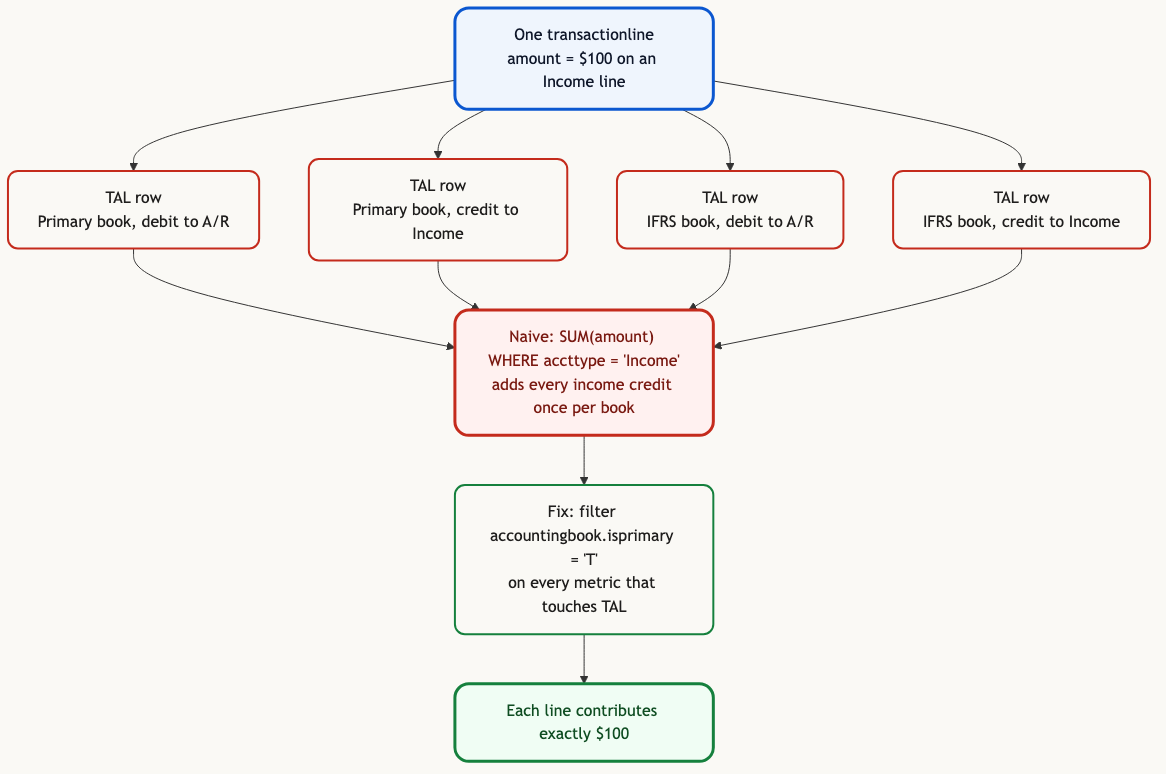
One line, N books, 2 x N rows on transaction accounting line. The fix is one predicate on the primary book, and it has to travel with every metric that touches TAL.
Related traps in the same schema
The multi-book multiplier is the one worth fixing first, and it is not alone. Three more, each documented and each its own kind of wrong:
Consolidated exchange rate is applied where you often forget it. NetSuite carries three amount fields per transaction (transaction currency, base subsidiary currency, consolidated parent currency), and the effective-dated rates live on consolidatedexchangerate. Summing the raw amount column without picking one adds euros to dollars.
Saved-search field names shift as the same logical field moves across surfaces. A custom column can be custcol_foo in a saved search, custcol_foo in SuiteQL, customColumnFoo in REST, and (usually) custcol_foo as landed. Rename the custom field in the UI and every dependent saved search breaks silently. This is more a workflow trap than a schema one, but any post that touches custom segments hits it.
Revenue-arrangement tables sit outside the transaction posting flow. ASC 606 recognized revenue is not sitting in transactionaccountingline for recognized amounts on subscription lines, and answering "what did we recognize this quarter" from the tables above alone gives billed, not recognized. Fivetran excludes revenue arrangement transactions from its staging deliberately, and does so upstream of the join under discussion.
Find out what your book count is doing to your numbers.
agami-core is source-available. Point it at your replicated NetSuite and see which relationships come back inferred, which come back empty, and which metrics need an accounting-book filter attached before an agent goes near them.
Get agami-core or tell us which NetSuite report you stopped trusting
Frequently asked questions
Does this only affect estates running Multi-Book Accounting? The multi-book multiplier only fires when Multi-Book is enabled. The composite-join half of the trap fires on every estate, because transactionaccountingline to transactionline is composite in the underlying data regardless of the feature flag. Both queries at the top of the post are worth running either way; the first tells you which trap you have.
How can I tell if Multi-Book is on without asking Finance? select count(*) from accountingbook is the test. One row means single book. More than one means Multi-Book is enabled, and the isprimary flag tells you which one the standard reports were using.
Isn't this what SuiteAnalytics Assistant is for? NetSuite's native NL-to-report layer runs inside a workbook, so it inherits the same accounting-book boundary the workbook UI enforces. That is what makes it credible on in-app questions. The scope this post addresses is different: a warehouse copy of the tables, queried by an agent that is not inside a NetSuite workbook and is not seeing the workbook UI's warnings.
Why is the accounting-book filter on the metric, not on the relationship? Because it depends on the question. Revenue on the primary book is one answer; total posted amounts across all books is a different, occasionally correct answer (for reconciling parallel ledgers, for example). Filtering at the metric layer lets both exist, each named for what it computes. Filtering at the relationship layer forces one interpretation on every downstream question.
Is this specific to Fivetran or to one warehouse? No. The cause is upstream of the warehouse. NetSuite stores TAL rows per book because Multi-Book Accounting is defined that way, and any replication path lands that shape. Table casing and column names vary by extract tool and destination, but the multiplier does not.
References
- Oracle NetSuite help: Joining Transaction Line and Transaction Accounting Line in a Dataset
- Oracle NetSuite help: Data Duplication Based on Record Joins
- Oracle NetSuite help: Multi-Book Accounting Overview
- Oracle NetSuite Analytics Warehouse: report authoring tips
- Fivetran: NetSuite SuiteAnalytics connector
- Fivetran dbt package: int_netsuite2__transaction_lines.sql
- Fivetran dbt package: int_netsuite2__tran_with_converted_amounts.sql
- Tim Dietrich: NetSuite SuiteQL for journal entry details, with the 2026 cross-product correction
- agami-core on GitHub