Why naive prompting isn't a data agent
A staging Postgres taken down. Wrong customers in dashboards. 4% revenue drift. Three production failures that taught us a data agent is context engineering, not prompting.

Production Graveyard · 8 min read
Why naive prompting isn't a data agent
The seventh production query took down our staging Postgres. Here's the autopsy and what now lives in our Skill so the eighth one didn't.
TL;DR · text-to-SQL production failures, in three buckets
- "Schema in the prompt + GPT-class model" works on the first six queries and fails on the seventh. The failures are not random; they fall into three predictable buckets: schema hallucination, ambiguous-metric-name resolution, and join geometry that craters the database.
- Fixing them is not about adding more model. It is about adding the right context. The lessons we learned the hard way over two years now live as roughly six hundred lines of instruction inside
data-agent.skill.md, loaded by Claude on demand. - On the same model, the same schema, and the same one hundred queries: naive prompting answered 47 correctly. The Skill answered 91. The model did not change. The context did.
The seductive trap
The first internal demo of any natural-language data agent is dangerous because it works.
You take a fresh schema, you paste it into the prompt, you ask "how many incidents were opened last week," the model returns a clean piece of SQL, the query runs, the answer matches the dashboard. You ask the next question, it works again. You ask the third, it works. By the fifth question, you are shipping a Loom to your CEO.
The seventh question takes down staging Postgres. Or returns a number that is plausibly close to right and quietly wrong. Or joins through a bridge table the wrong way and answers a question nobody asked.
We have seen all three, multiple times, in production.
This post is the autopsy of the three most common failure modes of naive LLM-to-SQL, and the specific context-engineering moves that retire each one. There are other graveyards (entity-resolution disasters, semantic-model drift, the three-hour query) and we will get to them. This is the foundational one because it is the failure that convinces every team that builds a data agent that the answer is "more model." It is not. The answer is the instructions you ship to the model.
Failure mode 1: schema hallucination at scale
The first thing that goes wrong is the model invents a column.
It does not invent a column at random. It invents the column it would expect to exist if your schema were a textbook example of the domain. It is a closer-to-perfect schema than yours. It is also wrong.
A real example. The user asks: "what is the resolution time on P1 incidents this quarter." On a clean ServiceNow data model the answer is EXTRACT(EPOCH FROM (resolved_at - opened_at))/3600 against the incident.task table. On the actual schema the model was reasoning about, that table existed but the resolution timestamp had been re-modeled into a workflow stage table during a customization three years ago. The column the model wanted, resolved_at, did not exist on the parent. The model wrote SQL that referenced it anyway. Postgres replied with an UndefinedColumn error and the query failed cleanly.
That was the polite failure mode.
The impolite version is the one we hit on a Salesforce schema with a heavy custom-fields layer. The user asked for "closed-won opportunities last quarter." The model reasoned its way to WHERE stage = 'Closed Won' against the opportunities table. The column it wanted was stagename, not stage. But because the schema also had a stage_history__c table tracking transitions, and that table did contain a stage column, the model picked the wrong table, joined to it incorrectly, and returned a number. The number was wrong by 12% because it was counting stage transitions, not opportunity records.
That number sat in a board deck for two days before someone caught it. Nobody got fired. The team got religion about validation.
The fix is not "use a smarter model." The smarter model invents fewer columns and tables but still invents some. The fix is to load the model with two specific pieces of context before it writes any SQL:
- The set of columns that actually exist on the candidate tables, fetched fresh, not pasted into a system prompt that was last updated six months ago.
- The set of columns the customer's team has confirmed are the canonical resolution-time, stage, owner, and amount fields. This is the semantic model.
Both of those are jobs for context engineering, not the model. Today they live in the Skill: a ## Schema validation block that tells the model to call the MCP get_schema tool before drafting SQL, and a ## Canonical fields block that pins which columns map to which business concepts for this org. Anything that does not match those constraints is rejected before it gets executed.
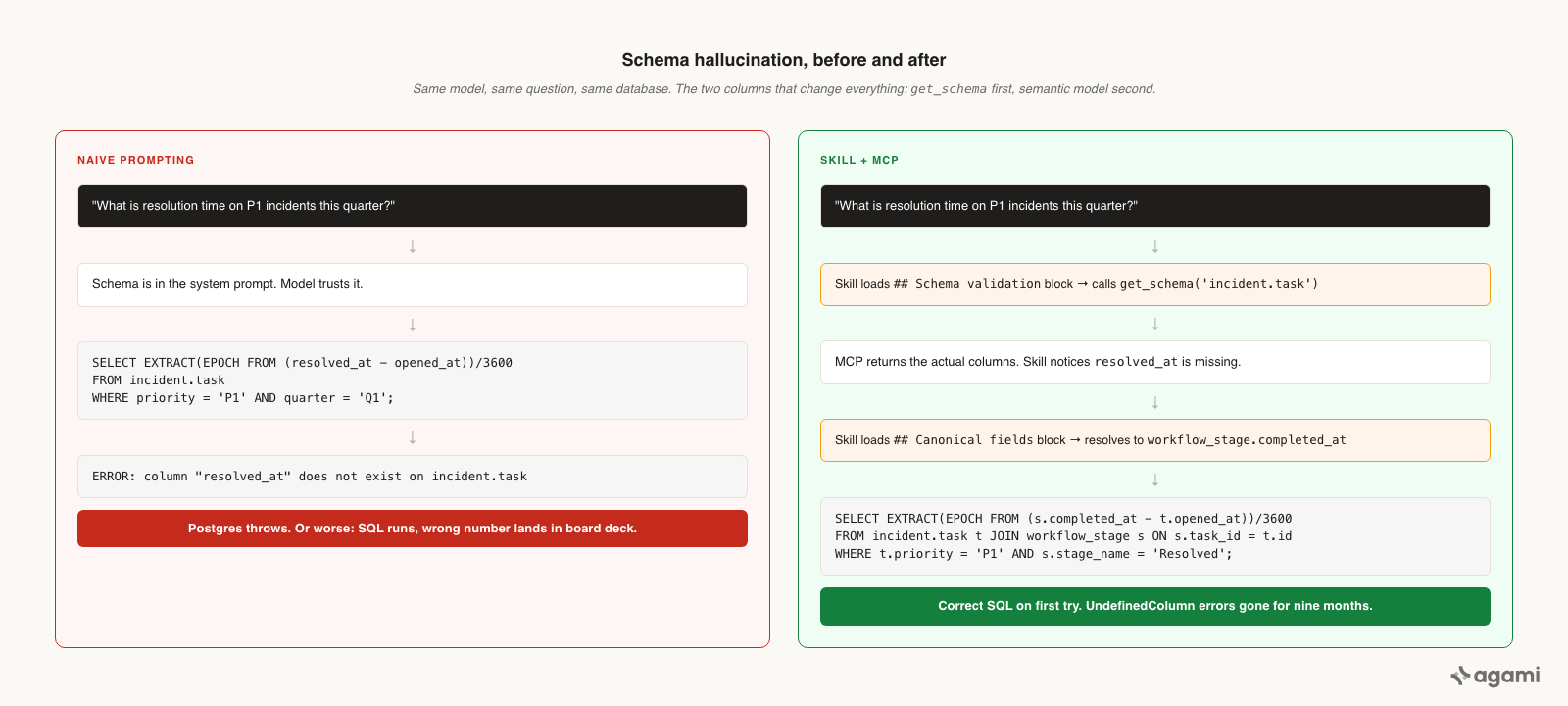
Same model, same question, same database. The two columns that change everything: get_schema first, semantic model second.
We have not seen UndefinedColumn in production for nine months.
Failure mode 2: ambiguous-metric resolution
The second failure is harder because the SQL runs and the answer is wrong.
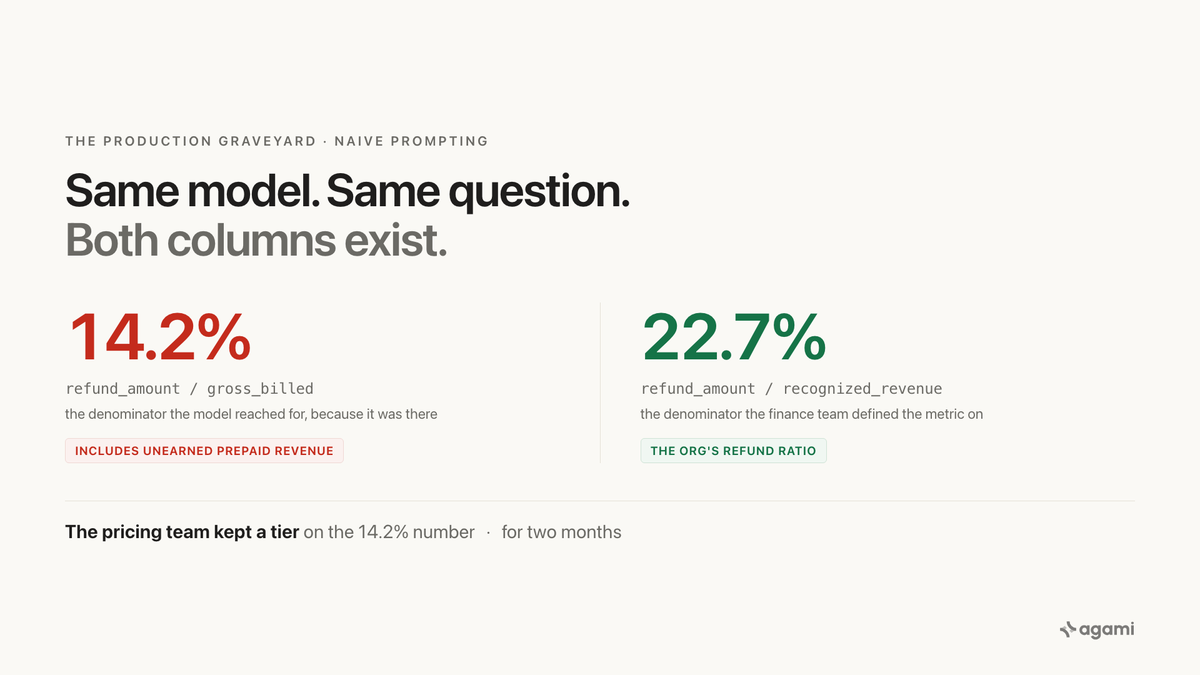
Every B2B schema has at least three columns that someone, at some point, called "revenue." There is the gross-billed amount on the line item, the net amount after discounts on the invoice, and the recognized revenue on the journal entry. They are not the same number. In any given quarter they can differ by ten to thirty percent.
A user types "show me revenue by region last quarter." The model picks one. It is plausible. It is referenced in the schema. Sometimes it happens to be the one the finance team uses for the metric the user is actually asking about. Often it is not.
The most expensive version of this we hit was at a company where the user asked "what is our refund ratio for the new pricing tier." The model wrote SQL that divided refund amount by gross-billed amount on the invoice line. The finance team measured refund ratio against recognized revenue on the journal entry, because gross-billed includes deferred revenue from annual prepaid contracts that have not been earned yet. The model's answer was 14.2%. The finance team's answer was 22.7%. The pricing team had been deciding to keep a tier based on the 14.2% number for two months.
The fix here is not validation, because both columns exist. The fix is the semantic model. There has to be a single artifact that says "the metric refund_ratio for this org is SUM(refund_amount) / SUM(recognized_revenue)," authored once by the finance team, version-controlled, and loaded into the model's context whenever the user mentions revenue, refunds, or anything adjacent.
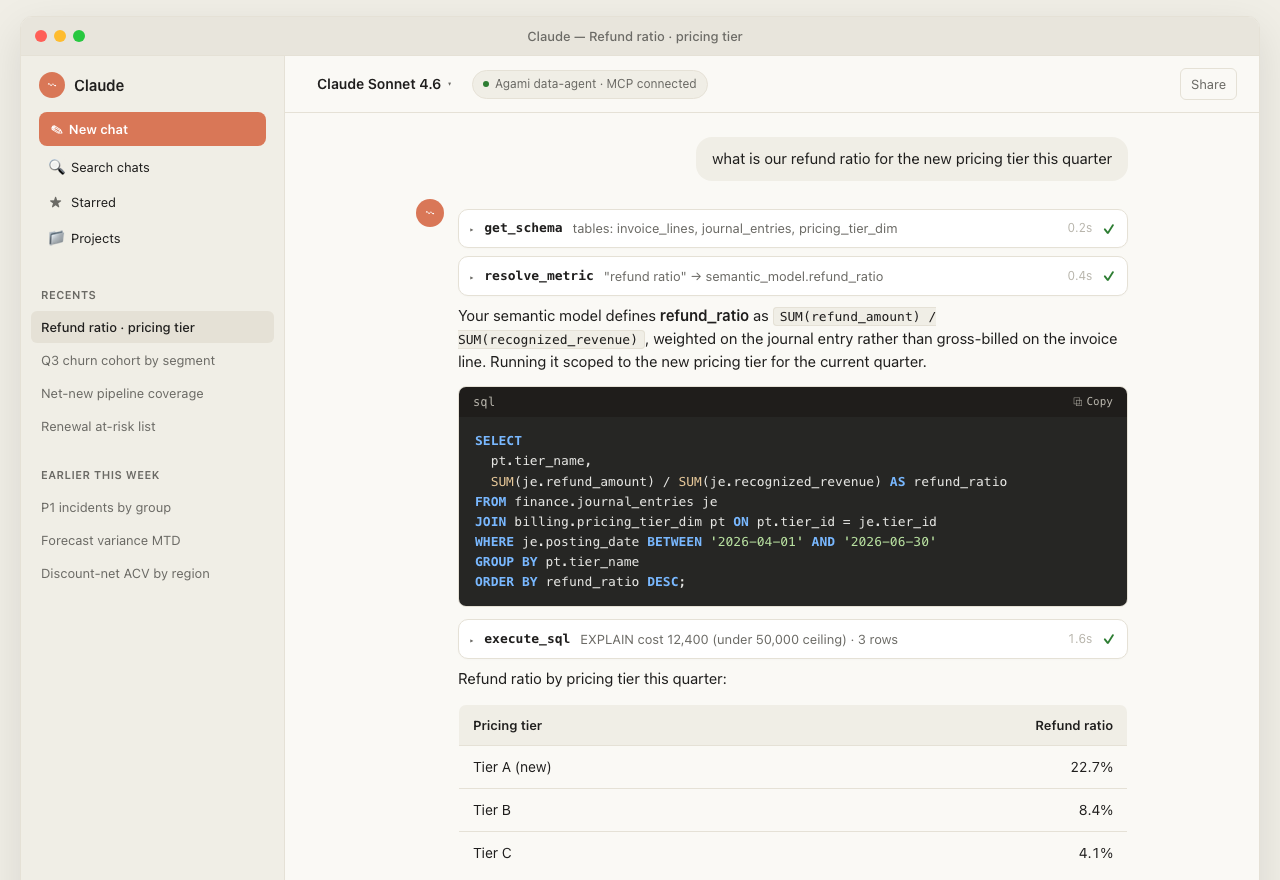
The Skill+MCP path on the same question that produced the 14.2% wrong number under naive prompting. Same model, two very different outcomes.
The same Skill runs inside ChatGPT (via MCP), Cursor, and any other assistant that supports the protocol. The conversation surface changes; the answer does not.
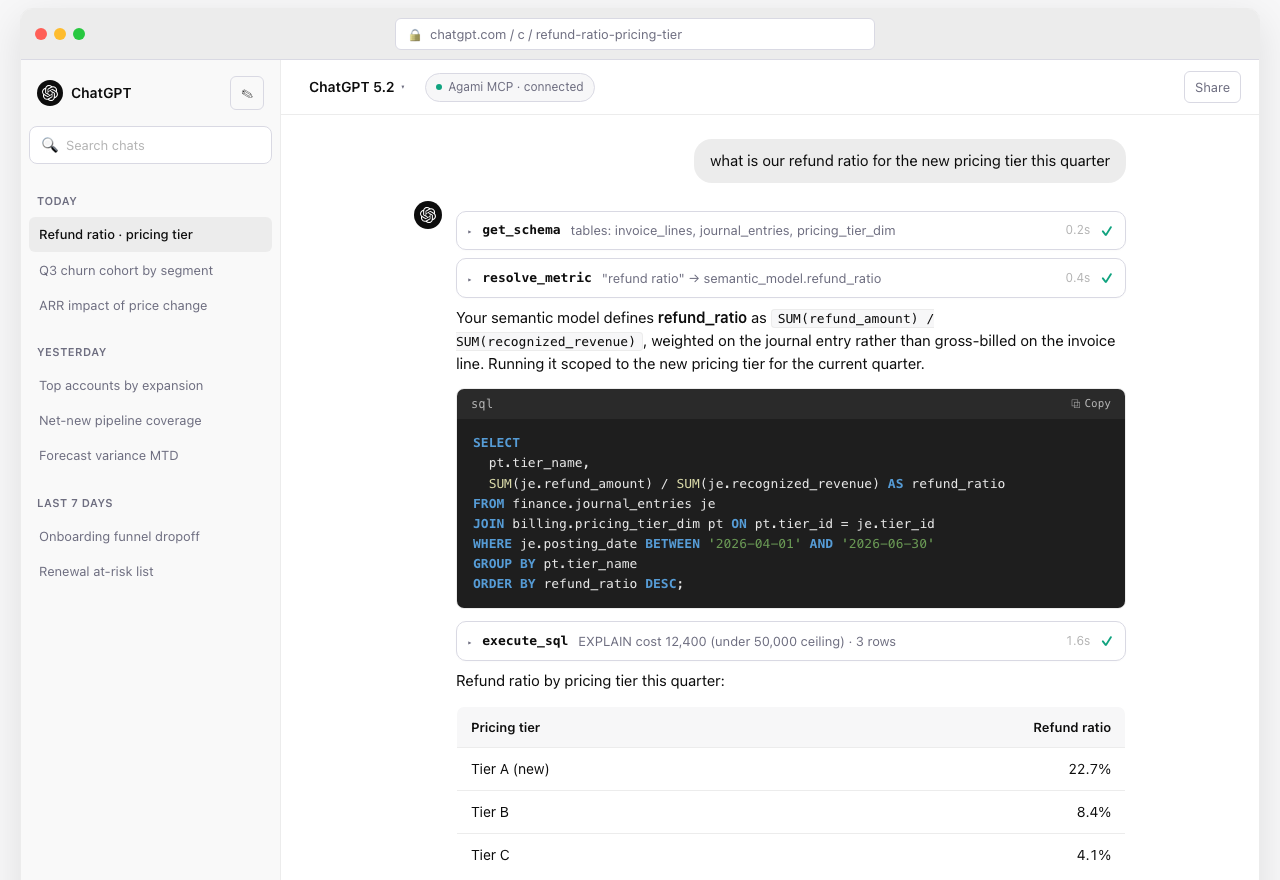
The same Skill, same MCP, running inside ChatGPT. The model is different; the semantic model is the same; the answer is the same 22.7%.
A semantic model is the thing that converts ambiguous business vocabulary into unambiguous SQL. Every serious data agent in production now has one (we wrote about why this category is having its moment). The Skill's job is to teach the model to look at the semantic model first, prefer it over the column it would have guessed, and ask the user a clarifying question when the metric they typed is not in the model.
The Skill's ## Metric disambiguation block has three rules. Prefer the semantic model definition over a column name that looks similar. If the user uses a phrase that maps to more than one defined metric, list them and ask. If the metric is not defined, do not guess; tell the user it is not defined and propose adding it.
It is not a model upgrade. It is a workflow.
Failure mode 3: joins that crater the database
The third failure is the most operationally embarrassing.
The model writes SQL. The SQL is syntactically perfect. It joins three tables. One of those joins is on a non-indexed text column against a billion-row events table. The query grabs every connection in the connection pool, runs for ninety minutes, and locks staging Postgres until somebody kills the session.
This happened to us in the first month of running natural-language queries against production-shaped data. The user asked a perfectly reasonable question (a count of customers who had a support ticket in the same calendar week as a deploy). The model wrote SQL that joined tickets to deploys on a calendar-week expression with no index on the deploy timestamp. We did not have a query timeout. We did not have a row cap. We did not have an EXPLAIN-before-execute step. We had a database that fell over.
The next morning we had four guardrails.
- Every generated query is wrapped in a statement-level timeout enforced by the MCP server's
execute_sqltool, not by the model. - Every generated query gets a
LIMITinjected unless the user has explicitly asked for an export. - Before execution,
execute_sqlrunsEXPLAINand rejects any plan whose estimated cost exceeds a per-tenant ceiling. - Every tenant has a token budget and a circuit breaker. After a configurable number of expensive queries in a window, the agent goes quiet for that user until a human acknowledges.
None of these live in the Skill. The Skill cannot enforce them, because the model can be talked out of any rule that lives in its prompt. They live one layer down, in the MCP server that the Skill uses. The model gets one tool: execute_sql. The tool decides what is allowed.
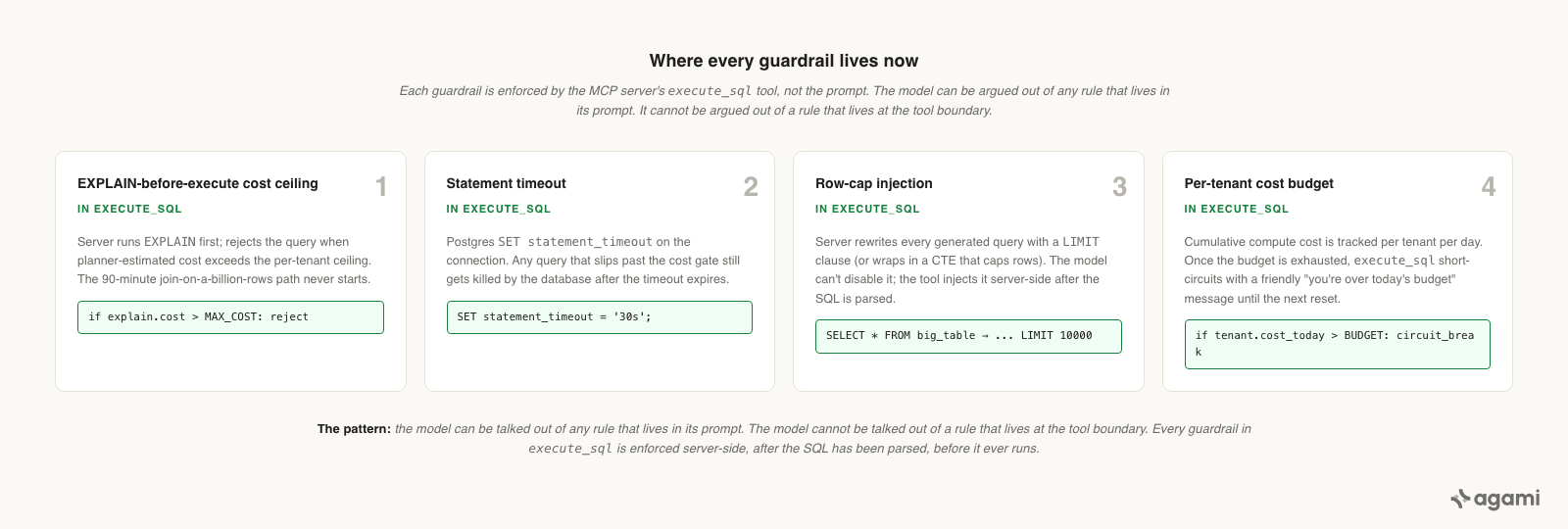
The model can be talked out of any rule that lives in its prompt. The model cannot be talked out of a rule that lives at the tool boundary.
Governance does not live in the prompt. The frontier model is a brilliant generalist; it is not a database administrator and it is not your security team.
This is the part of the architecture that took us the longest to internalize. The frontier model is a brilliant generalist; it is not a database administrator and it is not your security team. The MCP server is where the database administrator and the security team encode their rules, and the model has to use the tools the server exposes. The shortest version: every guardrail you would normally put in the agent's prompt belongs in the tool the agent calls. The MCP-server-as-governance-boundary pattern gets its own deeper write-up later in this series.
What changed
Two years ago we needed a fifteen-stage pipeline to handle these three failure modes. There was a table planner, an output column resolver, a SQL generator, a validator, and ten more stages between them. Each stage existed because of a specific incident.
Today the model is good enough that one Skill plus one MCP server matches what those fifteen stages used to do, on the same eval set, at lower cost and lower latency. We will write up that architecture transition in the closing post of this series.
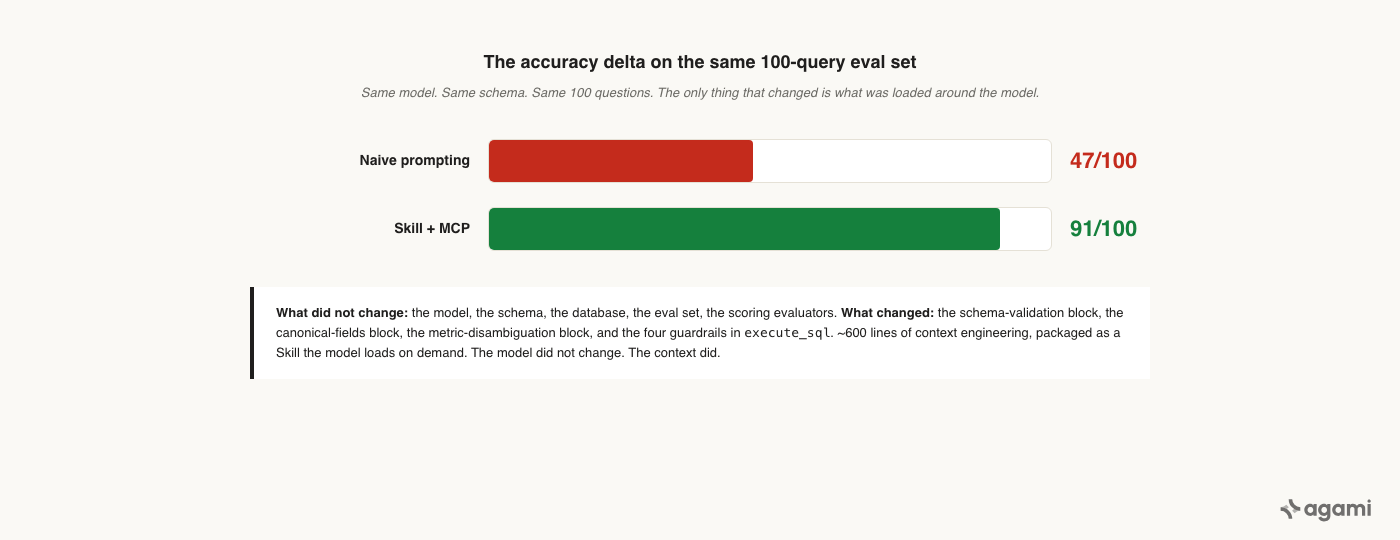
The model did not change. The context did.
The thing the architecture transition is not is "we got rid of the work." The work moved. It moved into the Skill, which is six hundred lines of context engineering that encode every lesson from every Graveyard. It moved into the MCP server, which encodes every governance rule the database administrator would have written. The fifteen stages were a fragile, expensive way of doing the same job in 2024. The Skill plus MCP is the cheaper, more durable way of doing the same job in 2026.
The model did not change. The context did.
Frequently asked questions
Q: What is the most common text-to-SQL production failure?
A: Schema hallucination. The model writes SQL referencing a column that does not exist on the table it picked. About half of all production failures we have seen on naive prompting setups are this single class.
Q: Why does a smarter model not fix it?
A: Smarter models hallucinate fewer columns but still hallucinate some. The fix is in the context loaded around the model, not in the model itself. Specifically: validating against the actual schema (via an MCP tool call) and pinning canonical fields in a semantic model the Skill loads on demand.
Q: Is this an argument against frontier models for NL-to-SQL?
A: No. The opposite. The frontier model is the right primitive; the failure modes here disappear once you load it with the right context. Two years ago we needed a 15-stage pipeline to handle these. Today one Skill plus one MCP server matches the same accuracy at lower cost.
Q: How do I prevent the database-takedown class of failures?
A: Move every guardrail (timeout, EXPLAIN-cost ceiling, row cap, per-tenant cost budget) into the MCP server's execute_sql tool. Do not put them in the prompt. The model can be talked out of any rule that lives in its prompt.
Q: What is the accuracy delta between naive prompting and a Skill-driven setup?
A: On the same model, the same schema, and the same 100-query eval set: naive prompting answered 47 correctly. The Skill answered 91. The model did not change.
References
- Agami blog, "The Semantic Model Is Having Its Moment."
- Agami blog, "Buy a CRM Subscription. Own Your Data Agent."
- Anthropic, "Complete Guide to Building Skills for Claude."
See these failure modes on your data.
Connect a Postgres or warehouse and we will run the same naive-prompting trace against your actual schema, then show you what changes when the Skill is in the loop.
Book a demo or run the OSS Skill →
About the author
Sandeep Kachru is the co-founder of Agami AI. Before Agami, he spent over a decade building data platforms at Google, Meta, and Airtable.