The ServiceTitan Column That Stops One Ticket Paying Two Technicians in Full
Every foreign key in a replicated ServiceTitan schema is correct, and the obvious join still credits each technician the whole ticket. The semantic model is where the split weight gets applied.

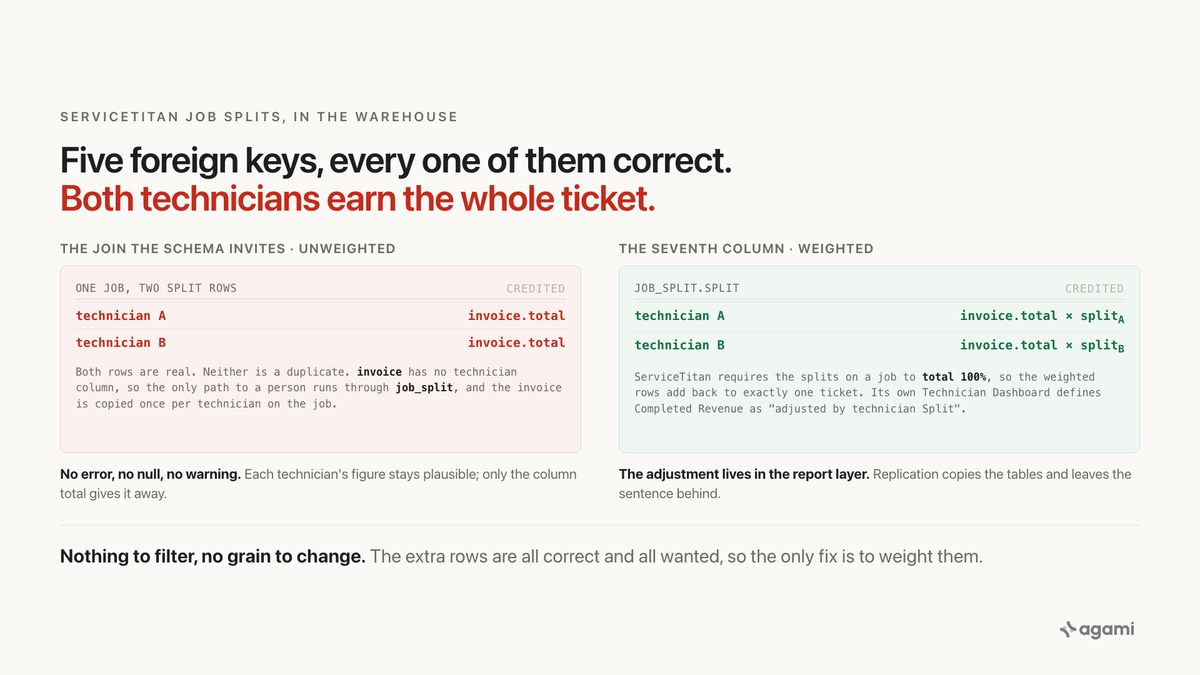
Ask a ServiceTitan data warehouse what each technician brought in and the job splits table will hand you a total that is too big. Not because a join is missing, and not because a key is wrong. Every foreign key in the query is declared, correct, and exactly the one you want.
A service manager asks what each technician brought in last quarter.
Point an AI at the landed schema and it finds the path immediately, because there is only one. The invoice table has no technician column, so the money cannot reach a person directly. It has to travel invoice to job, job to job_split, job_split to technician. Four tables, three joins, every one of them a foreign key that Fivetran marks in its published ServiceTitan ERD.
The query compiles. One row per technician, sorted by revenue. Every individual number looks like something a technician could plausibly have billed.
Add them up and the total is larger than what the company invoiced.
Before you start
- ServiceTitan already landed in a warehouse. This post is written for the team that has it. Fivetran ships a managed ServiceTitan connector in SaaS and Hybrid deployments, with the setup guide here. Hybrid needs an Enterprise or Business Critical Fivetran plan.
- There is no self-serve sandbox. ServiceTitan grants a developer environment per request through
developer.servicetitan.io, and it needs approval rather than a signup. So there is no path from cold to a queryable tenant in one sitting, and everything below runs against your own replicated schema. - Casing varies by extract tool. Fivetran's documentation writes these tables uppercase and its ERD writes them lowercase; Snowflake normalises up, BigQuery and Redshift down. This post uses lowercase. Adjust to whatever your destination did.
- Keep help.servicetitan.com open. Its
llms.txtindexes the whole help centre and every page has a plain markdown twin, which makes it the most readable vendor documentation in this series.
The question
"What did each technician bring in last quarter?"
In the trades this is not a reporting curiosity. It is payroll, it is commission, and it is the conversation a service manager has with a technician about why their number moved. It is asked constantly, it is asked of the warehouse the moment there is one, and it has a right answer that the business already knows.
What breaks
Here is the query, with every join key a declared foreign key:
select t.name        as technician,
       sum(i.total)  as revenue
from   invoice   i
join   job        j  on j.id = i.job_id
join   job_split  js on js.job_id = j.id
join   technician t  on t.id = js.technician_id
where  i.invoice_date >= date '2026-01-01'
group  by t.name
order  by revenue desc;
Nothing about that is careless. invoice.job_id really does point at job.id. job_split.job_id really does point at job.id. job_split.technician_id really does point at technician.id. An introspection pass over this schema finds all of them and gets every cardinality right.
Now take a job that two technicians worked, which in the trades is an ordinary Tuesday rather than an edge case. The job has one invoice and two job_split rows. The join produces two output rows, and each one carries the invoice's full total.
Both technicians are credited the entire ticket.
There is no duplicate-row error to catch, because neither row is a duplicate. Each is a genuine technician-and-job pair that really exists and really matters. There is no null, no type mismatch, no warning. The per-technician figures stay individually plausible, which is what stops anyone noticing. Only the column total gives it away, and only if somebody happens to compare it against what the company actually billed.
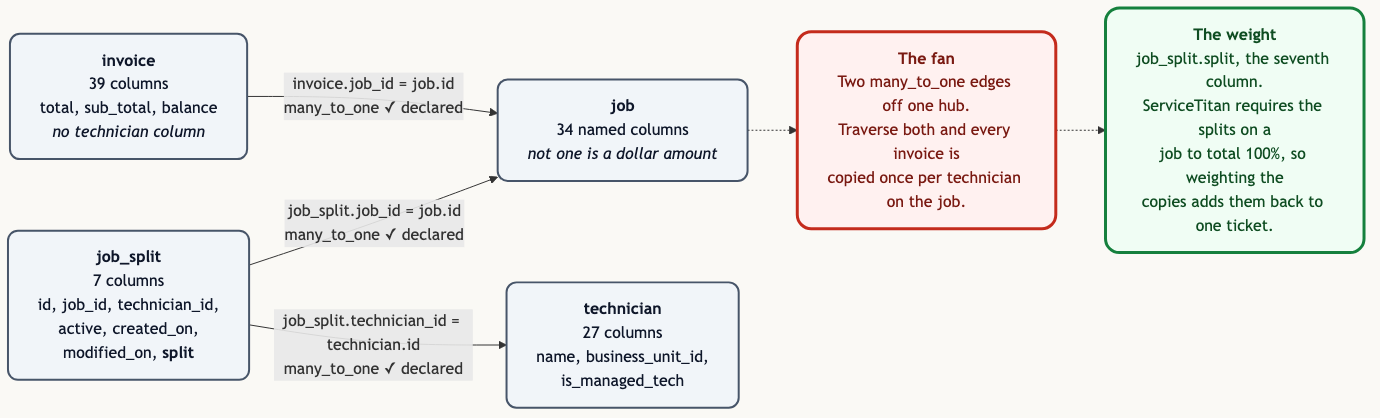
Two many_to_one edges off one hub. The graph is correct; what it does not say is that one of the edges carries a weight.
Why it breaks
Start with what is on each table, because the shape of the problem is visible there.
The job table lands with 34 named columns plus the custom_* block, and not one of them is a dollar amount. The closest thing to money on a ServiceTitan job is no_charge, a boolean. So a job knows its type, its customer, its business unit, its status, its appointments and whether anyone got billed at all, and it does not know what it was worth.
Money lives one table away, on invoice.total and invoice_item.total. And invoice has no technician column at all. It carries employee_id, which is the office employee on the record rather than the person who drove out and did the work.
Between them sits job_split, which lands with exactly seven columns:
id job_id technician_id active created_on modified_on splitThat is the whole table. One row per technician per job, and ServiceTitan is explicit that it is per job and not per appointment: "Splits can only be calculated per job, there is no way to calculate splits on an appointment."
So the grain that holds the money and the grain that holds the technician are different tables, and the only thing connecting them is a hub. Two many_to_one edges hang off job: one coming from invoice, one coming from job_split. Traverse both in a single query and you have a fan trap, which is an old problem with a well-known shape.
What makes this ServiceTitan's own rather than a textbook example is the resolution. The extra rows are not wrong and must not be removed. Every one of them is a real technician with a real, documented claim on part of that ticket. You cannot filter your way out, the way you can with a HubSpot deal that belongs to three companies, where the extra association rows are the wrong association type and get dropped. You cannot re-grain your way out either, the way you can with Salesforce opportunity amounts, where the parent column is already a roll-up of the children and the fix is to stop summing the parent.
The only correct move is to weight the rows. And the weight is sitting right there in the seventh column, which the schema names split and describes not at all.
ServiceTitan describes it plainly in its own help centre:
"Split determines how much credit each technician is getting for the job. For example: If two technicians perform work on a job, the split could be an even 50%-50%, or it could be 75%-25% if the first technician did a bulk of the work."
And the application enforces that the parts make a whole: "Splits are assigned from the job invoice page and must total 100%."
What ServiceTitan did for you
Here is the part worth sitting with. This is not an oversight anywhere in the chain. ServiceTitan knows about the weighting, applies it everywhere, and writes it into the definition of its own metrics.
From the Technician Dashboard documentation, defining its own columns:
"Completed Revenue: Sum of income items on jobs completed within the date range, adjusted by technician Split."
"Opportunity Job Average: Average revenue from job opportunities, adjusted by technician split."
And, in case there is any doubt about the blast radius: "Splits affect revenue-related metrics in addition to payroll reports. Several key performance indicators (KPIs) are split-adjusted."
So the boundary exists, it is documented, and it is enforced on every screen a service manager has ever looked at. It lives in the report layer, as a phrase in a metric definition.
Fivetran then replicates invoice and job_split faithfully and correctly. It has nothing to apologise for. But the words "adjusted by technician Split" are not a column, so they are not among the things that get copied. The tables arrive intact and the sentence that made them add up stays behind.
This is the same shape as Salesforce's "Opportunities with Products" report type holding the line-item grain, and the same shape as ServiceNow's table inheritance: the thing that made the application's number correct was never a column, so replication had nothing to copy.
One more wrinkle rides along with it. Fivetran captures deletes for fifteen ServiceTitan tables, and job_split is not one of them. The changelog records when that changed: under June 2024, deletes stopped being captured for JOB_SPLIT, JOB, INVOICE and PAYMENT. So rows ServiceTitan has removed persist in your warehouse, and the only signal you have is the active flag. Splits in particular churn while a job is open: "If you manually edit splits before a job is complete and a technician is assigned or unassigned, the splits automatically reset." Any technician revenue query that does not filter on active is weighting with splits that no longer exist.
The fix
None of this is a query problem. Rewriting the SQL fixes one question for one person on one afternoon, and the next person to ask about technician performance starts from the same schema and reaches the same wrong number by the same correct route.
It belongs in the semantic model, where the fan is declared once as a property of the edge and every question inherits it.
# subject_areas/field_service/job.yaml
relationships:
  - name: invoice_to_job
    from: { table: invoice,   columns: [job_id] }
    to:   { table: job,       columns: [id] }
    cardinality: many_to_one
    citation: >
      Fivetran ServiceTitan connector ERD: invoice.job_id marked FK to job.id.
      Many invoices per job is expected, not exceptional. Join from
      invoice.job_id and not from job.invoice_id: the latter holds a single
      invoice and silently drops adjustments.

  - name: job_split_to_job
    from: { table: job_split, columns: [job_id] }
    to:   { table: job,       columns: [id] }
    cardinality: many_to_one
    fans: [invoice.total, invoice.sub_total, invoice_item.total]
    weight_column: job_split.split
    citation: >
      Fivetran ServiceTitan connector ERD: job_split.job_id marked FK to job.id,
      one row per technician per job. help.servicetitan.com "Set technician
      splits": splits are assigned from the job invoice page and must total
      100%, and there are no splits per appointment.

  - name: job_split_to_technician
    from: { table: job_split,  columns: [technician_id] }
    to:   { table: technician, columns: [id] }
    cardinality: many_to_one
    citation: >
      Fivetran ServiceTitan connector ERD, job_split.technician_id FK to
      technician.id.
The fans: and weight_column: pair is the load-bearing part, and it is worth reading slowly. fans: lists the measures that get multiplied when a query reaches them through this edge. weight_column: names the thing that puts them back. Together they say: when a query reaches invoice.total through job_split, multiplying by split is not optional. An agent that ignores it is not making a stylistic choice, it is producing a number the model has already declared invalid.
Then the two metrics, and the fact that there are two of them is the point:
metrics:
  - name: revenue_by_technician
    calculation: sum(invoice.total * job_split.split / {split_scale})
    filters:
      - job_split.active
      - invoice.active
    source_tables: [invoice, job, job_split, technician]
    primary_table: invoice
    grain: one row per technician
    citation: >
      help.servicetitan.com Technician Dashboard, Revenue report, defines
      Completed Revenue as "Sum of income items on jobs completed within the
      date range, adjusted by technician Split". This metric reproduces that
      weighting against the replicated schema.

  - name: revenue_total
    calculation: sum(invoice.total)
    filters:
      - invoice.active
    source_tables: [invoice]
    primary_table: invoice
    citation: >
      Fivetran ServiceTitan connector ERD, invoice.total. Declared against
      invoice alone so that no join path can inflate it.
revenue_total is bound to invoice and nothing else. That is deliberate. It gives the model one statement of company revenue that cannot be reached through job_split and therefore cannot be inflated by it, which is what makes the two numbers reconcilable: weighted technician revenue should sum to it, and if it does not, something is wrong and you can see that it is wrong.
Three decisions in here are not inferable from the schema, and a person has to make them once.
What scale split lands on. The application talks in percentage points that total 100. Whether the connector lands 50 or 0.5 is a property of your estate, and it is not something any public document will tell you. That is what {split_scale} is for, and the first query in the next section answers it in one statement. Do not guess it; a model that divides by 100 when it should divide by 1 is wrong by two orders of magnitude and looks completely calm about it.
Whether inactive splits count historically. For payroll, only the current split is true. For a year-over-year technician trend, dropping reassigned splits silently rewrites history. The schema is neutral; the business is not.
Whether adjustment invoices move technician credit. invoice.adjustment_to_id marks a correction. Whether a technician's revenue should change when an invoice gets adjusted months later is a compensation policy, and companies genuinely differ on it.
Reproduce it yourself
This runs against your own warehouse, which is the only route available for ServiceTitan.
- Run the scale query below first. It tells you which scale
splitlanded on and how many of your jobs carry more than one technician, which is the same as telling you how exposed you are. - Run the wrong query from the top of this post. Keep the output.
- Run the gap query. It puts a number on what step 2 has been quietly adding.
- Declare the relationships and the two metrics, then ask the question in plain English in the assistant your team already opens, and compare the answer against ServiceTitan's own Technician Dashboard for the same period.
The scale query. Run this before anything else:
select case
         when total_split between 0.99 and 1.01 then 'fraction, sums to 1'
         when total_split between 99   and 101  then 'percentage points, sums to 100'
         else 'neither'
       end                                        as split_scale,
       count(*)                                   as jobs,
       sum(case when techs > 1 then 1 else 0 end) as multi_technician_jobs
from (
  select job_id,
         sum(split) as total_split,
         count(*)   as techs
  from   job_split
  where  active
  group  by job_id
) per_job
group  by 1
order  by jobs desc;
Two things come back. The scale, which you write into the metric. And multi_technician_jobs, which is the count of jobs where the unweighted query credits more than one person the full ticket. If that number is zero you can stop reading. In the trades it will not be zero.
The gap query. This is the one worth keeping:
select sum(i.total)                                          as revenue_actual,
       sum(i.total * per_job.techs)                          as revenue_unweighted,
       sum(i.total * per_job.techs) / nullif(sum(i.total),0) as overstatement_factor
from   invoice i
join (
  select job_id, count(*) as techs
  from   job_split
  where  active
  group  by job_id
) per_job on per_job.job_id = i.job_id
where  i.active
  and  i.invoice_date >= date '2026-01-01';
overstatement_factor is your own number, computed on your own estate. It is the average number of technicians per invoiced job, and it is exactly how much the unweighted query inflates every technician revenue report anyone has run against this warehouse.
Then split it by business unit. Crews that run two-technician installs will sit well above the company average and crews that run single-technician service calls will sit at 1.0, and seeing which teams the error concentrates in is more persuasive than the total.
The corrected query. :split_scale is 100 or 1, from the first query:
select t.name                                 as technician,
       sum(i.total * js.split / :split_scale) as revenue
from   invoice   i
join   job        j  on j.id = i.job_id
join   job_split  js on js.job_id = j.id
                    and js.active
join   technician t  on t.id = js.technician_id
where  i.active
  and  i.invoice_date >= date '2026-01-01'
group  by t.name
order  by revenue desc;
That one ties to the Technician Dashboard, because it is applying the same adjustment the dashboard applies.
Frequently asked questions
Why does my ServiceTitan technician revenue not match the Technician Dashboard?
Almost certainly because the warehouse query is not weighting by job_split.split. ServiceTitan defines Completed Revenue on its Technician Dashboard as the sum of income items "adjusted by technician Split", and that adjustment lives in the report definition rather than in a column. A replicated schema has invoice.total and job_split.split sitting in separate tables with nothing recording that one must be multiplied by the other, so the obvious join credits every technician on a job the entire invoice.
What is job_split in the ServiceTitan schema?
A seven-column table holding one row per technician per job: id, job_id, technician_id, active, created_on, modified_on and split. It is the only path from money to technician in the landed schema, because invoice has no technician column. Splits are per job and never per appointment; ServiceTitan states that directly.
Does job_split.split land as a percentage or a fraction?
That depends on your estate and no public document settles it. The application works in percentage points that must total 100, but what the connector writes into the column is something you have to check. Group job_split by job_id, sum split, and see whether the totals cluster near 100 or near 1. Write the answer into the metric definition rather than into each query.
Can I just deduplicate the rows instead of weighting them?
No, and this is what makes ServiceTitan different from a HubSpot association fan or a Salesforce line-item roll-up. Every job_split row is correct and every one is wanted: they are real technicians with a documented claim on part of the ticket. There is nothing to filter and no grain to change. Dropping rows would fix the total and destroy the per-technician answer, which is the answer that was asked for.
Why do deleted job splits still appear in my warehouse?
Because Fivetran stopped capturing deletes for JOB_SPLIT, JOB, INVOICE and PAYMENT in June 2024, as its changelog records. Deletes are still captured for fifteen other tables. For these four the only signal is the active flag, so every technician revenue query needs to filter on it. Splits churn more than most tables, because reassigning a technician on an open job resets them.
References
- Set technician splits, ServiceTitan. What
splitmeans, that splits are assigned from the job invoice page and must total 100%, and the managed-technician rule. - Technician Dashboard, Revenue report, ServiceTitan. The metric definitions this post rests on, including Completed Revenue "adjusted by technician Split".
- Enter technician commission, job splits, and spiffs, ServiceTitan. That splits are calculated per job and never per appointment.
- ServiceTitan connector, Fivetran. What lands, the SaaS and Hybrid deployment models, and the fifteen tables that capture deletes.
- ServiceTitan connector release notes, Fivetran. The June 2024 change that stopped delete capture for
JOB_SPLIT,JOB,INVOICEandPAYMENT. - ServiceTitan connector ERD, Fivetran. Every column list and every foreign key in this post. The interactive page renders client-side; the column-level facts here were read from its public preview image at
https://fivetran.com/_/api/service-erd/servicetitan/preview-image/public. - ServiceTitan connector setup guide, Fivetran.
- agami-core on GitHub
Make your ServiceTitan data answerable
Agami is the semantic layer between your AI assistant and your warehouse. It declares what each column means, which joins fan and what weights them back, so an agent returns a governed number or says why it cannot.